
1. Product Overview
This manual provides detailed instructions for the installation, operation, and maintenance of your Roinvou 5G WiFi 2+64G Car Radio. Please read this manual thoroughly before use to ensure proper functionality and safety.

Image: The Roinvou 10.1-inch car radio seamlessly integrated into a car's dashboard, showcasing its vibrant touchscreen interface with various application icons for entertainment and communication.
This upgraded radio dash kit is specifically designed for Volkswagen Passat B6, B7, and CC models from 2010-2015. It comes with an in-dash head unit, wiring harness cables, a CANBUS decoder, and a frame panel. It supports most stock features, including steering wheel controls and air conditioner information display.
2. Package Contents
Verify that all components are present in the package:
- VW Passat B6 B7 CC Car Stereo Head Unit
- Power Cable
- CANBUS Box
- Radio Antenna
- RCA Harness
- GPS Antenna
- AHD Backup Camera
- External Microphone
- Rear Camera Input Cable
- Dual USB Cable
- Installation Tool

Image: A visual representation of the car stereo's dimensions and a detailed list of all included accessories and cables for installation.
3. Setup and Installation Notes
Important: Before beginning installation, ensure the power cable port on the stereo matches your original car's wiring. Professional installation is recommended.
3.1 Pre-Installation Check
- Verify vehicle compatibility (Volkswagen Passat B6/B7/CC 2010-2015).
- Ensure the vehicle's ignition is off and the battery is disconnected.
- Familiarize yourself with the wiring diagram provided with the unit.
3.2 Installation Steps (General)
- Carefully remove the original car radio unit and trim.
- Connect the provided wiring harness to the car's existing harness.
- Integrate the CANBUS decoder as per the wiring diagram to retain steering wheel controls and other vehicle data.
- Connect the GPS antenna and route it to a suitable location (e.g., dashboard, A-pillar).
- If installing the AHD backup camera, route the camera cable from the rear of the vehicle to the head unit and connect it to the "Rear Camera Input Cable". Ensure the camera's power is connected to the reversing lamp for automatic activation.
- Connect the external microphone for improved call quality.
- Secure the new Roinvou head unit into the dashboard using the provided frame panel.
- Reconnect the car battery and test all functions.

Image: A visual comparison illustrating the car dashboard before and after the installation of the Roinvou car radio, highlighting the seamless integration.
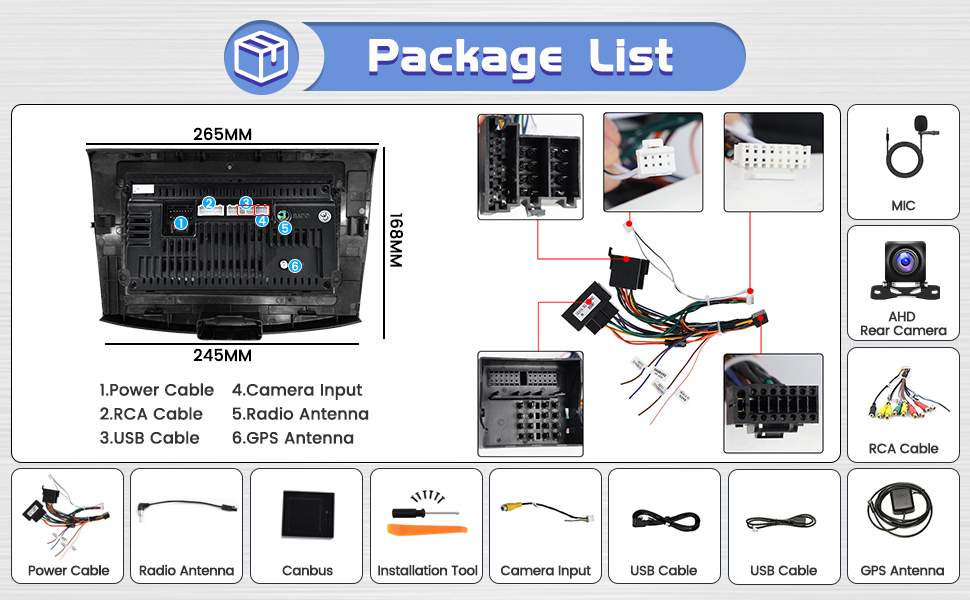
Image: A comprehensive wiring diagram for connecting the AHD reversing camera, including power and video signal lines.
4. Operating Instructions
4.1 User Interface and Display
The unit features a 10.1-inch HD capacitive touch screen with 1024 x 600 resolution. You can customize your experience with multiple EQ options and 28 desktop themes. Press and hold the home screen to switch between themes.

Image: A collage showcasing the diverse range of 28 desktop themes available on the Roinvou car stereo, alongside visual explanations of Phone Mirror Link, Built-in DSP, and the high-resolution display.
4.2 Wireless CarPlay & Android Auto
The unit supports built-in wireless/wired Apple CarPlay and wireless/wired Android Auto for seamless smartphone integration. This allows for voice-assisted control and easy access to phone features like music, navigation, calls, notifications, and messages.

Image: Demonstrations of Wireless CarPlay and Wireless Android Auto, illustrating how smartphone apps and voice commands function on the car stereo's display.
Video: This video demonstrates the user interface functions, including switching between desktop themes, adjusting audio settings (DSP), using the radio, playing music and videos, accessing car information, and browsing the web. It also shows the connection process for both Apple CarPlay and Android Auto, highlighting Bluetooth pairing and USB debugging for Android.
4.3 GPS Navigation & WiFi
The car radio includes a built-in GPS module. You can use navigation software like Waze and free offline maps. With a WiFi/hotspot connection, online maps function perfectly, and you can download apps from the Play Store (e.g., YouTube, TikTok) to enhance your in-car experience.

Image: Displays the GPS navigation system with a map and route, and the WiFi Hotspot feature enabling access to popular online applications.
4.4 Bluetooth & FM/RDS Radio
The unit features built-in and external microphones for hands-free calling, music playback, and voice functions. You can sync contacts for convenience. The stable FM radio has 18 preset stations and supports manual, semi-automatic, and fully automatic channel search. High-quality FM/RDS radio provides channel broadcasting, weather forecasts, and real-time road conditions.

Image: Illustrates the functionality of steering wheel controls, the FM/RDS radio interface, split-screen mode, and the Bluetooth calling feature.
4.5 AHD Backup Camera & Steering Wheel Control
When connected to the reversing camera (included), the unit automatically displays the reversing image when the car is put into reverse gear, enhancing parking safety. The steering wheel functions allow for easy switching between radio channels, adjusting volume, and changing songs for a safer driving experience.

Image: The AHD Reversing Image displayed on the car stereo, complete with parking guidelines for enhanced safety during reverse maneuvers.
4.6 Other Features
- Phone Mirror Link: Project your phone screen onto the stereo. iOS devices connect via WiFi, Android devices via USB/WiFi.
- Built-in DSP: Digital Sound Processor with multiple EQ options (Rock, Pop, Dance, Classical, Soft, Jazz) for a superior music listening experience.
- Split Screen: View two applications on the screen simultaneously.
5. Maintenance and Care
To ensure the longevity and optimal performance of your Roinvou Car Radio, follow these maintenance guidelines:
- Regularly clean the touchscreen with a soft, lint-free cloth. Avoid abrasive cleaners or solvents.
- Keep the unit free from dust and debris.
- Ensure proper ventilation around the unit to prevent overheating.
- Avoid exposing the unit to extreme temperatures or direct sunlight for prolonged periods.
- Periodically check all cable connections to ensure they are secure.
6. Troubleshooting
If you encounter any issues with your Roinvou Car Radio, please refer to the following common troubleshooting steps:
- No Power: Check all power connections and the vehicle's fuse box. Ensure the unit is properly installed and receiving power.
- No Sound: Verify speaker connections and audio settings (volume, EQ). Ensure the correct audio source is selected.
- Touchscreen Unresponsive: Try restarting the unit. If the issue persists, a factory reset might be necessary (refer to the "Settings" menu on the device).
- GPS Signal Lost: Ensure the GPS antenna is properly installed and has a clear view of the sky. Check navigation app settings.
- Bluetooth Connection Issues: Ensure Bluetooth is enabled on both the car radio and your mobile device. Delete previous pairings and try reconnecting.
- CarPlay/Android Auto Not Connecting: For wired connections, try a different USB cable. For wireless, ensure WiFi and Bluetooth are enabled. Some Samsung phones may have restrictions.
- Backup Camera Not Displaying: Check the camera's power and video connections. Ensure the camera is properly triggered when the vehicle is in reverse.
For persistent issues, please contact customer support.
7. Specifications
| Feature | Detail |
|---|---|
| Model Name | Roinvou 2+64G Android CarPlay Stereo |
| Operating System | Android 13 |
| RAM | 2GB |
| ROM | 64GB |
| Screen Size | 10.1 Inches |
| Display Resolution | 1024 x 600 |
| Connectivity | 5G WiFi, Bluetooth, USB |
| Special Features | Wireless/Wired CarPlay & Android Auto, GPS Navigation, FM RDS Radio, DSP, Mirror Link, Steering Wheel Control, 28 Desktop Themes |
| Audio Output Mode | Stereo |
| Item Weight | 3.3 pounds |
| Package Dimensions | 11.06 x 8.03 x 3.62 inches |
8. Warranty and Support
Your Roinvou Car Radio comes with a 1 Year Warranty from the date of purchase. This warranty covers manufacturing defects and malfunctions under normal use.
For any questions, technical assistance, or warranty claims, please contact Roinvou customer support. You can typically find support contact information on the official Roinvou website or through your purchase platform.

Image: The Roinvou brand logo.
Roinvou is committed to blending innovation and passion to redefine driving experiences. Our mission is to empower journeys where cutting-edge technology meets present joy. We strive to craft cars into lifestyle extensions—future-focused yet grounded in today’s thrill.
For more information, visit the Roinvou Store on Amazon.