1. Introduction
Welcome to the user manual for your new iPepul 991EX Scientific Calculator with an integrated notepad. This device is designed to support a wide range of mathematical and scientific calculations, from basic arithmetic to advanced functions, while also providing a convenient digital writing surface for notes and scratch work. This manual provides essential information for setup, operation, maintenance, and troubleshooting to ensure optimal use of your calculator.

Figure 1.1: The iPepul 991EX calculator in various educational and professional settings.
2. Product Overview
The iPepul 991EX is a versatile scientific calculator featuring 552 functions and an integrated LCD writing pad. Its compact, foldable design makes it ideal for students and professionals requiring both calculation and note-taking capabilities on the go.
Key Features:
- 552 Calculation Functions: Covers trigonometric, exponential, logarithmic, calculus, statistical, algebraic, complex numbers, matrices, and vectors.
- Integrated Notepad: Facilitates simultaneous calculation and note-taking.
- Secure Locking Key: Prevents accidental deletion of content on the writing screen.
- Dual Power Source: Operates on solar power and is rechargeable via Type-C.
- Multi-functional Keyboard: Equipped with scientific symbols and function keys for enhanced efficiency.
- Portable Design: Foldable and lightweight for easy transport.

Figure 2.1: The iPepul 991EX Scientific Calculator with its integrated writing pad.

Figure 2.2: Overall design of the iPepul 991EX calculator.
3. Setup
3.1 Unboxing and Initial Inspection
Upon receiving your iPepul 991EX calculator, carefully open the packaging and remove all contents. Verify that the calculator, stylus pen, and Type-C charging cable are present. Inspect the device for any visible damage.

Figure 3.1: Contents of the iPepul 991EX package.
3.2 Initial Charge
Although the calculator features solar power, it is recommended to fully charge the device using the provided Type-C cable before first use. Connect the Type-C cable to the charging port on the calculator and a compatible USB power source.
4. Operating Instructions
4.1 Power On/Off
- To turn on: Press the ON button.
- To turn off: Press SHIFT then AC (OFF).
4.2 Basic Calculations
Perform standard arithmetic operations (addition, subtraction, multiplication, division) using the numeric keypad and operation symbols. Press = to display the result.
4.3 Advanced Functions (552 Functions)
The iPepul 991EX supports 552 functions. Many advanced functions are accessed by pressing the SHIFT key followed by the corresponding function button. Refer to the detailed function guide included in the packaging for specific operations related to:
- Trigonometric functions (sin, cos, tan)
- Logarithmic and exponential functions (log, ln, e^x)
- Calculus (integration, differentiation)
- Statistical calculations
- Complex numbers, matrices, and vectors
- Equation solving and inequalities

Figure 4.1: Display modes for various calculation functions.
4.4 Notepad Usage
The integrated LCD writing pad allows for quick notes and scratch work. Use the provided stylus pen to write directly on the black screen.
- Writing: Use the stylus to write on the right-hand screen.
- Erasing: Press the One Delete Button (located above the writing pad) to clear the screen.
- Locking Content: To prevent accidental erasure, slide the Lock Key (located on the top edge of the writing pad) to the locked position.
- Unlocking Content: Slide the Lock Key back to the unlocked position to enable erasing.

Figure 4.2: Key components of the multi-functional calculator, including the writing board and lock key.

Figure 4.3: Detail of the secure locking key for the writing screen.
5. Charging and Power
The iPepul 991EX calculator is equipped with a dual power system to ensure continuous operation.
- Solar Power: The calculator features a solar panel that charges the internal battery when exposed to light. This provides an eco-friendly and convenient power source for everyday use.
- Type-C Charging: For faster charging or when solar power is insufficient, use the provided Type-C cable to connect the calculator to a USB power adapter, computer, or power bank.

Figure 5.1: Illustration of solar and Type-C charging methods.
Official Product Video: Charging and Features
Video 5.1: This video demonstrates the Type-C charging capability and highlights various features of the iPepul 991EX Scientific Calculator.
6. Maintenance
- Cleaning: Use a soft, dry cloth to clean the calculator's surface and screen. Avoid abrasive cleaners or solvents.
- Storage: Store the calculator in a cool, dry place away from direct sunlight and extreme temperatures. Ensure the writing pad is closed to protect the screen.
- Stylus Care: Keep the stylus clean and store it securely in its designated slot to prevent loss or damage.
7. Troubleshooting
| Issue | Possible Cause | Solution |
|---|---|---|
| Calculator does not turn on. | Low battery or no power. | Charge the calculator using the Type-C cable or expose the solar panel to light. |
| Writing pad content cannot be erased. | The lock key is engaged. | Slide the lock key to the unlocked position, then press the erase button. |
| Incorrect calculation results. | Incorrect mode setting or input error. | Check the calculator's mode (e.g., DEG/RAD) and re-enter the calculation carefully. Refer to the function guide for complex operations. |
8. Specifications
| Feature | Detail |
|---|---|
| Model Number | 991EX |
| Product Dimensions | 6.5 x 3.2 x 0.04 inches |
| Item Weight | 15.8 ounces |
| Power Source | Solar, Type-C Rechargeable (1 Lithium Ion battery included) |
| Screen Size | 2.7 Inches (Calculator Display) |
| Calculator Type | Engineering/Scientific |
| Number of Functions | 552 |
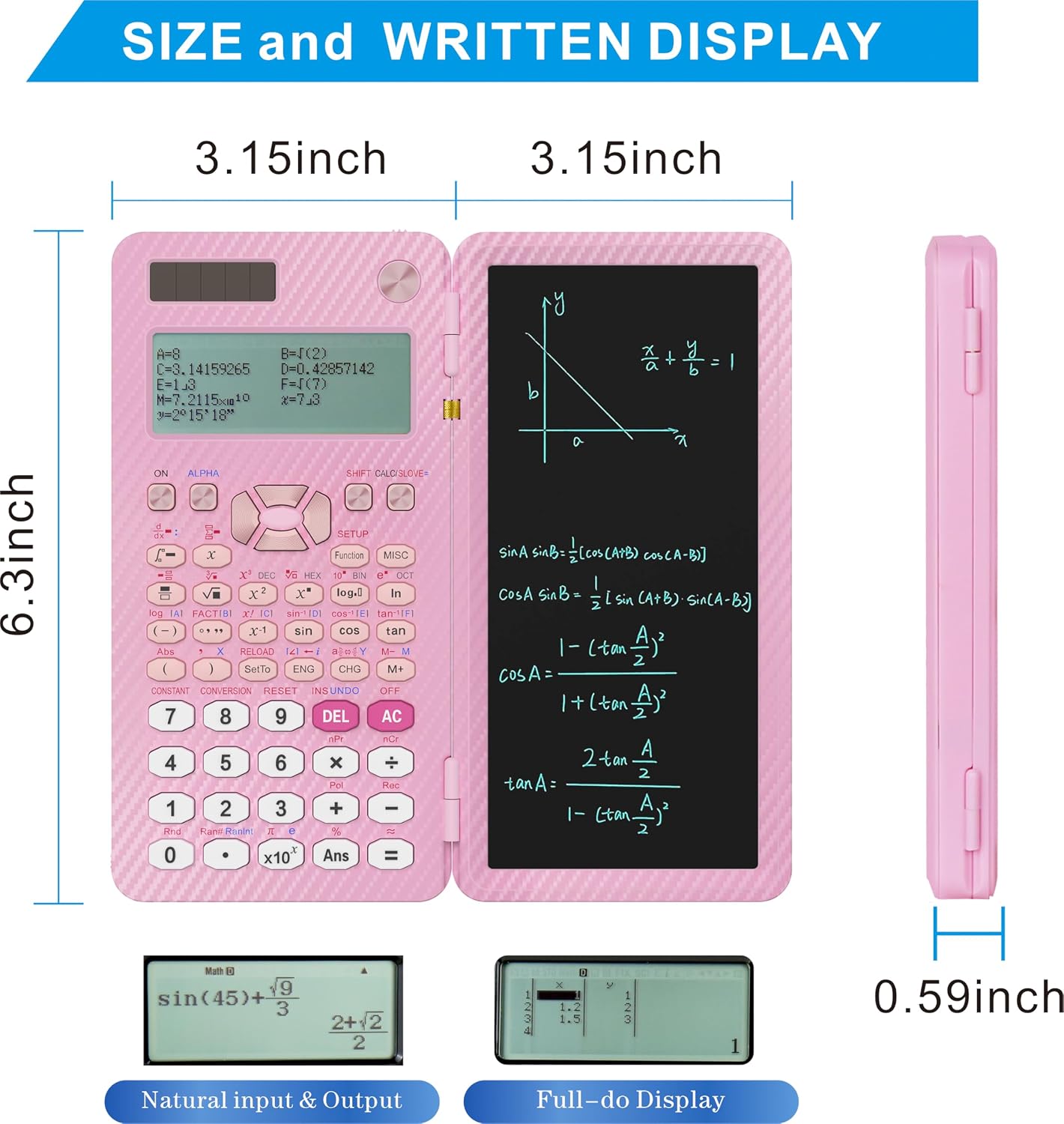
Figure 8.1: Physical dimensions and display examples of the calculator.
Official Product Video: 552 Functions Overview
Video 8.2: This video provides an overview of the 552 functions available on the iPepul 991EX Scientific Calculator.
9. Warranty and Support
For warranty information, technical support, or further assistance, please refer to the contact details provided in the product packaging or visit the official iPepul store online. Keep your purchase receipt as proof of purchase for any warranty claims.
Visit the iPepul Store for more products and information.


