
1. Introduction
This manual provides detailed instructions for the installation, operation, and maintenance of your Dosilkc UltraHD 4K POE Outdoor Bullet Security Camera (Model DS-T461). This 8MP IP network camera offers advanced surveillance features including human/vehicle detection, color night vision, and two-way audio. Please read this manual thoroughly before use to ensure proper setup and optimal performance.

Figure 1: Application Scenarios for the Dosilkc 4K POE Bullet Camera. The camera is suitable for various indoor and outdoor environments such as garages, warehouses, corridors, and courtyards.
2. Safety Information
Observe the following safety precautions to prevent damage to the product and ensure user safety:
- Ensure the power supply meets the camera's requirements (PoE).
- Do not attempt to disassemble or modify the camera. This will void the warranty.
- Install the camera in a secure location to prevent unauthorized removal.
- Avoid pointing the camera directly at strong light sources for extended periods.
- Keep the camera away from strong electromagnetic interference.
- Use only manufacturer-approved accessories.
3. Package Contents
Verify that all items are present in the package:
- Dosilkc UltraHD 4K POE Outdoor Bullet Security Camera
- User Manual (this document)
- Install Screw Bag
- Waterproof Cable Cover
4. Product Overview
Familiarize yourself with the components of your security camera.

Figure 2: Camera Components and Dimensions. This diagram labels the lens, microphone, IR LEDs, speaker, SD card slot, and mounting bracket, along with the camera's physical dimensions.
- Lens: Captures video footage.
- Mic: Built-in microphone for audio input.
- IR LEDs: Infrared LEDs for night vision in low-light conditions.
- Speaker: Built-in speaker for two-way audio output.
- SD Card Slot: Supports Micro SD cards up to 512GB for local storage.
- Bracket: Adjustable mounting bracket for installation.
5. Setup and Installation
5.1 Physical Installation
The camera is designed for both indoor and outdoor use with an IP66 weatherproof housing.

Figure 3: IP66 Weatherproof Housing. The camera's robust design ensures protection against various weather conditions including rain, snow, and high temperatures.
- Choose a Location: Select a suitable location for optimal surveillance coverage. Consider the camera's 105° diagonal field of view.
- Mount the Camera: Use the provided screw bag to securely mount the camera to a wall or ceiling.
- Connect POE Cable: Connect a single Ethernet cable to the camera's POE port. This cable will provide both power and data transmission. Use the waterproof cable cover for outdoor installations to protect the connection.
5.2 Initial Configuration
The camera supports Plug & Play with Hikvision NVRs and is compatible with other NVRs (e.g., Da-hua) via Open Network Video Interface protocol. It also works with third-party software like Blue Iris and iSpy.

Figure 4: Multiple Storage and Compatibility Options. The camera offers flexible storage solutions including NVRs, FTP, NAS, and local SD card, and integrates with various surveillance software.
- NVR Connection:
- For Hikvision NVRs: Connect the camera directly to the NVR's POE port. The camera should be automatically detected.
- For other NVRs: Refer to your NVR's manual for adding ONVIF-compatible IP cameras.
- Software Integration: If using third-party software (e.g., Blue Iris, iSpy), follow their respective guides for adding an ONVIF IP camera.
- Mobile App Setup: Download the recommended mobile application (refer to packaging or quick start guide for app name). Follow the in-app instructions to add your camera and access live view and settings.
Video 1: Camera Setup Guide
This video demonstrates the basic setup process for the Dosilkc 4K POE Bullet Security Camera, including physical installation and initial connection steps.
6. Operation
6.1 Live View and Recording
Access the live view through your NVR or mobile application. Recordings can be stored on an NVR, FTP server, NAS server, or a local Micro SD card (up to 512GB, not included).

Figure 5: Superior 4K UHD Image Quality. This image illustrates the enhanced detail provided by the 8MP (3840x2160) resolution compared to lower resolutions.
6.2 Night Vision Modes
The camera features dual-light full-color technology with three smart night vision modes, selectable via the mobile app:
- IR Night Vision Mode: Standard black-and-white infrared vision.
- Full Color Night Vision Mode: Utilizes white light to provide full-color images in darkness.
- Smart Night Vision: Automatically switches between IR and full-color based on detected motion or alarm settings.
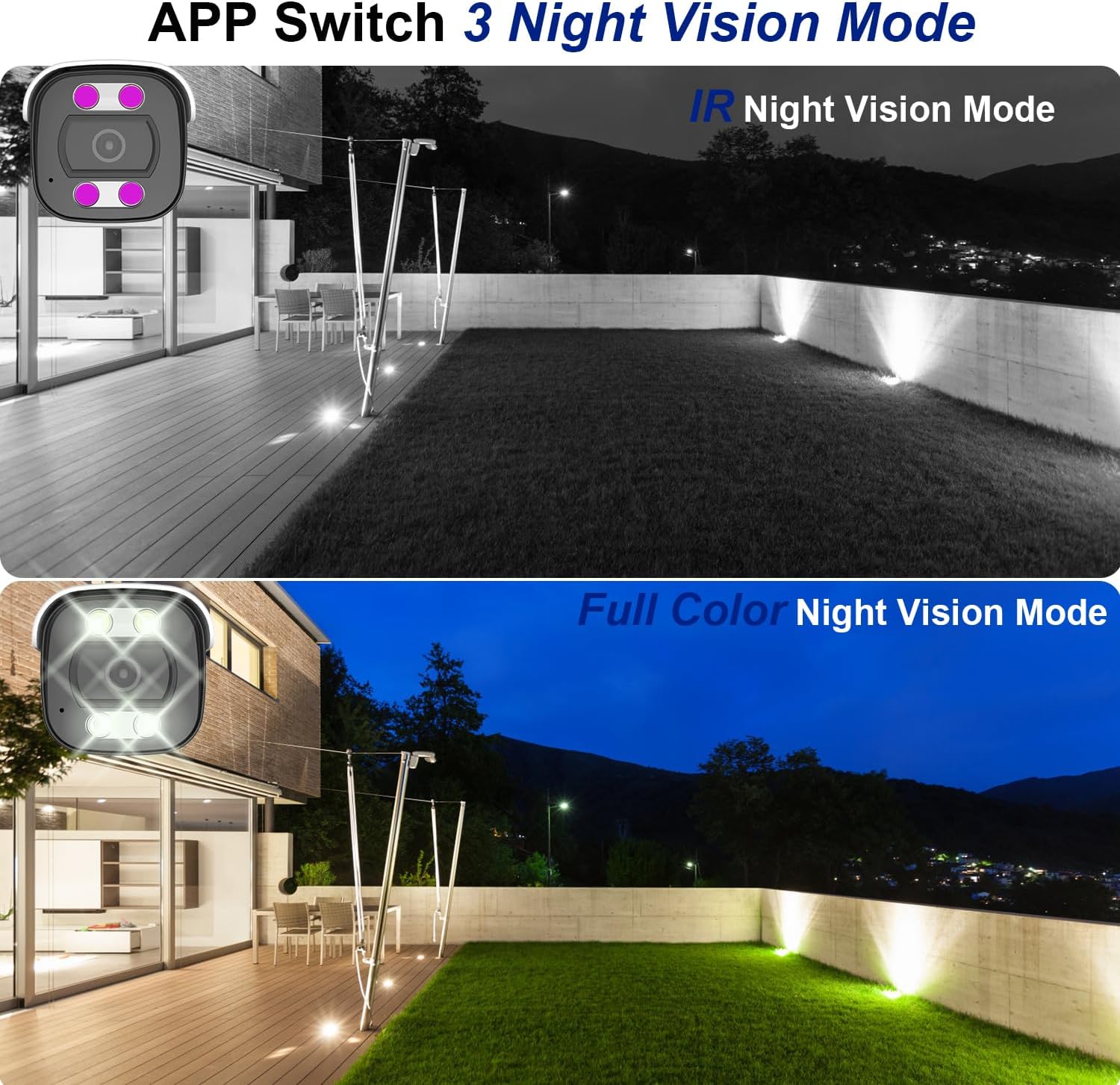
Figure 6: Night Vision Modes. This image demonstrates the difference between traditional IR (black and white) and full-color night vision capabilities.
6.3 Person/Vehicle Detection
The camera is equipped with professional human/vehicle detection functions to reduce false alarms. When a person or vehicle enters the configured detection area, the camera will automatically send real-time video or snapshots to your mobile phone.
- Detection Area: Configure specific zones within the camera's view for detection.
- Sensitivity: Adjust the detection sensitivity to optimize performance and minimize unwanted alerts.

Figure 7: Smart Human/Vehicle Detection. The camera identifies human presence and sends an immediate alert to a connected mobile device.
Video 2: Smart Detection Features
This video demonstrates the human and vehicle detection capabilities of the camera, showing how it identifies subjects and triggers alerts.
6.4 Two-Way Audio
The built-in microphone and speaker allow for two-way communication. You can listen to audio from the camera's location and speak through the camera using the mobile app or NVR interface.

Figure 8: Two-Way Audio Functionality. The camera enables real-time communication, allowing users to speak and listen remotely.
Video 3: Two-Way Audio Demonstration
This video illustrates the two-way audio feature, demonstrating how users can communicate through the camera.
7. Maintenance
Regular maintenance ensures the longevity and optimal performance of your camera:
- Cleaning: Gently wipe the camera lens and housing with a soft, damp cloth. Do not use harsh chemicals or abrasive cleaners.
- Firmware Updates: Periodically check for firmware updates through the mobile app or manufacturer's website to ensure the latest features and security patches.
- Cable Inspection: Regularly inspect the Ethernet cable and waterproof cover for any signs of wear or damage, especially in outdoor installations.
- Storage Management: If using an SD card, periodically review and manage recorded footage to prevent the card from becoming full.
8. Troubleshooting
Here are solutions to common issues you might encounter:
| Problem | Possible Cause | Solution |
|---|---|---|
| Camera not powering on. | No power from PoE switch/NVR; faulty Ethernet cable. | Ensure PoE switch/NVR is powered on. Check Ethernet cable connection and integrity. Try a different PoE port or cable. |
| No video feed. | Network connectivity issue; incorrect NVR/app settings. | Verify network connection. Ensure camera is properly added to NVR/app. Check IP address settings. |
| Poor night vision. | IR LEDs obstructed; incorrect night vision mode. | Clear any obstructions from the camera's view. Switch night vision mode in the app (IR, Full Color, Smart). |
| False alarms from detection. | Detection sensitivity too high; detection area too broad. | Adjust detection sensitivity and refine the detection area in the camera settings via the app or NVR. |
| Two-way audio not working. | Microphone/speaker disabled; volume too low; network latency. | Check audio settings in the app/NVR. Ensure volume is up. Verify stable network connection. |
Video 4: Advanced Troubleshooting Tips
This video provides additional tips and solutions for common operational issues with the Dosilkc security camera.
9. Specifications
| Feature | Detail |
|---|---|
| Model Number | DS-T461 |
| Video Capture Resolution | 4K (3840*2160@20fps) |
| Image Sensor | 1/3" Progressive Scan CMOS |
| Lens | 2.8mm |
| Viewing Angle (FoV) | 105 Degrees (diagonal) |
| Night Vision Range | 88 Feet (Color Night Vision available) |
| Audio | Built-in 2-way audio (microphone & speaker) |
| Detection | Human/Vehicle Detection |
| Storage | Micro SD Card Slot (up to 512GB), NVR, FTP, NAS |
| Compression | H.265/H.264 |
| Connectivity | Wired (PoE - Power over Ethernet) |
| Weather Resistance | IP66 Waterproof |
| Dimensions (L x W x H) | 17.98 x 6.99 x 6.99 cm (approx. 7.08 x 2.75 x 2.75 inches) |
| Weight | 481 g |
| Mounting Type | Ceiling Mount, Screw In |
| Compatible Devices | Digital Video Recorder (NVR), Blue Iris, iSpy |
10. Warranty and Support
For warranty information and technical support, please refer to the official Dosilkc website or contact their customer service directly. Keep your purchase receipt as proof of purchase for warranty claims.
Online Support: Visit the Dosilkc official website for FAQs, software downloads, and support resources.
Contact Support: Refer to your product packaging or the official website for customer service contact details.