
Introduction
This manual provides detailed instructions for the assembly, operation, and maintenance of your AODK 66" L Shaped Desk. Please read all instructions carefully before beginning assembly and retain this manual for future reference.
Safety Information
Always assemble the desk on a stable, level surface. Ensure the desk is properly anchored to the wall or floor to prevent tipping, especially when using the power outlet. Do not overload the desk or place heavy objects on the edges to prevent instability. Always follow the assembly instructions carefully and use appropriate tools. Keep the power outlet and cords away from water and heat sources to prevent electrical hazards.
Package Contents
Before assembly, verify that all components are present and undamaged. Refer to the included assembly manual for a complete list of parts and hardware. All parts are clearly labeled for easy identification.

Image: Overview of desk components and dimensions.
Assembly Instructions
The AODK 66" L Shaped Desk is designed for versatile configuration, allowing it to be set up as a 66"x66" corner desk or a 113" long two-person desk. Two people are recommended for assembly to ensure stability and ease of construction. Follow the step-by-step instructions provided in the assembly manual included in your package. All hardware and desk components are clearly labeled to simplify the process.
Key Assembly Tips:
- Preparation: Clear a spacious, level area for assembly. Lay out all parts and hardware, matching them to the labels in the manual.
- Orientation: Pay close attention to the orientation of beams and parts as indicated in the diagrams to avoid reassembly.
- Stability: Ensure all screws are tightened securely, but do not overtighten.
- Reversible Design: Decide on your preferred L-shape orientation (left or right) or long desk configuration before starting, as this will dictate certain assembly steps.

Image: L-shaped desk configuration.

Image: Long desk configuration.
Assembly Video:
Video: Overview of the AODK L Shaped Computer Desk with 6 File Drawers, demonstrating features and potential configurations.
Operating Instructions
Built-in Power Outlet:
The desk features a built-in power outlet with 3 AC outlets (125V/12A) and 2 USB ports (5V/2A). This allows for convenient charging and powering of multiple devices directly from your desk. The power cord is 6.6 feet long.

Image: Recessed power outlet with AC and USB ports.
LED Light Strip:
The upgraded LED light strip provides ambient lighting with 13 lighting modes and 7 color variations. Use the attached controller to cycle through modes and colors to suit your preference. Ensure the LED strip is properly connected to one of the USB ports on the power outlet.

Image: Desk with RGB LED strips illuminated.
Storage Features:
The desk includes a file cabinet with two drawers for organizing letter, legal, and A4 size files, and four-tier fabric storage drawers for additional storage. Two under-desk storage shelves (18.1"x11") are also provided, suitable for a CPU tower or other office items. The long monitor stand (47.2" long) can comfortably hold two monitors, promoting an ergonomic viewing height.

Image: Desk with various storage options.

Image: 4-tier fabric storage drawers.
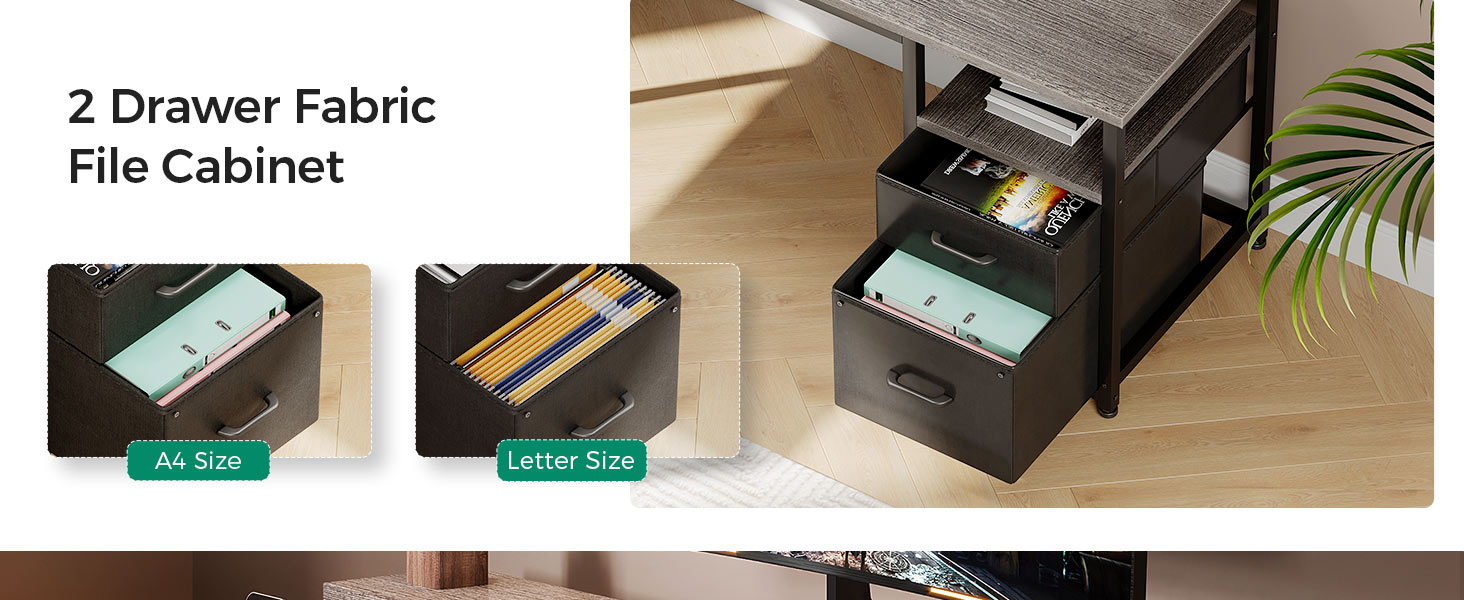
Image: 2-tier fabric file cabinet.
Video: Demonstrating the AODK L Shaped Desk with 2-Tier File Cabinet and 4 Drawers, highlighting storage capacity.
Maintenance
- Cleaning: Wipe surfaces with a soft, damp cloth. Avoid abrasive cleaners or harsh chemicals that may damage the finish.
- Stability Check: Periodically check all screws and connections to ensure they remain tight. Retighten if necessary to maintain desk stability.
- Fabric Drawers: The fabric drawers can be spot cleaned with a mild detergent and damp cloth. Allow to air dry completely.
- Weight Distribution: Distribute weight evenly across the desk surface. Avoid placing excessively heavy items on edges or unsupported areas.
Troubleshooting
- Desk Wobbles: Check that the desk is on a level surface. Adjust the foot pads at the bottom of the desk legs to compensate for uneven flooring. Ensure all assembly screws are tightened.
- Power Outlet Not Working: Verify that the desk's main power cord is securely plugged into a functional wall outlet. Check connections to the built-in power strip.
- LED Lights Not Functioning: Ensure the LED strip's USB connector is firmly plugged into one of the desk's USB ports. Check the controller for proper operation and ensure it is not damaged.
- Drawers Stick or Don't Slide Smoothly: Ensure the fabric drawers are correctly inserted into their frames. Check for any obstructions or items caught in the drawer mechanism.
Specifications
| Feature | Detail |
|---|---|
| Brand | AODK |
| Model Number | B02013401008UUOUC0BV4D752 |
| Shape | L-Shape (Reversible) |
| Product Dimensions | 18.9"D x 66"W x 35"H |
| Color | Grey |
| Material Type | Engineered Wood (Top), Alloy Steel (Frame) |
| Item Weight | 75.8 pounds |
| Number of Drawers | 4 (Fabric) + 2 (File Cabinet) |
| Number of Shelves | 3 (including monitor stand) |
| Power Outlet | 3 AC Outlets (125V/12A), 2 USB Ports (5V/2A) |
| LED Light | 13 Lighting Modes, 7 Color Variations |
| Recommended Assembly | 2 people |
Warranty and Support
For any questions, missing parts, or concerns regarding your AODK L Shaped Desk, please refer to the contact information provided in your original purchase documentation or contact AODK customer support directly. Please have your model number (B02013401008UUOUC0BV4D752) and proof of purchase available when contacting support.


