
Lamicall 4" Long
Lamicall Bike Handlebar Extender User Manual
Model: 4" Long
1. Introduction
This manual provides comprehensive instructions for the installation, operation, and maintenance of your Lamicall Bike Handlebar Extender. Designed for both bicycles and motorcycles, this 4-inch long aluminum alloy extension provides additional mounting space for various accessories, enhancing your riding experience.
2. Product Features
- Easy Installation: Comes with non-slip silicone rubber and plastic sheets for flexible adjustment and a hexagon wrench for assembly.
- Excellent Durability: Constructed from high-quality aluminum alloy, ensuring sturdiness and rust resistance. Features a fine matte surface finish.
- Thickening Treatment: Reinforced at clamp mount points for enhanced durability and safety, even on uneven terrain.
- Increased Mounting Space: Provides additional handlebar space and improves accessory visibility for items like headlights, phone holders, GPS devices, speedometers, and cameras.
- Wide Compatibility: Suitable for circular handlebars with diameters of 0.875 inches (22 mm), 1.0 inches (25.4 mm), 1.25 inches (32 mm), and 1.34 inches (34mm). The extension tube itself is 4 inches long with a 0.875-inch (22 mm) diameter.
3. What's in the Box
The Lamicall Bike Handlebar Extender package includes the following components:
- 1 x Handlebar Extension Tube (4 inches long, 0.875 inches diameter)
- 1 x Bar Mount Clamp
- Various Plastic Pads (for 25.4mm and 32mm handlebars)
- Various Silicone Pads (for 22mm and 32mm handlebars)
- 1 x Hexagon Wrench

Figure 3.1: All components included in the Lamicall Bike Handlebar Extender package. This includes the extension tube, bar mount, various non-slip pads, and a hexagon wrench.
4. Setup and Installation
Follow these steps to properly install the Lamicall Bike Handlebar Extender on your bicycle or motorcycle handlebar:
- Identify Handlebar Diameter: Measure the diameter of your existing handlebar where you intend to mount the extender.
- Select Appropriate Pads: Based on your handlebar's diameter, choose the correct combination of plastic and/or silicone non-slip pads.
- For 0.875 inches (22 mm) handlebars: Use both plastic and silicone pads.
- For 1.0 inches (25.4 mm) handlebars: Use plastic pads.
- For 1.25 inches (32 mm) handlebars: Use silicone pads.
- For 1.34 inches (34 mm) handlebars: No pads are required.
- Position the Bar Mount: Open the bar mount clamp and place it around your handlebar at the desired location. Ensure the chosen pads are correctly inserted within the clamp to provide a snug fit.
- Secure the Bar Mount: Use the provided hexagon wrench to tighten the screws on the bar mount clamp. Tighten securely but do not overtighten, as this may damage your handlebar or the extender. The clamp should be firm and not rotate freely.
- Attach the Extension Tube: Insert the 4-inch extension tube into the designated slots on the bar mount. Ensure it is fully seated.
- Final Tightening: Tighten the screws that secure the extension tube to the bar mount using the hexagon wrench. Verify that the extension tube is stable and does not wobble.
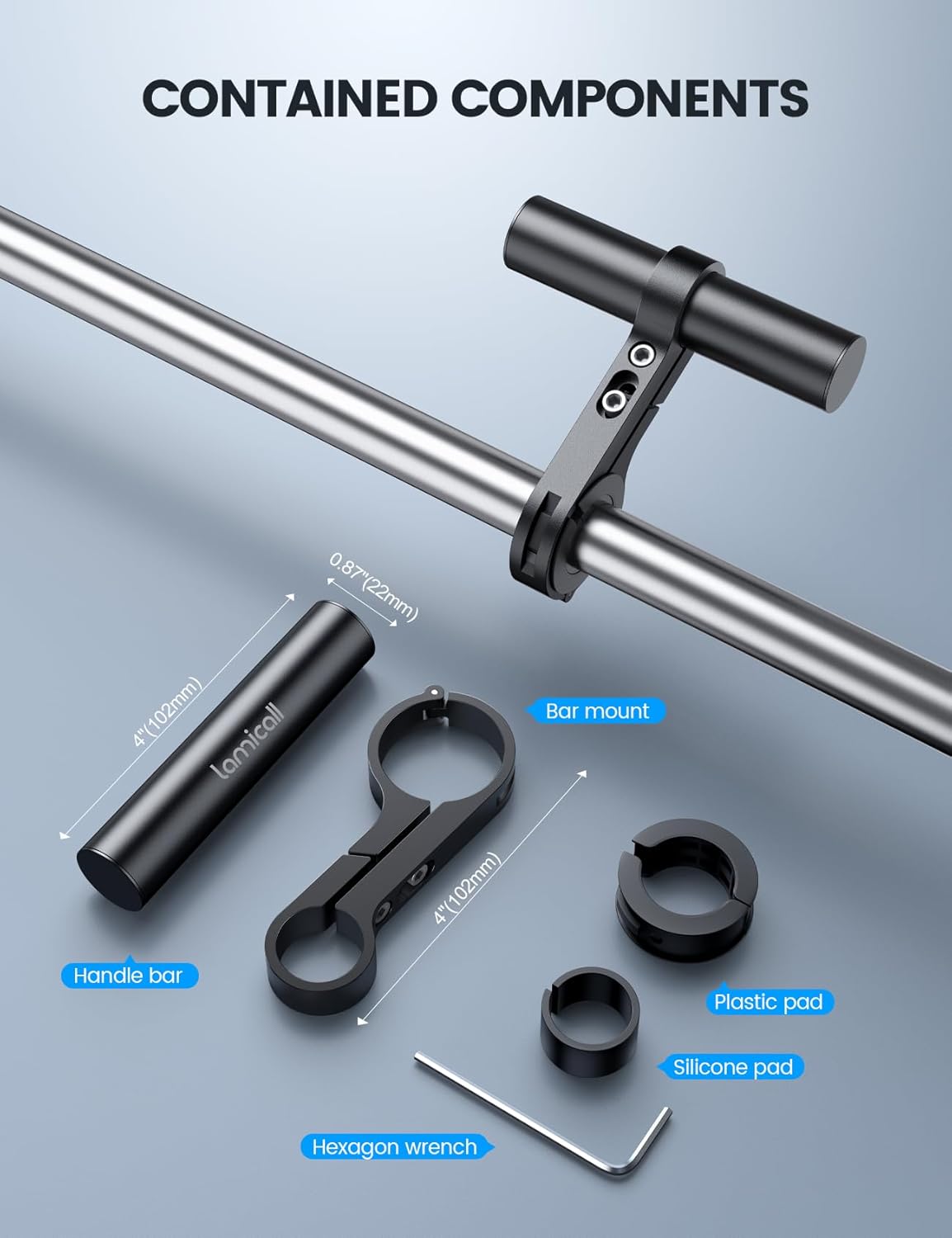
Figure 4.1: Compatibility chart illustrating the use of different pads for various handlebar diameters.
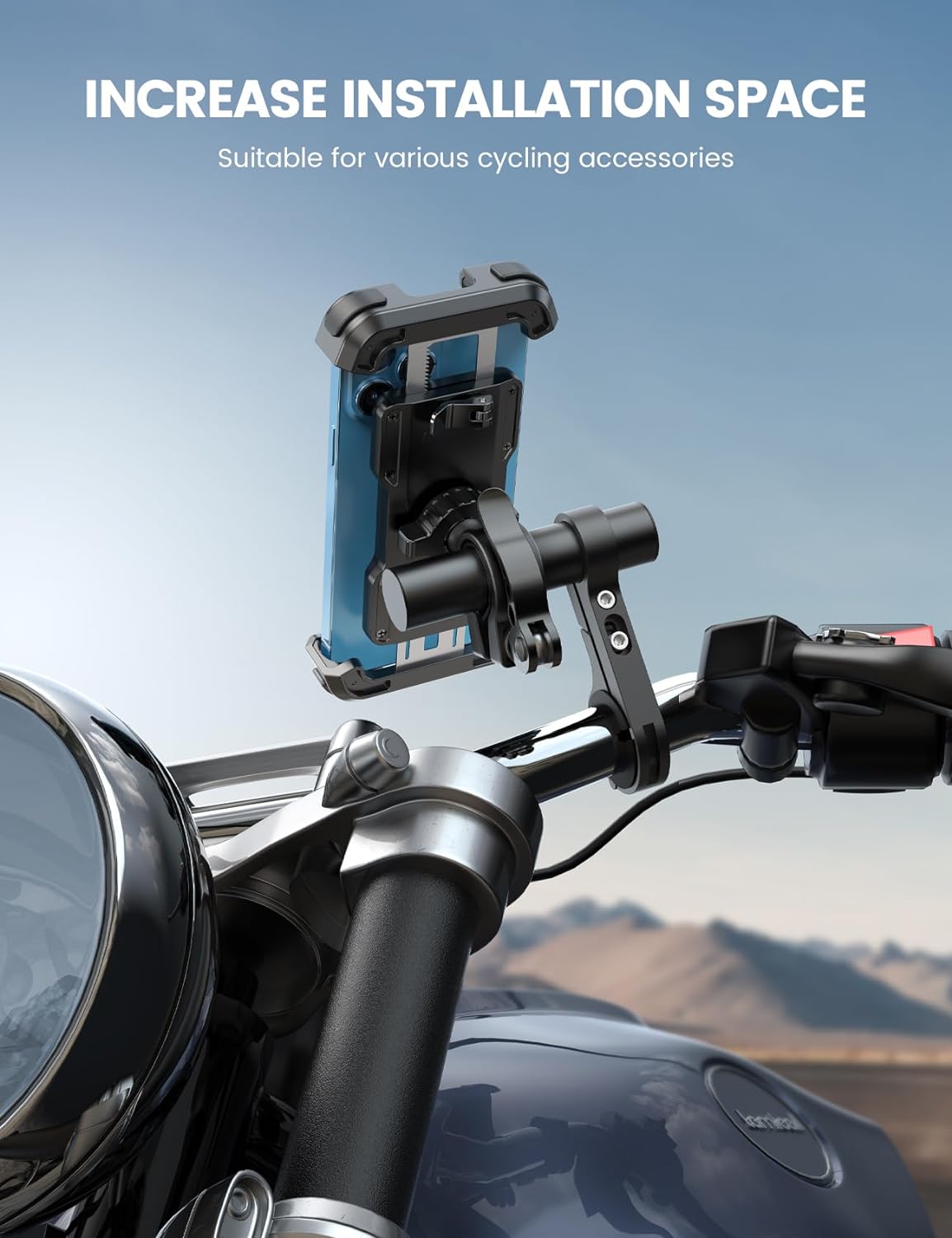
Figure 4.2: The handlebar extender installed on a bicycle, providing additional space.

Figure 4.3: The handlebar extender installed on a motorcycle, demonstrating its use with a phone holder.
5. Operating (Usage)
Once installed, the Lamicall Bike Handlebar Extender provides a stable and convenient platform for mounting various accessories. Its primary function is to expand the usable space on your handlebar, allowing for better organization and visibility of your devices.
Common accessories that can be mounted include:
- Bike Headlights or Flashlights
- Motorcycle/Bicycle Phone Holders
- GPS Devices
- Speedometers or Odometers
- Action Cameras (e.g., GoPro)
- Other small electronic devices or bags
Ensure that any mounted accessories are securely fastened to the extender to prevent movement or detachment during riding. Periodically check the tightness of all screws to maintain stability.

Figure 5.1: The extender demonstrating its stability and load-bearing capacity.

Figure 5.2: An action camera mounted on the extender on a motorcycle.
6. Maintenance
To ensure the longevity and optimal performance of your Lamicall Bike Handlebar Extender, follow these maintenance guidelines:
- Regular Cleaning: Wipe the extender with a damp cloth to remove dust, dirt, and grime. For stubborn dirt, a mild soap solution can be used, followed by rinsing and drying.
- Inspect for Damage: Periodically check the aluminum alloy components for any signs of bending, cracks, or corrosion. Inspect the plastic and silicone pads for wear or degradation.
- Check Tightness: Regularly verify that all screws are securely tightened. Vibrations from riding can sometimes loosen fasteners over time. Retighten as necessary using the provided hexagon wrench.
- Avoid Harsh Chemicals: Do not use abrasive cleaners, solvents, or strong chemicals, as these can damage the finish or material of the extender.
- Storage: If removing the extender for extended periods, store it in a clean, dry place away from direct sunlight and extreme temperatures.
7. Troubleshooting
This section addresses common issues you might encounter with your handlebar extender.
Issue: The extender clamp does not tighten securely or spins on the handlebar.
Possible Causes and Solutions:
- Incorrect Pad Selection: Ensure you have selected the appropriate non-slip plastic and/or silicone pads for your handlebar's diameter. Refer to Section 4, "Setup and Installation," for the correct pad combination. Using pads that are too thin or not using any pads when required will result in a loose fit.
- Pads Not Seated Correctly: Verify that the non-slip pads are fully and evenly seated within the clamp before tightening.
- Insufficient Tightening: Use the provided hexagon wrench to tighten the clamp screws firmly. Ensure the screws are tightened evenly on both sides. Do not overtighten, but apply enough force to prevent rotation.
- Handlebar Shape: This extender is designed for circular handlebars only. If your handlebar is square or oval, the clamp will not secure properly.
Issue: Accessories mounted on the extender are wobbly.
Possible Causes and Solutions:
- Loose Extender Tube: Check the screws that secure the extension tube to the bar mount. Tighten them firmly with the hexagon wrench.
- Loose Accessory Mount: Ensure that the accessory itself (e.g., phone holder, light) is securely fastened to the extender tube. Refer to the accessory's own instructions for proper mounting.
8. Specifications
| Attribute | Detail |
|---|---|
| Brand | Lamicall |
| Model | 4" Long Handlebar Extender |
| Material | Aluminum Alloy, Plastic, Silicone |
| Extension Tube Length | 4 inches (102 mm) |
| Extension Tube Diameter | 0.875 inches (22 mm) |
| Compatible Handlebar Diameters | 0.875" (22 mm), 1.0" (25.4 mm), 1.25" (32 mm), 1.34" (34 mm) |
| Color | Black |
| Item Weight | 3.2 ounces |
| Product Dimensions | 4 x 0.88 x 0.04 inches (overall) |
9. Warranty and Support
Lamicall products are manufactured with quality and customer satisfaction in mind. For any questions, concerns, or support needs regarding your Lamicall Bike Handlebar Extender, please contact Lamicall customer service directly.
Please visit the official Lamicall website or refer to your purchase documentation for specific warranty terms and contact information. Keep your proof of purchase for warranty claims.
You can also visit the Lamicall Store on Amazon for more information and support resources.
Ask a question about this manual
Ask about setup, troubleshooting, compatibility, parts, safety, or missing instructions. Manuals+ will review the question and use this page’s manual context to help answer it.