
Introduction
The BolyGuard SG520-DB Trail Camera is a high-performance device designed for outdoor wildlife monitoring, property surveillance, and security applications. It captures high-resolution 4K videos and 37MP photos, featuring dual flash technology (Black IR & White LED) for clear color images both day and night. With a super-fast trigger speed of less than 0.7 seconds and IP67 waterproofing, this camera is built to perform reliably in various weather conditions and capture every important moment.
What's in the Box
Upon unboxing your BolyGuard SG520-DB Trail Camera, please ensure all the following items are present:
- 1 x BolyGuard SG520-DB Trail Camera
- 1 x Mounting Strap
- 1 x User Manual
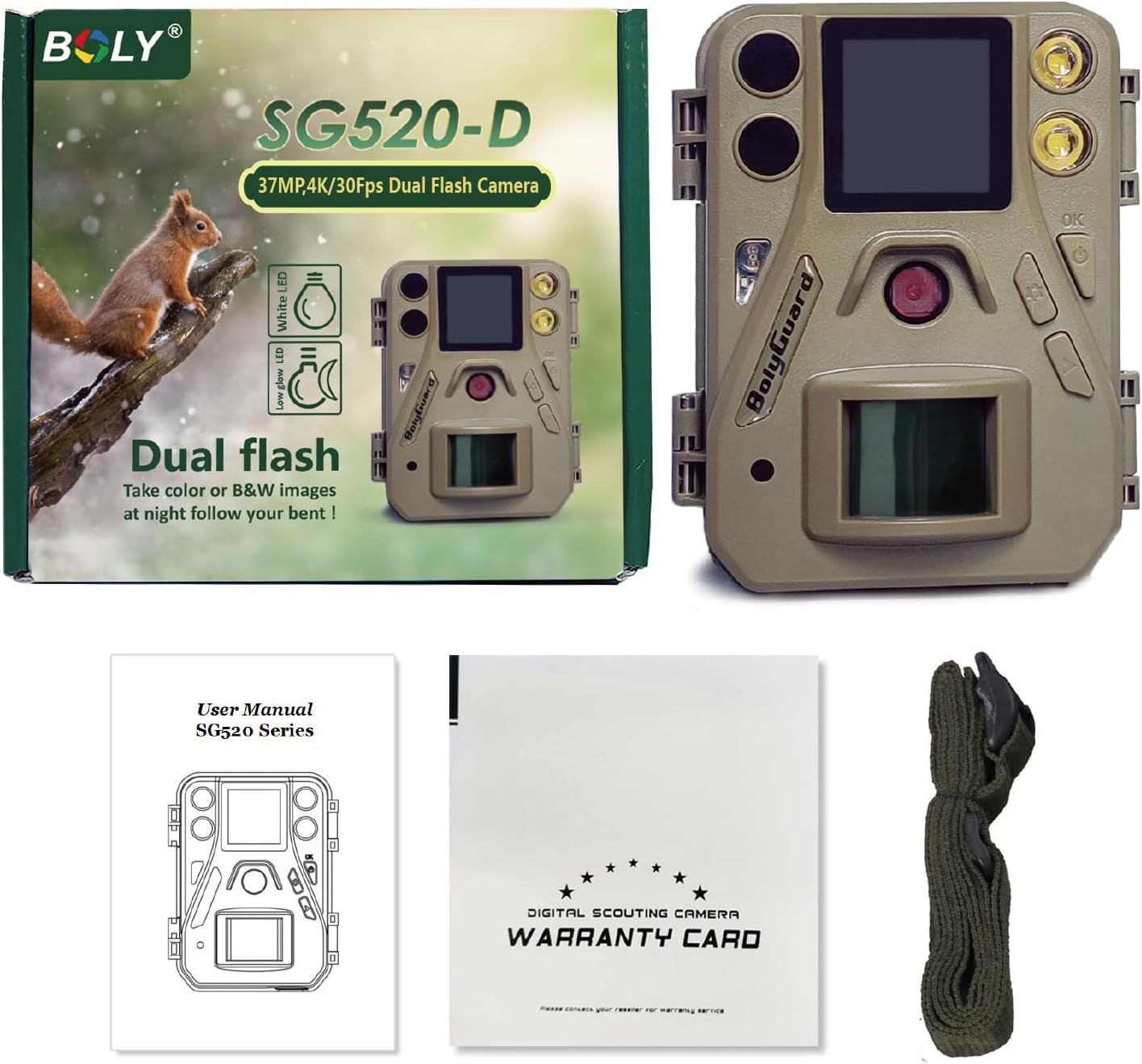
Image: Contents of the BolyGuard SG520-DB Trail Camera package.
Product Overview
Familiarize yourself with the key components of your SG520-DB Trail Camera:
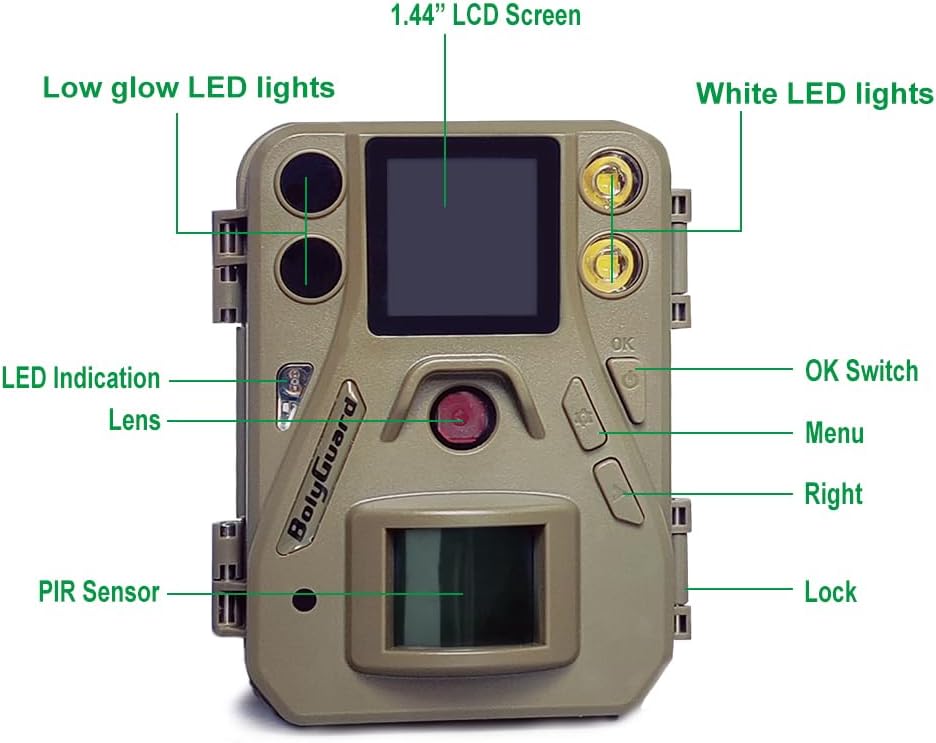
Image: Labeled diagram of the BolyGuard SG520-DB Trail Camera.
- Low Glow LED Lights: For discreet night vision.
- 1.44" LCD Screen: For menu navigation and viewing.
- White LED Lights: For color night vision.
- Lens: Main camera lens.
- PIR Sensor: Passive Infrared sensor for motion detection.
- OK Switch: Power on/confirm selections.
- Menu Button: Enter/exit settings.
- Right Button: Navigate options.
- Lock: Secures the camera housing.
- MIC: Microphone for audio recording.
Setup
1. Battery and SD Card Installation
The camera operates on 4 AA batteries and supports an SD card up to 256GB. Ensure batteries are inserted with correct polarity and the SD card is properly seated before closing the camera housing.
Video: SG520-DB Unboxing & Setup Guide. This video demonstrates how to install batteries and the SD card, and navigate the basic settings of the camera.
2. Basic Settings
After installing batteries and the SD card, power on the camera using the OK button. Use the Menu and Right buttons to navigate through the settings. Key settings include:
- Language: Select your preferred language.
- Camera Mode: Choose between Photo, Video, or Photo+Video.
- Photo Size: Set the resolution for still images (e.g., 37MP).
- Video Size: Set the resolution for videos (e.g., 4K).
- Photo Burst: Configure the number of photos taken per trigger.
- Set Clock: Adjust the date and time for accurate timestamps on your recordings.
Operating Modes
The SG520-DB Trail Camera offers versatile operating modes to suit different monitoring needs:
- Photo Mode: Captures still images when motion is detected.
- Video Mode: Records video clips when motion is detected.
- Photo+Video Mode: Captures a still image followed by a video clip upon motion detection.
The camera features a fast trigger speed of less than 0.7 seconds, ensuring that movements are captured promptly. The trigger distance extends up to 30 meters (100 feet).
Image and Video Quality
Experience superior clarity with the SG520-DB's advanced imaging capabilities:
- High Resolution: Captures stunning 37MP photos and 4K videos at 30fps, encoded in H.265 format for efficient storage.
- Dual Flash Night Vision: Equipped with both White LED and 940nm no-glow IR LED lights. The White LED allows for color pictures and videos at night, while the IR LEDs provide discreet black and white night vision.

Image: Comparison of 37MP vs. 24MP image clarity.

Image: Demonstration of dual night vision modes (Black IR and White LED).
Video: Night footage from the SG520-DB, demonstrating color image selection in a garden setting.
Video: Night footage showcasing the camera's color night vision capabilities.
Mounting
The SG520-DB Trail Camera is designed for easy installation. Use the included mounting strap to secure the camera to a tree or post. Ensure the camera is positioned to capture the desired area without obstruction.

Image: BolyGuard SG520-DB Trail Camera mounted on a tree.
Specifications
| Feature | Specification |
|---|---|
| Model Number | SG520-DB |
| Effective Still Resolution | 37 MP |
| Video Capture Resolution | 4K |
| Frame Rate | 30 fps |
| Video Encoding | H.265 |
| Night Vision | Dual Flash (Black IR & White LED) |
| Night Vision Range | 90 Feet |
| Trigger Speed | < 0.7s |
| Trigger Distance | Up to 30m (100ft) |
| Water Resistance Level | IP67 Waterproof |
| Power Source | 4 AA Batteries or Solar Power Bank |
| Supported SD Card | Up to 256GB |
| Operating Temperature | -20℃ to +70℃ (-4°F to 158°F) |
| Product Dimensions | 2 x 2 x 2 inches |
| Item Weight | 1 pound |
Maintenance
To ensure the longevity and optimal performance of your BolyGuard SG520-DB Trail Camera, follow these maintenance guidelines:
- Cleaning: Regularly wipe the camera lens and PIR sensor with a soft, dry cloth to remove dirt, dust, or moisture. Avoid abrasive cleaners.
- Battery Care: Replace all batteries simultaneously with new, high-quality alkaline or rechargeable AA batteries. Remove batteries if the camera will not be used for an extended period to prevent leakage.
- SD Card: Format the SD card periodically using the camera's menu to ensure optimal performance and prevent data corruption. Use a reliable, high-speed SD card.
- Storage: When not in use, store the camera in a cool, dry place away from direct sunlight and extreme temperatures.
Troubleshooting
If you encounter issues with your camera, refer to the following common problems and solutions:
- Camera Not Powering On: Check battery installation and ensure batteries are fresh. Verify the power switch is in the ON position.
- No Images/Videos Captured: Ensure the SD card is inserted correctly and has sufficient free space. Check the camera mode settings (Photo, Video, Photo+Video). Verify the PIR sensor is not obstructed.
- Poor Image/Video Quality: Clean the camera lens. Ensure the camera is mounted securely to prevent movement. Check resolution settings.
- Short Battery Life: Use high-quality batteries. Reduce the frequency of captures or video length in settings. Consider using an external solar power bank for extended use.
- Night Vision Issues: Ensure the night vision mode is enabled in settings. Check for obstructions in front of the IR/White LEDs.
Warranty and Support
The BolyGuard SG520-DB Trail Camera comes with a 2-Year Hassle-Free Guarantee, exceeding the standard 1-year market warranty. This includes 24/7 support and free replacements for eligible issues.
For further assistance, technical support, or warranty claims, please refer to the contact information provided in your warranty card or visit the official BolyGuard website.
Additional Product Videos
Video: SG520 Product Overview. This video provides a general overview of the SG520-DB Trail Camera's features and design.
Video: 520 4K Series Day Footage. This video showcases the camera's performance during daylight hours.
Video: BolyGuard Trail Camera Footage. This video provides additional examples of footage captured by the camera.


