1. Introduction
This manual provides detailed instructions for the installation, operation, and maintenance of your ROCKBROS Basic Bike Computer Mount. Please read this manual thoroughly before installation and use to ensure proper function and safety.
2. Product Overview
The ROCKBROS Basic Bike Computer Mount is an out-front aluminum integrated mount designed for bicycle handlebars. It provides a secure and convenient position for your bike computer, action camera, or bike light.
2.1 Key Features
- Compact and Lightweight: Designed to occupy minimal handlebar space.
- Optimal Viewing Angle: Positions your device for easy viewing, enhancing safety during rides.
- Versatile Compatibility: Includes bases for various bike computers and supports action cameras or bike lights.
2.2 Package Contents
Verify that all components are present before beginning installation:
- ROCKBROS Basic Bike Computer Mount (Aluminum)
- Bike Computer Bases (Garmin, Bryton, Wahoo compatible)
- Action Camera/Bike Light Adapter
- 2mm Hexagonal Bolt Wrench
- 4mm Hexagonal Bolt Wrench
- Shims (x2)
- MS Hexagon Socket Head Cap Screws (x2)
- Aluminum Washers (x2)
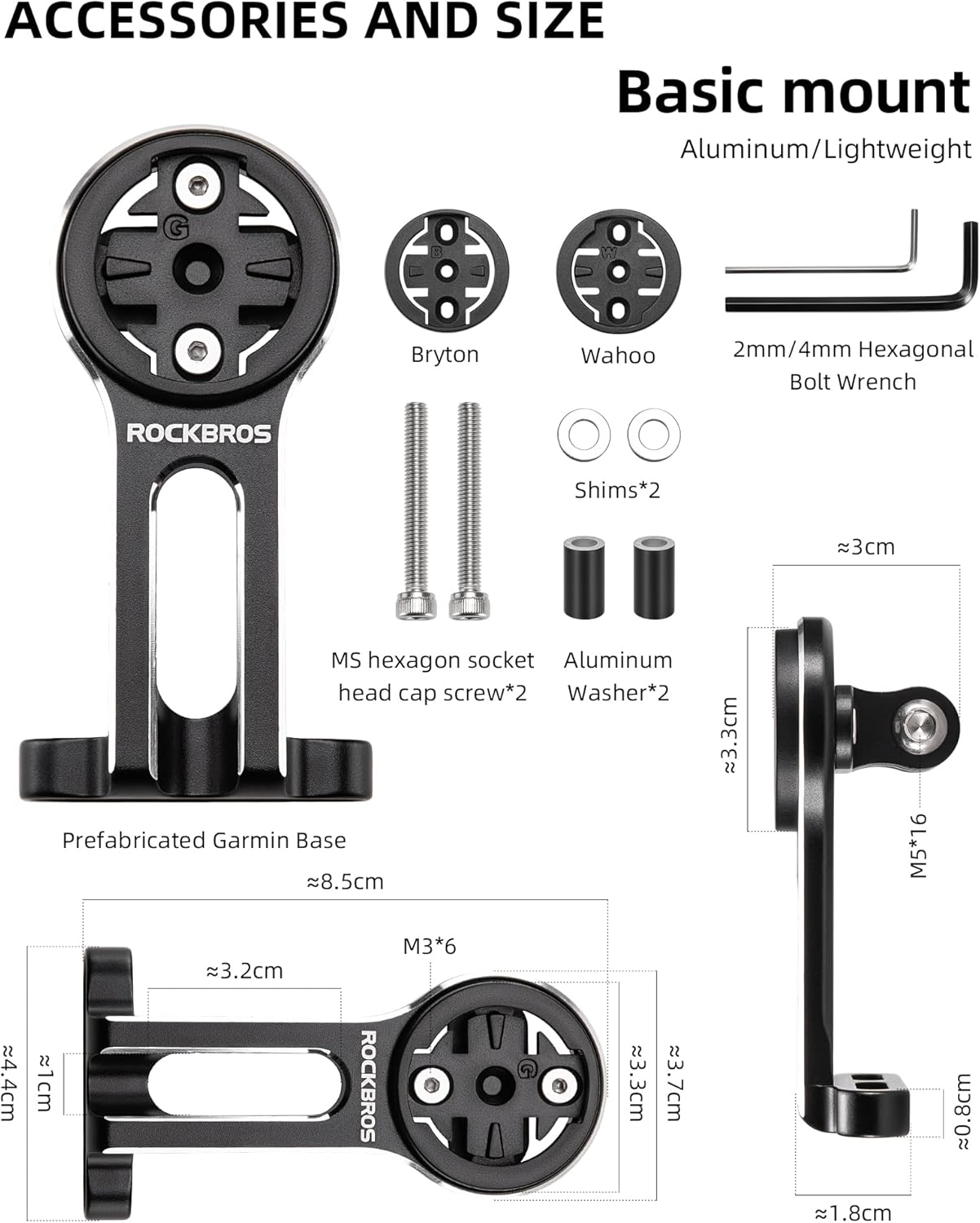
Image: Overview of the ROCKBROS Basic Bike Computer Mount components, including the main bracket, various computer bases, wrenches, screws, shims, and washers. Detailed dimensions are also shown.

Image: Close-up of the interchangeable bases provided for Garmin, Bryton, and Wahoo bike computers. Note: Wahoo bases are not compatible with Go Pro mounts simultaneously.
3. Installation Guide
Follow these steps to correctly install the ROCKBROS Basic Bike Computer Mount on your bicycle.
3.1 Handlebar Stem Compatibility
Ensure your bike's handlebar stem has a distance of up to 4 centimeters between the mounting screws for proper fitment. Measure your stem distance before proceeding.
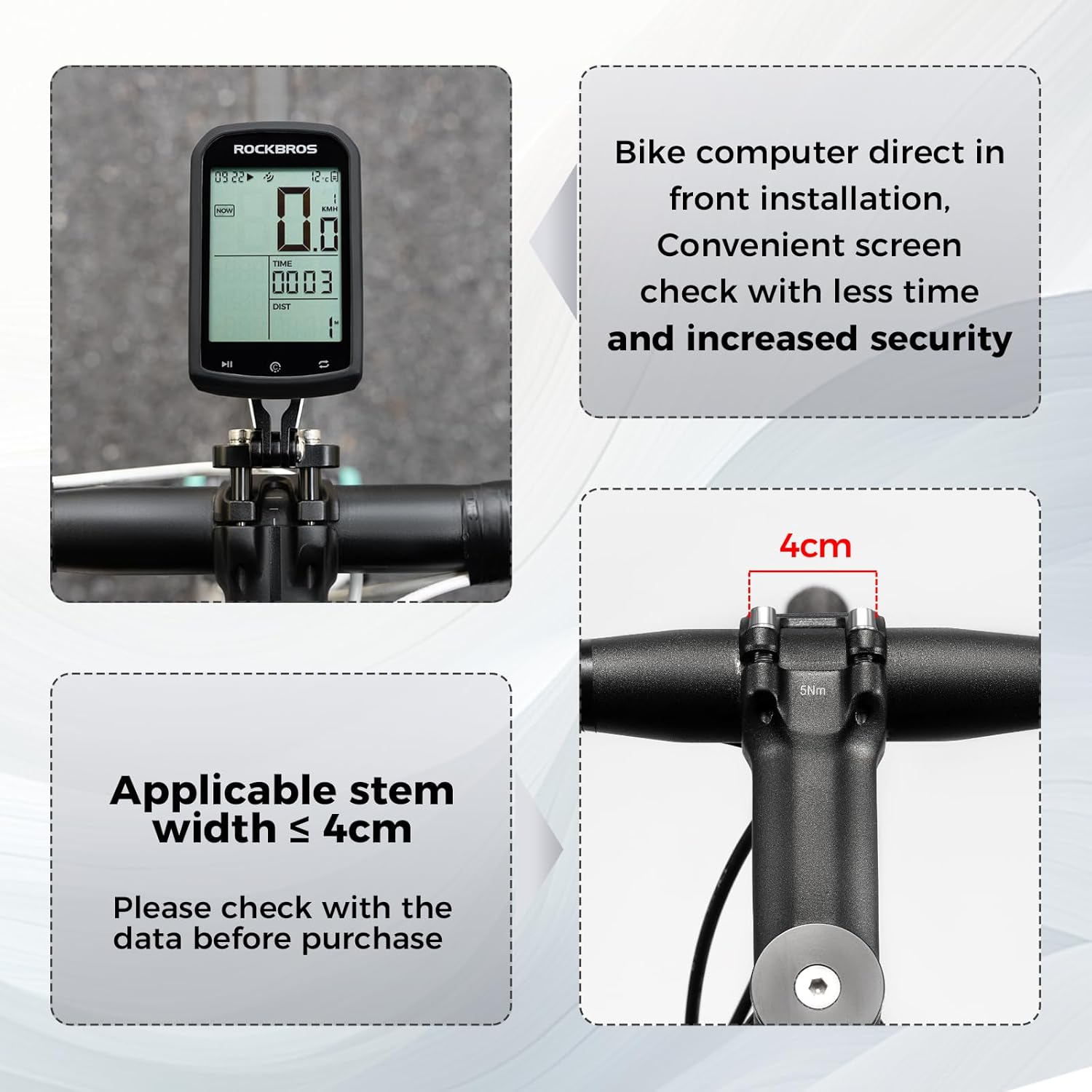
Image: The bike computer mount installed on a handlebar, illustrating the required stem width of 4cm or less for compatibility.
3.2 Mounting the Bracket
- Unscrew Riser Screws: Carefully unscrew the two riser screws on your bike's handlebar stem using the appropriate hex wrench. Keep these screws and any existing washers safe.
- Position the Mount: Align the ROCKBROS mount with the screw holes on your handlebar stem. If necessary, place the provided shims between the handlebar and the backside of the bracket to ensure a snug fit and prevent slipping.
- Insert and Tighten Screws: Insert the provided MS Hexagon Socket Head Cap Screws (or your original riser screws if compatible) through the mount and into the stem. Hand-tighten them initially.
- Final Tightening: Using the appropriate hex wrench, gradually tighten both screws evenly until the mount is secure and does not rotate. Do not overtighten.

Image: A visual guide showing the four steps for installing the bike computer mount: unscrewing, positioning with screws and shims, tightening, and completion.
3.3 Attaching Devices
- Bike Computer: Select the appropriate base for your Garmin, Bryton, or Wahoo computer. Attach it to the top of the mount using the small screws. Then, twist your bike computer onto the base until it locks securely.
- Action Camera/Bike Light: Use the action camera/bike light adapter. Attach it to the underside of the mount using the provided screw. Then, secure your action camera (e.g., Go Pro) or compatible bike light to the adapter.

Image: The bike computer mount shown with both an action camera and a bike light attached, demonstrating its versatility.
4. Operation
Once installed, the ROCKBROS Basic Bike Computer Mount provides a stable platform for your devices.
- Device Attachment: Ensure all devices are securely clicked or screwed into place before riding.
- Viewing Angle: The out-front design offers a comfortable and direct viewing angle for your bike computer, reducing the need to look down significantly and improving cycling safety.

Image: A bike computer displayed on the mount, illustrating how its position allows for a comfortable and easy viewing angle during cycling.
5. Maintenance
Regular maintenance will prolong the life and ensure the safety of your bike computer mount.
- Cleaning: Wipe the mount with a damp cloth to remove dirt and grime. Avoid harsh chemicals.
- Inspection: Periodically check all screws for tightness. Ensure the mount is still securely fastened to the handlebar stem. Inspect the plastic computer bases for any signs of wear or cracking, especially after impacts.
- Storage: If removing the mount for extended periods, store it in a clean, dry place.
6. Troubleshooting
- Mount is slipping or rotating:
Ensure the handlebar stem screws are tightened sufficiently. If slipping persists, verify that the shims were correctly installed between the handlebar and the bracket. The shims are crucial for a secure fit on some handlebar designs.
- Device not fitting correctly:
Confirm you are using the correct adapter base for your specific bike computer model (Garmin, Bryton, Wahoo). Note that the Wahoo base cannot be used simultaneously with a Go Pro mount due to potential interference or design limitations.
- Mount appears damaged:
If the mount or any of its components show signs of damage (e.g., cracks in the plastic bases, bent aluminum), discontinue use immediately and replace the affected parts or the entire mount to prevent potential loss of your devices during a ride.
7. Specifications
| Brand | ROCKBROS |
| Model | Basic Mount |
| Material | Aluminum |
| Color | Black |
| Mounting Type | Handlebar (Out-Front) |
| Compatible Handlebar Stem Width | Up to 4 cm |
| Compatible Devices | Garmin, Bryton, Wahoo bike computers; Go Pro action cameras; compatible bike lights |
| Item Weight | 2.89 ounces (approx. 82 grams) |
| Package Dimensions | 4.45 x 2.17 x 1.46 inches |

Image: The mount shown with a bike light, highlighting its compact and lightweight design suitable for handlebars with a stem distance up to 4cm.
8. Warranty & Support
This ROCKBROS Basic Bike Computer Mount comes with a 1-year warranty from the date of purchase, covering manufacturing defects. For warranty claims or technical support, please contact ROCKBROS customer service through their official website or the retailer where the product was purchased. Please retain your proof of purchase for warranty validation.
For additional information or assistance, visit the official ROCKBROS website: ROCKBROS Store


