Introduction
This manual provides detailed instructions for the assembly, operation, and maintenance of your FITUEYES Floor TV Stand with Power Outlet. Please read this manual thoroughly before installation and use to ensure proper function and safety. This stand is designed to accommodate televisions ranging from 32 to 75 inches, with a maximum weight capacity of 88 lbs and VESA patterns between 100x100mm and 600x400mm.
Safety Information
To prevent injury or damage, always adhere to the following safety guidelines:
- Ensure your television's weight and VESA mounting pattern are within the stand's specified limits (maximum 88 lbs, VESA 100x100mm to 600x400mm).
- Place the TV stand on a stable, level surface to prevent tipping.
- Do not overload the shelves. The plastic shelf has a weight capacity of up to 11 lbs.
- Keep children and pets away from the stand during assembly and ensure all components are securely fastened. The tempered glass base features rounded corners to minimize injury risk.
- Do not attempt to modify the stand or use it for purposes other than its intended use.
- Route all cables safely to avoid tripping hazards and ensure proper ventilation for electronic devices.
Product Features Overview
The FITUEYES Floor TV Stand offers several features designed for convenience and functionality:
- Integrated Power Strip: Equipped with 3 AC outlets (125V/12A) and a 5ft power cord for convenient power access.
- Cable Management: Built-in features to organize and conceal cables, maintaining a tidy appearance.
- Adjustable Height: The TV mount offers 8 optional adjustable positions, allowing height adjustments from 48.2 inches to 56.5 inches (1226mm to 1434mm).
- Swivel Functionality: The TV can be swiveled 30 degrees left or right for optimal viewing angles.
- Flexible Shelves: Two plastic shelves, each measuring 15.4 inches (L) x 10.2 inches (W), are steplessly adjustable to accommodate various devices.
- Tempered Glass Base: An 8mm thick tempered glass base provides stability and durability.
Video: Overview of FITUEYES Floor TV Stand features, including TV size compatibility, power strip, cable management, flexible shelves, height adjustment, and swivel capability.
Assembly Instructions
Assembly is designed to be straightforward with no drilling required. Follow the steps below carefully. It is recommended to have a second person assist with mounting the TV.
Step 1: Base Assembly
Attach the main support column to the tempered glass base. Ensure all screws are tightened securely. The base includes non-slip rubber pads for stability.

Image: Detail of the tempered glass base, showing the non-slip pad and a channel for cable routing.
Step 2: Install Power Strip and Cable Management
Integrate the power strip into the main column. Utilize the provided cable management clips and channels to route the power cord and other device cables neatly along the stand's column.
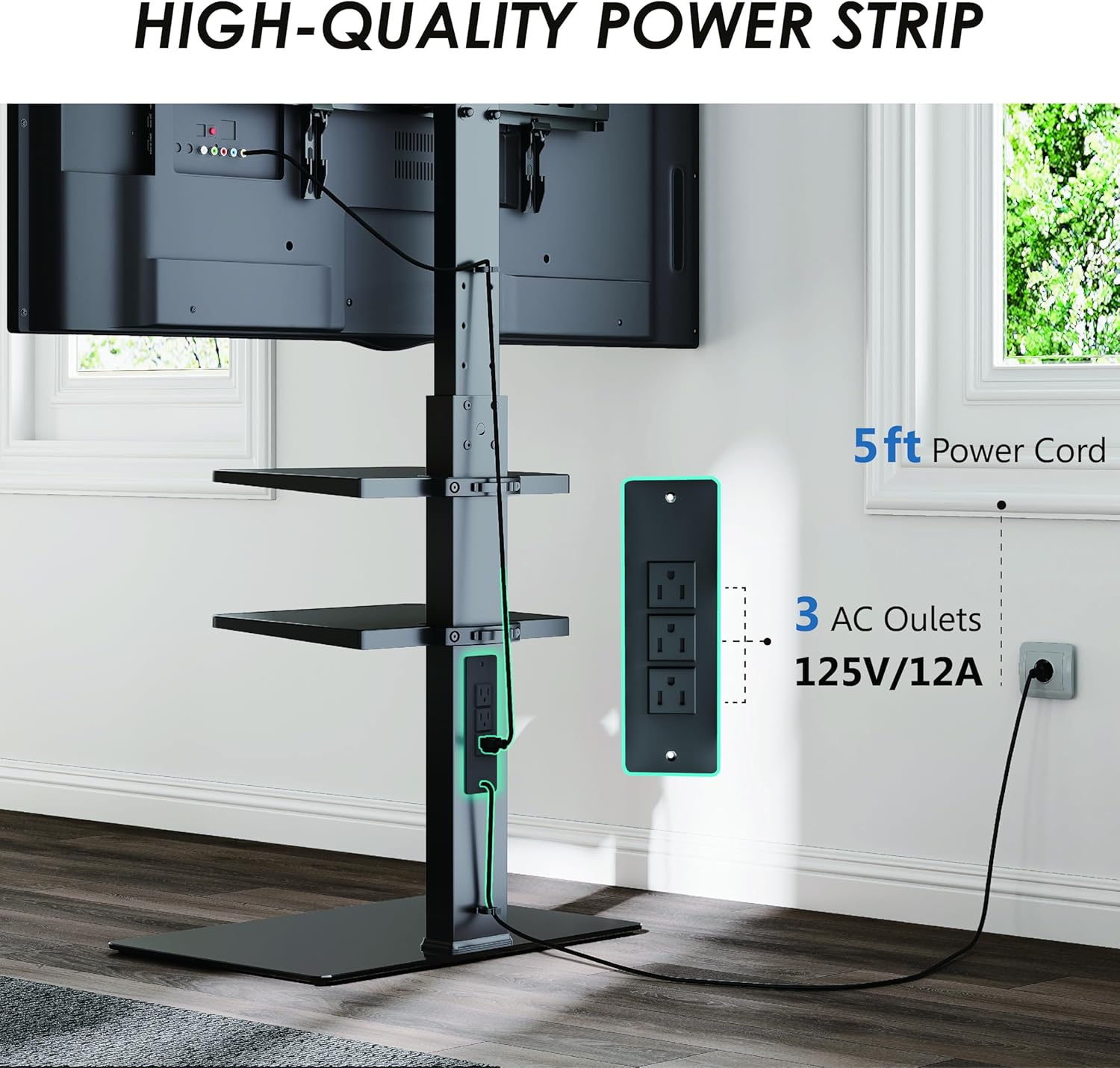
Image: Illustration of the integrated power strip and cable management system, highlighting the 3 AC outlets and 5ft power cord.
Step 3: Attach TV Mounting Brackets
Secure the TV mounting brackets to the back of your television using the appropriate screws and spacers for your TV's VESA pattern. Ensure the brackets are level and firmly attached.

Image: Detailed view of the TV mounting bracket, illustrating the secure attachment mechanism.
Step 4: Mount the TV to the Stand
With assistance, carefully lift your television and hook the mounted brackets onto the main column of the stand. Secure the TV in place using the locking mechanisms on the brackets.
Step 5: Install and Adjust Shelves
Attach the plastic shelves to the main column. The shelves offer stepless adjustment, allowing you to position them at your desired height. Ensure they are level and stable before placing devices on them.
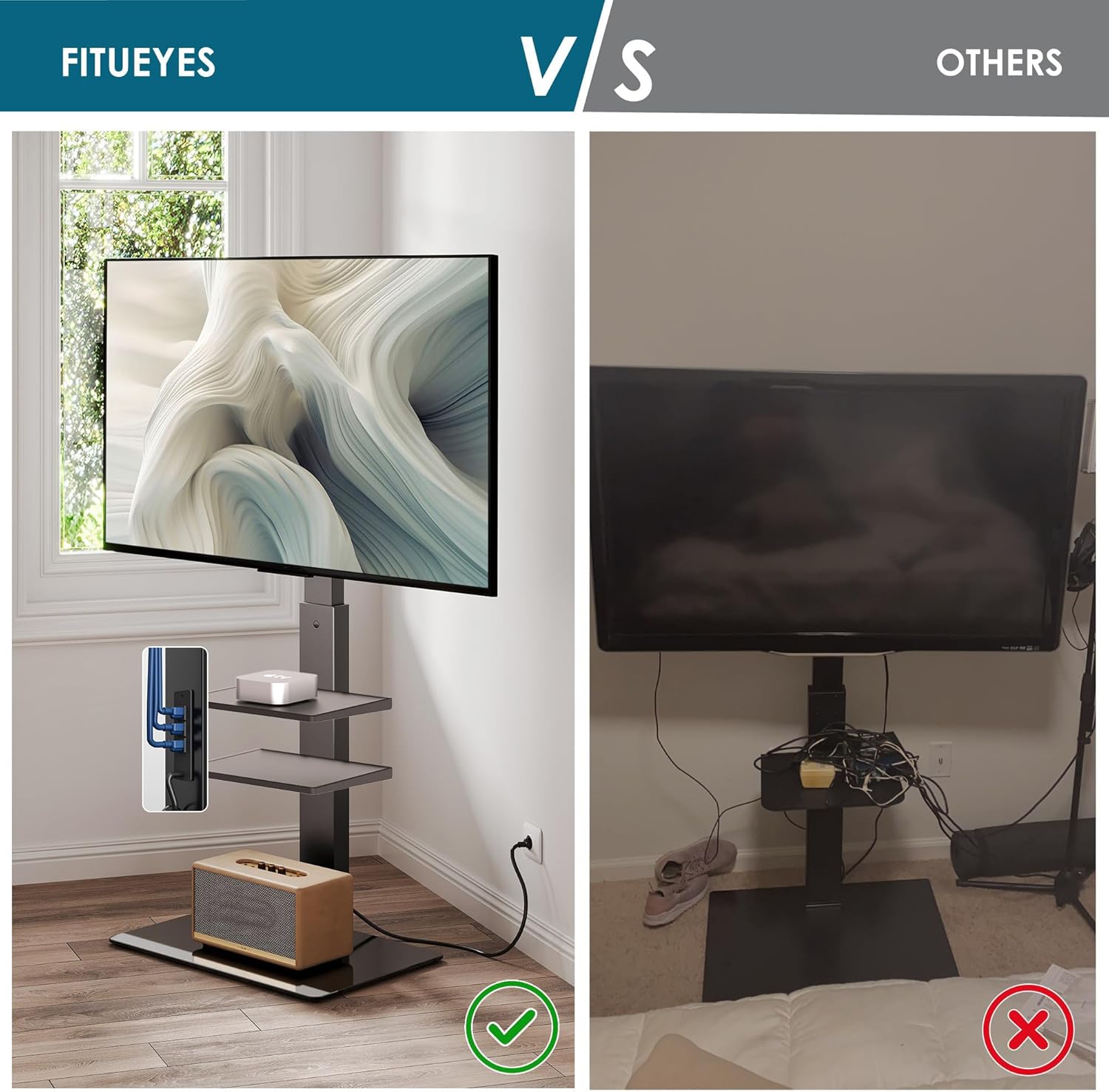
Image: The FITUEYES stand with devices and organized cables, demonstrating its clean aesthetic.
Operating Instructions
Adjusting TV Height
The TV mount allows for height adjustment. Loosen the securing bolts on the vertical bars behind the TV, slide the TV to one of the 8 available positions between 48.2 inches and 56.5 inches, and then re-tighten the bolts to secure the TV at the desired height.
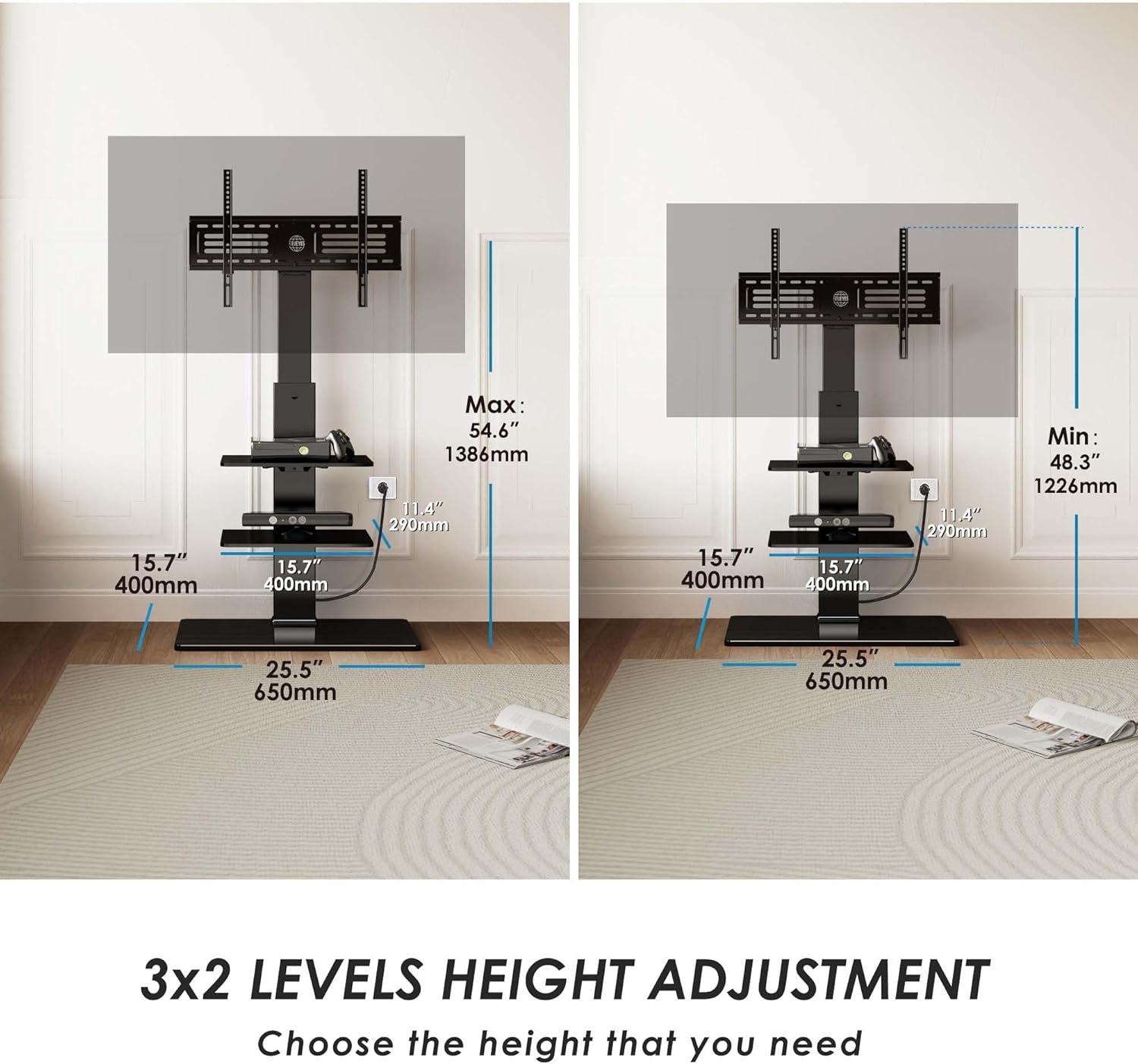
Image: Height adjustment diagram, showing the minimum (48.3") and maximum (54.6") TV height settings.
Swiveling the TV
The TV mount can be swiveled up to 30 degrees to the left or right. Gently push the sides of the TV to achieve your preferred viewing angle. No tools are required for this adjustment.

Image: The TV stand's swivel feature, demonstrating a 30-degree rotation capability.
Using the Power Strip
Plug your TV and other media devices into the integrated 3-outlet power strip located on the back of the main column. This helps consolidate power connections and reduces cable clutter.
Maintenance
Regular maintenance will help prolong the life and appearance of your TV stand:
- Clean the metal and tempered glass surfaces with a soft, damp cloth. Avoid abrasive cleaners or harsh chemicals that could damage the finish.
- Periodically check all screws and bolts to ensure they remain tight. Re-tighten if necessary.
- Inspect cables for any signs of wear or damage. Replace damaged cables immediately.
Troubleshooting
If you encounter issues with your FITUEYES Floor TV Stand, refer to the following common solutions:
- Stand feels unstable: Ensure the stand is on a flat, level surface. Check that all assembly screws, especially those connecting the main column to the base and the TV brackets, are fully tightened.
- TV is not level: Verify that the TV mounting brackets are installed evenly on the back of your TV and that the TV is properly seated on the stand's hooks. Adjust the height as needed.
- Cables are tangled: Utilize the integrated cable management system. Reroute cables through the designated channels and use cable ties or clips to keep them organized.
- Power strip not working: Check if the stand's main power cord is securely plugged into a functional wall outlet. Ensure devices are properly plugged into the power strip outlets.
Specifications
| Feature | Specification |
|---|---|
| Model Number | B0D2CQT2G2 |
| Compatible TV Sizes | 32-75 inches |
| Maximum TV Weight | 88 lbs (40 kg) |
| VESA Compatibility | 100x100mm to 600x400mm |
| Material | Metal, Tempered Glass |
| Height Adjustment Range | 48.2" - 56.5" (1226mm - 1434mm) |
| Swivel Angle | ±30 degrees |
| Power Strip | 3 AC Outlets (125V/12A), 5ft Power Cord |
| Shelf Dimensions (each) | 15.4" (L) x 10.2" (W) |
| Shelf Weight Capacity (each) | 11 lbs |
| Item Weight | 31.2 lbs |
| Assembly Required | Yes (Easy assembly, no drilling) |
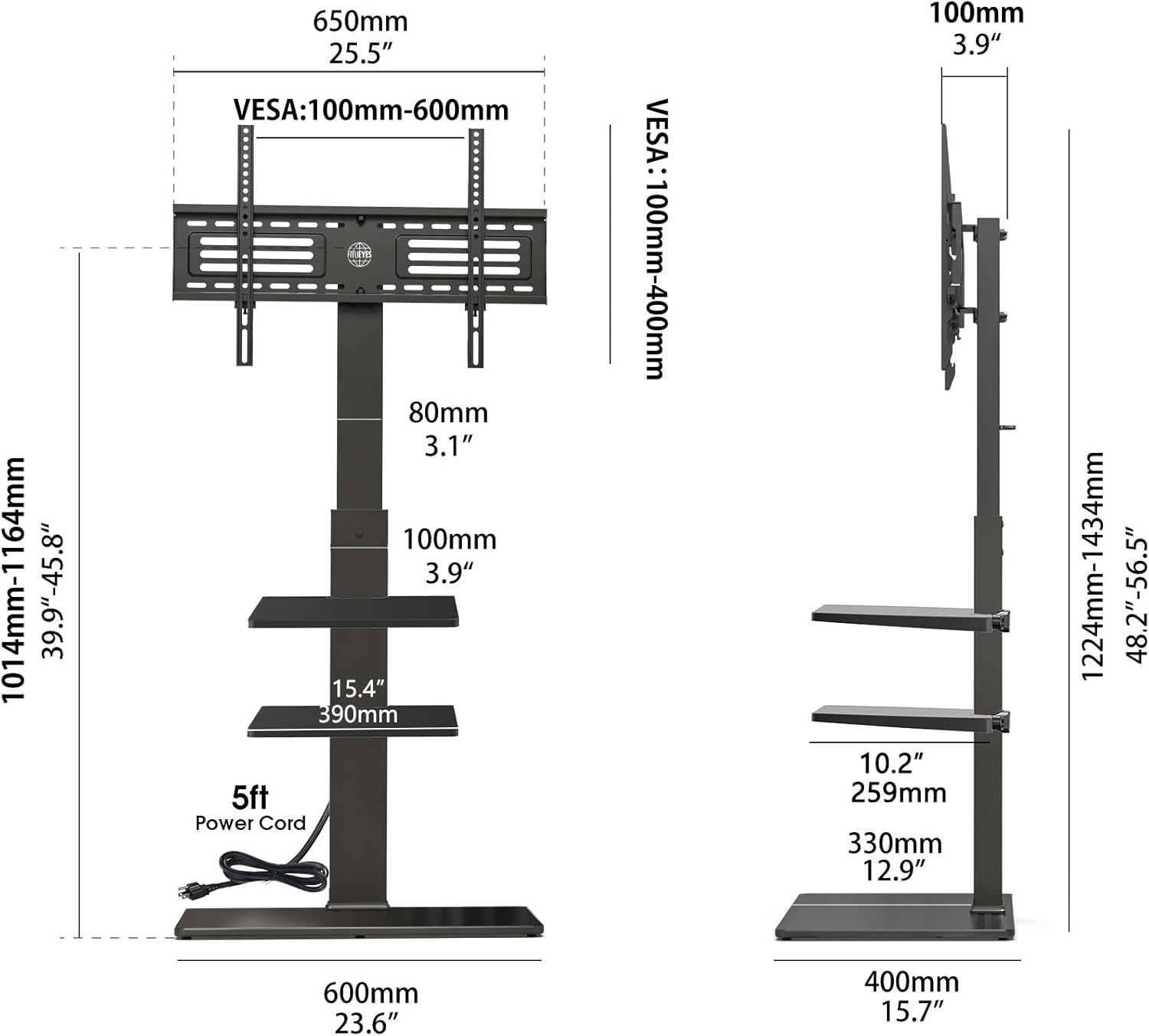
Image: Comprehensive dimensional drawing of the TV stand, including VESA compatibility and shelf measurements.

Image: Visual representation of TV size compatibility (32" to 75") and a list of supported VESA mounting patterns.
Warranty and Support
FITUEYES offers a warranty of up to 10 years on this product. For warranty claims, technical support, or any questions regarding your TV stand, please contact FITUEYES customer service through their official website or the retailer where the product was purchased. Please have your model number (B0D2CQT2G2) and purchase information ready.


