
Introduction
Welcome to the instruction manual for your new MOFII Wireless Keyboard and Mouse Combo. This full-size 2.4G plug-and-play set features a unique typewriter retro round key design, offering both aesthetic appeal and functional efficiency. This manual provides essential information on setting up, operating, maintaining, and troubleshooting your device to ensure optimal performance and longevity.
Product Overview
The MOFII Wireless Keyboard and Mouse Combo includes a full-size keyboard with a numeric keypad, a contoured mouse, and a single USB receiver for both devices. The design emphasizes comfort and ease of use with its ergonomic features and durable construction.

Figure 1: MOFII Wireless Keyboard and Mouse Combo (Lovely Pink)
Key Components:
- Wireless Keyboard: Full-size layout with retro round keycaps and a numeric pad.
- Wireless Mouse: Ergonomically contoured for comfortable grip.
- USB Receiver: A single 2.4G USB receiver connects both the keyboard and mouse to your device. It is conveniently stored inside the mouse.
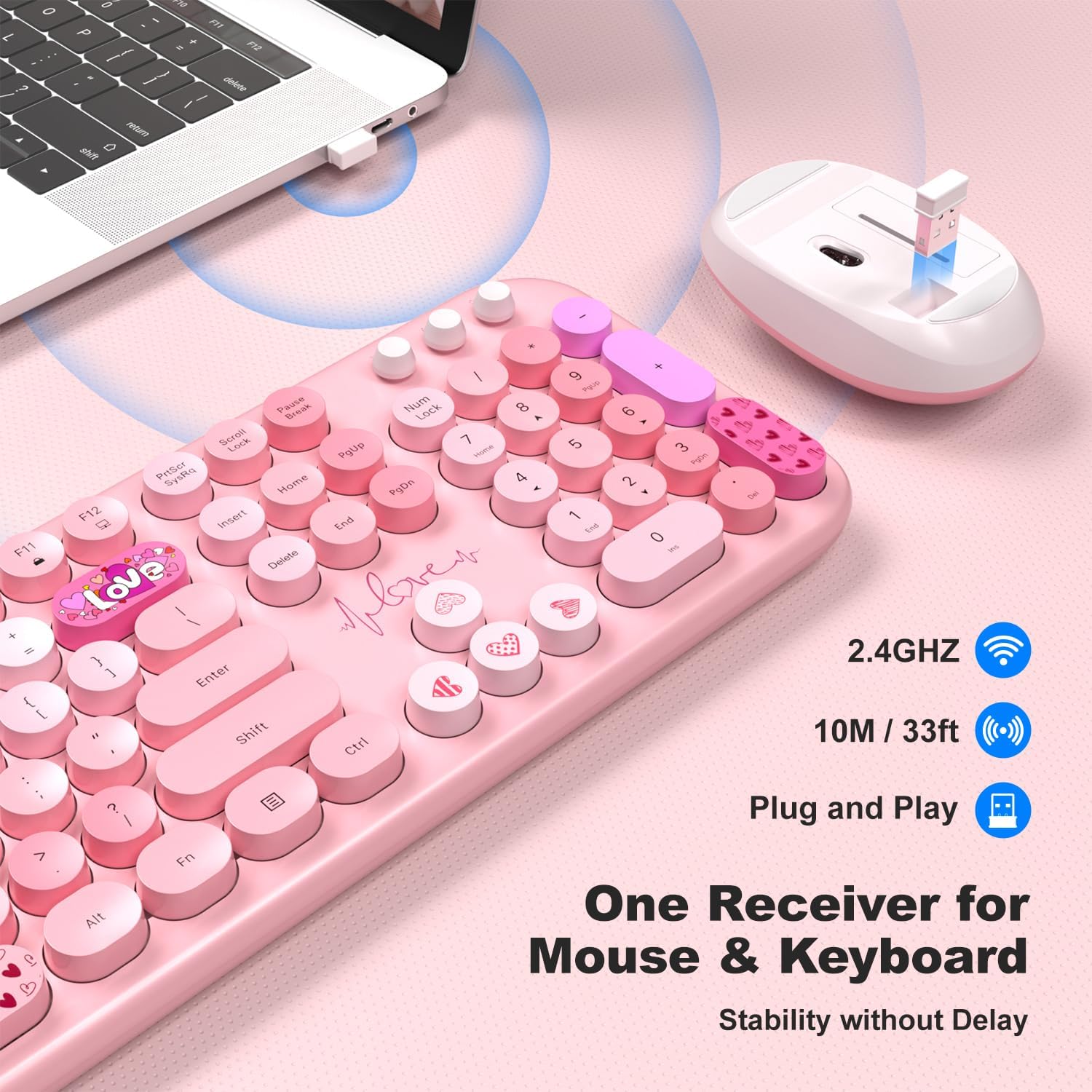
Figure 2: USB receiver stored within the mouse for portability.
Product Dimensions:
Understanding the dimensions can help with desk setup and portability.

Figure 3: Detailed dimensions of the keyboard and mouse.
- Keyboard Dimensions: Approximately 17.71 inches (length) x 5.31 inches (width) x 1.57 inches (height with stands extended).
- Mouse Dimensions: Approximately 4.13 inches (length) x 2.56 inches (width) x 1.37 inches (height).
- Item Weight: 1.98 pounds (combined).
Setup Instructions
Follow these steps to set up your MOFII Wireless Keyboard and Mouse Combo:
- Install Batteries:
- Locate the battery compartments on the underside of both the keyboard and the mouse.
- Insert one AA battery into the keyboard and one AA battery into the mouse, ensuring correct polarity (+/-).
- Retrieve USB Receiver:
- The USB receiver is stored in a slot on the underside of the mouse. Gently pull it out.
- Connect USB Receiver:
- Plug the USB receiver into an available USB port on your computer (PC, desktop, or laptop).

Figure 4: The combo offers wide compatibility with various devices and operating systems.
- Automatic Connection:
- The keyboard and mouse are designed for plug-and-play functionality. They should automatically connect to your computer within a few seconds. No additional drivers are typically required.
- Adjust Keyboard Angle:
- Flip out the folding holders on the underside of the keyboard to adjust the typing angle for improved ergonomics.
Operating Instructions
Once set up, your MOFII Wireless Keyboard and Mouse Combo is ready for use. Here are some operational details:
Wireless Connectivity:
- The combo operates on a stable 2.4G wireless connection, providing a reliable link up to 10 meters (33 feet) away from the USB receiver.
Ergonomic Design:
The keyboard features a folding holder and anti-slide pads to provide an optimal slope, reducing wrist strain during extended typing sessions. The mouse is contoured to fit comfortably in your hand for hours of use.

Figure 5: The keyboard's ergonomic design helps reduce wrist pressure.
Multimedia Hotkeys:
The keyboard includes 13 multimedia hotkeys for one-touch commands to enhance your productivity. These keys are typically located along the top row (F1-F12) and may require pressing the 'Fn' key in combination with the function key for activation.

Figure 6: Overview of the 13 multimedia hotkeys for quick access functions.
Auto-Sleep Feature:
To conserve battery life, both the keyboard and mouse are equipped with an auto-sleep function. After 8-10 minutes of inactivity, the devices will enter sleep mode. To wake them up, simply press any key on the keyboard or click the mouse button.

Figure 7: The auto-sleep feature helps extend battery life.
Maintenance
Proper maintenance ensures the longevity and optimal performance of your MOFII Wireless Keyboard and Mouse Combo:
- Cleaning:
- The keyboard features removable keycaps, making cleaning easier. Gently pull off the keycaps to clean underneath with a soft brush or compressed air.
- Wipe the surface of both the keyboard and mouse with a soft, damp cloth. Avoid using harsh chemicals or abrasive materials.
- Battery Replacement:
- When the devices show signs of low power (e.g., delayed response, intermittent connection), replace the AA batteries in both the keyboard and mouse.
- Dispose of used batteries responsibly according to local regulations.
- Storage:
- When not in use for extended periods, remove the batteries to prevent leakage.
- Store the USB receiver inside the mouse to prevent loss.
Troubleshooting
If you encounter issues with your MOFII Wireless Keyboard and Mouse Combo, refer to the following common problems and solutions:
| Problem | Possible Cause | Solution |
|---|---|---|
| Keyboard or mouse not responding | Low or dead batteries; Device in auto-sleep mode; USB receiver disconnected or faulty. | Replace batteries. Press any key on keyboard or click mouse to wake up. Re-plug the USB receiver. Try a different USB port. |
| Lag or delayed response | Interference from other wireless devices; Device too far from receiver; Low battery. | Move closer to the receiver. Ensure no large metal objects are between devices and receiver. Replace batteries. |
| Keys not typing correctly | Software issue; Physical obstruction under keycap. | Restart your computer. Clean under the keycap. Ensure Num Lock/Caps Lock are in desired state. |
| Mouse cursor erratic or not moving | Dirty optical sensor; Unsuitable surface; Low battery. | Clean the optical sensor on the mouse. Use on a clean, non-reflective mouse pad or surface. Replace batteries. |
Specifications
Detailed technical specifications for the MOFII Wireless Keyboard and Mouse Combo:
- Brand: MOFII
- Model: B0D2CQ1Z56
- Color: Lovely Pink
- Connectivity Technology: 2.4G Wireless (USB Receiver)
- Special Feature: Round Keycaps, Ergonomic Design, Auto-Sleep Function
- Compatible Devices: Personal Computer (Windows, Desktop, Laptop)
- Power Source: 1 x AA Battery for Keyboard, 1 x AA Battery for Mouse
- Wireless Range: Up to 10 meters (33 feet)
- Manufacturer: MOFII
- First Available: December 4, 2021
Warranty and Support
MOFII stands behind the quality of its products. Your Wireless Keyboard and Mouse Combo comes with the following:
- 30-Day Money-Back Guarantee: If you are not satisfied with your purchase, you may be eligible for a refund within 30 days.
- 12-Month Warranty: The product is covered by a 12-month warranty from the date of purchase, covering manufacturing defects.
For warranty claims, technical assistance, or any other inquiries, please contact MOFII customer support through the retailer's platform or the official MOFII website. Please have your product model number (B0D2CQ1Z56) and purchase details ready when contacting support.