
1. Introduction
This manual provides detailed instructions for the MechLands Ajazz AK870 Gasket-Mounted Wireless Gaming Keyboard. Please read this manual thoroughly before using the product to ensure proper operation and to maximize your experience. This keyboard features a compact TKL layout, multiple connectivity options, customizable RGB backlighting, and a comfortable gasket-mounted design.
2. Product Features
- Compact 87 Keys TKL Design: Maximizes desk space while retaining essential keys for gaming and productivity.
- Gasket-Mounted & Flex-Cut PC Plate and PCB: Provides a comfortable typing experience, reduces noise, and offers responsive keystrokes.
- 5-Layer Padding for Superior Sound: Includes Poron foam, IXPE switch pad, PET sound enhancement pad, and a bottom silicone pad to minimize typing noise and resonance.
- Low-Latency Wireless & Wired Connectivity: Supports Bluetooth 5.0, 2.4GHz wireless, and USB-C wired connections for versatile device compatibility. Equipped with a 4000mAh battery for extended use.
- South-facing LEDs with 1.6M RGB: Offers 16.8 million colors for customizable backlighting, allowing users to personalize their typing environment.

3. Setup
3.1. What's in the Box
- MechLands Ajazz AK870 Keyboard
- USB-C Cable
- Keycap Puller
3.2. Initial Charging
Before first use, connect the keyboard to a USB power source using the provided USB-C cable. The keyboard features a 4000mAh battery. A full charge ensures extended wireless operation.
3.3. Connectivity Modes
The AK870 supports three connection modes: Bluetooth 5.0, 2.4GHz wireless, and USB-C wired.

3.3.1. USB-C Wired Connection
- Ensure the mode switch on the keyboard is set to 'USB'.
- Connect the provided USB-C cable to the keyboard and your computer.
- The keyboard will be automatically recognized by your system.
3.3.2. 2.4GHz Wireless Connection
- Set the mode switch on the keyboard to '2.4G'.
- Plug the 2.4GHz USB receiver into an available USB port on your computer.
- The keyboard should connect automatically. If not, press Fn + R to initiate pairing.
3.3.3. Bluetooth 5.0 Connection
- Set the mode switch on the keyboard to 'BT'.
- Press and hold Fn + Q, Fn + W, or Fn + E for 3-5 seconds to enter pairing mode for Bluetooth device 1, 2, or 3 respectively. The corresponding key's backlight will flash rapidly.
- On your device (PC, laptop, smartphone, tablet), search for Bluetooth devices and select 'AJAZZ AK870'.
- Once paired, the key's backlight will stop flashing.
4. Operating Instructions
4.1. System Compatibility
The keyboard is compatible with Windows and macOS operating systems. Use the dedicated Win/Mac switch on the keyboard to select the appropriate layout for your system.
4.2. RGB Backlight Control
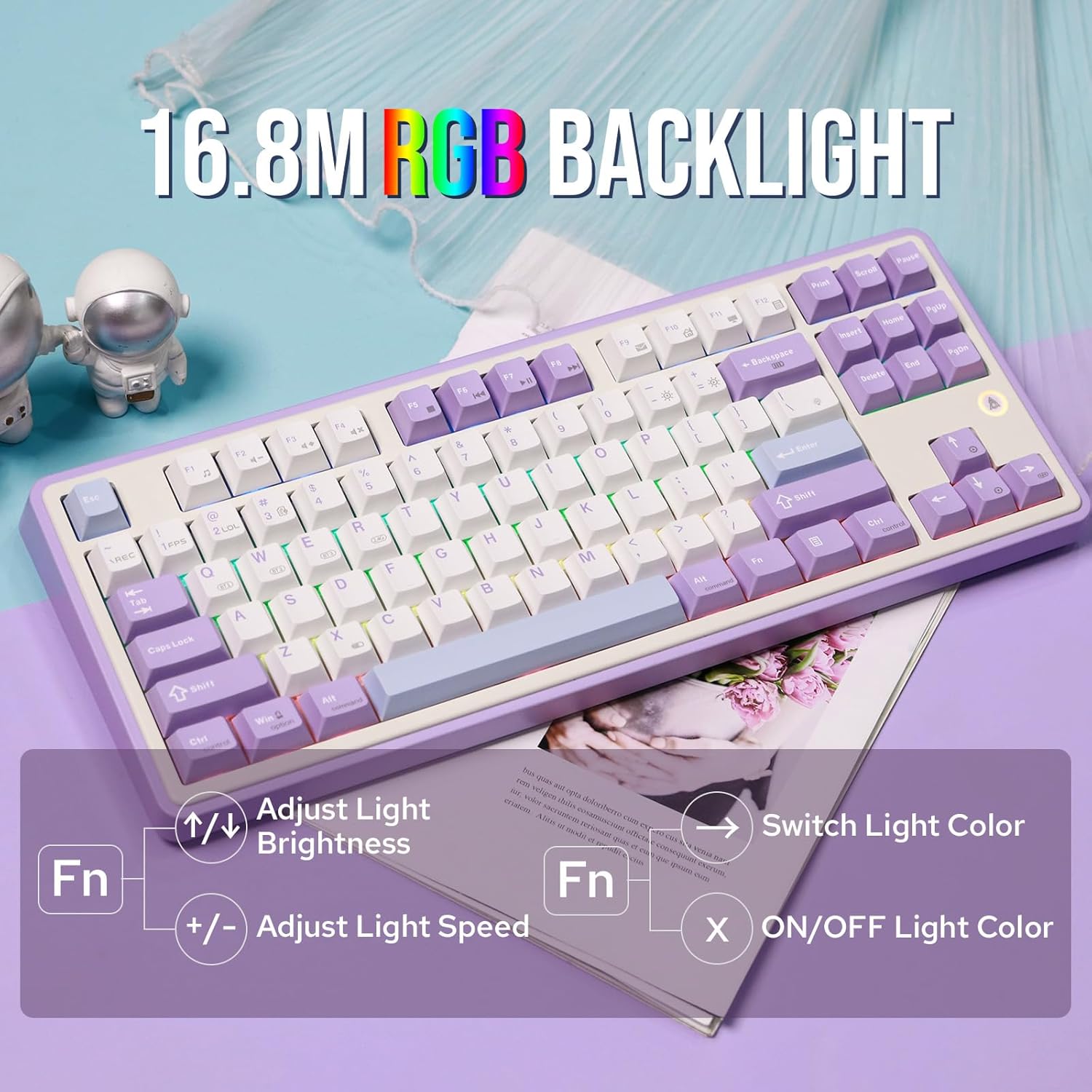
The AK870 features dynamic RGB backlighting with 16.8 million colors. You can adjust the lighting effects directly from the keyboard:
- Adjust Light Brightness: Press Fn + Up Arrow to increase brightness, Fn + Down Arrow to decrease brightness.
- Adjust Light Speed: Press Fn + '+' to increase effect speed, Fn + '-' to decrease effect speed.
- Switch Light Color: Press Fn + Right Arrow to cycle through different colors.
- ON/OFF Light Color: Press Fn + X to turn the backlight on or off.
4.3. Software Customization
The Ajazz AK870 supports programmable software for advanced customization of key assignments, macros, and lighting effects. Refer to the official MechLands website for software download and detailed instructions.

4.4. Hot-Swappable Switches
The AK870 features hot-swappable switch sockets, allowing you to easily change mechanical switches without soldering. This enables customization of typing feel and sound.

4.4.1. Replacing Switches
- Use the provided keycap puller to carefully remove the keycap from the desired switch.
- Use a switch puller (not included, but often comes with replacement switches) to gently pull the switch straight up from the PCB.
- Align the pins of the new switch with the holes on the PCB and press it firmly into place until it clicks. Ensure the pins are not bent.
- Replace the keycap.
5. Maintenance
5.1. Cleaning the Keyboard
- Disconnect the keyboard from your computer before cleaning.
- Use a soft, lint-free cloth slightly dampened with water or a mild cleaning solution to wipe the keycaps and chassis.
- For deeper cleaning, use the keycap puller to remove keycaps and clean underneath with compressed air or a small brush.
- Avoid using harsh chemicals or abrasive materials.
5.2. Battery Care
- Avoid fully discharging the battery frequently.
- Charge the keyboard regularly, especially if it will be stored for an extended period.
- Store the keyboard in a cool, dry place.
6. Troubleshooting
6.1. Keyboard Not Responding
- Wired Mode: Ensure the USB-C cable is securely connected to both the keyboard and the computer. Check if the mode switch is set to 'USB'. Try a different USB port or cable.
- 2.4GHz Mode: Ensure the 2.4GHz receiver is plugged in and the mode switch is set to '2.4G'. Re-pair by pressing Fn + R. Check battery level.
- Bluetooth Mode: Ensure the mode switch is set to 'BT'. Check if the keyboard is paired correctly with your device. Re-pair by holding Fn + Q/W/E. Check battery level.
6.2. RGB Backlight Issues
- If backlights are off, press Fn + X to toggle them on.
- Adjust brightness using Fn + Up/Down Arrow.
- If specific keys are not lighting up, check if the switches are properly seated or if they need replacement.
6.3. Connectivity Drops
- Wireless Modes: Ensure the keyboard is within range of the receiver/device. Avoid interference from other wireless devices.
- Check battery level; low battery can affect wireless stability.
6.4. Typing Sound/Feel
If the typing sound or feel is not as expected, ensure all switches and keycaps are properly installed. The gasket-mounted design and 5-layer padding are designed to provide a specific acoustic profile.
7. Specifications
| Brand | MechLands |
| Model Name | AK870 |
| Number of Keys | 87 |
| Keyboard Layout | QWERTY |
| Connectivity Technology | Bluetooth 5.0, 2.4GHz Wireless, USB-C Wired |
| Compatible Devices | Laptop, PC, Smartphone, Tablet |
| Compatible Operating System Family | MacOS, Windows |
| Keyboard Backlighting | RGB (South-facing LEDs, 16.8M colors) |
| Special Features | Backlit, Customizable Display Keys, Ergonomic, Hot-Swappable, Rechargeable |
| Battery Capacity | 4000mAh |
| Material | Polybutylene Terephthalate (PBT Keycaps) |
| Switch Type | Linear (Gift Switch) |
8. Warranty and Support
8.1. Warranty Information
The MechLands Ajazz AK870 keyboard comes with a 1-year warranty from the date of purchase. This warranty covers manufacturing defects and malfunctions under normal use. It does not cover damage caused by misuse, accidents, unauthorized modifications, or normal wear and tear.
8.2. Customer Support
For technical assistance, troubleshooting, or warranty claims, please contact MechLands customer support through the official website or your retailer. Please have your purchase receipt and product model number (AK870) ready when contacting support.


