
Monzlteck SwitchWallMount_TheftProtection
Monzlteck Anti-Theft Wall Mount for Nintendo Switch Original/OLED Instruction Manual
Model: SwitchWallMount_TheftProtection
Introduction
This manual provides detailed instructions for the installation, operation, and maintenance of your Monzlteck Anti-Theft Wall Mount for Nintendo Switch Original and OLED models. Please read this guide thoroughly before installation and use to ensure proper functionality and safety.
Package Contents
Verify that all components are present before beginning installation.
- Monzlteck Wall Mount (Metal bracket)
- Combination Lock
- Drywall Screws
- Anchors

Image: Included components and dimensions. This image displays the metal wall mount bracket, a combination lock, drywall screws, and anchors. Dimensions for the mount are also shown, including a length of 81mm (3.2in) and a height of 62mm (2.4in) for the main plate, and a depth of 70mm (2.8in).
Setup and Installation
Follow these steps to securely install your Monzlteck wall mount.
- Choose a Location: Select a suitable wall location for mounting. Ensure the surface is sturdy enough to support the weight of the mount and your Nintendo Switch.
- Mark Drilling Points: Hold the wall mount against the desired location on the wall. Use a pencil to mark the positions for the screw holes.
- Drill Pilot Holes: Using an appropriate drill bit (e.g., 4mm as indicated in the diagram), drill pilot holes at the marked positions. If installing into drywall, insert the provided anchors into the pilot holes.
- Attach the Mount: Align the wall mount with the drilled holes and secure it to the wall using the provided screws. Ensure the mount is firmly attached and stable.
- Cable Management: Route your Nintendo Switch's power and HDMI cables through the designated openings in the mount.
Video: Monzlteck Anti-Theft Wall Mount Installation Guide. This video demonstrates the process of installing the Monzlteck wall mount, showing how to secure it to a wall and place the Nintendo Switch within it.
Operating Instructions
Inserting the Nintendo Switch
- Gently slide your Nintendo Switch (Original or OLED model) into the wall mount. Ensure it is seated correctly within the bracket.
- Connect the necessary cables (power, HDMI) to your Switch and route them as desired.

Image: Nintendo Switch Original model securely placed in the Monzlteck wall mount. The black Original model is shown from the front, held firmly by the black metal bracket.
Using the Anti-Theft Feature
The included combination lock provides an anti-theft solution for your Nintendo Switch.
- Once the Switch is in the mount, position the security bar over the top of the console.
- Thread the combination lock through the designated hole on the security bar and the corresponding loop on the mount.
- Set your desired combination for the lock. Refer to the lock's individual instructions for setting or resetting the combination.
- Scramble the numbers to secure the lock.

Image: Nintendo Switch OLED model secured in the wall mount with the combination lock attached. The lock is visible at the bottom of the mount, preventing removal of the console.
Video: Demonstration of the anti-theft lock. This short video shows how the combination lock is used to secure the Nintendo Switch within the wall mount.
Compatibility and Options

Image: The Monzlteck wall mount is compatible with both Nintendo Switch OLED and Original models, shown side-by-side.
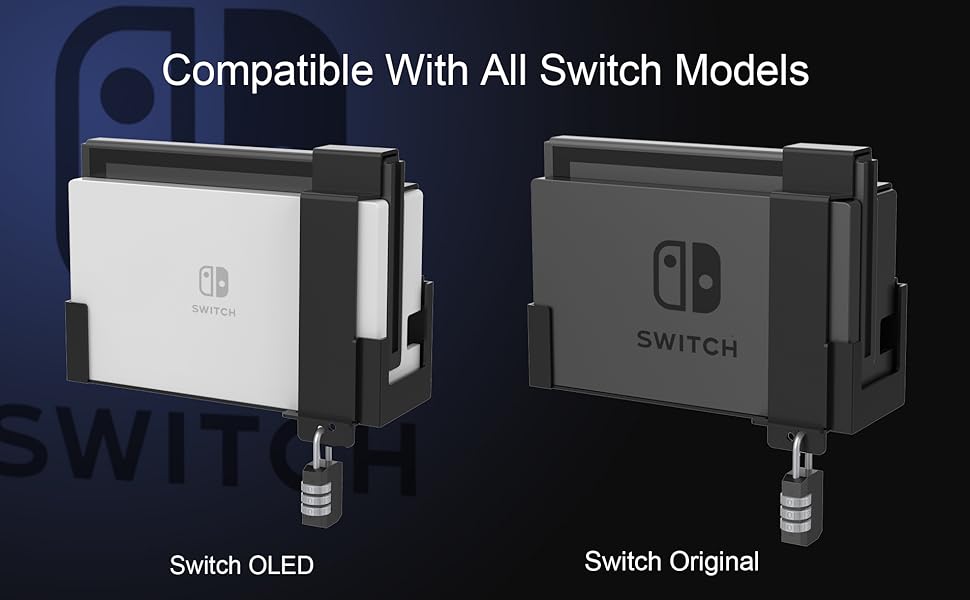
Image: The wall mount can be used with or without the anti-theft combination lock, offering flexible security options.
Maintenance
The Monzlteck wall mount requires minimal maintenance.
- Cleaning: Wipe the mount with a soft, dry cloth to remove dust. For stubborn marks, a slightly damp cloth can be used, followed by immediate drying. Avoid abrasive cleaners or solvents.
- Inspection: Periodically check the mounting screws to ensure they remain tight and secure.
Troubleshooting
| Problem | Possible Cause | Solution |
|---|---|---|
| Mount feels loose on the wall. | Screws are not fully tightened or anchors are not properly seated. | Tighten all mounting screws. If the issue persists, re-evaluate anchor installation or consider relocating the mount to a more secure wall stud. |
| Combination lock cannot be reset or opened. | Incorrect combination entered or reset procedure not followed correctly. | Refer to the specific instructions provided with the combination lock for resetting the code. Ensure the shackle is fully depressed when setting a new combination. If the lock is faulty, it may need replacement. |
| Nintendo Switch does not fit correctly. | Incorrect model of Switch or obstruction. | Ensure you are using a Nintendo Switch Original or OLED model. Check for any cases or accessories on the Switch that might prevent it from seating properly. |
Specifications
- Brand: Monzlteck
- Model Number: SwitchWallMount_TheftProtection
- Material: Metal
- Finish Type: Powder Coated
- Mounting Type: Wall Mount
- Color: Black
- Compatible Devices: Nintendo Switch Original, Nintendo Switch OLED
Warranty Information
This Monzlteck product comes with a 3-year manufacturer warranty. This warranty covers defects in materials and workmanship under normal use. Please retain your proof of purchase for warranty claims. For detailed warranty terms and conditions, please contact Monzlteck customer support.
Customer Support
If you encounter any issues or have questions regarding your Monzlteck Anti-Theft Wall Mount, please contact our customer support team for assistance.
- Online Support: Visit the official Monzlteck website for FAQs and support resources.
- Email: [Insert Monzlteck Support Email Here, if available]
- Phone: [Insert Monzlteck Support Phone Number Here, if available]
When contacting support, please have your product model number (SwitchWallMount_TheftProtection) and purchase details ready.
Ask a question about this manual
Ask about setup, troubleshooting, compatibility, parts, safety, or missing instructions. Manuals+ will review the question and use this page’s manual context to help answer it.