Introduction
This manual provides detailed instructions for the installation, operation, and maintenance of your Yosoo Health Gear 1080P Reverse Hitch Camera. Please read this manual thoroughly before using the product to ensure proper function and safety.
Package Contents
Verify that all items listed below are included in your package:
- 1 x Reverse Hitch Camera
- 1 x Bracket Kit (4PCS)
- 1 x Data Cable
- 1 x User Manual
Note: A memory card is not included and must be purchased separately if local storage is desired.
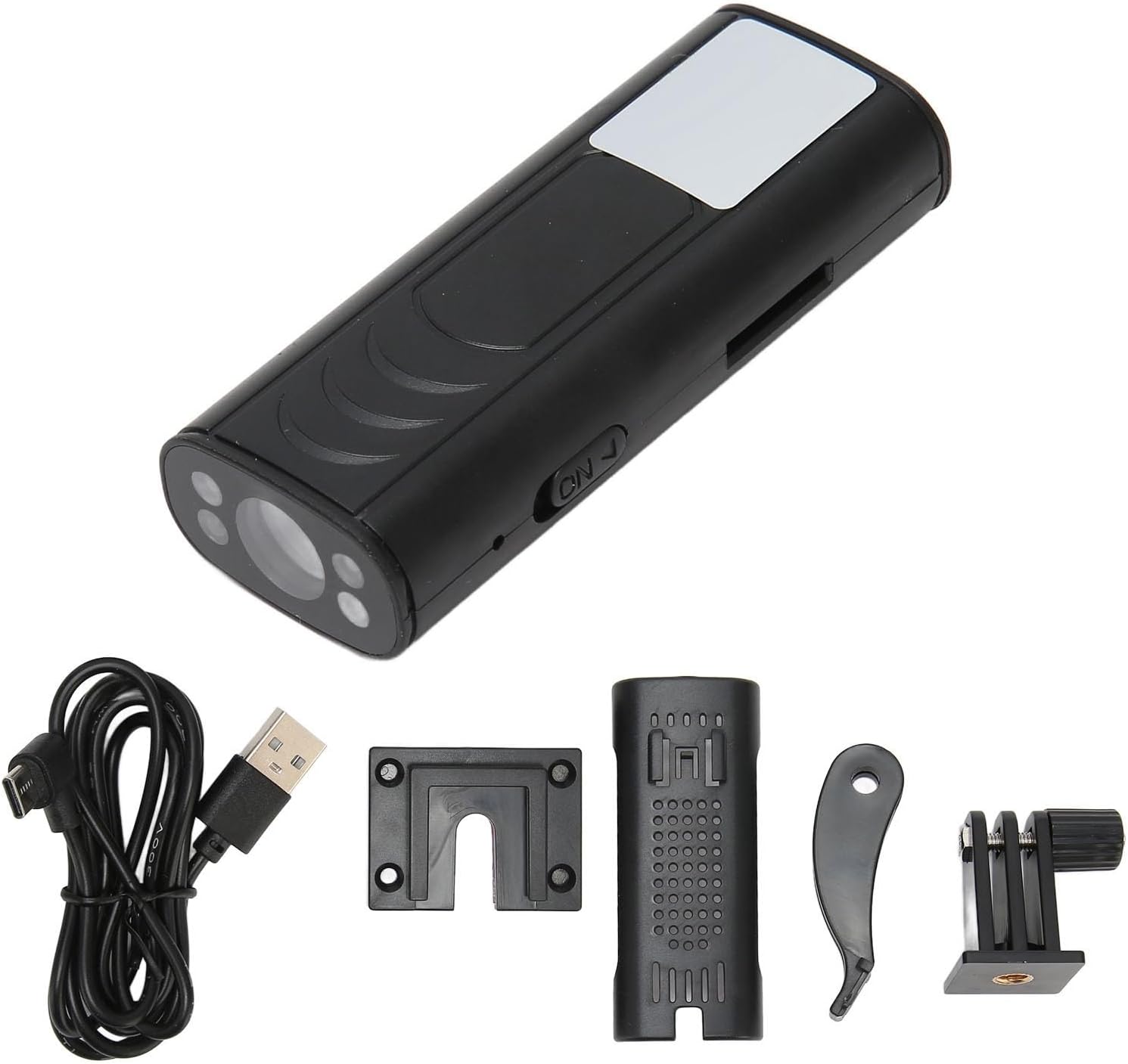
Image: The Yosoo Health Gear Reverse Hitch Camera shown with its included accessories: the camera unit, various bracket components, and a data cable.
Product Features
- High Definition 1080P Resolution: Provides clear and detailed video footage.
- 150° Wide Angle Lens: Offers an expansive field of view for comprehensive monitoring.
- Superior Night Vision: Equipped with 4 infrared LED lights for clear visibility in low-light conditions.
- Built-in Rechargeable Battery: 600mAh lithium-ion battery for wireless operation.
- Wireless Connectivity: Peer-to-peer direct connection via Wi-Fi for mobile app control.
- Motion and Sound Detection: Alerts your phone with photos and video upon detection.
- Versatile Mounting: Features a magnet and an adhesive double base for various installation scenarios.
- Waterproof Design: Suitable for all weather conditions.
- Storage Options: Supports up to 32GB memory card (not included) for local storage.
- Cross-Platform Compatibility: Supports both iOS and Android operating systems.

Image: A mobile phone screen showing real-time video feed from the camera, illustrating its remote monitoring capability and 150-degree wide-angle view. Various use cases like reversing, pet monitoring, baby monitoring, elderly care, and security are depicted.

Image: Illustration of the camera assisting in hitching a trailer, highlighting its 150-degree viewing angle. Insets demonstrate the camera's super night vision with 4 infrared LEDs and its 100% waterproof design.
Setup and Installation
1. Charging the Camera
Before initial use, fully charge the camera's built-in lithium-ion battery using the provided data cable. Connect the data cable to the camera's charging port and a standard USB power adapter (not included).
2. Mounting the Camera
The camera offers versatile mounting options:
- Adhesive Mount: Use the adhesive double base for secure attachment to flat surfaces. Ensure the surface is clean and dry before applying.
- Magnetic Mount: The camera is equipped with a magnet for quick attachment to metallic surfaces.
- Bracket Kit: Utilize the included bracket kit for adjustable positioning and more permanent installations. The bracket allows for a 210° rotation of the camera.

Image: A side view of the camera attached to its adjustable bracket, demonstrating how it can be positioned.

Image: An angled view of the camera mounted on its base, showing the connection point and the camera's orientation.

Image: A view of the bottom of the camera mount, highlighting the adhesive backing for secure attachment.
3. App Download and Connection
- Download the App: Search for the dedicated app on your iOS App Store or Android Google Play Store. Refer to the manual for the specific app name.
- Power On Camera: Press the power button on the camera to turn it on.
- Connect via Wi-Fi: On your smartphone, go to Wi-Fi settings and connect to the camera's direct Wi-Fi network. The network name will typically start with a specific prefix (e.g., "CAM-XXXX").
- Open App: Launch the app and follow the on-screen instructions to add and connect to your camera.
Operating Instructions
1. Real-time Monitoring
Once connected to the app, you can view live video feed from the camera on your smartphone. This is ideal for reversing, monitoring hitch connections, or general surveillance.
2. Motion and Sound Detection
- Activation: Enable motion and sound detection features within the camera's app settings.
- Alerts: When motion or sound is detected, the camera will automatically send alerts to your phone, typically including three quick photos and a short video recording.
3. Video Recording and Storage
- Memory Card: Insert a memory card (up to 32GB, not included) into the camera's designated slot for local video storage. Ensure the memory card is formatted correctly via the app.
- Cloud Storage: The app may offer options for cloud storage (subscription may be required).
- Accessing Recordings: View recorded footage directly through the app.
Maintenance
- Cleaning: Use a soft, damp cloth to clean the camera lens and body. Avoid abrasive cleaners or solvents.
- Battery Care: For optimal battery life, avoid extreme temperatures and fully charge the camera periodically if not in regular use.
- Firmware Updates: Check the app regularly for any available firmware updates for your camera to ensure optimal performance and new features.
Troubleshooting
| Problem | Possible Cause | Solution |
|---|---|---|
| Camera not powering on | Low battery; faulty charging cable/adapter | Charge the camera fully. Try a different charging cable or adapter. |
| Cannot connect to camera Wi-Fi | Camera not powered on; out of range; incorrect Wi-Fi selection | Ensure camera is on. Move closer to the camera. Select the correct camera Wi-Fi network. Restart both camera and phone. |
| No image or poor image quality in app | Poor Wi-Fi signal; dirty lens; low light (without night vision) | Ensure strong Wi-Fi connection. Clean the camera lens. Activate night vision if in low light. |
| Motion detection not working | Feature not enabled in app; incorrect sensitivity settings | Enable motion detection in the app settings. Adjust sensitivity levels. |
| Memory card not recording | Memory card full; not formatted; faulty card | Check memory card capacity. Format the card via the app. Try a different memory card. |
Specifications
| Item Type | Reverse Hitch Camera |
| Material | ABS |
| Battery Type | Built-in 600mAh lithium-ion battery |
| Resolution | 1080P High Definition |
| Connection | Peer-to-peer direct connection, Wi-Fi |
| Video Format | AVI |
| Angle of View | 150° Wide Angle Lens |
| Image Sensor | 1/4in CMOS sensor |
| Support Systems | iOS, Android |
| Storage | Supports up to 32GB memory card (not included) |
| Alarm Detection | Mobile detection support |
| Product Dimensions | 5.51"L x 3.54"W x 1.57"H |
| Item Weight | 4.9 ounces |
Warranty and Support
For warranty information or technical support, please refer to the product packaging or contact Yosoo Health Gear customer service directly. Contact details can typically be found on the manufacturer's official website or through your purchase platform.
You can visit the Yosoo Health Gear Store for more information.