Itomoro ACZ424

Itomoro Baby Car Camera ACZ424 User Manual

Model: ACZ424 | Brand: Itomoro

1. Introduction

Thank you for choosing the Itomoro Baby Car Camera ACZ424. This dual-channel display system is designed to provide parents with a clear and wide view of their children in rear-facing car seats, enhancing safety and peace of mind during travel. Equipped with HD 1080P resolution and IR night vision, this monitor ensures you can observe your child clearly, day or night, without distraction.

Itomoro Baby Car Camera ACZ424 with a parent looking at a baby in a car seat, highlighting safe driving, peace of mind, easy installation, wide angle, and night vision.

The Itomoro Baby Car Camera ACZ424 is designed for safe driving and peace of mind, offering easy installation, a wide-angle view, and night vision capabilities.

2. Package Contents

Please verify that all items are present in your package:

Diagram showing the contents of the Itomoro Baby Car Camera package: 5-inch monitor, two AHD IR cameras, video cable, cigarette lighter adapter, and user manual.

Overview of the components included in the Itomoro Baby Car Camera ACZ424 package.

3. Key Features

Image showing the dual-channel display feature of the Itomoro Baby Car Camera, with two cameras connected to the monitor, each showing a child in a car seat.

The dual-channel display allows simultaneous monitoring of two camera feeds on the 5-inch monitor.

Image demonstrating the 940nm IR Night Vision feature of the Itomoro Baby Car Camera, showing a clear black and white view of a sleeping baby in a car seat in the dark.

The 940nm IR Night Vision provides a clear view of your child even in complete darkness.

4. Setup and Installation

The Itomoro Baby Car Camera ACZ424 is designed for quick and easy installation, typically taking around 5 minutes.

  1. Mount the Camera: Securely attach the camera(s) to the headrest of the seat where your child is located, ensuring a clear view of the child. The camera typically straps around the headrest.
  2. Connect Power: Plug the cigarette lighter power adapter into your vehicle's 12V power outlet.
  3. Connect Monitor: Connect the video cable from the camera(s) to the monitor. Place the monitor on your dashboard or a suitable flat surface using the anti-slip mat provided, ensuring it does not obstruct your view of the road.
Three-step visual guide for quick installation of the Itomoro Baby Car Camera. Step 1 shows camera mounting on a headrest. Step 2 shows plugging into a cigarette lighter. Step 3 shows the monitor placed on the dashboard.

Follow these simple steps for a quick and easy installation of your baby car camera system.

5. Operating Instructions

Powering On/Off

Once connected to the cigarette lighter, the monitor will typically power on automatically when the vehicle starts. To manually turn it on or off, locate the power button on the monitor unit.

Switching Display Modes (Single/Dual Channel)

The monitor supports both single and dual-channel display modes. To switch between channels or view both simultaneously, press the designated button on the monitor. This allows you to focus on one camera feed or view both side-by-side.
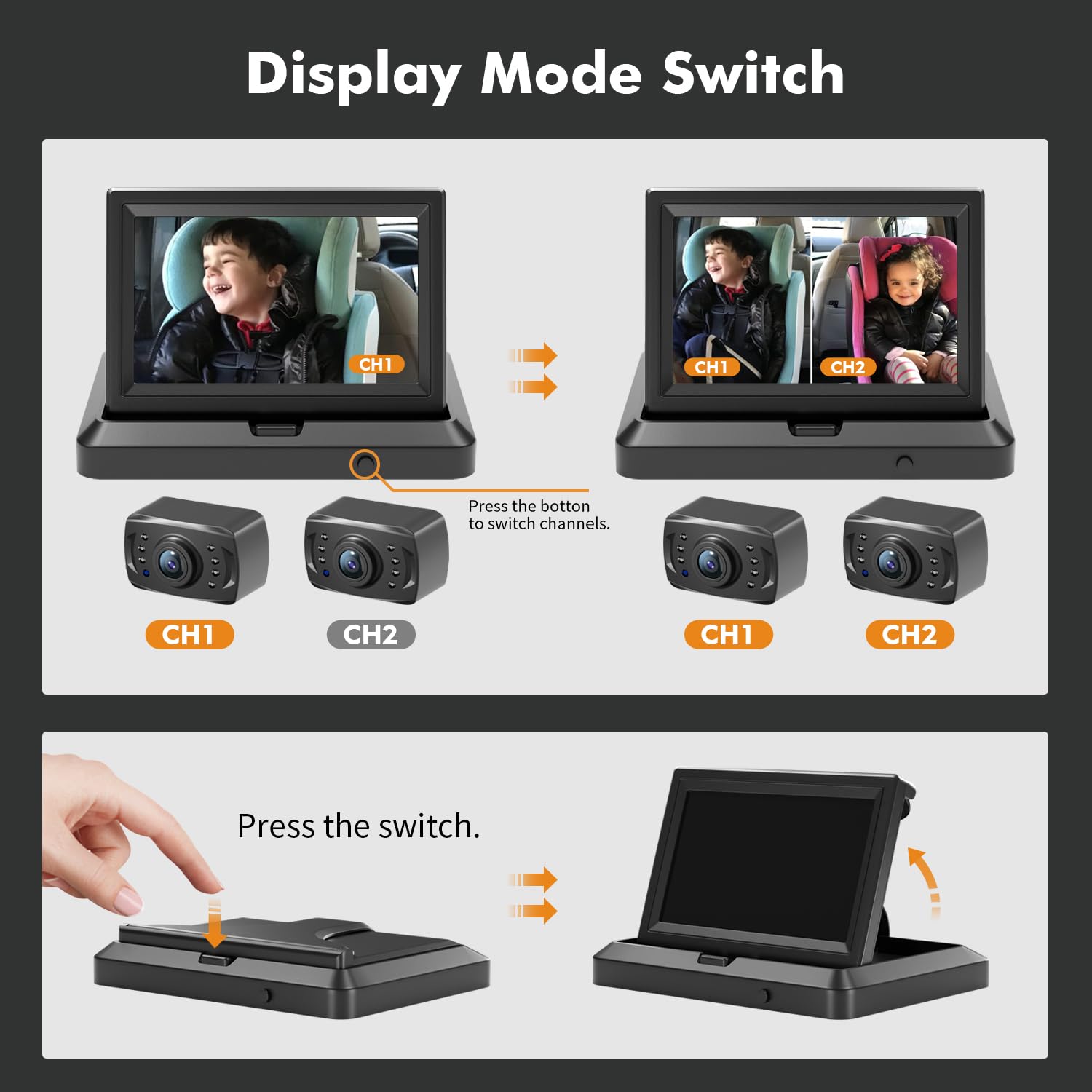
Diagram illustrating how to switch display modes on the Itomoro Baby Car Camera monitor. It shows pressing a button to toggle between single camera view (CH1 or CH2) and dual-channel view (CH1 and CH2).

Easily switch between single and dual-channel display modes by pressing the button on the monitor.

6. Maintenance and Care

7. Troubleshooting

ProblemPossible CauseSolution
No image on screenPower cable disconnected; Camera cable disconnected; Faulty power outlet.Check all cable connections; Ensure cigarette lighter is providing power; Try a different power outlet.
Image is blurry or unclearCamera lens dirty; Camera not focused correctly; Low light conditions (if night vision not active).Clean camera lens; Adjust camera angle; Ensure night vision is functioning in low light.
Monitor turns off unexpectedlyLoose power connection; Vehicle power fluctuation.Securely re-plug the power adapter; Test in another vehicle if possible.
Night vision not workingInsufficient darkness for auto-activation; Camera malfunction.Ensure ambient light is low enough; Contact customer support if issue persists.

8. Specifications

Documents - Itomoro – ACZ424

no relevant documents