1. Introduction
Thank you for choosing the pxy Loud Alarm Clock. This analog alarm clock is designed for reliability and ease of use, featuring a classic retro design with a loud alarm suitable for heavy sleepers. It operates on batteries and includes a convenient night light function. This manual provides detailed instructions for setting up, operating, and maintaining your alarm clock.

Image 1.1: The pxy Loud Alarm Clock in black, shown with included AA batteries.
2. Setup
Follow these steps to prepare your pxy Loud Alarm Clock for use.
2.1 Battery Installation
- Locate the battery compartment cover on the back of the alarm clock.
- Remove the cover by sliding it downwards or lifting it off.
- Insert one (1) AA battery into the compartment, ensuring the positive (+) and negative (-) terminals align correctly with the indicators inside. Two AA batteries are provided with the clock.
- Replace the battery compartment cover securely.
2.2 Setting the Current Time
- Turn the 'Set Clock Time' knob, located on the back of the clock, in either direction until the hour and minute hands display the correct current time.
- For accuracy, it is recommended to set the time slightly ahead and then turn it back to the exact time.
2.3 Setting the Alarm Time
- Turn the 'Set Alarm Time' knob, also on the back of the clock, until the alarm hand points to your desired wake-up time.
- Note that the alarm hand moves independently of the main time hands.

Image 2.1: Rear view of the alarm clock, highlighting the battery compartment, alarm switch, backlight button, and time/alarm setting knobs.
3. Operating Instructions
3.1 Activating and Deactivating the Alarm
- To activate the alarm, slide the 'Alarm Switch' (located on the back of the clock) to the 'ON' position.
- To deactivate the alarm, slide the 'Alarm Switch' to the 'OFF' position. The alarm will sound at the set time if the switch is in the 'ON' position.

Image 3.1: The pxy alarm clock actively ringing, indicated by sound wave graphics.
3.2 Using the Night Light Function
- To illuminate the clock face in the dark, press and hold the 'Backlight Button' located on the back of the clock.
- Release the button to turn off the backlight. This feature allows you to check the time at night without needing external light.

Image 3.2: A side-by-side comparison showing the alarm clock face under normal lighting and with its night light function activated.
4. Maintenance
Proper care will ensure the longevity and accurate performance of your alarm clock.
- Cleaning: Wipe the clock with a soft, dry cloth. Do not use abrasive cleaners or solvents, as these may damage the finish or internal components.
- Battery Replacement: Replace the AA battery annually, or sooner if the clock hands slow down or the alarm sound weakens. Always dispose of used batteries responsibly.
- Environment: Avoid exposing the clock to extreme temperatures, direct sunlight, high humidity, or strong magnetic fields, which can affect its accuracy and lifespan.
5. Troubleshooting
If you encounter issues with your pxy Loud Alarm Clock, refer to the following common solutions:
| Problem | Possible Cause | Solution |
|---|---|---|
| Clock not keeping accurate time. | Low battery; environmental factors. | Replace the AA battery. Ensure the clock is not exposed to extreme temperatures or strong magnetic fields. |
| Alarm does not sound. | Alarm switch is OFF; alarm time not set correctly; low battery. | Ensure the 'Alarm Switch' is in the 'ON' position. Verify the 'Set Alarm Time' knob is pointing to the desired alarm time. Replace the AA battery. |
| Night light not working. | Low battery; faulty button. | Replace the AA battery. If the issue persists, contact customer support. |
| Alarm is too quiet. | Low battery. | Replace the AA battery. The pxy alarm clock is designed to be loud; a weak alarm often indicates a low battery. |
6. Specifications
Key technical details for your pxy Loud Alarm Clock:
- Brand: pxy
- Model: PT260, PT505
- Color: Black (as per current product variant)
- Display Type: Analog
- Style: Classic
- Product Dimensions: Approximately 4.5"W x 6.1"H
- Power Source: Battery Powered (1 AA battery required, included)
- Room Type: Bedroom
- Shape: Round
- Indoor/Outdoor Usage: Indoor
- Material: Metal
- Frame Material: Metal
- Alarm Clock: Yes
- Operation Mode: Quartz
- Clock Form: Twin Bell
- Item Weight: Approximately 0.64 ounces (18.14 g)
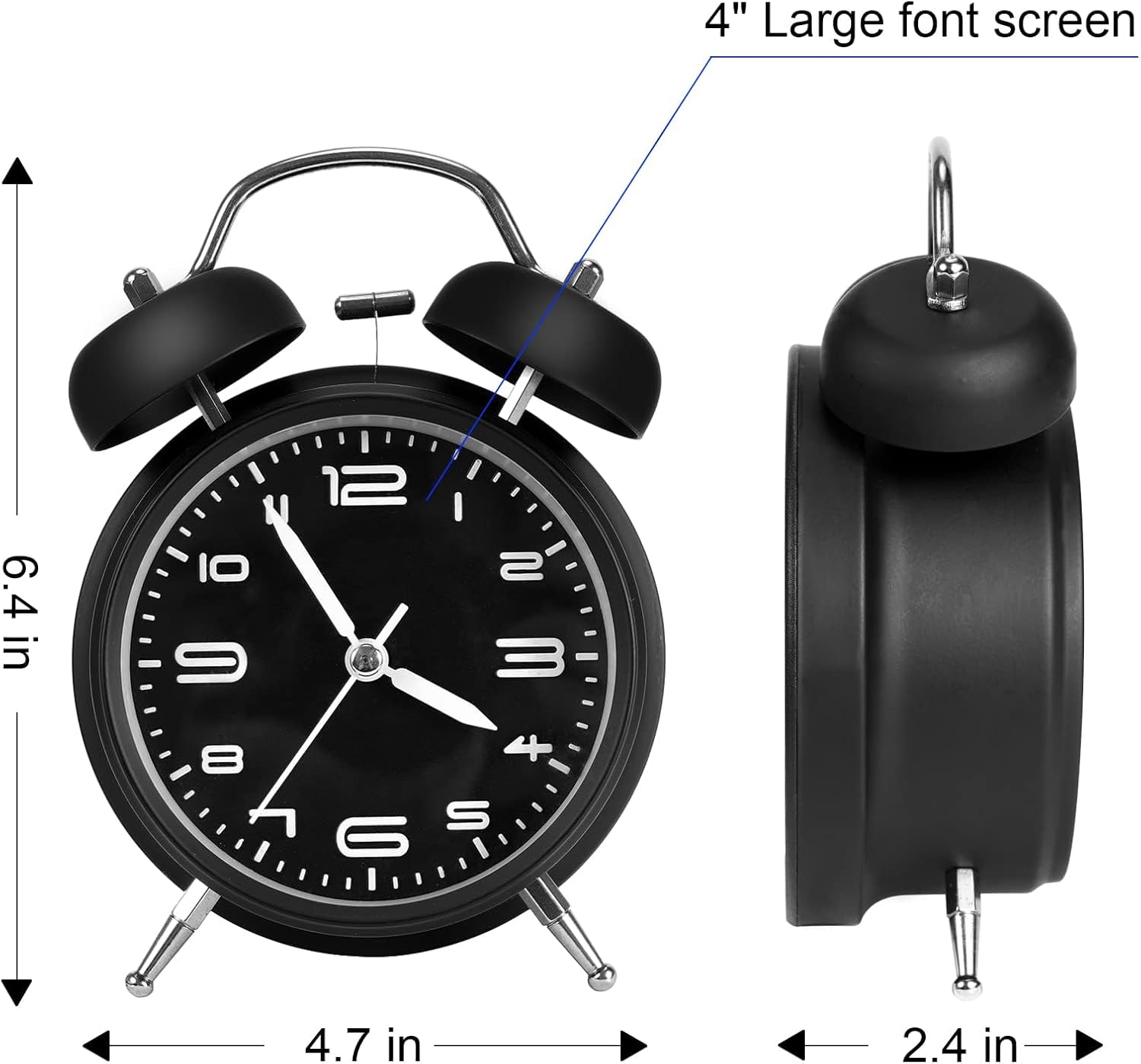
Image 6.1: Detailed dimensions of the pxy alarm clock.
7. Warranty and Support
7.1 Warranty Information
This pxy Loud Alarm Clock comes with a Limited Warranty. For specific details regarding warranty coverage, duration, and terms, please refer to the product packaging or contact pxy customer support directly. Keep your purchase receipt as proof of purchase.
7.2 Customer Support
If you have any questions, require assistance with setup or operation, or need to report a defect, please contact pxy customer support. You can typically find contact information on the product packaging or the official pxy website. When contacting support, please have your product model (PT260 or PT505) and purchase date available.


