

Introduction
The Timex T232B alarm clock radio is designed to provide a customizable sleep experience with a variety of features. This bedside clock includes dual independent alarms, FM radio with presets, a large display with adjustable dimmer, and a USB charging port. A battery backup system ensures time and alarm settings are maintained during power interruptions.

Image: Front view of the Timex T232B Alarm Clock, displaying the time 10:09 in red digital numbers. The clock is black with a sleek, curved design.
Key Features
- Dual Alarms: Set two independent alarms with options to wake to FM radio or buzzer.
- FM Radio: Digital tuning with auto/manual scanning and 10 station presets.
- Large Display: 1.2-inch clock display with adjustable Hi/Lo/OFF dimmer.
- USB Charging Port: Convenient USB-A port for charging smartphones and other devices.
- Sleep Timer: Program the radio to play for 10-90 minutes before automatically turning off.
- Adjustable Volume: Built-in volume switch for both radio and alarm buzzer.
- Battery Backup: Requires 2 AAA batteries (not included) to maintain time and alarm settings during power outages.
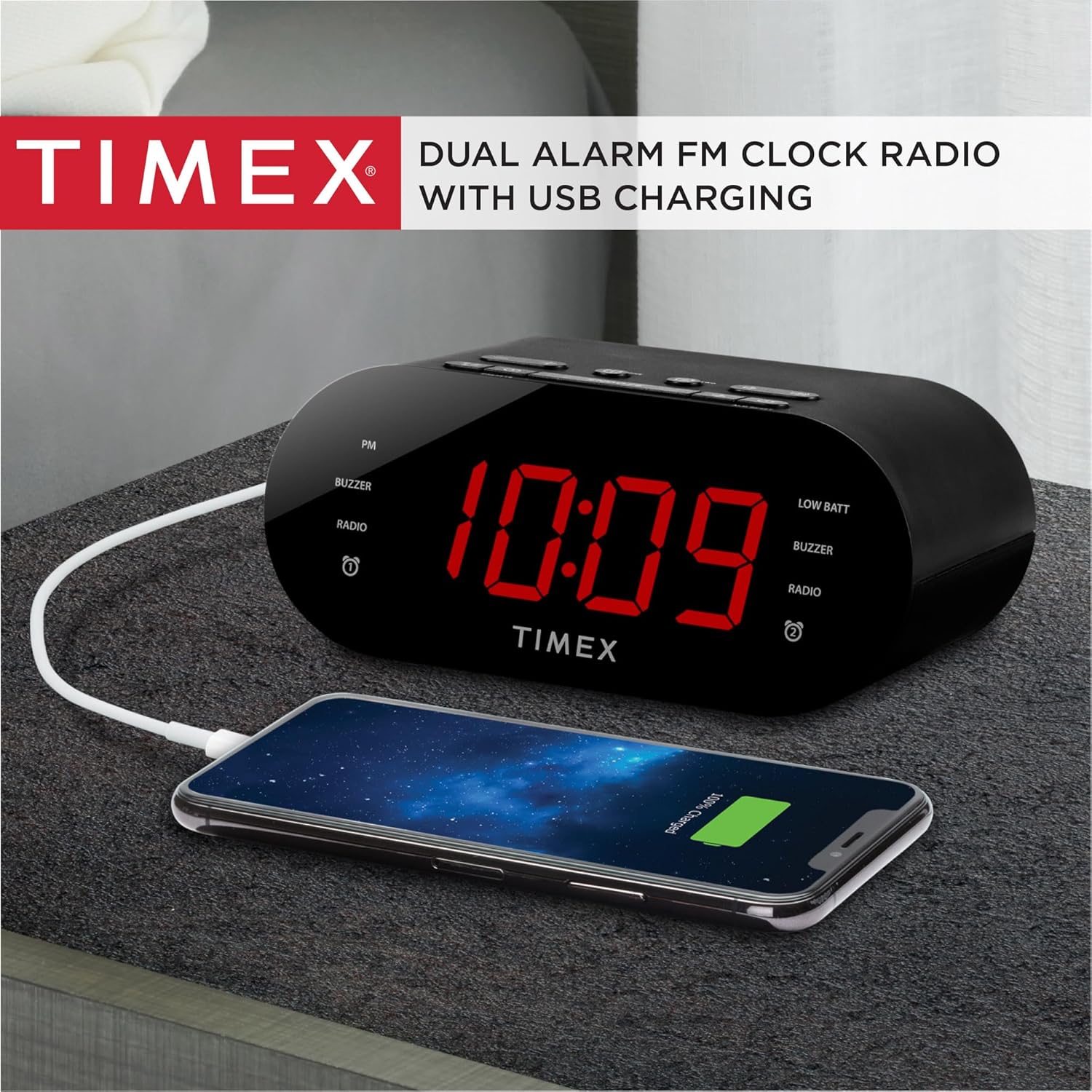
Image: The Timex T232B Alarm Clock shown next to a smartphone connected via a USB cable, illustrating the USB charging feature.
Setup
Power Connection
Connect the supplied AC wall adapter to the DC jack located on the back of the unit. Plug the adapter into a standard working wall outlet. The clock display will illuminate.
Battery Backup Installation
For battery backup, install 2 AAA batteries (not included) into the battery compartment located on the bottom of the unit. Ensure the polarity (+/-) matches the diagram inside the compartment. These batteries will preserve your time and alarm settings in case of a temporary power interruption, but they do not power the main functions of the clock.

Image: A view of the Timex T232B Alarm Clock from the top and back, highlighting the USB charging port and the overall compact design.
Operating Instructions
Setting the Time
- Press and hold the TIME SET button (located on the top panel) until the time display flashes.
- Press the HOUR button to adjust the hour. Observe the PM indicator for correct AM/PM setting.
- Press the MIN button to adjust the minutes.
- Press TIME SET again to confirm and exit time setting mode.
Setting the Alarms (Alarm 1 & Alarm 2)
The unit features two independent alarms. The process is similar for both.
- Press and hold the ALARM ONE or ALARM TWO button until the alarm time display flashes.
- Press the HOUR button to adjust the alarm hour.
- Press the MIN button to adjust the alarm minutes.
- Press the respective ALARM ONE or ALARM TWO button again to select the alarm source (Buzzer or FM Radio). The corresponding indicator will light up.
- Press the respective ALARM ONE or ALARM TWO button one more time to confirm and exit alarm setting mode.
Snooze Function
When the alarm sounds, press the large SNOOZE button to temporarily silence the alarm for approximately 9 minutes. The alarm will sound again after the snooze period.
Turning Off/Resetting Alarm
To turn off the alarm for the day, press the ALM RESET button. The alarm will be reset for the same time the following day.

Image: A hand pressing the "ALM RESET" button on the top of the Timex T232B Alarm Clock, demonstrating how to turn off the alarm.
FM Radio Operation
- Press the MODE button repeatedly until "FM" appears on the display.
- Press the +/- buttons to manually tune to a desired FM station.
- To auto-scan for the next available station, press and hold the +/- buttons.
- To set a preset station:
- Tune to the desired station.
- Press and hold the PRESETS button until the preset number flashes.
- Use the +/- buttons to select the desired preset number (1-10).
- Press PRESETS again to save the station.
- To recall a preset station, short press the PRESETS button repeatedly to cycle through saved stations.

Image: Top-down view of the Timex T232B Alarm Clock, clearly showing all control buttons for time, alarm, snooze, volume, and radio presets. The power adapter is also shown.
Sleep Timer
While listening to the FM radio, press the SLEEP button repeatedly to cycle through sleep timer durations (10, 20, 30, 40, 50, 60, 70, 80, 90 minutes). The radio will automatically turn off after the selected time.
Display Dimmer
Press the DIMMER button to adjust the brightness of the clock display between High, Low, and Off settings.
USB Charging
Connect your smartphone or other USB-powered device to the USB-A charging port on the back of the unit using a compatible USB cable. This port is for charging only and does not support data transfer or audio playback.
Maintenance
Cleaning
Wipe the unit with a soft, dry cloth. Do not use liquid cleaners or abrasive materials.
Battery Replacement
If the "BATT. LOW" indicator appears or if the clock loses time during a power interruption, replace the 2 AAA backup batteries. Ensure proper polarity when installing new batteries.
Troubleshooting
| Problem | Possible Cause / Solution |
|---|---|
| Clock display is blank or not working. | Ensure the AC power adapter is securely plugged into both the unit and a working wall outlet. The unit requires AC power for primary operation. |
| Cannot set time or alarm. | Ensure you are pressing and holding the correct "TIME SET" or "ALARM" button until the display flashes before attempting to adjust. Refer to "Operating Instructions" for detailed steps. |
| Radio presets are lost after unplugging. | The backup batteries (2 AAA, not included) are for maintaining time and alarm settings only, not radio presets. Radio presets are stored in volatile memory and will be lost if the unit is unplugged from AC power without backup batteries installed. |
| USB charging is not working or slow. | Ensure the USB cable is properly connected to both the clock and your device. Verify your device is compatible with standard USB-A charging. This port is for charging only. |
| Alarm is too soft or too loud. | Adjust the built-in volume switch (located on the top panel) to your desired level. The buzzer alarm starts softly and gradually gets louder. |
Specifications
| Feature | Detail |
|---|---|
| Brand | Timex |
| Model Number | T232B |
| Color | Black |
| Display Type | Digital |
| Product Dimensions | 6.3"W x 2.72"H |
| Power Source | AC-DC wall adapter with barrel jack |
| Special Feature | Battery backup for time and alarms (2 AA batteries not included), Charging Port |
| Room Type | Bedroom |
| Material | Plastic |
| Are Batteries Included | No (for backup) |
| Mounting Type | Tabletop |
| Alarm Clock | Yes |
| Manufacturer | SDI Technologies |
| Item Weight | 12 ounces |
Warranty and Support
This Timex T232B Alarm Clock comes with a Limited Warranty. For detailed warranty information and support, please refer to the documentation included with your product or visit the official Timex brand store.
You can explore more Timex alarm clocks and products by visiting the Timex Brand Store.


