
1. Introduction and Compatibility
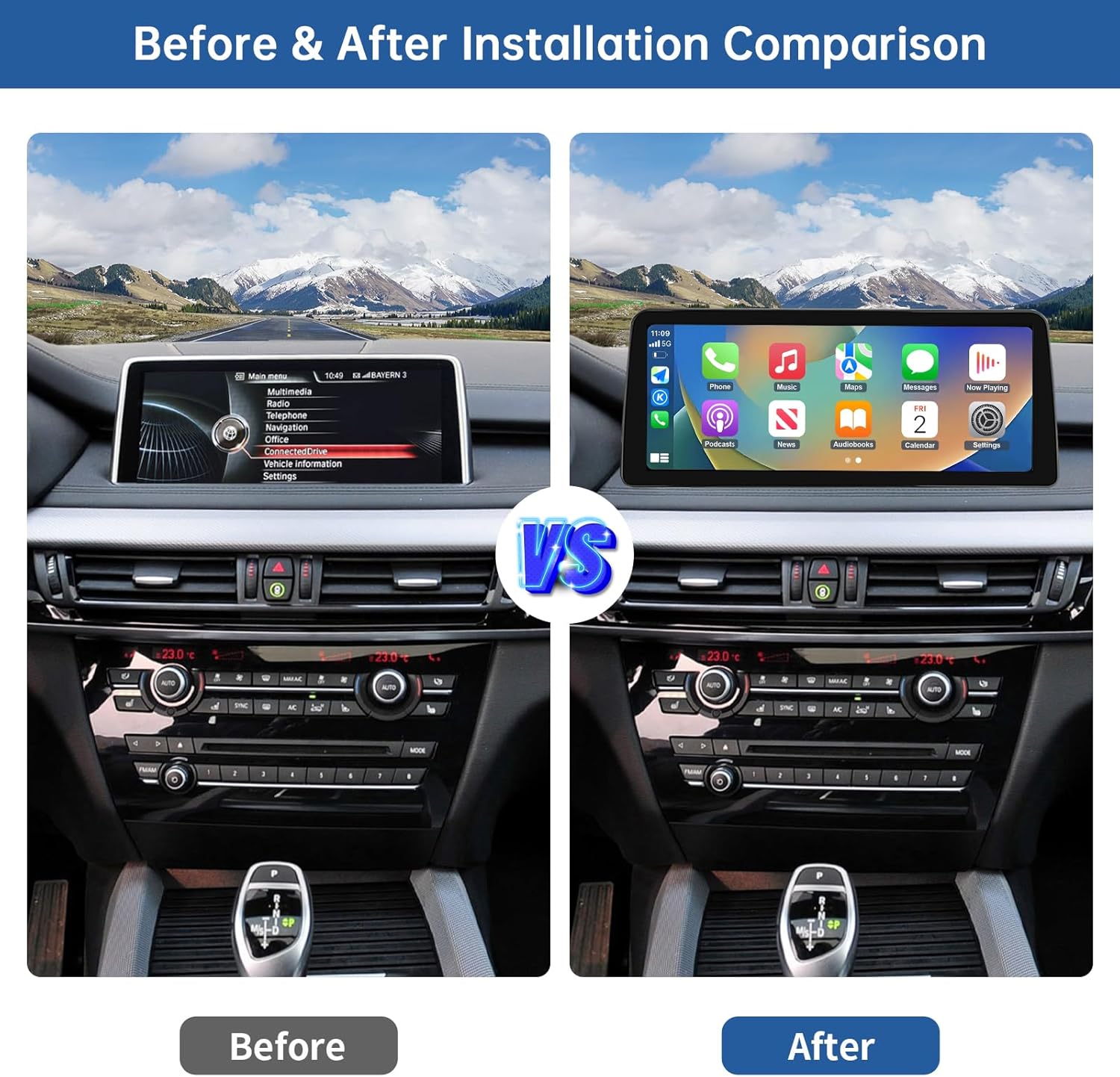
This manual provides detailed instructions for the installation and operation of your Road Top 12.3-inch Ultra-Narrow Touchscreen multimedia system. This system is designed to replace your original car screen, retaining the OEM system while adding advanced features like wireless CarPlay, wireless Android Auto, and wireless Mirrorlink functions. The high-resolution 1920x720 display offers enhanced clarity.
1.1 Vehicle Compatibility
This 12.3-inch Ultra-Narrow Touchscreen is specifically designed for BMW X5 Series F15 and BMW X6 Series F16 models manufactured between 2014 and 2016, equipped with the NBT System. Please verify your vehicle's model, year, and existing infotainment system type to ensure compatibility before installation.

The system is compatible only with vehicles featuring the NBT system. It is not compatible with CIC, EVO ID5, or EVO ID6 systems.
2. Setup and Installation
Installation of this multimedia screen requires accessing the car dashboard to connect the necessary wiring. It is recommended to proceed carefully and methodically. Most issues encountered during installation are typically related to incorrect cable connections or settings.
2.1 Included Components
The package includes the following items:
- Car Screen (12.3 inch)
- Power Cable
- USB Cable
- AUX Cable
- Mounting Bracket

2.2 Pre-Installation Notes
- Before fully reassembling your dashboard, it is crucial to test all functions of the new screen to ensure proper operation.
- Refer to online video tutorials for specific vehicle dashboard removal and wiring guidance for BMW X5/X6 F15/F16 models.
- Ensure all cables are securely connected and routed to avoid damage or interference.
3. Operating Instructions
3.1 Core Functions
The Road Top multimedia system integrates several key functions:
- Wireless CarPlay: Seamless integration with Apple iPhones for navigation, music, calls, and messages.
- Wireless Android Auto: Connects Android smartphones for access to Google Maps, media, and communication apps.
- Wireless Mirrorlink: Displays your iOS or Android phone screen directly on the car's display.
- Bluetooth: For audio streaming and hands-free calling.
- EQ Adjustable: Customize audio settings for optimal sound quality.

3.2 Control Methods
The Linux-based car screen supports multiple control methods:
- Touch Control: Directly interact with the screen for navigation and selection.
- Steering Wheel Controls: Utilize existing steering wheel buttons for functions such as volume, track skipping, voice control, and answering calls.
- Original iDrive Controller: The factory joystick control is retained and functional within the new system.
3.3 Day and Night Mode
The system features automatic light sensitivity, adjusting the display between day and night modes based on your car's original headlight status. This ensures optimal visibility and a comfortable driving experience in varying light conditions.

3.4 Retained Original Factory Functions
The upgraded touchscreen seamlessly integrates with and retains all original factory functions of your BMW, including:
- Original car radio
- Amplifier function
- Factory joystick control
- Original reversing camera
- Parking radar
3.5 Camera Functions
The system supports both factory original reverse cameras and aftermarket reverse cameras. When the vehicle is shifted into reverse, the camera display will activate automatically. The system also supports front view camera DVR (CVBS input). Please note that aftermarket 360-degree camera systems are not supported.

3.6 Switching Between Systems
To switch between the new Linux system interface (CarPlay/Android Auto) and your original BMW OEM car system, simply click the "Original car interface" icon on the new system's home screen. You can return to the Linux system by touching any part of the screen when in the OEM interface.

4. Maintenance
To ensure the longevity and optimal performance of your Road Top touchscreen, follow these maintenance guidelines:
- Cleaning: Use a soft, lint-free cloth to gently wipe the screen. For stubborn smudges, slightly dampen the cloth with water or a screen-safe cleaner. Avoid harsh chemicals, abrasive materials, or excessive moisture.
- Temperature: Avoid exposing the unit to extreme temperatures, both hot and cold, for extended periods.
- Physical Protection: Protect the screen from direct impact or sharp objects to prevent scratches or damage.
- Software Updates: Periodically check with Road Top support for any available software updates to improve performance and add features.
5. Troubleshooting
If you encounter issues with your Road Top multimedia system, please refer to the following common solutions before contacting support:
5.1 Common Issues and Solutions
- No Power/Screen Blank:
- Check all power cable connections to ensure they are securely seated.
- Verify that the vehicle's ignition is on. - No Sound/Poor Audio Quality:
- Ensure the AUX cable is correctly connected and selected as the audio source in your original BMW system.
- Check Bluetooth connection for wireless audio.
- Adjust EQ settings if audio quality is poor. - CarPlay/Android Auto Not Connecting:
- Ensure Wi-Fi and Bluetooth are enabled on your smartphone.
- Forget the device from your phone's Bluetooth settings and re-pair.
- Restart both your phone and the car's system.
- Check USB connections if attempting wired CarPlay/Android Auto. - Original BMW Functions Not Working:
- Verify all original wiring harnesses are correctly reconnected.
- Ensure the system is properly switched to the OEM interface. - Reverse Camera Not Displaying:
- Check the camera input connections.
- Ensure the vehicle is in reverse gear.
- For aftermarket cameras, verify the camera's power supply and signal connection. - Front Camera Not Activating with Parking Sensors:
- Some systems may require specific settings adjustments for front camera detection. Consult the support section or contact Road Top Direct for guidance on specific settings.
Many problems can be resolved by carefully checking all cable connections and system settings. If issues persist, please contact customer support for further assistance.
6. Specifications
| Feature | Specification |
|---|---|
| Brand | Road Top |
| Model Name | RM |
| Display Size | 12.3 Inches |
| Resolution | 1920 x 720 HD |
| Operating System | Linux |
| Connectivity Technology | Bluetooth |
| Special Features | Wireless Apple CarPlay, Wireless Android Auto, Wireless Mirrorlink, EQ Adjustable, Day/Night Mode |
| Control Method | Touchscreen, Steering Wheel Control, iDrive Controller |
| Item Weight | 4.58 pounds |
| Package Dimensions | 15.43 x 7.2 x 6.81 inches |
| Included Components | Car screen, Power cable, USB cable, AUX cable |
7. Warranty and Support
7.1 Product Warranty
This Road Top product comes with a 1-year warranty from the date of purchase, covering manufacturing defects. Please retain your proof of purchase for warranty claims.
7.2 Customer Support
For any installation assistance, troubleshooting, or warranty inquiries, please contact Road Top Direct. They are equipped to provide professional support and guidance.
To contact support:
- Locate the product on the Amazon platform.
- Click on the seller's name, typically listed as "Road Top Direct" near the product details.
- On the seller's page, look for an option such as "Ask a question" to send a message directly to their support team.

Note: No official product videos from the seller were available in the provided data for embedding in this manual.