1. Product Overview
The Eureka NES520BL Flash Corded Stick Vacuum Cleaner is a versatile 2-in-1 cleaning solution designed for efficient cleaning of various floor types, including carpet, tile, and hard floors. Its lightweight design and powerful suction make it ideal for everyday use and tackling pet hair. This manual provides essential information for the safe and effective operation and maintenance of your vacuum cleaner.
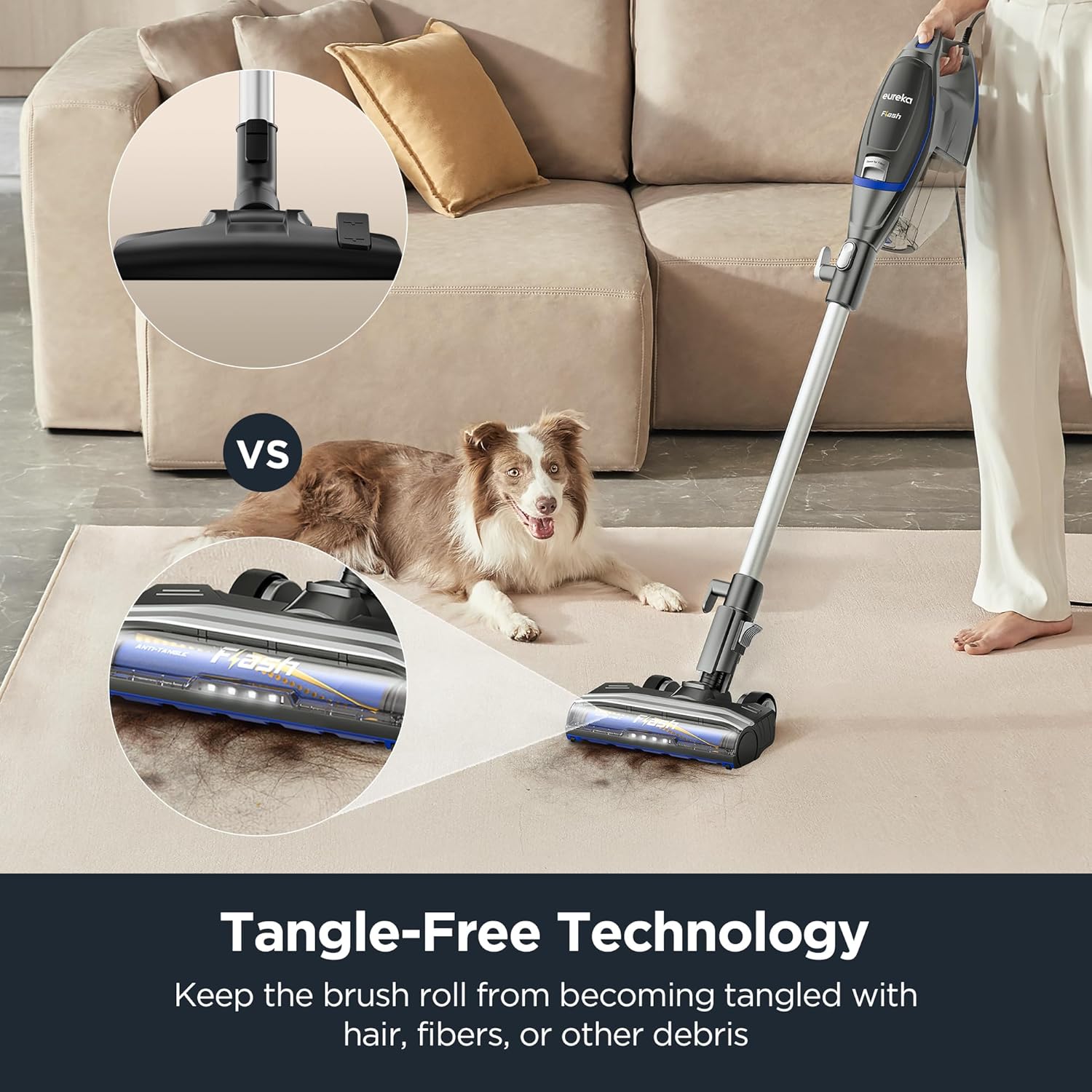
Figure 1: Eureka NES520BL Flash Corded Stick Vacuum Cleaner
2. Important Safety Instructions
Before using this appliance, read all instructions and cautionary markings in this manual and on the product. Failure to follow the warnings and instructions may result in electric shock, fire, and/or serious injury.
- Always unplug the vacuum cleaner from the electrical outlet before cleaning or servicing.
- Do not use outdoors or on wet surfaces.
- Do not allow to be used as a toy. Close attention is necessary when used by or near children.
- Use only as described in this manual. Use only manufacturer’s recommended attachments.
- Do not use with damaged cord or plug. If appliance is not working as it should, has been dropped, damaged, left outdoors, or dropped into water, return it to a service center.
- Do not pull or carry by cord, use cord as a handle, close a door on cord, or pull cord around sharp edges or corners. Do not run appliance over cord. Keep cord away from heated surfaces.
- Do not unplug by pulling on cord. To unplug, grasp the plug, not the cord.
- Do not handle plug or vacuum cleaner with wet hands.
- Do not put any object into openings. Do not use with any opening blocked; keep free of dust, lint, hair, and anything that may reduce airflow.
- Keep hair, loose clothing, fingers, and all parts of body away from openings and moving parts.
- Do not pick up anything that is burning or smoking, such as cigarettes, matches, or hot ashes.
- Do not use to pick up flammable or combustible liquids, such as gasoline, or use in areas where they may be present.
- Do not use without dust cup and/or filters in place.
- Turn off all controls before unplugging.
- Use extra care when cleaning on stairs.
- Store your vacuum cleaner indoors in a cool, dry area.
3. Product Components
The Eureka NES520BL Flash Corded Stick Vacuum Cleaner comes with several components designed for versatile cleaning. Familiarize yourself with each part:
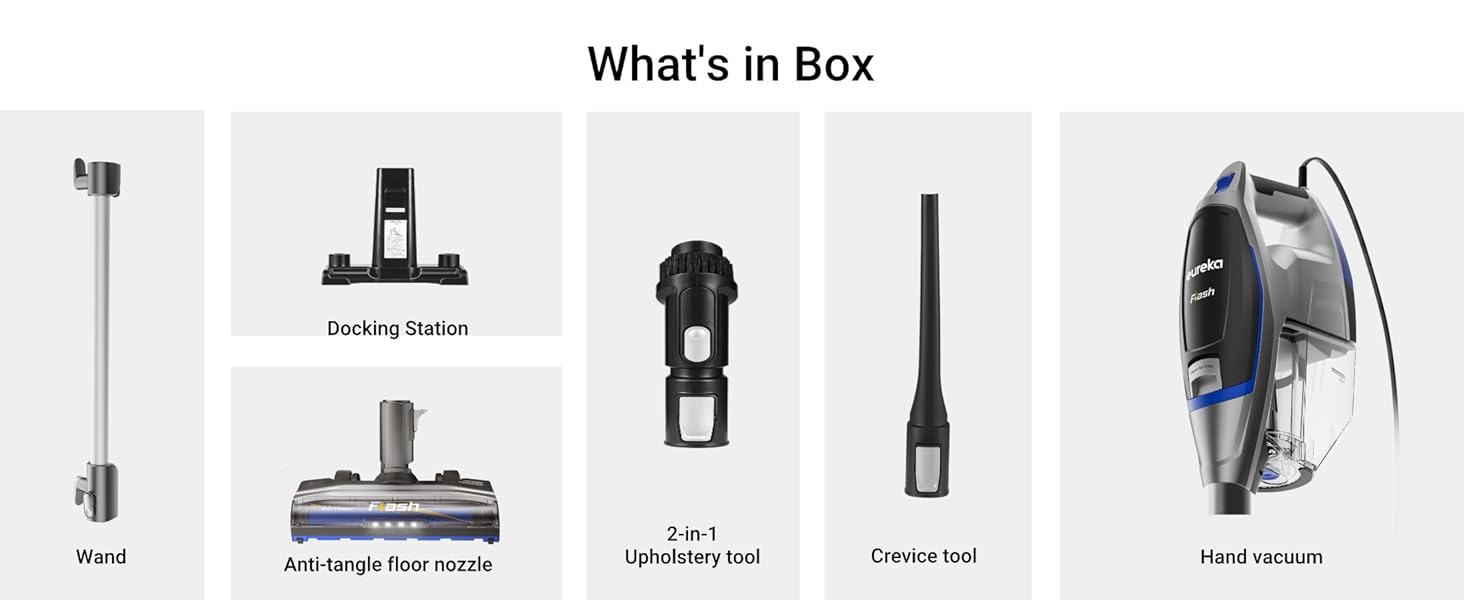
Figure 2: Components included in the box
- Main Unit (Hand Vacuum): Contains the motor, dust cup, and filters.
- Wand: Extends the reach of the vacuum for floor cleaning and high-up areas.
- Anti-tangle Floor Nozzle: Features a brush roll with LED headlights for effective cleaning on various surfaces and preventing hair tangles.
- Docking Station: Provides a convenient storage solution for the vacuum and its accessories.
- Crevice Tool: Ideal for cleaning tight spaces, corners, and edges.
- 2-in-1 Upholstery Tool: Designed for cleaning upholstery, curtains, and other delicate surfaces.
4. Setup and Assembly
Follow these steps to assemble your Eureka NES520BL Flash Corded Stick Vacuum Cleaner:
- Attach the Wand: Insert the wand into the main unit (hand vacuum) until it clicks securely into place.
- Attach the Floor Nozzle: Connect the anti-tangle floor nozzle to the bottom of the wand, ensuring it locks firmly.
- Install Dust Cup: Ensure the dust cup is properly attached to the main unit.
- Store Accessories: Place the crevice tool and 2-in-1 upholstery tool onto the designated slots on the docking station for easy access.
Your vacuum is now assembled and ready for use. Ensure the power cord is untangled before plugging it into an electrical outlet.
5. Operating Instructions
5.1 Powering On/Off and Speed Settings
Plug the power cord into a suitable electrical outlet. The vacuum features a power button and speed settings on the main unit:
- Press the power button to turn the vacuum on or off.
- Select the desired suction power: a lower setting for delicate surfaces or light debris, and a higher setting for deep cleaning or stubborn dirt.
5.2 Using as a Stick Vacuum
For floor cleaning, use the vacuum in its assembled stick configuration. The anti-tangle floor nozzle is designed for effective cleaning on various surfaces:
- The swivel steering allows for easy maneuverability around furniture and obstacles.
- LED headlights illuminate the cleaning path, making dust and debris visible even in dimly lit areas.
- The anti-tangle brush roll is designed to prevent hair and fibers from wrapping around it, maintaining optimal performance.
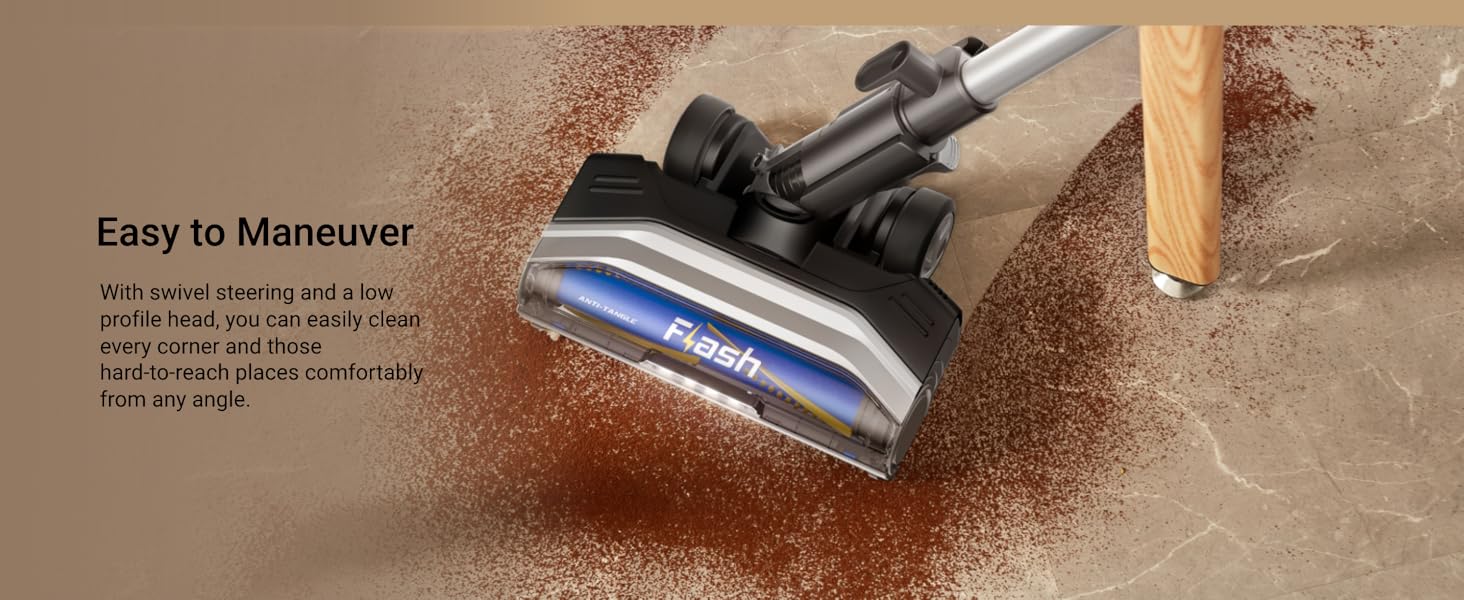
Figure 3: Easy maneuverability with swivel steering
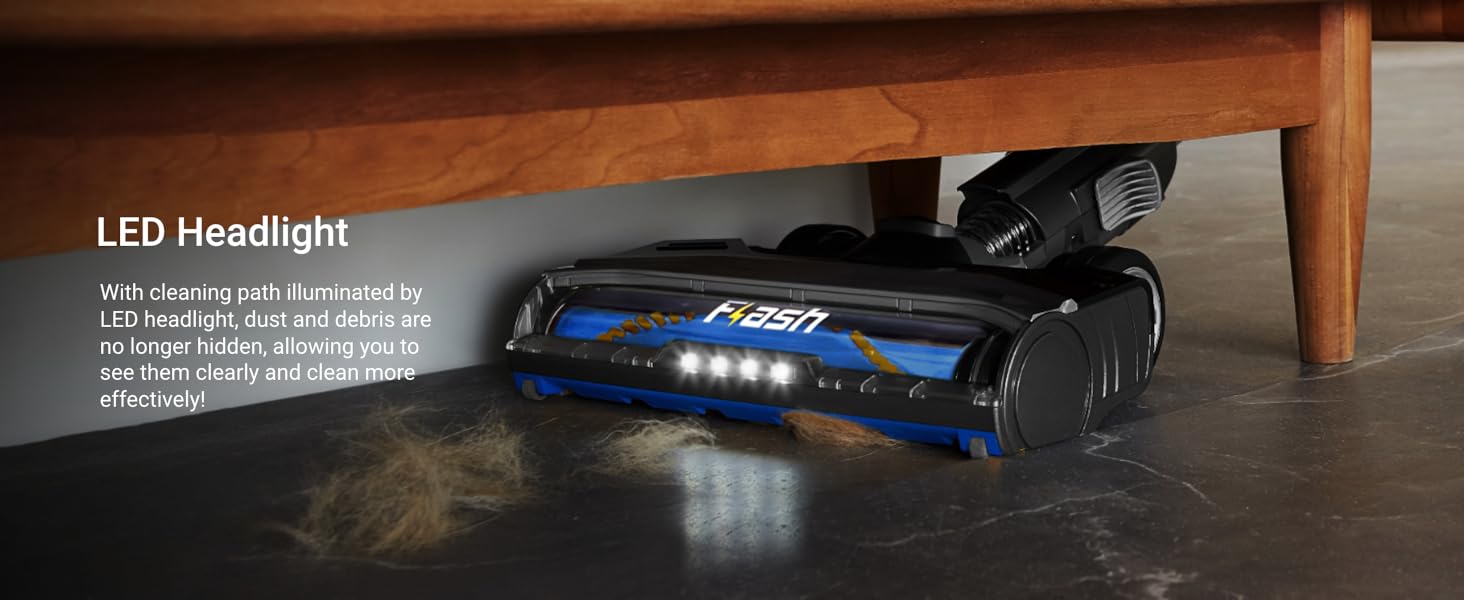
Figure 4: LED headlights for improved visibility
5.3 Converting to Handheld Vacuum
To convert the stick vacuum into a handheld unit:
- Press the release button located at the base of the main unit to detach it from the wand.
- Attach the desired accessory (crevice tool or 2-in-1 upholstery tool) directly to the handheld unit.
This mode is perfect for cleaning stairs, upholstery, car interiors, and other hard-to-reach areas.
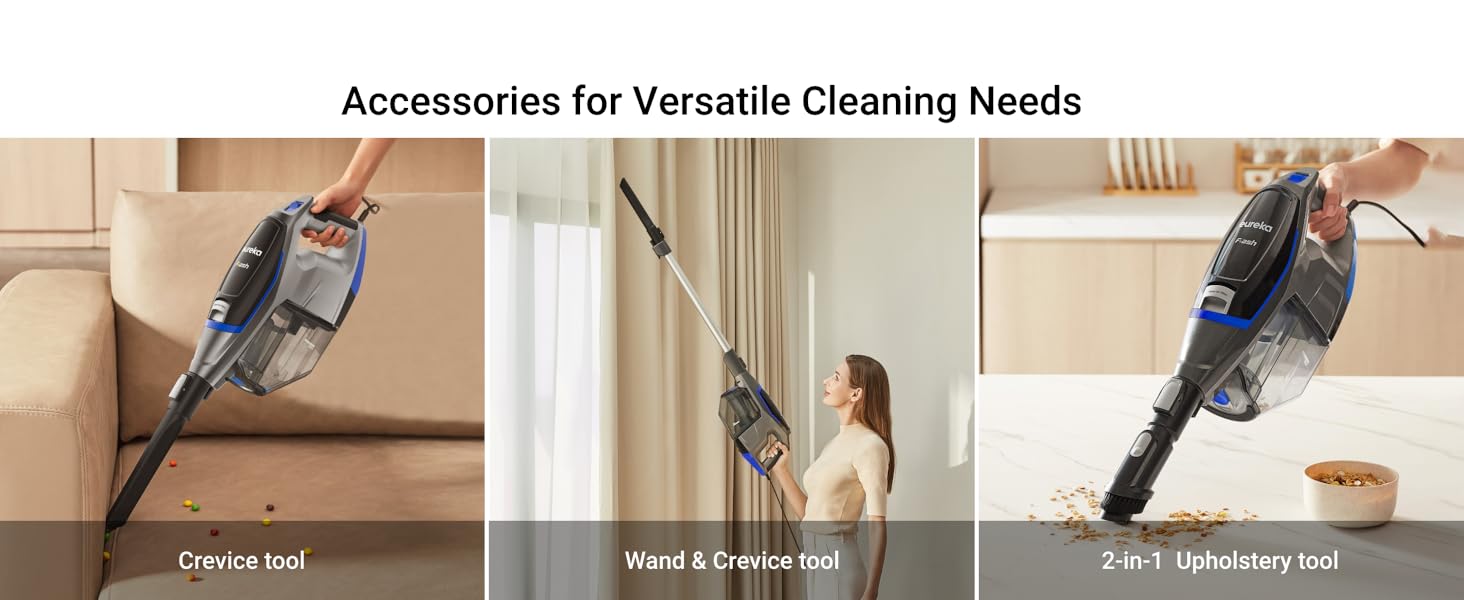
Figure 5: Versatile cleaning with included accessories
5.4 Cord Management
The vacuum features a long power cord for extended reach. Ensure the cord is fully extended and free of tangles before use. Wrap the cord neatly around the cord hooks on the vacuum for storage.
5.5 Product Videos
Eureka Corded Stick Vacuum Cleaner for Home Pet Hair
Video 1: Demonstrates the features and usage of the Eureka Corded Stick Vacuum Cleaner, highlighting its effectiveness on pet hair and its 2-in-1 functionality.
Lightweight But Powerful...Perfect For Quick Cleanups
Video 2: Showcases the lightweight design and powerful suction of the vacuum, ideal for quick and efficient cleanups around the home.
This vacuum deserves a review
Video 3: A detailed review demonstrating the vacuum's performance and features in a home setting.
6. Maintenance
Regular maintenance ensures optimal performance and extends the life of your vacuum cleaner.
6.1 Emptying the Dust Cup
The Eureka NES520BL is a bagless vacuum, making dust cup emptying simple:
- Ensure the vacuum is unplugged.
- Locate the dust cup release button on the main unit and press it to detach the dust cup.
- Hold the dust cup over a trash bin and open the bottom flap to empty debris.
- Close the flap and reattach the dust cup to the main unit until it clicks.
6.2 Cleaning the Filters
The vacuum uses a foam filter that is washable:
- Unplug the vacuum.
- Remove the dust cup. The foam filter is located inside.
- Remove the foam filter and tap off loose dirt.
- Rinse the filter under cool, running water until the water runs clear.
- Allow the filter to air dry completely for at least 24 hours before reinserting it into the dust cup. Do not use the vacuum with a wet filter.
6.3 Cleaning the Brush Roll
Although designed with anti-tangle technology, periodic inspection and cleaning of the brush roll is recommended:
- Unplug the vacuum and turn the floor nozzle upside down.
- Use scissors to carefully cut away any hair, string, or debris wrapped around the brush roll.
- Ensure the brush roll spins freely after cleaning.

Figure 6: Dust cup emptying, filter cleaning, and storage
7. Troubleshooting
If your vacuum cleaner is not performing as expected, refer to the following common issues and solutions:
| Problem | Possible Cause | Solution |
|---|---|---|
| Vacuum will not turn on | Power cord not firmly plugged in. | Check power cord. Ensure it is securely plugged into an electrical outlet. |
| Loss of suction | Dust cup is full. Filter is dirty. Hose or nozzle is clogged. | Empty dust cup. Clean or replace filter. Check hose and nozzle for blockages. |
| Brush roll not spinning | Debris wrapped around brush roll. Floor nozzle is clogged. | Unplug vacuum and remove debris from brush roll. Check for blockages in the floor nozzle. |
8. Specifications
- Brand: Eureka
- Model Number: NES520BL
- Power Source: Corded Electric
- Special Feature: Bagless, Lightweight, Portable, Spotless Cleaning, Washable Filter
- Filter Type: Foam
- Surface Recommendation: Hard Floor, Carpet, Tile
- Product Dimensions: 14.3 x 5.1 x 30.7 inches
- Item Weight: 7.4 Pounds
- UPC: 840296510063
- ASIN: B0D268C4YY
9. Warranty and Support
This Eureka product is covered by a manufacturer's warranty. For detailed warranty information, including terms and conditions, please refer to the warranty card included with your product or visit the official Eureka website. For technical support, replacement parts, or service inquiries, please contact Eureka customer service.