
E-LekTech 36V 100Ah
E-LekTech 36V 100Ah LiFePO4 Lithium Battery User Manual
Model: 36V 100Ah
1. Introduction
Thank you for choosing the E-LekTech 36V 100Ah LiFePO4 Lithium Battery. This manual provides essential information for the safe and efficient operation, installation, and maintenance of your battery. This battery is designed for various applications including golf carts, off-grid systems, RVs, solar power setups, and home backup solutions, offering a long cycle life and stable performance.
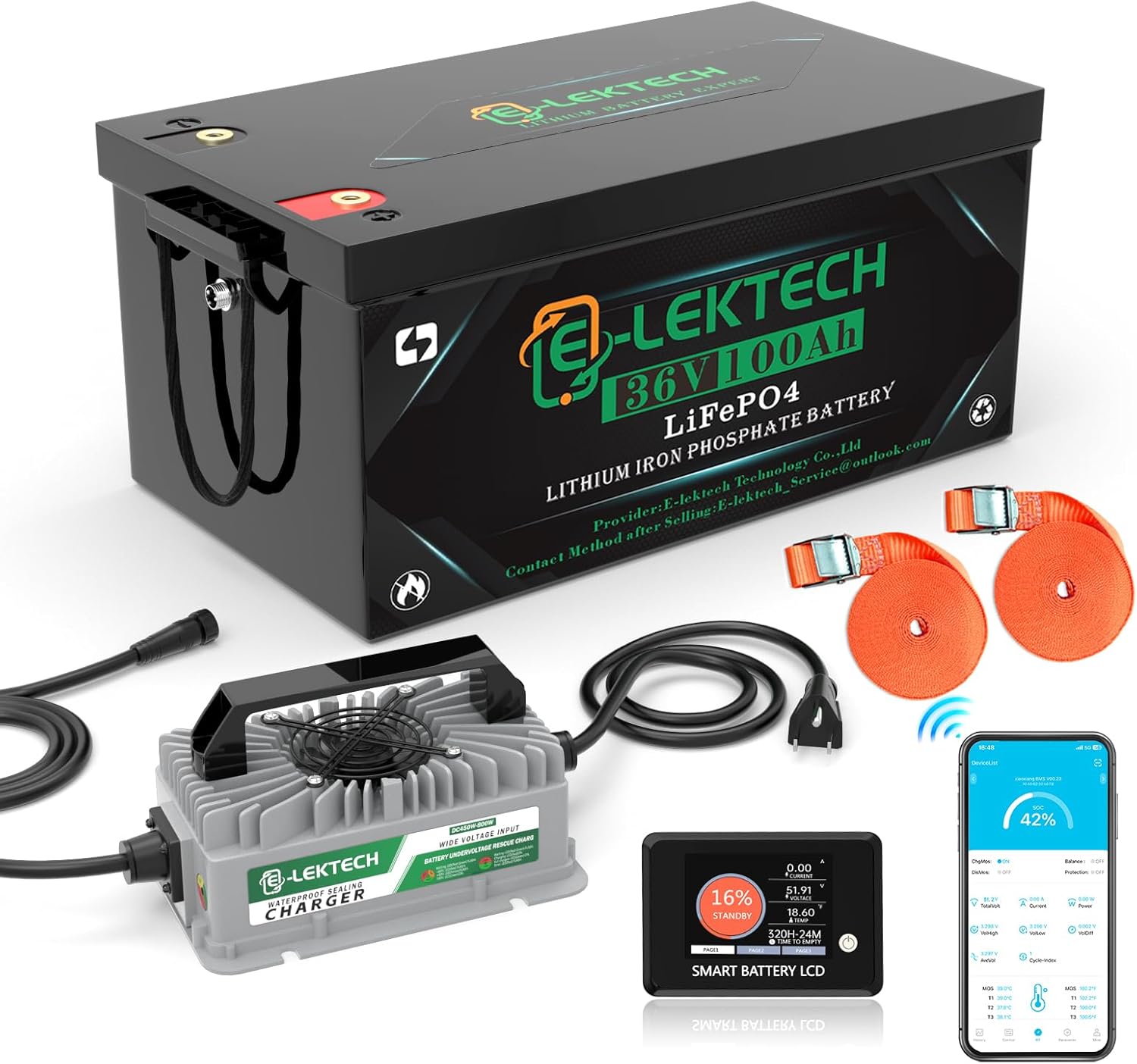
Image 1: E-LekTech 36V 100Ah LiFePO4 Lithium Battery and included accessories.
2. Safety Information
Please read and understand all safety instructions before installing or operating the battery. Failure to follow these instructions may result in electric shock, fire, serious injury, or death.
- Do not short-circuit the battery terminals.
- Do not expose the battery to fire or extreme heat.
- Do not immerse the battery in water.
- Use only the specified charger for this battery.
- Ensure proper ventilation during charging and operation.
- Keep out of reach of children.
- Wear appropriate personal protective equipment (PPE) such as gloves and eye protection during installation.
3. Package Contents
Verify that all items are present in your package:
- 1 x E-LekTech 36V 100Ah LiFePO4 Battery
- 1 x 43.8V LiFePO4 Battery Charger
- 1 x LCD Touchscreen Display
- 2 x Binding Straps for Battery Securing
- User Manual (this document)
4. Product Overview
The E-LekTech 36V 100Ah LiFePO4 battery features advanced technology for reliable power delivery. It includes a built-in 200A Battery Management System (BMS) for comprehensive protection and Grade A cells for extended lifespan.
4.1. Key Features
- Advanced BMS: Integrated 200A BMS provides protection against overcharge, over-discharge, overcurrent, and over-temperature.
- Long Cycle Life: Offers over 8000 deep cycles, ensuring a lifespan of up to 10 years.
- High Energy Density: 3840Wh energy capacity in a lightweight design (58.4 pounds).
- Wide Operating Temperature: Charges at 32°F~131°F (0~55℃); Discharges at -22°F~131°F (-30~55℃).
- Smart Monitoring: Equipped with an LCD touchscreen and APP for real-time battery status monitoring and control.
4.2. Internal Structure and Protection
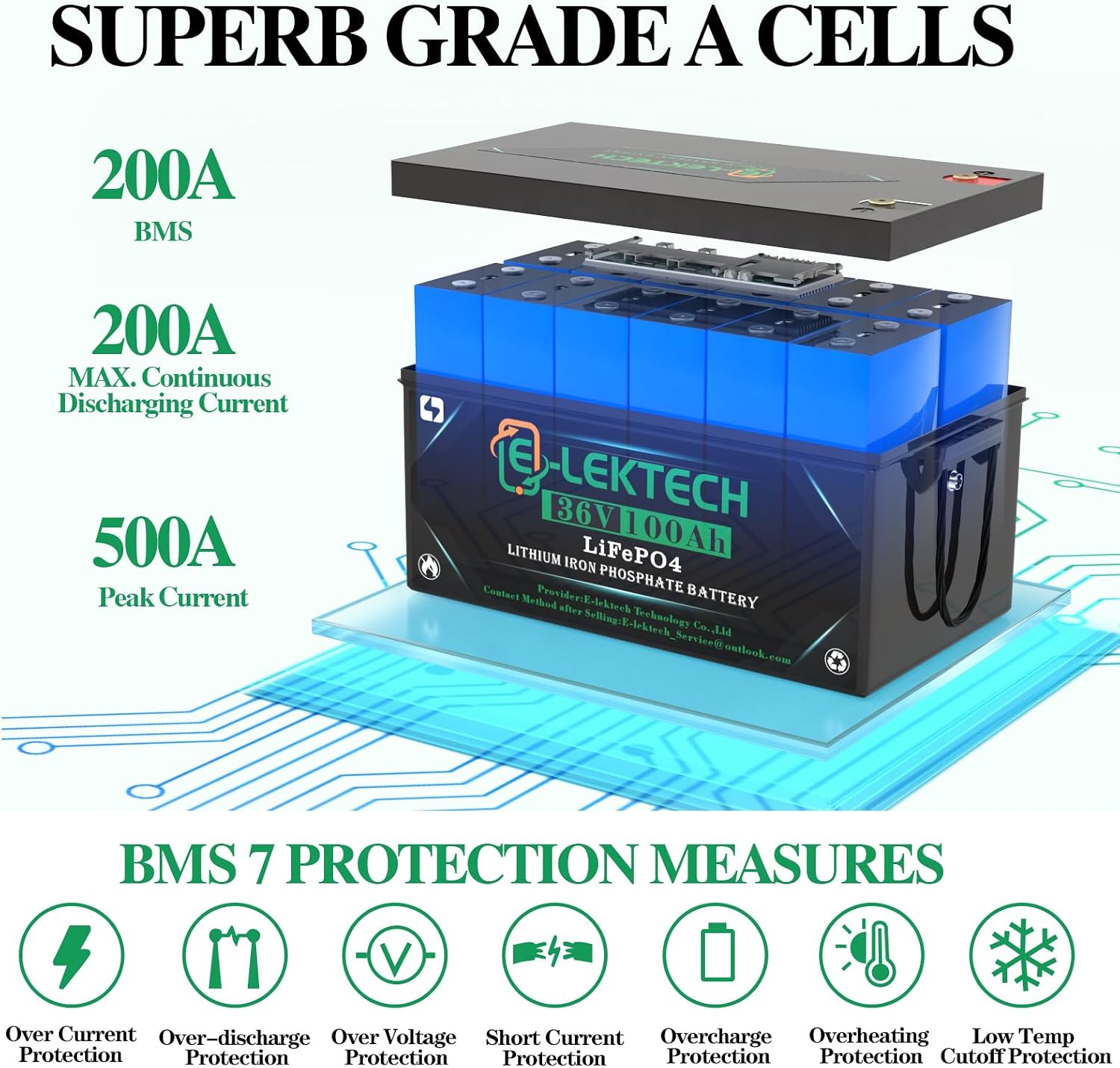
Image 2: Internal structure highlighting Grade A cells and BMS protection features.
The battery utilizes superb Grade A cells and a robust BMS to ensure safety and longevity. The BMS offers multiple protection measures including over current, over-discharge, over voltage, short circuit, overcharge, overheating, and low temperature cutoff protection.
5. Specifications
Detailed technical specifications for the E-LekTech 36V 100Ah LiFePO4 Lithium Battery:
| Feature | Specification |
|---|---|
| Model | 36V 100Ah |
| Battery Type | LiFePO4 (Lithium Iron Phosphate) |
| Nominal Voltage | 36V |
| Capacity | 100Ah |
| Energy | 3840Wh |
| BMS | 200A |
| Max Continuous Discharging Current | 200A |
| Peak Current | 500A |
| Cycle Life | 8000+ cycles |
| Operating Temperature (Charge) | 32°F~131°F (0~55℃) |
| Operating Temperature (Discharge) | -22°F~131°F (-30~55℃) |
| Dimensions (L*W*H) | 19.52 x 10.6 x 8.8 inches |
| Weight | 58.4 pounds |
| Terminal Type | M8 |

Image 3: Battery dimensions and M8 terminal details.
6. Setup and Installation
Proper installation is crucial for optimal performance and safety. This battery is designed for easy integration into various systems, including golf carts.
6.1. Pre-Installation Checks
- Ensure the battery is fully charged before first use.
- Verify that your system's voltage and current requirements match the battery's specifications.
- Inspect the battery for any physical damage.
6.2. Installation Steps (General)
- Disconnect Power: Before beginning installation, ensure all power sources to your system are disconnected.
- Position the Battery: Place the battery in a secure, well-ventilated location. For golf cart applications, ensure it fits properly in the battery compartment.
- Secure the Battery: Use the provided binding straps or other appropriate securing methods to prevent movement during operation.
- Connect Terminals: Connect the positive (+) terminal of the battery to the positive (+) terminal of your system, and the negative (-) terminal of the battery to the negative (-) terminal of your system. Ensure connections are tight and secure.
- Connect LCD Screen: Install the LCD touchscreen in a convenient location, such as the dashboard of a golf cart, using the included bracket. Connect it to the battery's communication port.
- Reconnect Power: Once all connections are secure, reconnect power to your system.

Image 4: Example installation of the battery in a golf cart, showing LCD screen and securing straps.
6.3. Initial Charging
Use the provided 43.8V LiFePO4 battery charger for initial and subsequent charging. A full charge typically takes approximately 6.7 hours.

Image 5: The battery connected to its dedicated charger.
7. Operating Instructions
The E-LekTech battery offers convenient monitoring and control through its LCD touchscreen and a dedicated mobile application.
7.1. LCD Touchscreen Operation
The LCD touchscreen provides real-time data and control options:
- Real-time Display: View battery voltage, current, temperature, and state of charge (SOC).
- Battery Switch: Turn on/off charge and discharge functions directly from the screen.
- Cell Voltage Monitoring: Monitor individual cell voltages for detailed battery health assessment.

Image 6: LCD touchscreen interface displaying various battery parameters.
7.2. Mobile Application Monitoring
Download the E-LekTech mobile application to monitor and control your battery remotely via Bluetooth. The app provides a comprehensive overview of battery status, historical data, and allows for remote control of certain functions.
For a visual guide on the battery's features and applications, please watch the following videos:
LiFePO4 Lithium Golf Cart Battery Overview
Video 1: This video provides an overview of the E-LekTech LiFePO4 Lithium Golf Cart Battery, demonstrating its features and suitability for golf cart applications.
Small-volume Lifepo4 Lithium Battery for Your Trip!
Video 2: This video showcases the compact size and portability of the E-LekTech LiFePO4 Lithium Battery, highlighting its use for travel and various outdoor activities.
8. Maintenance
To ensure the longevity and optimal performance of your E-LekTech LiFePO4 battery, follow these maintenance guidelines:
- Regular Inspection: Periodically check the battery for any signs of damage, corrosion on terminals, or loose connections.
- Keep Clean: Keep the battery terminals and casing clean and free from dirt and debris. Use a dry cloth for cleaning.
- Proper Storage: If storing the battery for an extended period, ensure it is charged to approximately 50-70% of its capacity and stored in a cool, dry place. Avoid extreme temperatures.
- Avoid Deep Discharge: While LiFePO4 batteries tolerate deep discharge, consistent deep cycling can reduce overall lifespan. Monitor the state of charge.
- Use Correct Charger: Always use the dedicated LiFePO4 charger provided or one specifically designed for LiFePO4 batteries with appropriate voltage and current settings.
9. Troubleshooting
This section addresses common issues you might encounter with your E-LekTech LiFePO4 battery. For problems not listed here, please contact customer support.
| Problem | Possible Cause | Solution |
|---|---|---|
| Battery not charging | Loose charger connection, faulty charger, BMS protection activated (over-discharge, low temperature) | Check charger connections. Ensure charger is functioning. Allow battery temperature to rise if too cold. If deeply discharged, a specialized charger might be needed to wake up the BMS. |
| No power output | Battery discharged, loose terminal connections, BMS protection activated (over-discharge, overcurrent) | Check battery charge level. Tighten terminal connections. Reduce load if overcurrent protection is triggered. Recharge the battery. |
| LCD screen not displaying | Loose connection to battery, screen malfunction | Check the connection cable between the LCD and the battery. Ensure the battery is powered on. |
| Battery overheating | Excessive load, poor ventilation, high ambient temperature | Reduce the load on the battery. Ensure adequate airflow around the battery. Move to a cooler environment if possible. |
10. Warranty and Support
E-LekTech stands behind the quality of its products.
10.1. Warranty Information
Your E-LekTech 36V 100Ah LiFePO4 battery comes with a 10-year warranty. This warranty covers defects in materials and workmanship under normal use and service conditions. Please retain your proof of purchase for warranty claims.
10.2. Customer Support
If you encounter any problems during use or have questions regarding your battery, please contact E-LekTech customer support. Our team is committed to assisting you within 24 hours to analyze and resolve issues, restore battery functionality, and provide guidance on optimal usage.
For support, please refer to the contact information provided with your purchase or visit the official E-LekTech website.
Ask a question about this manual
Ask about setup, troubleshooting, compatibility, parts, safety, or missing instructions. Manuals+ will review the question and use this page’s manual context to help answer it.