
1. Introduction
Thank you for choosing the FULODE F-6000 IEM Dual Channel UHF Wireless In-Ear Monitor System. This system is designed to provide high-quality, reliable audio monitoring for stage performances, studio sessions, and church services. Featuring advanced UHF band PLL phase-locking technology, it offers stable transmission, excellent anti-interference capabilities, and a wide operating range. Please read this manual thoroughly to ensure proper setup and optimal performance of your new system.
2. Safety Information
- Do not expose the unit to rain or moisture to prevent fire or electric shock.
- Do not open the casing. There are no user-serviceable parts inside. Refer all servicing to qualified personnel.
- Avoid placing the unit near heat sources or in direct sunlight.
- Ensure proper ventilation around the unit.
- Use only the provided power adapter.
- Keep out of reach of children.
- Prolonged exposure to high volume levels can cause permanent hearing damage. Adjust volume to a comfortable level.
3. Product Overview
The FULODE F-6000 IEM system includes a wireless desktop transmitter and multiple wireless bodypack receivers, along with earphones and necessary cables. The system is designed for ease of use and robust performance.
3.1 Wireless Desktop Transmitter
The transmitter features a durable metal housing and a clear LED display for monitoring frequencies and signal levels. It supports two independent channels.

Image: Front view of the FULODE F-6000 IEM Wireless Desktop Transmitter, highlighting its controls and display.
Front Panel Controls:
- Power Switch: Turns the unit on/off for each channel.
- Headphone Volume Control: Adjusts the monitoring volume for the connected headphones.
- 6.35mm Headphone Output: For direct monitoring from the transmitter.
- Function Setting Buttons: Used to navigate menus and adjust settings.
- LED High Definition Display: Shows frequency, RF, and AF signal levels.
- Set Button with Pressing Function: For selecting and confirming settings.
Rear Panel Connections:
- Antenna Connectors: For attaching the included antennas.
- DC IN (12V-18V): Power input for the transmitter.
- AF IN (R) & AF IN (L): Combo XLR/6.35mm inputs for right and left audio signals.
- AF Level Controls: Adjusts the input audio level for each channel.
3.2 Wireless Bodypack Receiver
The bodypack receiver is compact and designed for portability, featuring a plastic construction with a metal clip for secure attachment. It operates on two AA batteries (not included).

Image: The FULODE F-6000 IEM Wireless Bodypack Receiver with its battery compartment open, showing the two AA battery slots.
Bodypack Features:
- Antenna: For receiving wireless signals.
- LED High Definition Display: Shows current frequency, battery status, and signal indicators.
- Low Battery Indicator: Alerts when batteries are running low.
- RF Indicator Light: Illuminates when receiving a radio frequency signal.
- Power Switch and Volume Control: Integrated knob for turning on/off and adjusting earphone volume.
- Headphone Output: 3.5mm jack for connecting earphones.
- Function Setting Button (SET): For navigating settings and frequency adjustment.
- Exit Button (ESC): To exit menus or cancel selections.
- Battery Compartment: Holds two AA batteries.
3.3 Earphones
The system includes high-quality in-ear earphones designed for comfortable and clear audio monitoring.
4. Setup
Follow these steps to set up your FULODE F-6000 IEM system:
4.1 Connect the Transmitter
- Attach Antennas: Screw the two enhanced antennas into the ANTENNA ports on the rear panel of the desktop transmitter.
- Connect Power: Plug the DC power adapter into the DC IN port on the rear of the transmitter, then plug the adapter into a power outlet.
- Connect Audio Input: Connect your audio source (e.g., mixing console, audio interface) to the AF IN (R) and AF IN (L) combo jacks on the rear panel using XLR or 6.35mm cables. Adjust the AF Level controls as needed.
- Power On: Press the POWER button on the front panel for each channel you intend to use. The LED display will illuminate.
Video: A detailed guide on setting up the FULODE F-6000 IEM system, including connecting antennas, power, and audio inputs.
4.2 Prepare the Bodypack Receiver
- Insert Batteries: Open the battery compartment on the back of the bodypack receiver and insert two AA batteries, ensuring correct polarity. Close the compartment securely.
- Connect Earphones: Plug the included earphones into the 3.5mm Headphone Output jack on the top of the bodypack receiver.
- Power On: Rotate the Power/Volume knob clockwise to turn on the bodypack. The display will light up.
5. Operating
5.1 Frequency Selection and Pairing
The system supports 40 adjustable frequencies (520 MHz-580 MHz) to minimize interference. You can manually adjust frequencies or use the auto-pairing function.
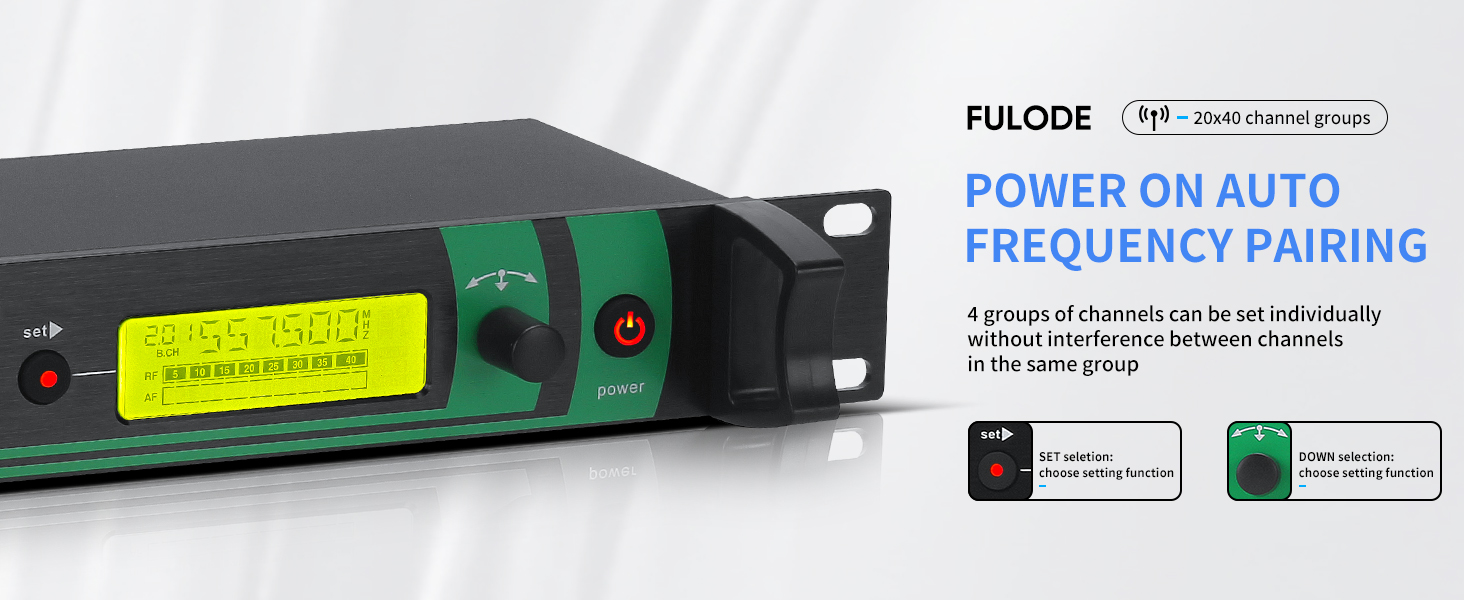
Image: The transmitter's display showing options for automatic frequency pairing and manual adjustment.
- On Transmitter: Press the SET button to enter the frequency selection mode. Use the Up/Down selection buttons to choose a group and then a specific channel. Press SET again to confirm.
- On Bodypack Receiver: With the bodypack powered on, open the battery compartment. Press the SET button inside the compartment to initiate pairing. The bodypack will automatically sync with the transmitter's selected frequency.
5.2 Volume Adjustment
- Transmitter: Use the Headphone Volume Control knob on the front panel to adjust the monitoring volume for the connected headphones.
- Bodypack Receiver: Rotate the Power/Volume knob on the top of the bodypack to adjust the volume of your earphones.
5.3 Wireless Range
The FULODE F-6000 IEM system offers a wireless range of up to 330 feet (100 meters) in optimal conditions. Ensure a clear line of sight between the transmitter and receivers for best performance.

Image: Visual representation of the wireless range, showing effective distances for the FULODE IEM system.
6. Maintenance
- Cleaning: Use a soft, dry cloth to clean the units. Do not use liquid cleaners or aerosols.
- Storage: Store the system in a cool, dry place away from direct sunlight and extreme temperatures. Remove batteries from bodypack receivers if not used for extended periods.
- Battery Care: Replace AA batteries in bodypack receivers when the low battery indicator appears. Consider using rechargeable batteries for frequent use.
7. Troubleshooting
| Problem | Possible Cause | Solution |
|---|---|---|
| No sound from earphones | Low battery in bodypack; incorrect frequency; earphones not connected; transmitter not powered on. | Replace batteries; ensure bodypack and transmitter are on the same frequency; check earphone connection; power on transmitter. |
| Interference/Static | Nearby wireless devices; operating too far from transmitter; frequency conflict. | Change frequency on transmitter and bodypack; reduce distance to transmitter; identify and move away from interfering devices. |
| Bodypack not pairing | Incorrect pairing procedure; transmitter not in pairing mode. | Repeat pairing steps carefully; ensure transmitter is ready for pairing. |
8. Specifications
- Brand: FULODE
- Model Number: F-2000 IEM
- Wireless Technology: UHF RF
- Frequency Range: 520 MHz - 580 MHz
- Adjustable Frequencies: 40 preset frequencies
- Wireless Range: Up to 330 feet (100 meters)
- Transmitter Material: Metal
- Bodypack Material: Plastic with metal clip
- Bodypack Power: 2x AA Batteries (not included)
- Headphone Jack: 6.35 mm (Transmitter), 3.5mm (Bodypack)
- Audio Driver Type: Balanced Armature Driver
- Noise Control: Adaptive Noise Cancellation
- Impedance: 32 Ohms
- Item Weight: 2.11 Kilograms (total system)
- Specific Uses: Stage Performance, Sound Broadcasting, Studio, Church
9. What's in the Box

Image: All components included in the FULODE F-6000 IEM system package.
- Wireless Desktop Transmitter x1
- Wireless Bodypack Receiver x6
- High Sound Quality Earphones x6
- Enhanced Antennas x2
- 6.35mm Audio Cables x4
- High Quality Power Supply x1
- Instruction Manual x1
10. Warranty and Support
This FULODE product comes with a 360-day warranty. For technical support or warranty claims, please contact FULODE Official Shop directly through your purchase platform or visit their official store page.
For additional information and products, visit the FULODE Store.