
XTRONS 14.9" from 2018 NBT EVO System
User Manual
XTRONS 14.9 Inch Android 14 Car Stereo
Model: 14.9" from 2018 NBT EVO System
Introduction
This manual provides comprehensive instructions for the installation, operation, and maintenance of your XTRONS 14.9 Inch Android 14 Car Stereo. Designed for select BMW models, this advanced system offers a 2K IPS touch screen, global 4G connectivity, and seamless smartphone integration, enhancing your in-car entertainment and navigation experience.
Please read this manual thoroughly before using the product to ensure proper installation and optimal performance. Keep this manual for future reference.
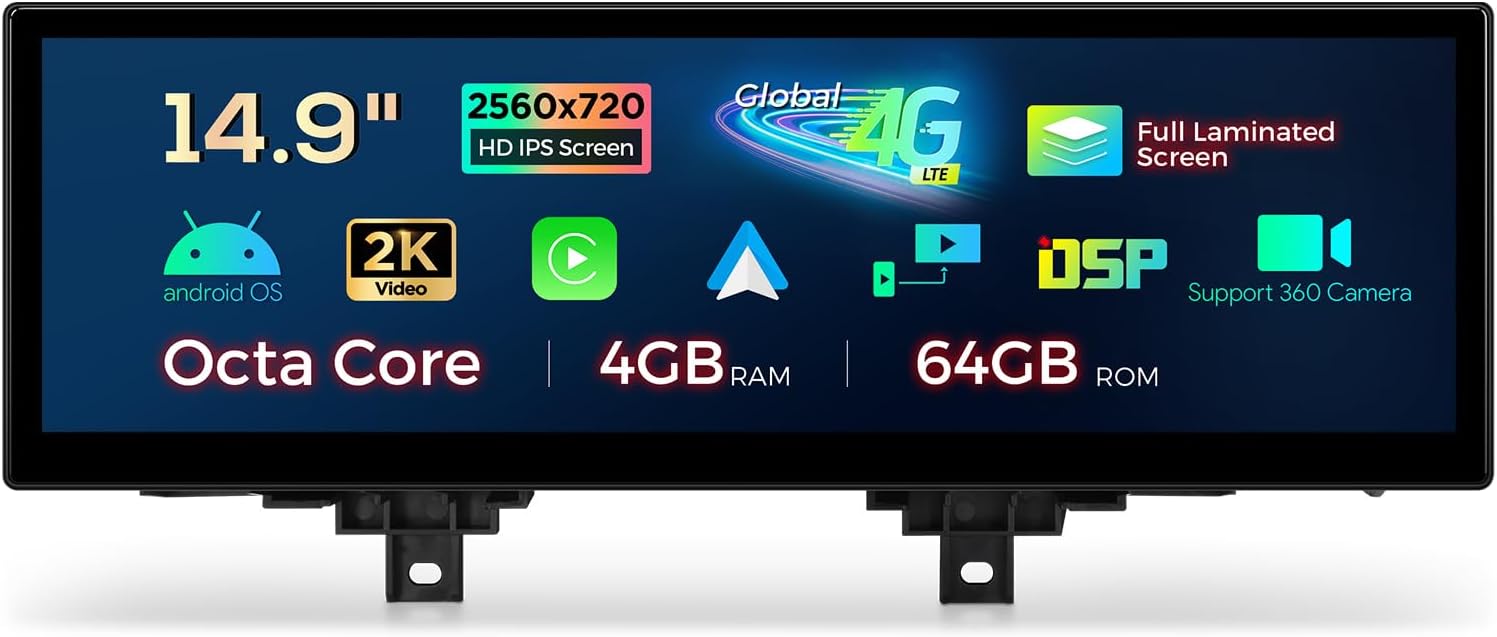
This image displays the XTRONS 14.9-inch car stereo unit, highlighting its main features including a 2K IPS HD screen, Octa Core processor, 4GB RAM, 64GB ROM, Global 4G LTE connectivity, full laminated screen, DSP audio processing, and support for 360-degree cameras.
Key Features
- 14.9" 2K IPS Screen: Enhanced clarity and vibrant colors with a large, fully-laminated, ultra-slim 2K IPS display.
- Octa Core with Android 14: Responsive performance with 4GB DDR4 RAM and 64GB Solid State ROM.
- Global 4G LTE: Connect anywhere with Micro-SIM support (data only) for up to 300Mbps download speed.
- Wireless CarPlay & Android Auto: Seamless smartphone integration for navigation, calls, and music.
- Dual Wi-Fi Band: Supports 2.4GHz and 5GHz for flexible and faster connectivity.
- Multi-task Display & PIP: Run two applications simultaneously or overlay videos while using other apps.
- Retained Original Functions: Maintains iDrive system control, amplifier system, original radio, CD player, Bluetooth, backup camera display, and steering wheel controls.
Compatibility
This unit is designed for specific BMW models and years:
- For BMW 3 Series F30/F31/F34/F35/G20 (From 2018) with NBT EVO System
- For BMW 4 Series F32/F33/F36 (From 2018) with NBT EVO System
Important Notes on Compatibility: After installation, the gesture control function cannot be activated, and the touch function may not work when you switch to the original system. You can use the iDrive controller to control the original system.

This image provides crucial compatibility details for the XTRONS car stereo, specifying applicable BMW 3 Series (F30/F31/F34/F35/G20) and 4 Series (F32/F33/F36) models from 2018 with NBT EVO systems. It includes a visual comparison of the dashboard before and after installation, guidance on identifying the NBT EVO system, and important notes about potential changes to gesture control and touch functions after installation.
Package Contents
Verify that all the following items are included in your package:
- 1x ISO Wiring Harness
- 1x USB Cable
- 1x Mini Microphone
- 1x GPS Antenna
- 1x 4G Antenna
- 1x 4G SIM Card Slot
- 1x Mini Speaker
- 1x Audio Box
- 1x Audio Cable
- 1x User Manual
- 1x Installation Instruction

This image provides the physical dimensions of the XTRONS car stereo unit and a comprehensive visual list of all included accessories: ISO Wiring Harness, USB Cable, Mini Microphone, GPS Antenna, Audio Cable, 4G Antenna, 4G SIM Card Slot, User Manual, Audio Box, Mini Speaker, and Installation Instruction.
Setup and Installation
Installation of the XTRONS car stereo requires careful attention to wiring and vehicle-specific procedures. It is highly recommended to consult the included 'Installation Instruction' manual for detailed, step-by-step guidance. If you are not confident in performing the installation yourself, please seek professional assistance.
General Installation Notes:
- Ensure the vehicle's battery is disconnected before beginning installation.
- Carefully identify all original vehicle connections and match them with the provided wiring harness.
- Pay close attention to the fiber optic cable connection; ensure it clicks securely into place.
- Route all cables safely to prevent pinching or damage.
- Test all functions before fully reassembling the dashboard.
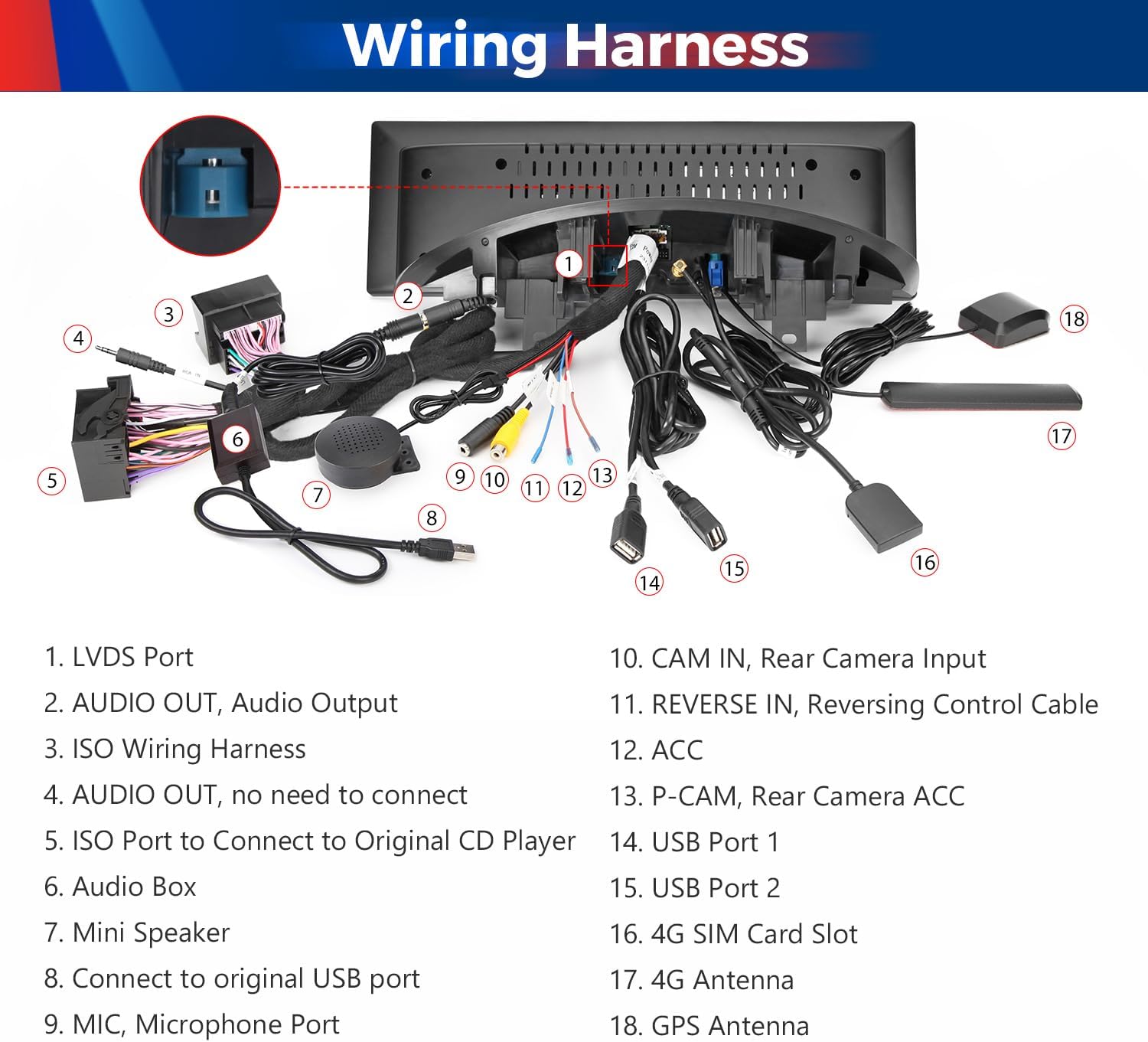
This image presents a detailed diagram of the wiring harness for the XTRONS car stereo, labeling each port and connection point, including LVDS Port, Audio Out, ISO Wiring Harness, USB Ports, Camera Inputs, and various antennas, to assist with proper installation.
Operating Instructions
Smartphone Integration (Wireless CarPlay & Android Auto)
The unit supports wireless CarPlay for iPhone and wireless/wired Android Auto for Android phones. This allows you to access compatible apps, navigation, calls, and music directly from your smartphone on the large screen.
- Wireless Connection: Enable Bluetooth on your smartphone and pair it with the XTRONS unit. Follow the on-screen prompts to activate CarPlay or Android Auto.
- Wired Connection (Android Auto): Connect your Android phone to the unit via a USB cable.
- Voice Commands: Access Siri or Google Assistant directly from the head unit for hands-free operation.
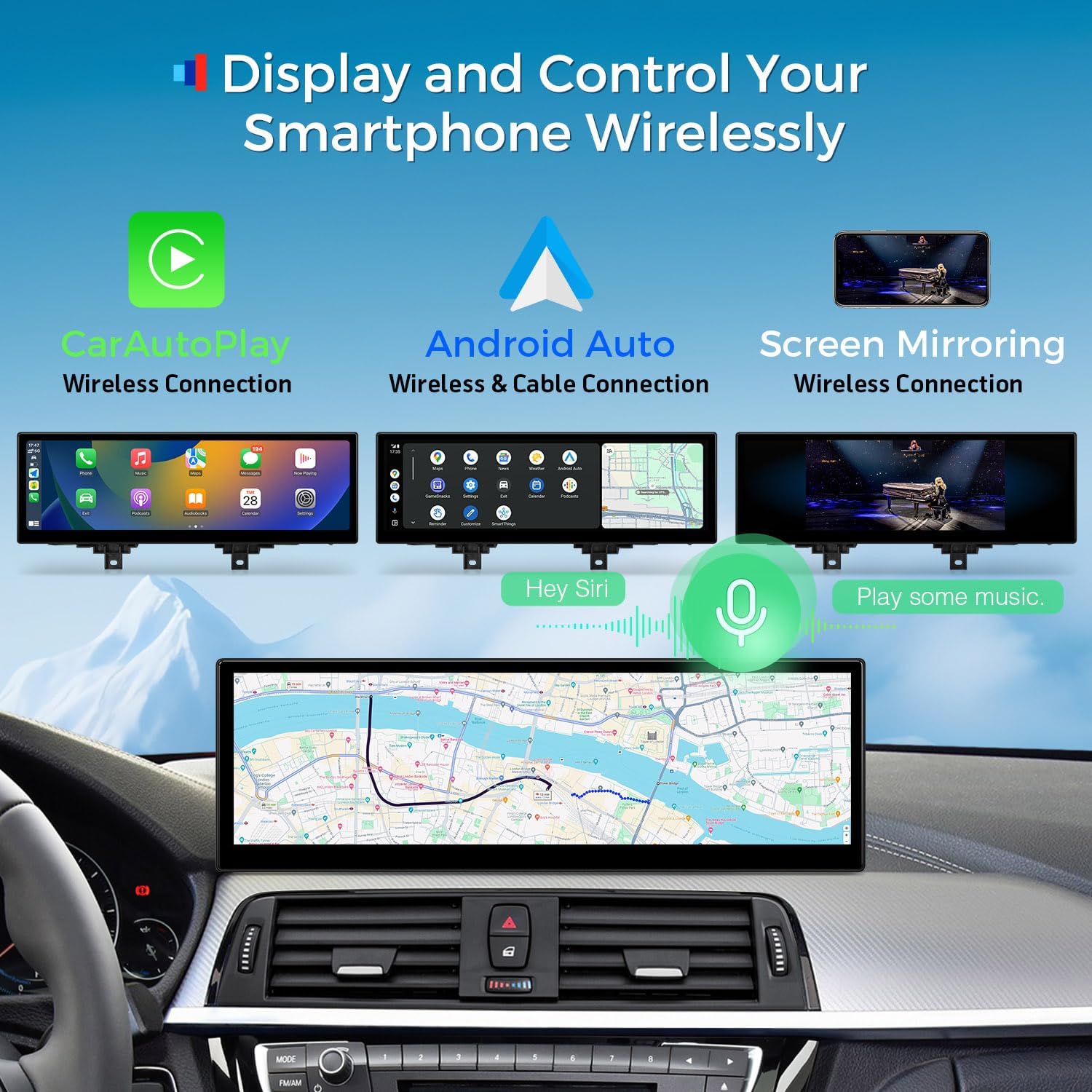
This image demonstrates the seamless smartphone integration capabilities of the XTRONS car stereo, including wireless CarAutoPlay for iPhones, wireless and wired Android Auto for Android devices, and wireless screen mirroring. It also indicates support for voice assistants like Siri and Google Assistant.
Mobile Network Sharing (4G LTE)
Insert a Micro-SIM card (not included) into the designated slot to enable 4G mobile broadband connection. This allows for internet access anywhere, supporting data services from 99% of worldwide carriers. Note that this feature is for data only and does not support phone calls.
Wi-Fi Connectivity
The unit supports dual Wi-Fi bands (2.4GHz and 5GHz) for flexible and fast internet access. Connect to available Wi-Fi networks to browse, stream, and download applications.

This image highlights the versatile internet access options for the XTRONS car stereo, featuring Global 4G LTE Cat 7 connectivity with speeds up to 300Mbps, supporting 99% of worldwide carriers. It also shows dual-band Wi-Fi support (2.4GHz and 5GHz) for flexible and fast wireless connections. A note clarifies that the Micro-SIM card is for data only, not phone calls.
Display Features (Multi-task & Picture-in-Picture)
Utilize the large 14.9-inch IPS screen for enhanced productivity and entertainment:
- Multi-task Display: Run two applications simultaneously, such as navigation and music, for efficient multi-tasking.
- Picture-in-Picture (PIP): Watch videos in a small overlay window while navigating or using other applications.

This image illustrates several advanced display features of the XTRONS car stereo. It shows the full laminated screen for superior clarity, the multi-task display capability allowing two applications simultaneously, picture-in-picture functionality for video overlays, the wide 32:9 aspect ratio of the 2K IPS touch screen, and the convenience of two built-in USB inputs.
Retained Original Car Functions
The XTRONS unit is designed to integrate seamlessly with your vehicle's existing systems, retaining key original functions:
- iDrive System Control
- Original Amplifier System
- Original Radio and CD Player
- Bluetooth Connectivity
- Backup Camera Display
- Steering Wheel Control Function

This image emphasizes that the XTRONS car stereo retains critical original vehicle functions, including the iDrive system control, the original amplifier system, original radio and CD player functionality, Bluetooth connectivity, backup camera display, and steering wheel control functions, ensuring a comprehensive upgrade without losing existing features.
Original Car Information Display
The unit can display essential vehicle information directly on its screen, providing convenient access to data such as speed, engine speed, remaining fuel, temperature, parking brake status, and seat belt reminders.

This image illustrates the XTRONS car stereo's ability to display original vehicle information directly on its screen, such as current speed, engine speed, remaining fuel, temperature, parking brake status, and seat belt reminders, integrating essential car data into the new display.
Maintenance
To ensure the longevity and optimal performance of your XTRONS car stereo, follow these maintenance guidelines:
- Cleaning: Use a soft, dry cloth to clean the screen and unit. For stubborn marks, slightly dampen the cloth with water. Avoid using harsh chemicals or abrasive cleaners.
- Software Updates: Periodically check for software updates from XTRONS to ensure you have the latest features and bug fixes. Follow the instructions provided with the update package.
- Environmental Conditions: Avoid exposing the unit to extreme temperatures, direct sunlight for prolonged periods, or excessive moisture.
Troubleshooting
If you encounter issues with your XTRONS car stereo, refer to the following common troubleshooting tips:
- No Power: Check all power connections, fuses, and ensure the vehicle's battery is charged. Verify the ISO wiring harness is securely connected.
- No Sound/iDrive Issues: Ensure the wiring harness connector is fully seated, especially the fiber optic cable. Verify the RCA out is connected to the car's AUX in if applicable. Check the 'CAN' settings in the unit's menu to match your OEM infotainment system (e.g., try 'All other BMW').
- No Internet (4G/Wi-Fi): For 4G, ensure the Micro-SIM card is correctly inserted and has an active data plan. For Wi-Fi, check network availability and password. If USB tethering is greyed out, verify phone settings and compatibility.
- CarPlay/Android Auto Not Connecting: Ensure Bluetooth is enabled on both devices. For wired Android Auto, try a different USB cable. Restart both the phone and the car stereo.
- Screen Unresponsive: Try restarting the unit. If the issue persists, a factory reset might be necessary (consult the full installation manual for instructions).
For persistent issues, please contact XTRONS customer support.
Specifications
| Feature | Detail |
|---|---|
| Display Size | 14.9 Inches |
| Resolution | 1280 x 720 |
| Operating System | Android 14 |
| Processor | Octa Core |
| RAM | 4GB DDR4 |
| ROM | 64GB Solid State |
| Connectivity Technology | Bluetooth 5.0, Wi-Fi (2.4GHz/5GHz), USB, Global 4G |
| Mounting Type | Dashboard Mount |
| Audio Output Mode | Stereo |
| Voice Command | Touchscreen |
Warranty and Support
XTRONS provides a 1-year warranty for this unit. This warranty covers manufacturing defects and ensures your rights and interests are protected.
For technical support, warranty claims, or any inquiries, please do not hesitate to contact XTRONS via Amazon email. Our professional technical support team will reply as soon as possible to assist you.
Ask a question about this manual
Ask about setup, troubleshooting, compatibility, parts, safety, or missing instructions. Manuals+ will review the question and use this page’s manual context to help answer it.