
1. Introduction
This manual provides detailed instructions for the installation, operation, and maintenance of your EZVALO EZL2415A 6-Pack Rechargeable Motion Sensor Puck Lights. Please read this manual thoroughly before use to ensure proper functionality and safety.
2. Safety Information
- Do not expose the lights to water or excessive moisture. These lights are not water-resistant.
- Do not attempt to disassemble or modify the lights. This may void the warranty and pose a safety risk.
- Keep the lights away from high temperatures and open flames.
- Ensure the charging cable is not damaged before use.
- Use only the provided charging cable or a compatible 5V USB charger.
- Keep out of reach of children.
3. Package Contents
Verify that all items are present in your package:
- 6x Motion Sensor Lights
- 1x Remote Control
- 6x Iron Filings (metal plates for adhesive mounting)
- 1x 3-in-1 Charging Cord
- 1x Instruction Manual (this document)

Image: Contents of the EZVALO 6-Pack Under Cabinet Lighting package.
4. Product Overview
The EZVALO EZL2415A puck lights are versatile, rechargeable lighting units designed for various indoor applications. They feature multiple color temperatures, RGB color options, motion sensing capabilities, and remote control operation.
Key Features:
- Multi-Color & White Options: 12 RGB colors and 3 white color temperatures (3000K Warm White, 4200K Natural White, 6500K Cool White).
- Rechargeable Battery: Built-in 1000mAh battery for extended use.
- Motion Sensor: Detects motion within a 120° range up to 10 ft.
- Multiple Modes: Always-On, Day Mode (motion-activated anytime), Night Mode (motion-activated in dark environments).
- Remote & Button Control: Adjust colors, brightness, and set timers.
- Easy Installation: Magnetic attachment, adhesive metal plates, or built-in hook.

Image: Dimensions of the compact EZVALO puck light.
5. Setup and Installation
The EZVALO puck lights offer flexible installation options to suit various surfaces.
Installation Methods:
- Magnetic Attachment: The lights have built-in magnets and can directly attach to any metal surface.
- Adhesive Metal Plates: For non-metal surfaces, use the included iron filings (metal plates). Peel off the protective film from the adhesive side of the metal plate and stick it to the desired clean, dry surface. The light can then be magnetically attached to this plate.
- Built-in Hook: Each light includes a small, retractable hook for hanging in closets or other suitable locations.

Image: Illustration of magnetic and adhesive installation methods.
Image: Detailed steps for adhesive installation.
6. Charging the Lights
The lights come with a built-in 1000mAh rechargeable battery. Fully charge the lights before first use.
Charging Procedure:
- Remove the puck light from its installed position (if using magnetic attachment).
- Connect the provided 3-in-1 charging cord to the charging port on the side of the puck light.
- Connect the USB-A end of the charging cord to a 5V USB power adapter (not included) or a computer USB port.
- The indicator light on the puck will show RED while charging and turn GREEN when fully charged.
- A full charge typically takes a few hours.

Image: Rechargeable puck lights and battery life information.

Image: Multiple lights being charged simultaneously with the included cable.
7. Operating Instructions
The EZVALO puck lights can be controlled via the built-in button or the included remote control.
7.1. Power On/Off and Mode Selection
The lights feature three operating modes, selectable via a switch on the side of the puck light:
- Always-On Mode: Provides continuous illumination. The motion sensor is disabled in this mode.
- Day Mode: The light turns on automatically when motion is detected, regardless of ambient light conditions.
- Night Mode: The light acts as a motion-sensor night light, activating only in dark environments when motion is detected. It will automatically turn off after 20 seconds of no motion.
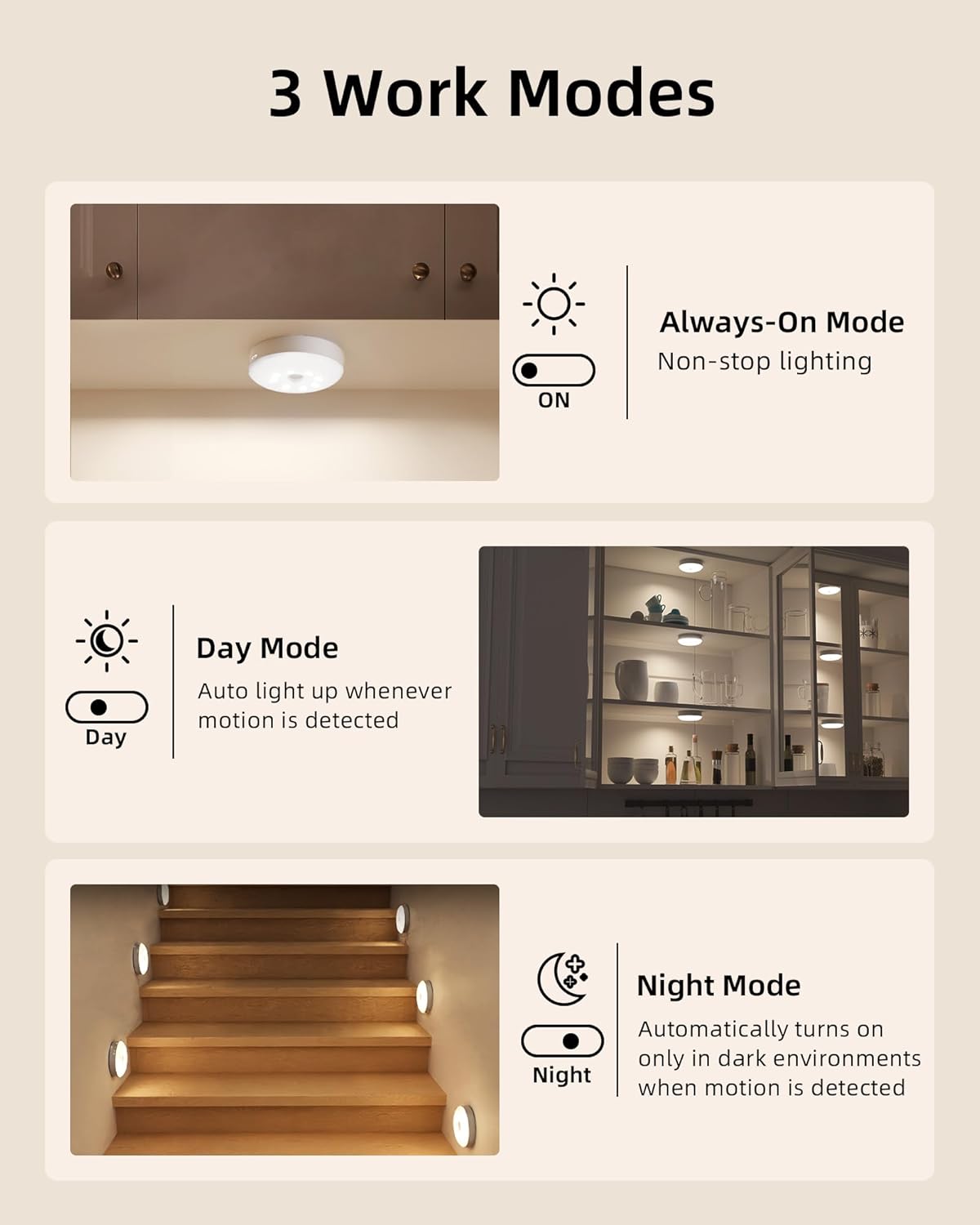
Image: Explanation of the three operating modes.

Image: Visual representation of Day, Night, and Auto-Off modes.
7.2. Motion Sensor Operation
In Day Mode or Night Mode, the integrated motion sensor detects movement. The sensor has a wide 120° detection angle and can detect motion up to 10 feet away. The light will automatically turn off after 20 seconds if no further motion is detected.

Image: Motion sensor detection range and angle.

Image: Motion sensing detection in a kitchen environment.
7.3. Control Options (Remote & Button)
You can control the lights using the remote control or the button on the light itself.
Remote Control:
The remote allows for comprehensive control of multiple lights simultaneously.
- ON/OFF: Power the lights on or off.
- Brightness Adjustment: Use '+' and '-' buttons to adjust between 10 brightness levels (20 LM to 50 LM).
- Color Selection: Choose from 12 RGB colors or 3 white color temperatures (3000K, 4200K, 6500K).
- Dynamic Modes: Select 'Flash' for single color breathing change or 'Fade' for 12-color cycling.
- Timer Setting: Set the lights to turn off automatically after 15, 30, 45, 60, or 120 minutes.
Built-in Button Control:
- Short Press: Changes the light color (cycles through white temperatures and RGB colors).
- Long Press: Activates smooth, stepless dimming to adjust brightness.

Image: Overview of remote and button control functions.

Image: Adjustable brightness, color options, and timing function.

Image: Example of RGB lighting in a kitchen setting.

Image: Two dynamic color modes: Fade and Flash.
8. Maintenance
- Clean the lights with a soft, dry cloth. Do not use abrasive cleaners or solvents.
- Ensure the charging port is free of dust and debris before charging.
- Store the lights in a cool, dry place when not in use for extended periods.
9. Troubleshooting
- Light not turning on: Ensure the battery is charged. Check the mode switch is not in the 'OFF' position.
- Motion sensor not working: Verify the light is in Day Mode or Night Mode. Ensure there are no obstructions blocking the sensor. In Night Mode, confirm the environment is sufficiently dark.
- Remote control not working: Check the battery in the remote. Ensure there is a clear line of sight between the remote and the light(s).
- Lights not holding a charge: Ensure the charging cable is properly connected and the power source is functional. If issues persist, contact customer support.
- Inconsistent motion detection: Ensure the lights are placed within the optimal sensing range (up to 10 ft) and angle (120°). Avoid placing lights near heat sources or air vents that might cause false triggers.
10. Specifications
| Brand | EZVALO |
| Model Name | EZVALO Motion Sensor Puck Lights |
| Model Number | EZL2415A |
| Color | White |
| Material | Acrylonitrile Butadiene Styrene (Plastic) |
| Product Dimensions | 3.3"L x 3.3"W x 1"H |
| Item Weight | 0.7 Pounds (per 6-pack) / 11.2 ounces (total package) |
| Power Source | Battery Powered (Rechargeable) |
| Battery Type | 1000mAh (built-in) |
| Light Source Type | LED |
| Brightness | 50 Lumen (Maximum) |
| Light Color Options | 3 Color Temps (3000K, 4200K, 6500K), 12 RGB Colors |
| Special Features | Adjustable Color Temperature, Color Changing, Dimmable, Motion Sensor, Timer |
| Control Method | Remote Control, Built-in Button |
| Motion Sensor Range | Up to 10 ft, 120° angle |
| Installation Type | Magnetic Mount, Adhesive Mount, Hook |
| Indoor/Outdoor Usage | Indoor Only |
| Water Resistance Level | Not Water Resistant |
11. Warranty and Support
EZVALO products come with a limited warranty. For specific warranty details and customer support, please refer to the information provided with your purchase or visit the official EZVALO store.
For further assistance, you may visit the EZVALO Store on Amazon.