Introduction
Thank you for choosing the EZVALO Under Cabinet Lighting system. This manual provides detailed instructions for the setup, operation, maintenance, and troubleshooting of your new rechargeable puck lights. Please read this manual thoroughly before use to ensure proper functionality and longevity of the product.
What's in the Box
Your EZVALO Under Cabinet Lighting package includes the following components:
- 6x Motion Sensor Puck Lights
- 1x Charging Station
- 1x Remote Control
- 6x Iron Filings (for adhesive mounting)
- 1x Instruction Manual

Setup and Installation
The EZVALO puck lights offer versatile installation options to suit various surfaces and needs.
1. Charging the Puck Lights
Before first use, fully charge all puck lights. The included 3-in-1 charging station allows you to charge three puck lights simultaneously. Connect the charging station to a 5V2A or 5V3A power adapter (not included) using the provided USB cable.

Each puck light has a built-in 1000mAh battery. A full charge provides up to 8 hours of continuous light at 100% brightness in Always-On Mode, or 15-45 days in Auto Mode with typical use.
2. Installation Methods
The puck lights can be installed using three methods:
- Magnetic Attachment: The lights can snap directly onto any metal surface.
- Adhesive Mounting: For non-metal surfaces, use the included iron filings. Remove the double-sided tape protective film from the iron plate, place it on the desired surface, and then magnetically attach the puck light.
- Built-in Hook: Each puck light features a built-in hook for hanging, offering flexibility for various applications.

Operating Instructions
The EZVALO puck lights offer multiple operating modes and control options.
1. Power and Mode Selection (Puck Light Button)
Each puck light has a physical switch for basic power and mode selection:
- ON: Continuous illumination.
- OFF: Light is off.
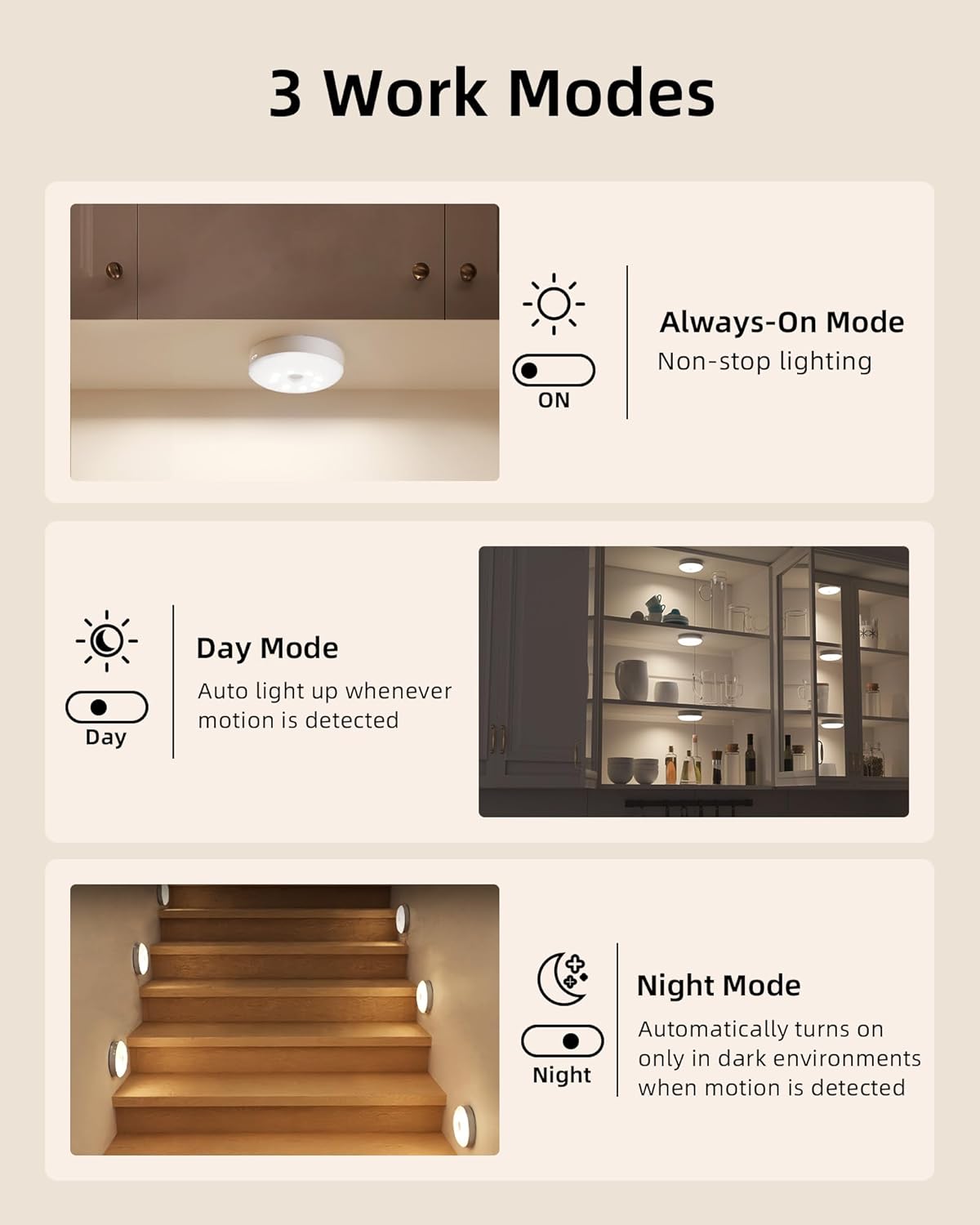
- Motion Sensor Mode (Middle Position): The light will activate based on motion detection.
2. Motion Sensor Functionality
The motion sensor detects movement within a 120° range and up to 10 feet. It automatically turns off after 20 seconds of no motion.
- Day Mode: Lights turn on whenever motion is detected, regardless of ambient light.
- Night Mode: Lights act as motion-sensor night lights, activating only in dark environments when motion is detected.
- Always-On Mode: Motion sensor is disabled for continuous light.
3. Remote Control Functions
The included remote control provides comprehensive command over multiple puck lights simultaneously:
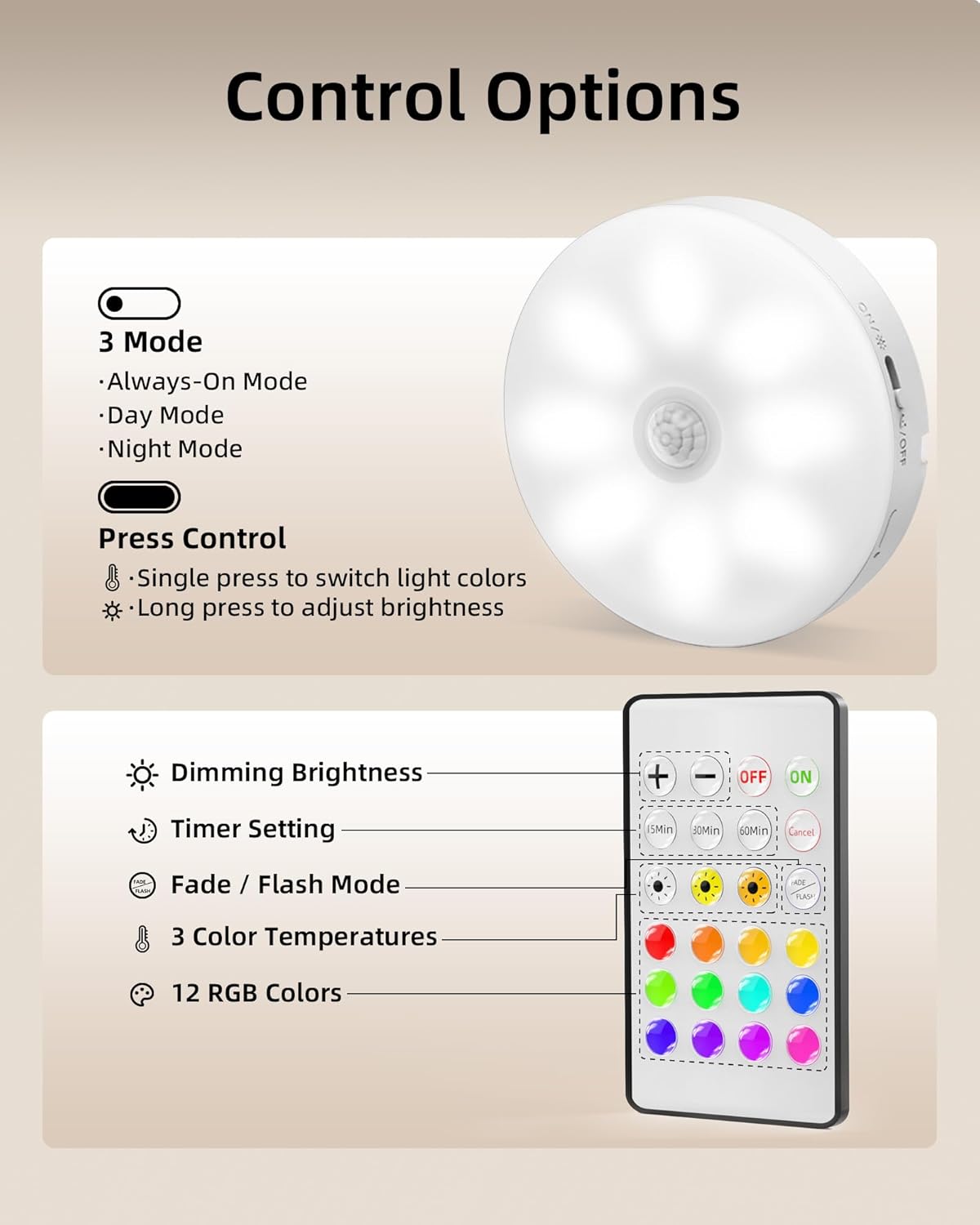
- ON/OFF: Power the lights on or off.
- Dimming: Adjust brightness with 10 levels (from 20 LM to 50 LM).
- Color Temperature: Select from 3 white color temperatures (3000K Warm White, 4200K Natural White, 6500K Cool White).
- RGB Colors: Choose from 12 distinct RGB colors.
- Dynamic Modes: Activate Flash Mode (single color breathing change) or Fade Mode (12 color shifts cycling).
- Timers: Set automatic shut-off timers for 15, 30, 45, 60, or 120 minutes.
- Sensor Bypass: When in Always-On Mode, the remote allows manual control, bypassing the motion sensor.
4. Button Control (On-Puck)
For quick adjustments, you can use the built-in button on each puck light:
- Single Press: Cycles through different light colors.
- Long Press: Adjusts brightness levels.
Maintenance
1. Cleaning
To clean the puck lights and charging station, use a soft, dry cloth. Avoid using abrasive cleaners or solvents, as these can damage the finish or electronic components. Ensure the devices are powered off and unplugged before cleaning.
2. Battery Care
The puck lights contain built-in Lithium-Ion batteries. To maximize battery life:
- Avoid fully discharging the batteries frequently.
- Charge the lights regularly, especially if they are used in Always-On mode.
- Store the lights in a cool, dry place if not in use for extended periods.
Troubleshooting
- Lights not turning on: Ensure the puck light is charged and the switch is set to 'ON' or a motion sensor mode. Check the remote control battery if using remote.
- Motion sensor not responding: Verify the switch is in the motion sensor position. Ensure there are no obstructions blocking the sensor. In Night Mode, confirm the environment is sufficiently dark.
- Lights not charging: Check that the USB cable is securely connected to both the charging station and a functional power source. Ensure the puck lights are correctly seated in the charging station.
- Remote control not working: Check the remote's battery. Ensure there is a clear line of sight between the remote and the puck lights.
- Lights dim or inconsistent: Recharge the puck lights. If the issue persists, contact customer support.
Specifications
| Feature | Detail |
|---|---|
| Brand | EZVALO |
| Model Number | EZL2415A |
| Color | White |
| Material | Acrylonitrile Butadiene Styrene |
| Light Fixture Form | Puck |
| Product Dimensions | 3.3"L x 3.3"W x 1"H |
| Item Weight | 1.5 pounds (for 6-pack) |
| Power Source | Battery Powered (1000mAh Lithium Ion, included) |
| Light Source Type | LED |
| Voltage | 5 Volts |
| Brightness | 50 Lumen (Max) |
| Special Features | Adjustable Color Temperature, Charging Station, Color Changing, Dimmable, Motion Sensor |
| Control Method | Remote, Touch |
| Installation Type | Magnetic, Adhesive, Hook |
| Indoor/Outdoor Usage | Indoor |
Warranty and Support
For any product inquiries, technical assistance, or warranty claims, please contact EZVALO customer support. Refer to the contact information provided with your product packaging or visit the official EZVALO website for further details.
Optional protection plans are available for purchase separately to extend coverage beyond the standard product warranty. Please refer to the specific terms and conditions of these plans for details.


