
1. Product Overview
The Geeni Smart Deadbolt Lock offers advanced security and convenience for your home. This keyless entry system provides multiple methods for access, including a keypad, traditional key, and control via the Geeni mobile application. It is designed for easy installation and integrates with smart home ecosystems for enhanced functionality.

Image: Overview of the Geeni Smart Deadbolt Lock, showing the exterior keypad, the Geeni app interface on a smartphone, and the interior deadbolt assembly.
Key features include real-time alerts, shareable access codes, and robust construction for weather resistance and anti-peeping user code protection. The lock is battery-powered, ensuring operation even during power outages.
2. Key Features
- Multi-Access Control: Unlock using a keypad code, physical key, voice commands, or the Geeni app.
- Smart Lock Functionality: Receive instant alerts on your smartphone for lock/unlock events and monitor access logs.
- Shareable Access Codes: Generate unique, one-time PIN codes for secure, temporary access via the Geeni app.
- Easy Installation: Designed for quick setup without the need for drilling, compatible with both left and right-handed doors.
- Advanced Security: Features sturdy aluminum alloy construction, IPX5 weather resistance, anti-peeping user code protection, and a solid lock cylinder.
- Voice Control: Compatible with Amazon Alexa and Google Assistant (requires a separate Wi-Fi bridge).
- Auto-Lock: Configurable automatic locking for added security.

Image: Visual representation of the Geeni Smart Deadbolt Lock's key features, including code entry, app control, physical keys, notifications, weather resistance, voice control, auto-lock, access scheduling, easy setup, and access sharing.
3. Box Contents
Before beginning installation, verify that all components are present in the package:
- Smart Deadbolt Lock (Front Panel, Back Panel, Deadbolt Body)
- Mounting Bracket
- 2 x Physical Keys
- Buckle Plate
- Gusset Plate
- 4 x AA Batteries
- Screws (3x 25mm Flat Head, 2x 8mm Flat Head, 5x 20mm Wood)
- User Manual (this document)

Image: All components included in the Geeni Smart Deadbolt Lock package, laid out for verification.
4. Installation Guide
The Geeni Smart Deadbolt Lock is designed for straightforward installation. No drilling is typically required for standard door preparations.
4.1 Door Compatibility
- Door Hole Diameter: 2.126 inches (54 mm)
- Door Thickness: 1.375 to 2 inches (35 mm to 50 mm)
- Compatible with both left-handed and right-handed doors.
- Backset: 2.36 inches (60 mm) or 2.76 inches (70 mm)

Image: Detailed measurements and compatibility information for door preparation, ensuring proper fit for the Geeni Smart Deadbolt Lock.
4.2 Step-by-Step Installation
- Prepare the Door: Ensure your door meets the compatibility requirements. Remove any existing deadbolt hardware.
- Install the Deadbolt Body: Insert the deadbolt body into the door edge. Ensure the latch bolt is oriented correctly for your door's swing. Secure with screws.
- Install the Exterior Assembly: Place the exterior keypad assembly onto the door, aligning the spindle with the deadbolt mechanism.
- Install the Mounting Plate: Route the cable from the exterior assembly through the mounting plate and secure the mounting plate to the door using screws.
- Connect the Interior Assembly: Connect the cable from the exterior assembly to the interior assembly.
- Install the Interior Assembly: Attach the interior assembly to the mounting plate, ensuring the thumb turn aligns with the deadbolt. Secure with screws.
- Install Batteries: Insert the 4 AA batteries into the battery compartment of the interior assembly.
- Test Operation: Manually test the deadbolt with the thumb turn and a physical key to ensure smooth operation.
For detailed visual instructions, refer to the included user manual or the Geeni support website.
5. Operating Instructions
5.1 Multiple Entry Options
The Geeni Smart Deadbolt Lock offers several convenient ways to access your property:
- Keypad Entry: Enter your programmed PIN code on the illuminated keypad.
- Physical Key: Use one of the two provided physical keys for traditional manual unlocking.
- Geeni App Control: Unlock or lock your door remotely via the Geeni smartphone application.
- Voice Control: Integrate with Amazon Alexa or Google Assistant for voice-activated locking/unlocking (requires Geeni Wi-Fi bridge, sold separately).

Image: Visual guide to the various methods of unlocking the Geeni Smart Deadbolt Lock, including app, keypad, key, and voice.
5.2 Geeni App Functions
The Geeni app provides comprehensive control and management of your smart deadbolt lock:
- Create PIN Codes: Easily generate and manage multiple user PIN codes.
- View History: Access a log of all lock and unlock events.
- Auto-Lock Settings: Configure the lock to automatically engage after a set period.
- Set Access Schedules: Program specific times or days for certain PIN codes to be active.
- Member Management: Add or remove users and assign their access rights.

Image: The Geeni mobile application interface, highlighting features such as PIN code creation, access history, auto-lock settings, and scheduling.
5.3 Notifications
Receive real-time alerts directly to your smartphone whenever the door is locked or unlocked, providing enhanced security monitoring and peace of mind.

Image: A smartphone displaying notifications from the Geeni app, indicating the status of the smart deadbolt lock (locked or unlocked).
5.4 Shareable Access Codes (One-Time PIN)
Generate temporary or one-time PIN codes through the Geeni app to grant secure access to visitors, service providers, or family members without sharing your primary code or physical keys.

Image: A scenario depicting the use of a one-time PIN code for entry, where a user receives a temporary code to access the property.
5.5 Voice Control Integration
The Geeni Smart Deadbolt Lock can be controlled using voice commands through Amazon Alexa or Google Assistant. A Geeni Wi-Fi bridge (sold separately) is required for this functionality.
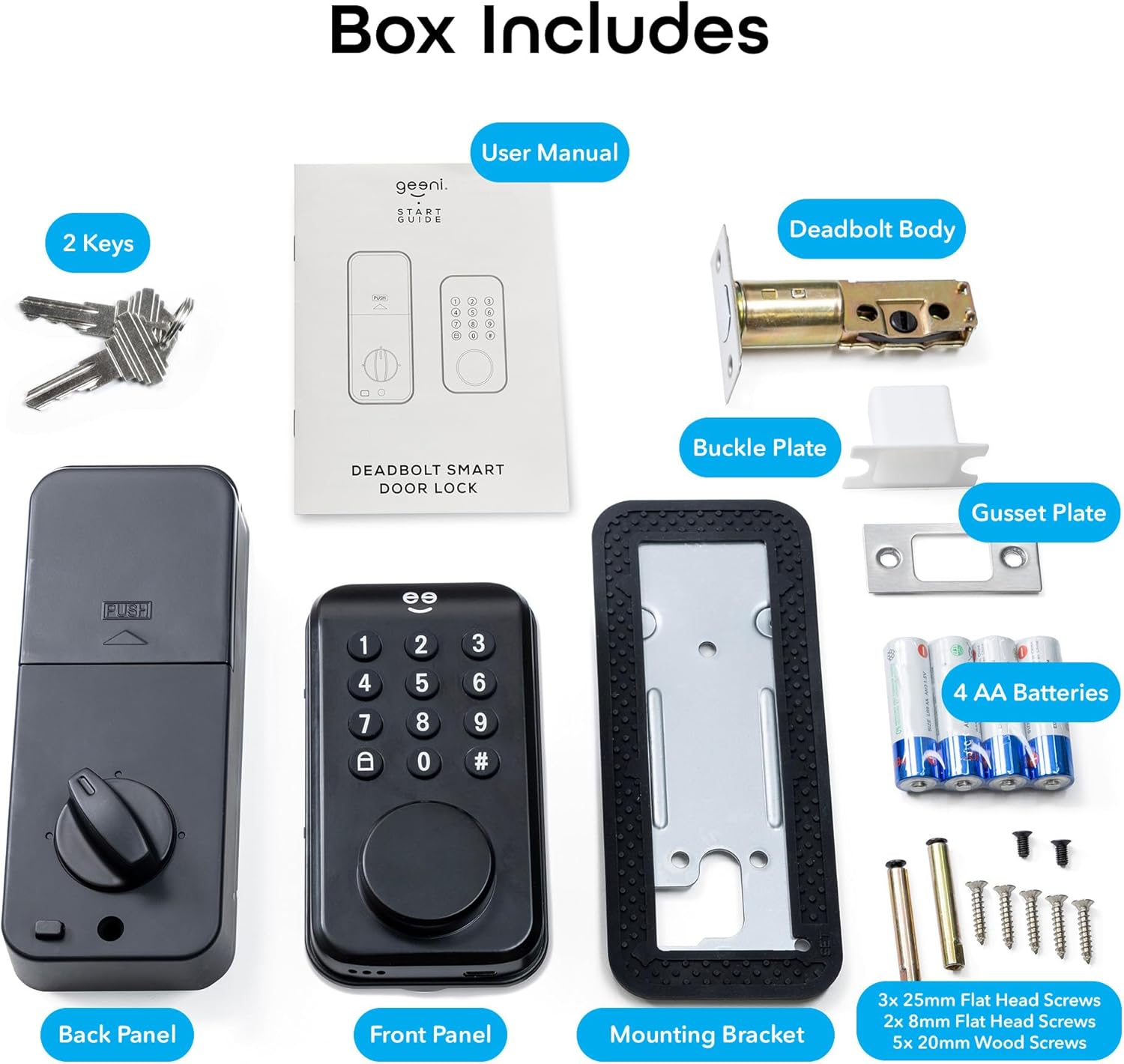
Image: An Amazon Echo device demonstrating voice control capabilities with the Geeni Smart Deadbolt Lock, showing compatibility with Google Home and Alexa.
6. Maintenance
- Battery Replacement: The lock is powered by 4 AA batteries. Replace batteries when the low battery indicator appears on the keypad or in the app. Use high-quality alkaline batteries for optimal performance.
- Cleaning: Clean the keypad and exterior surfaces with a soft, damp cloth. Avoid abrasive cleaners or solvents that could damage the finish or electronic components.
- Lubrication: Periodically check the deadbolt mechanism for smooth operation. If resistance is felt, apply a small amount of graphite lubricant to the bolt. Do not use oil-based lubricants.
- Firmware Updates: Ensure your Geeni app and lock firmware are up to date for the best performance and security features. Updates are typically managed through the Geeni app.
7. Troubleshooting
| Problem | Possible Cause | Solution |
|---|---|---|
| Lock does not respond to keypad entry. | Low batteries; incorrect code; keypad malfunction. | Replace batteries; verify PIN code; try physical key; contact support if issue persists. |
| Auto-lock feature not working. | Feature disabled in app; door misalignment; obstruction. | Check auto-lock settings in Geeni app; ensure door closes properly and deadbolt extends freely; verify strike plate alignment. |
| Cannot connect to Geeni app. | Bluetooth/Wi-Fi issues; app not updated; lock not in pairing mode. | Ensure Bluetooth is enabled on phone; check Wi-Fi connection (if using bridge); update Geeni app; follow pairing instructions in manual. |
| Voice control not working. | Geeni Wi-Fi bridge not connected/configured; incorrect voice command; integration issue. | Verify Geeni Wi-Fi bridge setup and connection; use precise voice commands; re-link Geeni skill/action in Alexa/Google Home app. |
| Lock is stiff or difficult to operate. | Misalignment; dirt/debris in mechanism; lack of lubrication. | Check door and frame alignment; clean deadbolt area; apply graphite lubricant to the bolt. |
If you encounter issues not listed here or if the suggested solutions do not resolve the problem, please contact Geeni customer support.
8. Specifications
| Feature | Detail |
|---|---|
| Brand | Geeni |
| Model Name | Smart Deadbolt Lock |
| Model Number | GN-WA015-101 |
| Lock Type | Combination Lock, Deadbolt, Key Lock |
| Material | Aluminum |
| Color | Black |
| Dimensions (L x W x H) | 1.97 x 2.76 x 6.89 inches (50 x 70 x 175 mm) |
| Item Weight | 2.03 pounds |
| Power Source | 4 x AA Alkaline Batteries (Included) |
| Connectivity Protocol | Bluetooth, Wi-Fi (with optional bridge) |
| Control Method | App, Touch (Keypad) |
| Controller Type | Amazon Alexa, Google Assistant (with optional bridge) |
| Special Features | Auto-Lock, Manual Key, Passcode Unlock, Voice Control, Weather Resistant (IPX5) |
| Recommended Uses | Airbnb doors, entry doors, bedroom doors, office doors, garage doors |
| UPC | 194383059455 |
9. Warranty and Support
Geeni products are designed for reliability and performance. For specific warranty details, please refer to the warranty card included with your product or visit the official Geeni support website.
Customer Support:
- For technical assistance, troubleshooting, or warranty claims, please visit the Geeni support portal or contact their customer service team.
- Online resources, FAQs, and video tutorials may also be available on the Geeni website.
For the most up-to-date support information, please visit: www.geeni.com/support