
Aideepen A7JCAJ0001-001-EU
Contents
Aideepen Digital Temperature Sensor Kit User Manual
Model: A7JCAJ0001-001-EU
Introduction
This manual provides essential information for the proper use and maintenance of your Aideepen Digital Temperature Sensor Kit. This kit includes five waterproof digital temperature sensors, designed for accurate and reliable temperature measurement in various applications. Each sensor features a durable stainless steel probe and a 5-meter cable, making them suitable for environments requiring moisture resistance.
The sensors are compatible with popular microcontrollers such as Arduino and Raspberry Pi, and can also be integrated with systems like Shelly. They operate on a one-wire bus interface, simplifying connectivity and data acquisition.

Image: A bundle of five Aideepen digital temperature sensors, showcasing their waterproof probes and long cables.
Setup and Wiring
The Aideepen digital temperature sensors are designed for straightforward integration. Each sensor features a three-wire output for power, ground, and data transmission.
Wiring Connections:
- Red Wire: VDD+ (Power Supply)
- Yellow Wire: DATA (Data Signal)
- Black Wire: GND (Ground)
Ensure correct polarity when connecting the sensor to your microcontroller or system. Refer to the e-book included with your purchase for detailed circuit diagrams and programming examples for Arduino and Raspberry Pi.
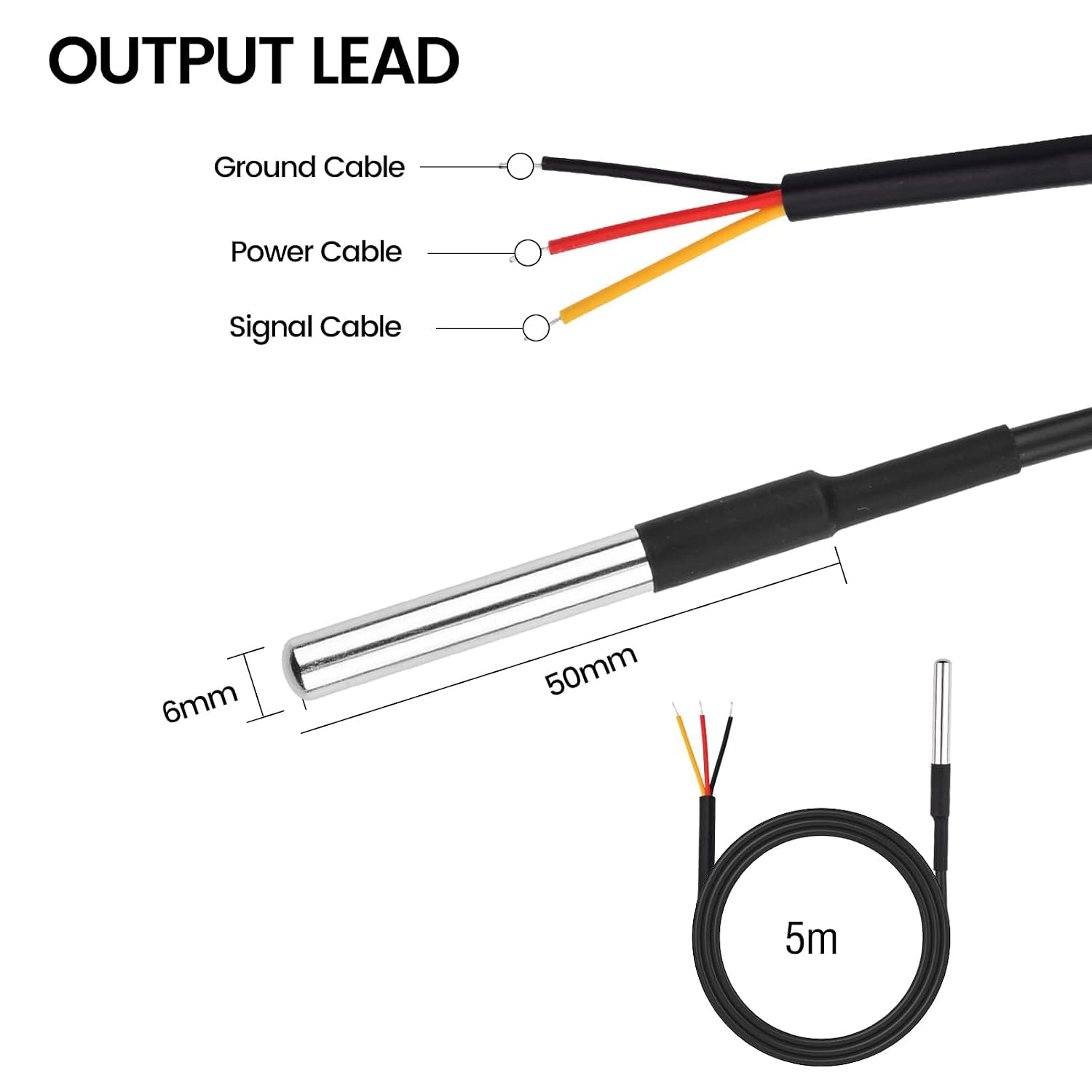
Image: Detailed diagram illustrating the output lead connections (VDD+, DATA, GND) and physical dimensions of the sensor probe and cable length.
Operating Principles
These digital temperature sensors utilize a one-wire bus interface for communication, allowing multiple sensors to share a single data line. The temperature signal is directly transmitted in digital mode, eliminating the need for external analog-to-digital converters and simplifying data processing by the connected device.
The sensor's robust design, featuring a stainless steel probe, ensures accurate and stable readings even in challenging environments. Its waterproof and anti-rust properties contribute to its longevity and reliability.

Image: Visual representation of the sensor and its digital signal transmission method.

Image: Infographic detailing the key operational characteristics and benefits of the sensor, such as anti-interference and accurate measurement.
Maintenance
The Aideepen digital temperature sensors are designed for durability and require minimal maintenance. Due to their waterproof and anti-rust stainless steel construction, they are well-suited for humid or submerged environments.
- Cleaning: If necessary, gently wipe the probe and cable with a damp cloth. Avoid using harsh chemicals or abrasive materials.
- Storage: Store sensors in a dry, cool place when not in use to prevent any potential damage to the cable or connectors.
- Inspection: Periodically inspect the cable for any signs of wear, cuts, or damage, especially if used in environments with physical stress.
Troubleshooting
If you encounter issues with your temperature sensors, consider the following common troubleshooting steps:
- No Reading/Incorrect Reading:
- Verify all wiring connections (Red to VDD+, Yellow to DATA, Black to GND) are secure and correct.
- Ensure the power supply voltage is within the specified range (3V to 5.5V).
- Check your microcontroller's code for proper sensor initialization and data reading protocols (e.g., OneWire library for DS18B20 sensors).
- Test with a different sensor from the kit to rule out an individual sensor issue.
- Intermittent Readings:
- Check for loose connections or damaged wires.
- Ensure proper pull-up resistor is used on the data line, as required by the one-wire protocol.
- Minimize electrical noise in the environment, especially if long cables are used.
- Sensor Not Detected:
- Confirm that the data pin on your microcontroller is correctly configured for input.
- Double-check the unique address discovery process in your code if using multiple sensors on a single bus.
For more advanced troubleshooting or specific programming assistance, consult online communities for Arduino, Raspberry Pi, or Shelly, or refer to the provided e-book.
Specifications
Below are the detailed technical specifications for the Aideepen Digital Temperature Sensor Kit:
| Parameter | Value |
|---|---|
| Product Type | Digital Temperature Sensor (Waterproof Probe) |
| Quantity per Pack | 5 sensors |
| Cable Length | 5 meters (approx. 16.4 feet) |
| Test Temperature Range | -55 °C to +125 °C (-67 °F to +257 °F) |
| Accuracy | ± 0.5 °C within -10 °C to +85 °C range |
| Voltage Range | 3 V to 5.5 V |
| Probe Material | Stainless Steel |
| Probe Dimensions | 6 mm diameter x 50 mm length |
| Output Lead Configuration | Black: GND; Yellow: DATA; Red: VDD+ |
| Interface | One-wire bus |
| Compatibility | Arduino, Raspberry Pi, Shelly |
| Manufacturer Reference | A7JCAJ0001-001-EU |

Image: A visual summary of the product's key specifications.
Applications
The versatility and robust design of the Aideepen digital temperature sensors make them suitable for a wide range of applications, including but not limited to:
- Thermostatic regulators
- Industrial control systems
- Digital thermometers
- General thermal monitoring systems
- Incubation temperature control
- Household refrigerators and freezers
- Warehouse temperature monitoring
- Air conditioning systems
- Greenhouse climate control

Image: Examples of diverse applications where the temperature sensor can be effectively utilized.
Warranty and Support
For information regarding product warranty, please refer to the terms and conditions provided by the seller, Aideepen-EU, at the time of purchase. Standard return policies apply as per Amazon's guidelines.
For technical support or further inquiries, please contact the seller directly through the Amazon platform. Additionally, the included e-book provides valuable resources for integrating and utilizing these sensors with your projects.
Documents and downloads
Ask a question about this manual
Ask about setup, troubleshooting, compatibility, parts, safety, or missing instructions. Manuals+ will review the question and use this page’s manual context to help answer it.