
Important Safety Information
Please read this manual thoroughly before assembly and operation. Keep this manual for future reference.
- Ensure all components are present and undamaged before assembly.
- Do not allow children to operate the desk without supervision.
- Keep hands and objects clear of moving parts during height adjustment.
- Do not overload the desk. Refer to the 'Specifications' section for weight limits.
- Use only the provided power adapter and components.
- If any issues arise, refer to the 'Troubleshooting' section or contact customer support.
Package Contents
Verify that all the following components are included in your package:
- Desktop (Brown)
- Desk Frame (Black) - includes legs, crossbar, and motor housing
- Control Panel
- Power Adapter and Cable
- Headphone Hooks (2)
- Assembly Hardware (screws, bolts, Allen wrenches)
- Instruction Manual
Setup and Assembly
Assembly typically takes approximately 3 hours. Follow the detailed instructions provided in the separate assembly guide included in your package. Ensure you have adequate space and a clean work area.
- Unpack all components and lay them out on a protective surface.
- Attach the desk legs to the crossbar and motor housing according to the assembly guide.
- Secure the desktop to the assembled frame using the provided screws.
- Mount the control panel to the underside of the desktop in a convenient location.
- Connect all cables from the motor and control panel to the power adapter.
- Attach the headphone hooks to the desired locations on the desk frame.
- Plug the power adapter into a wall outlet.
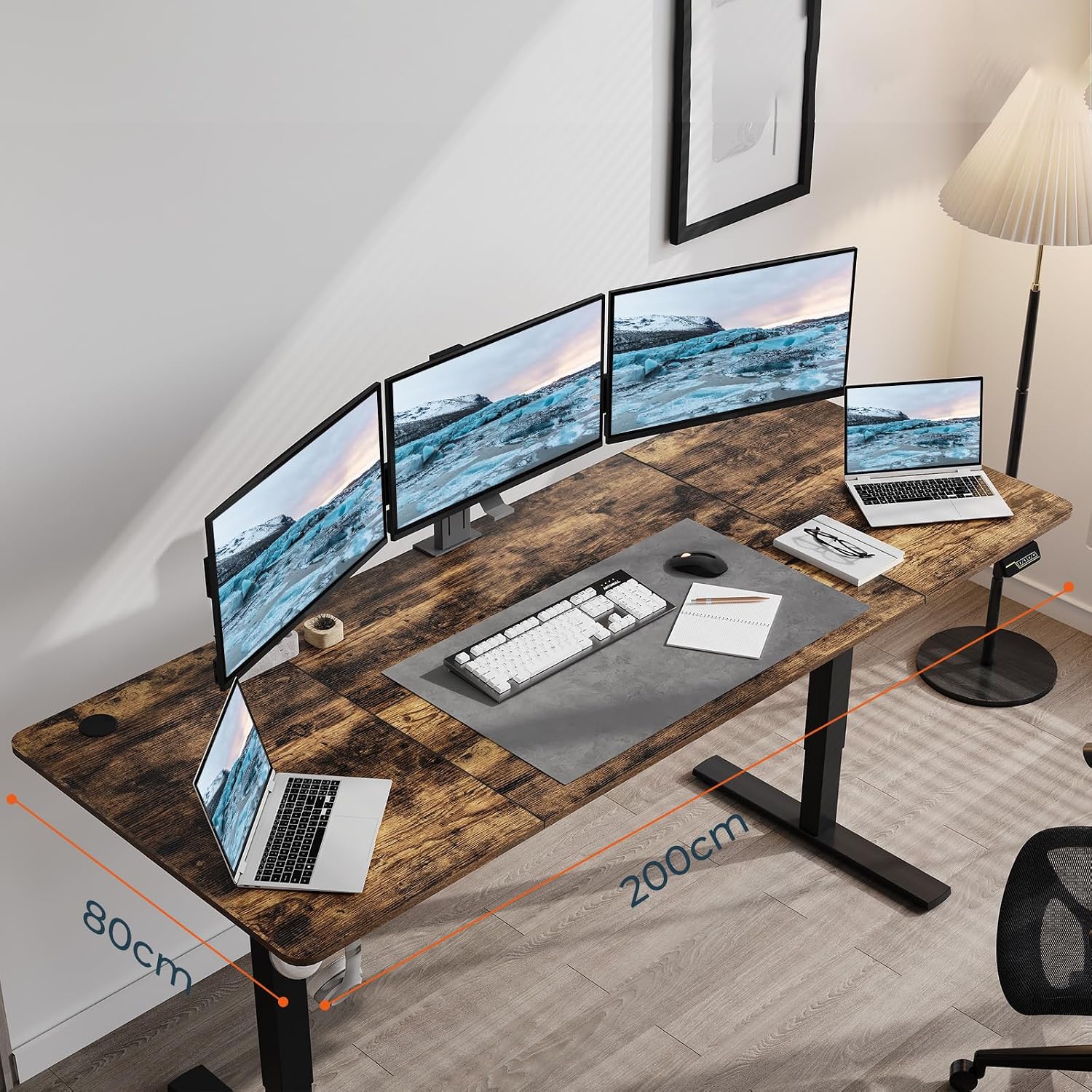
Image: Fully assembled FitStand Electric Standing Desk, showcasing its brown desktop and black frame.
Operating Instructions
The FitStand Electric Standing Desk features a multi-function control panel for easy height adjustments and other settings.
Height Adjustment
Use the Up and Down arrow buttons on the control panel to adjust the desk height. The desk operates quietly, allowing for smooth transitions without disturbance.
- For 1260, 1460, 1660 size desks: Height range is 73 cm to 118 cm.
- For 1880, 2080 size desks (including this 200x80cm model): Height range is 73 cm to 122 cm.

Image: Close-up of the desk's control panel, showing the up/down arrows, memory presets, and child lock button.
Memory Function
The desk allows you to save preferred heights for quick recall.
- Adjust the desk to your desired height using the Up or Down buttons.
- Press the M button (Memory) once. The display will flash.
- Press one of the numbered preset buttons (e.g., 1, 2, 3) within 3 seconds to save the current height to that preset.
- To recall a saved height, simply press the corresponding numbered preset button. The desk will automatically move to the saved position.
Child Lock
Activate the child lock to prevent accidental adjustments.
- To activate: Press and hold the Lock button for 3 seconds. The display will show 'LOC' or a lock icon. All other buttons will be disabled.
- To deactivate: Press and hold the Lock button again for 3 seconds. The display will return to the height reading, and the buttons will be active.
Maintenance
Regular maintenance ensures the longevity and optimal performance of your standing desk.
- Cleaning: Wipe the desktop and frame with a soft, damp cloth. Avoid harsh chemicals or abrasive cleaners.
- Cable Management: Periodically check that all cables are securely connected and not pinched or damaged.
- Stability Check: Ensure all screws and bolts remain tight. Retighten if necessary.
- Weight Limit: Do not exceed the maximum weight capacity to prevent damage to the motor and frame.
Troubleshooting
If you encounter any issues with your FitStand Electric Standing Desk, refer to the following common solutions:
| Problem | Possible Cause | Solution |
|---|---|---|
| Desk does not move / Motor not working | Power cable disconnected, child lock active, motor error. | Check power connections. Deactivate child lock. Unplug the desk for 10 minutes, then plug back in to reset. If the issue persists, contact support. |
| Desk moves unevenly | Uneven load, loose connections. | Ensure weight is evenly distributed. Check all frame connections and tighten if loose. |
| Error code on display | Specific system error. | Refer to the detailed error code list in the separate assembly guide or contact customer support with the specific code. |
Specifications
| Feature | Detail |
|---|---|
| Brand | FitStand |
| Model | FS-200x80-B0D22QZHHT |
| Shape | Rectangular |
| Product Dimensions (D x W x H) | 31.5" x 78.74" x 28.74" (78.74"W x 31.5"D x 28.74"H) |
| Size | 200 x 80 cm |
| Color | Black Frame + Brown Desktop |
| Base Material | Metal |
| Top Material Type | Metal (Frame), Wood (Desktop) |
| Special Feature | Electric Adjustable, Memory Function, Child Lock |
| Room Type | Office |
| Minimum Height | 73 cm (28.74 inches) |
| Maximum Height | 122 cm (48.03 inches) |
| Weight Capacity | 70 kg (154 lbs) for 1880, 2080 sizes |
| Motor Operation | Quiet |
| Mounting Type | Freestanding |
| UPC | 810072883810 |
| ASIN | B0D22QZHHT |
Warranty and Support
Your FitStand Electric Standing Desk comes with a standard manufacturer's warranty. Please refer to the warranty card included in your package for specific terms and conditions.
For technical assistance, troubleshooting beyond this manual, or warranty claims, please contact FitStand customer support through the retailer where the product was purchased or visit the official FitStand website.
Please have your model number (FS-200x80-B0D22QZHHT) and proof of purchase ready when contacting support.