
HYTOBP M°max
HYTOBP M°max Foldable FPV Drone User Manual
Model: M°max
1. Product Overview
The HYTOBP M°max Foldable FPV Drone is equipped with a 1080P HD camera and a brushless motor, designed for ease of use for beginners and adults. It features one-button take-off, headless mode, and 360° flips for an engaging flight experience. The drone's foldable design enhances portability.
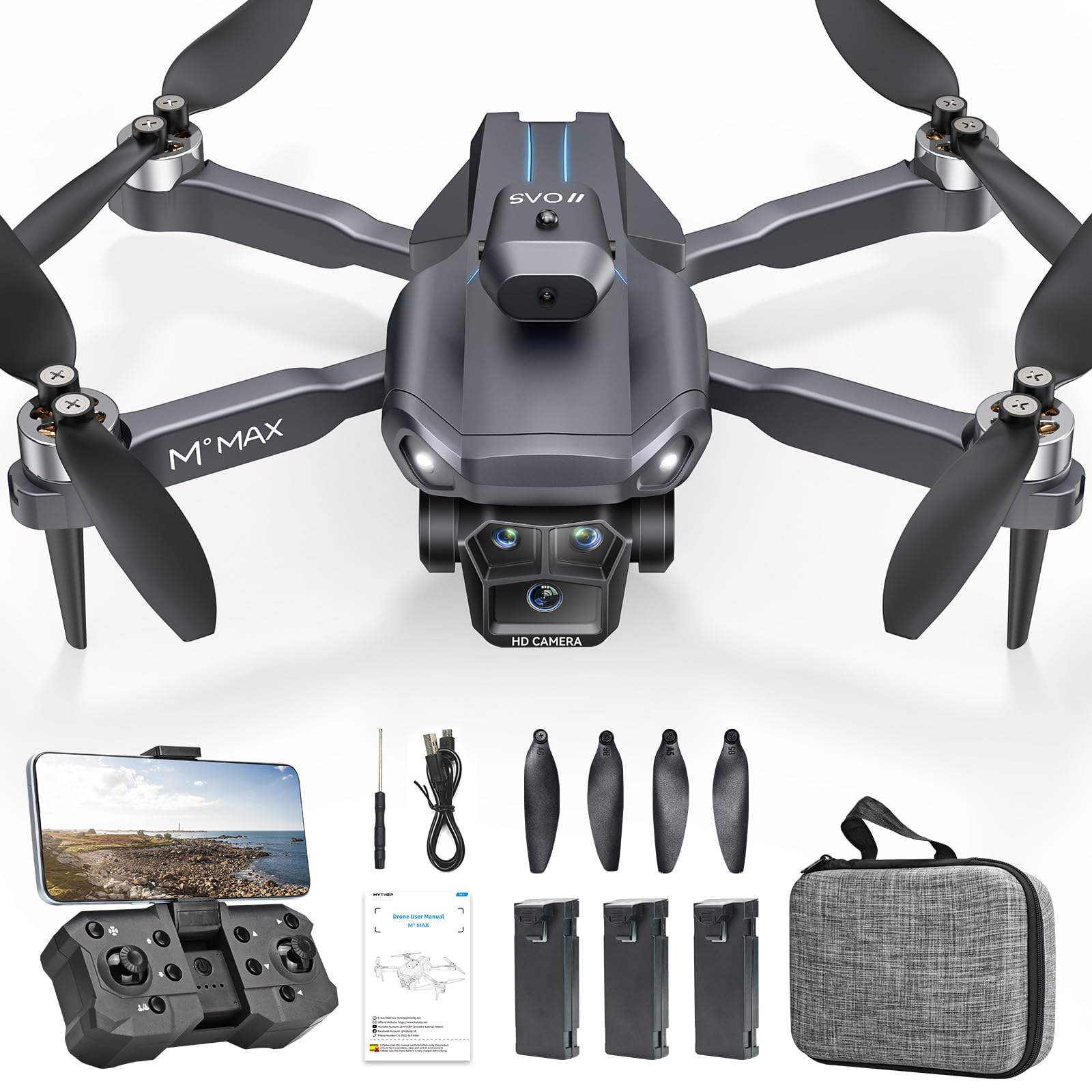
Image: The HYTOBP M°max Foldable FPV Drone in flight, showcasing its design and camera.
2. What's in the Box
Verify that all components are present in the package:
- M°max Drone x1
- Remote Control x1
- Batteries x3
- User Manual x1
- USB Cable x1
- Screwdriver x1
- Spare Main Fan Blades x4
- Blade Screws x4
- Storage Bag x1

Image: A visual representation of all items included in the HYTOBP M°max Drone package.
3. Setup Guide
3.1 Battery Installation and Charging
- Drone Battery: Insert the drone battery into the designated compartment. Ensure it clicks into place securely.
- Remote Control Batteries: Install the required batteries into the remote control.
- Charging: Fully charge the drone batteries using the provided USB cable and a standard 5V 2A charging adapter. The red light will illuminate during charging and turn off when fully charged.
3.2 App Installation and Connection
- Scan the QR code provided in the manual to download the drone application. Ensure you download the latest version.
- Grant necessary permissions (local network access, positioning, photo album access) when prompted during app installation.
- Connect your phone to the drone's Wi-Fi network.
- Open the installed app and wait for the connection to establish.
3.3 Pre-Flight Checks
- Ensure the drone and remote control are fully charged.
- Pair the remote control and the drone to the frequency.
- Place the drone on a flat, level surface for initial take-off to ensure stable flight.
- Check propellers for any damage or deformation.

Image: A user preparing the HYTOBP M°max Drone for flight, demonstrating ease of setup.
4. Operating Instructions
4.1 Basic Flight Controls
- One-Button Take-Off/Landing: Press the designated button on the remote control for automatic take-off or landing.
- Altitude Hold: The drone maintains a stable altitude automatically, simplifying control.
- Headless Mode: In headless mode, the drone's orientation is relative to the pilot, eliminating the need to adjust its position before flight.
- Adjustable 3 Speeds: The drone offers three speed settings (2M/s, 4M/s, 7M/s) to accommodate different skill levels. The first speed is recommended for beginners.

Image: Illustrations of One Button Take-off, Headless Mode, and Trajectory Flight features.

Image: The drone demonstrating its three adjustable speed settings for varied flight techniques.
4.2 Advanced Flight Features
- 360° Flips (3D Rotation): Execute impressive aerial maneuvers with the 360° flip function.
- Gesture Control: Use specific hand gestures to control the drone for photos or videos.
- Optical Flow Positioning: This feature helps the drone maintain its position stably, especially indoors or in areas with good ground texture.
- Waypoints Fly: Plan a flight path on the app interface, and the drone will automatically follow the designated route.

Image: The drone performing a 3D flip and following a pre-set waypoint flight path.

Image: Visuals illustrating 3D Rotation, Altitude Hold, and Gesture Control capabilities.
4.3 Camera Operation
- The drone features an Adjustable Triple Camera system, including a 1080P HD main camera and an overhead camera.
- The main camera has a 90° Electric Adjustment Angle, allowing you to change the camera's perspective during flight via the remote or app.
- Utilize the FPV (First Person View) real-time transmission feature to view live footage from the drone's camera on your connected smartphone.

Image: The drone's adjustable triple camera system, showing options for flat and overhead shooting.

Image: The drone's 1080P FPV camera with 90° electric adjustment and optical flow positioning.
5. Maintenance
5.1 Propeller Care
- Regularly inspect propellers for any signs of damage, cracks, or deformation.
- Replace damaged propellers immediately using the provided spare blades and screwdriver.
- Ensure all blade screws are securely fastened before each flight.
5.2 Battery Care
- Always use the provided USB cable and a compatible 5V 2A adapter for charging.
- Do not overcharge or completely discharge the batteries.
- Store batteries in a cool, dry place away from direct sunlight and extreme temperatures.
- If batteries show signs of swelling or damage, discontinue use and dispose of them properly.

Image: Three drone batteries, emphasizing the provision for longer flight durations.
5.3 General Cleaning
- Wipe the drone's body with a soft, dry cloth after use to remove dust and debris.
- Avoid exposing the drone to water or excessive moisture.
6. Troubleshooting
Refer to the following table for common issues and their solutions:
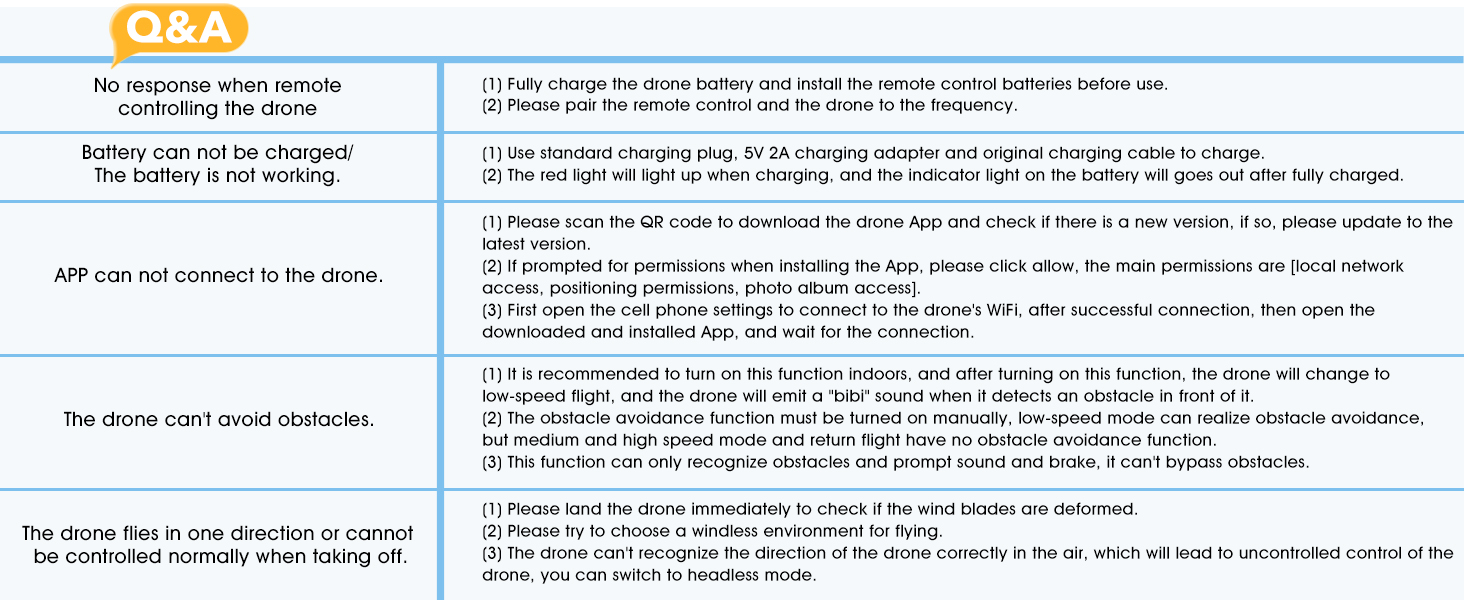
Image: A Q&A table addressing frequently asked questions and troubleshooting steps for the drone.
| Issue | Solution |
|---|---|
| No response when remote controlling the drone |
|
| Battery cannot be charged / The battery is not working |
|
| APP cannot connect to the drone |
|
| The drone cannot avoid obstacles |
|
| The drone flies in one direction or cannot be controlled normally when taking off |
|
7. Specifications
| Feature | Detail |
|---|---|
| Brand | HYTOBP |
| Model Name | M°max |
| Age Range (Description) | Adult |
| Color | Black |
| Video Capture Resolution | 1080p |
| Connectivity Technology | USB |
| Included Components | Battery, Remote Control, USB Cable, User Manual |
| Battery Capacity | 2000 Milliamp Hours |
| Video Capture Format | MP4 |
| Remote Control Technology | RF |
| Control Type | Remote Control |
| Wireless Communication Technology | Radio Frequency (RF) |
| Batteries Included? | Yes |
| Video Output Resolution | 1920x1080 Pixels |
| Includes Remote? | Yes |
| Optical Sensor Technology | CMOS, CCD |
| Includes Rechargeable Battery | Yes |
| Media Type | SD |
| Material | Plastic |
8. Warranty and Support
HYTOBP is committed to providing high-quality products and satisfactory after-sales service to customers worldwide. Our drones are designed for easy operation, safe flight, and long flight times.
8.1 Contact Information
For support or warranty inquiries, please contact us:
- Phone: +1(617)259-4732
- Email: hytobp@htwlkj.net

Image: HYTOBP customer support team ready to assist with inquiries.
Related documentsM°max


Ask a question about this manual
Ask about setup, troubleshooting, compatibility, parts, safety, or missing instructions. Manuals+ will review the question and use this page’s manual context to help answer it.