
Gerrit 3 Pro Plus
Hello Smart Watch 3 Pro Plus User Manual
Model: 3 Pro Plus
Introduction
This manual provides comprehensive instructions for the safe and efficient use of your Hello Smart Watch 3 Pro Plus. Please read this manual thoroughly before operating the device and retain it for future reference. The Hello Smart Watch 3 Pro Plus is an advanced wearable device featuring a 45mm AMOLED display, 4GB of internal storage, NFC capabilities, and Bluetooth calling, designed for seamless integration with both iOS and Android smartphones.
Package Contents
Upon opening the package, please verify that all items are present and in good condition:
- Hello Smart Watch 3 Pro Plus (1 unit)
- Wireless Magnetic Charging Cable (1 unit)
- User Manual (this document)
Product Overview
The Hello Smart Watch 3 Pro Plus is equipped with a high-resolution AMOLED display and a robust set of features for daily use and fitness tracking.
Key Features
- Display: 1.952-inch LTPO AMOLED Full HD screen, 410x502 resolution, 90Hz refresh rate, Always-on display support.
- Processor: A16, high performance with low power consumption.
- Memory: 256MB RAM + 4GB ROM for music, e-books, and more.
- Connectivity: Bluetooth 5.1, NFC.
- Battery: 450mAh Polymer Lithium-ion.
- Sensors: Real compass function, heart rate monitor, temperature sensor.
- Durability: IP68 Waterproof.
- Compatibility: Android 5.0+ and iOS 8.0+.
Physical Components
- Screen: Touch-sensitive AMOLED display.
- Crown/Rotary Button: For navigation and selection.
- Side Button: For power and menu access.
- Strap Lock Buttons: For securing and releasing the strap.
- Microphone: For voice commands and calls.
- Speaker: For audio output.
- Charging Contacts: On the rear for wireless charging.
- Sensors: On the rear for health monitoring.

Figure 1: Front view of the Hello Smart Watch 3 Pro Plus, showcasing its vibrant AMOLED display and sleek design.

Figure 2: Overview of key features including 4GB ROM, Compass, Bluetooth call, Wireless Charge, and IP68 Waterproof rating.
Setup
1. Charging the Device
Before first use, fully charge your smartwatch. Use the provided wireless magnetic charging cable.
- Connect the USB end of the charging cable to a power adapter (5V/1A recommended) or a computer's USB port.
- Place the back of the watch onto the magnetic charging pad. Ensure the charging contacts align correctly. The watch screen will indicate charging status.
- Allow approximately 2-3 hours for a full charge.
2. Power On/Off
- Power On: Press and hold the side button until the screen lights up.
- Power Off: Press and hold the side button, then select "Power Off" from the options on the screen.
3. App Installation (Qifit)
To unlock the full potential of your smartwatch, download and install the "Qifit" application on your smartphone.
- Scan the QR code provided in the watch's initial setup screen or search for "Qifit" in your smartphone's app store (Google Play Store for Android, Apple App Store for iOS).
- Install the application and follow the on-screen prompts to create an account or log in.
4. Pairing with Smartphone (Bluetooth)
Pairing your watch with the Qifit app enables data synchronization, notifications, and Bluetooth calling.
- Ensure Bluetooth is enabled on your smartphone.
- Open the Qifit app. Navigate to the "Device" or "Add Device" section.
- The app will search for nearby devices. Select "Hello Smart Watch 3 Pro Plus" or the corresponding device ID when it appears.
- Confirm the pairing request on both your watch and smartphone.
- For Bluetooth calling functionality, you may need to pair the watch separately as an audio device in your phone's Bluetooth settings (e.g., "Hello Watch Audio").
Operating Instructions
1. Basic Navigation
- Touchscreen: Swipe up, down, left, or right to navigate through menus and screens. Tap to select an item.
- Crown/Rotary Button: Rotate to scroll through lists or zoom in/out. Press to return to the home screen or confirm selection.
- Side Button: Press to access the app list or return to the previous screen. Long press for power options.
2. Bluetooth Calling
Once paired for audio, you can make and receive calls directly from your watch.
- Making Calls: Access the dialer or contacts list on your watch to initiate a call.
- Receiving Calls: When a call comes in, you can answer or reject it from your watch screen.

Figure 3: Illustration of the Bluetooth Calling feature, showing incoming call interface on the watch.
3. Music Playback and Storage
The 4GB ROM allows you to store music directly on your watch.
- Transferring Music: Use the Qifit app to transfer music files from your smartphone to the watch's internal storage.
- Playing Music: Access the music player on your watch. You can play music through the watch's speaker or connect Bluetooth headphones for private listening.

Figure 4: Visual representation of the 4GB ROM, highlighting its capacity for music, photos, and sound recordings.
4. NFC Access Card
The watch supports NFC for access control, simplifying entry to compatible systems.
- Setup: Follow the instructions in the Qifit app to configure NFC access cards. This typically involves registering your watch with a compatible NFC access system.
- Usage: Lift your wrist and tap the watch near the NFC reader to gain access.

Figure 5: Depiction of using the NFC access card feature to unlock a door.
5. Compass Function
The built-in compass provides real-time directional information.
- Accessing: Locate the "Compass" application on your watch.
- Calibration: If prompted, follow the on-screen instructions to calibrate the compass for accurate readings.
6. Sports Modes
The watch supports 173 sports modes to track various physical activities.
- Selecting a Mode: Navigate to the "Workout" or "Sports" app on your watch. Choose your desired activity (e.g., walking, running, cycling).
- Tracking: The watch will record data such as duration, calories burned, and heart rate during your workout.
- Data Sync: Workout data will synchronize with the Qifit app on your smartphone for detailed analysis.
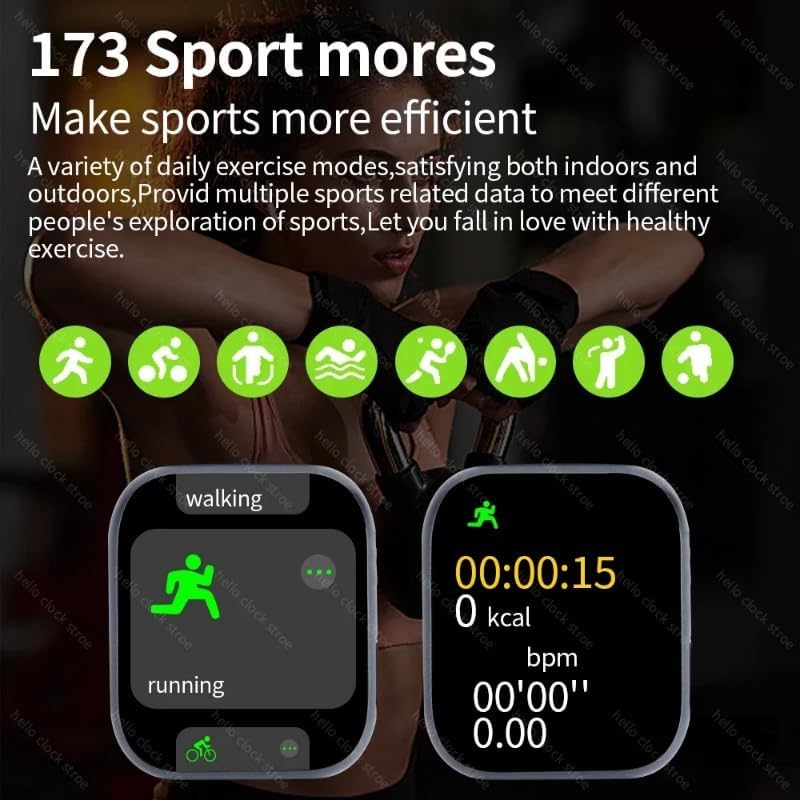
Figure 6: Display showing various sport modes and activity tracking interface.
7. Health Monitoring
The watch provides continuous monitoring of key health metrics.
- Heart Rate: Access the heart rate app to view your current heart rate. Continuous monitoring can be enabled in the Qifit app.
- Temperature: The watch can measure body temperature.
- Sleep Monitoring: Wear the watch to bed to track your sleep patterns and quality.
- Reminders: Set up sedentary reminders and drinking water reminders in the Qifit app.
8. Notifications
Receive notifications from your smartphone directly on your watch.
- Setup: Enable app notifications in the Qifit app settings on your smartphone.
- Viewing: Swipe down from the watch face to view recent notifications. A red dot indicator may appear for unread messages.
9. Customization
Personalize your watch experience.
- Watch Faces: Change watch faces from the watch settings or through the Qifit app. Custom watch faces are supported.
- Shortcut Bar: Customize the shortcut action bar for quick access to frequently used functions.
- Orange Key Function: Assign a custom function to the orange key for quick access.
- App Management: Uninstall certain built-in applications from the watch if desired.
10. E-book Function
Utilize the 4GB ROM to store and read e-books directly on your watch.
- Transferring E-books: Use the Qifit app to transfer e-book files to your watch.
- Reading: Access the e-book reader application on your watch to view your stored books.
Maintenance
1. Cleaning
- Wipe the watch screen and body with a soft, lint-free cloth.
- For stubborn marks, dampen the cloth slightly with water. Avoid using harsh chemicals or abrasive materials.
- Clean the charging contacts regularly to ensure efficient charging.
2. Water Resistance (IP68)
The Hello Smart Watch 3 Pro Plus is IP68 waterproof, meaning it is resistant to dust and can withstand immersion in water up to 1.5 meters for 30 minutes. While it is designed to be water-resistant, it is not recommended for swimming, diving, or high-pressure water activities (e.g., showering with hot water, sauna).
- Avoid exposing the watch to hot water or steam.
- After exposure to water, especially saltwater, rinse the watch with fresh water and dry it thoroughly.
3. Battery Care
- Avoid extreme temperatures, which can affect battery life.
- Charge the watch regularly; avoid letting the battery completely drain for extended periods.
- Use only the provided charging cable.
Troubleshooting
If you encounter issues with your Hello Smart Watch 3 Pro Plus, refer to the following common solutions:
| Problem | Possible Solution |
|---|---|
| Watch does not power on. | Ensure the watch is fully charged. Connect it to the charger for at least 30 minutes. |
| Cannot pair with smartphone. |
|
| Notifications are not received. |
|
| Inaccurate health data. |
|
| Short battery life. |
|
Specifications
| Feature | Detail |
|---|---|
| Brand | Gerrit |
| Model Number | 3 Pro Plus |
| Display Size | 1.952 Inches |
| Display Type | LTPO AMOLED, 410x502 resolution |
| Processor | A16 |
| Storage Capacity | 4 GB ROM |
| Operating System | Android (compatible with Android 5.0+ and iOS 8.0+) |
| Connectivity Technology | Bluetooth 5.1, NFC |
| Battery | 450 mAh Polymer Lithium-ion |
| Water Resistance | IP68 |
| Color | Rose |
| Special Features | Music Player, Compass, Bluetooth Calling, NFC Access Card, E-book Reader, 173 Sport Modes, Heart Rate Monitoring, Temperature Measurement, Sleep Monitoring |
Warranty and Support
For warranty information and technical support, please refer to the documentation provided with your purchase or contact the manufacturer directly. Keep your purchase receipt as proof of purchase for warranty claims.
Manufacturer: Gerrit
Related documents3 Pro Plus


Ask a question about this manual
Ask about setup, troubleshooting, compatibility, parts, safety, or missing instructions. Manuals+ will review the question and use this page’s manual context to help answer it.