
UGREEN DXP480T Plus
UGREEN NASync DXP480T Plus User Manual
Model: DXP480T Plus | Brand: UGREEN
1. Product Overview
The UGREEN NASync DXP480T Plus is a high-performance 4-bay all-flash Network Attached Storage (NAS) device designed for ultra-fast data processing and secure storage. Equipped with a powerful Intel i5 1235u 10-Core CPU and 8GB DDR5 RAM, it offers exceptional speed and efficiency for various applications, from multimedia streaming to professional data management. Its compact and durable aluminum alloy design ensures stable operation and longevity.
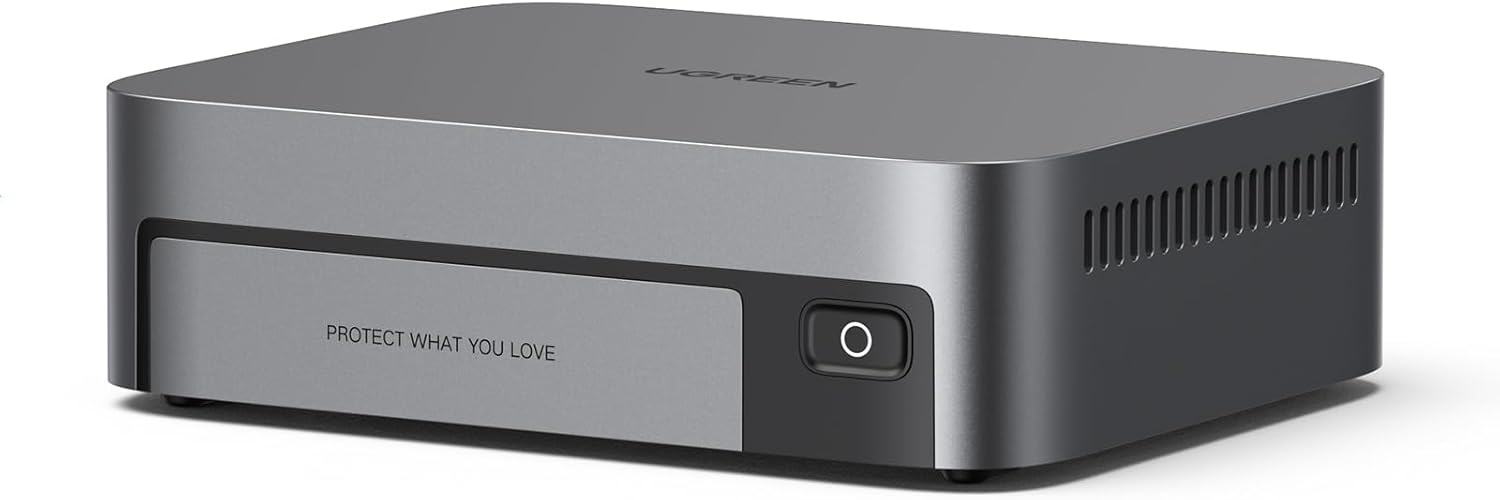
Figure 1.1: UGREEN NASync DXP480T Plus - Front View
Key Features:
- 10GbE Network Port & Wi-Fi 6: Achieves peak speeds of 1250MB/s for rapid data transfers and offers flexible wireless connectivity.
- Unparalleled Processing Performance: Features a 12th Gen, 10-core 12-thread Intel Core i5 Processor for enhanced performance.
- All-Flash, 32TB Massive Data Storage: Four M.2 NVMe slots support up to 32TB capacity with blazing fast read/write speeds. Supports JBOD/Basic/RAID0/RAID1/RAID5/RAID6/RAID10 RAID levels.
- One, All-Inclusive App: Simplifies management with a unified application for Storage Manager, Files, Photos, and more.
- Professional Data Security: Provides local data storage, encryption, and multi-factor authentication for enhanced privacy and security.

Figure 1.2: High-Performance Intel Core i5 Processor

Figure 1.3: All-Flash SSD Bays for Ultra-fast Read/Write

Figure 1.4: Up to 32TB All-Flash Storage Capacity

Figure 1.5: 10GbE Network Port for High-Speed Transfers

Figure 1.6: Dual Thunderbolt 4 Ports for Blazing-fast Data Transmission

Figure 1.7: One, All-Inclusive App for Seamless Operating System

Figure 1.8: Professional Data Security Features
2. Setup Guide
2.1 Package Contents
Before beginning, ensure all items are present in the package:
- NASync DXP480T Plus Unit
- User Manual
- After-sales Card
- Power Adapter
- Ethernet Cable (CAT7)
- SSD Silicone Pads (4x)
- Screws & Screwdriver

Figure 2.1: Package Contents
2.2 Hardware Installation
- Install M.2 NVMe SSDs: Open the drive bay cover. Insert your M.2 NVMe SSDs into the available slots. Secure them with the provided screws and use the silicone pads for proper fit and heat dissipation.
- Connect Power: Connect the power adapter to the NASync DXP480T Plus and then to a power outlet.
- Connect to Network: Use the provided CAT7 Ethernet cable to connect the 10GbE network port on the NAS to your router or network switch.
- Optional: Connect Display: If desired, connect an 8K HDMI compatible display to the HDMI port for direct output.
- Power On: Press the power button on the front of the device.
2.3 Initial Software Setup
Once the hardware is connected, proceed with the software setup:
- Download NAS App: Download the UGREEN NAS App on your computer or mobile device. This app is available for Windows, macOS, iOS, and Android.
- Discover Device: Launch the NAS App and follow the on-screen instructions to discover your NASync DXP480T Plus on your network.
- Initialization: The app will guide you through the initial setup process, including creating user accounts, setting up storage pools (RAID configuration), and updating firmware. It is recommended to upgrade the firmware for the best experience.
3. Operating Instructions
The NASync DXP480T Plus operates on the UGOS Pro System, accessible via the all-inclusive NAS App or web interface.

Figure 3.1: UGOS Pro System Overview
3.1 File Management and Access
Use the Files application within the NAS App to manage your data. You can upload, download, delete, and organize files and folders. Remote access is supported, allowing you to access your files from anywhere.

Figure 3.2: Effective File and Footage Management
3.2 Media Streaming
The NASync DXP480T Plus can serve as a home media library. Stream movies, music, and photos directly to your phones, tablets, PCs, and TVs.

Figure 3.3: Media Streaming Functionality
3.3 Smart Assistant Features
Leverage the integrated smart assistant for enhanced organization:
- Smart Search: Search pictures by text, identifying objects, people, or text within images.
- Recognition & Classification: Automatically categorize photos based on people, pets, and places.

Figure 3.4: Integrated Smart Assistant for Organization
3.4 Remote Access and Collaboration
Access your NASync DXP480T Plus remotely and synchronize files in real-time. This facilitates workflow-integrated team file synchronization for collaborative projects.

Figure 3.5: Remote Access Capabilities

Figure 3.6: Team File Synchronization
3.5 Professional Applications
The NASync DXP480T Plus supports various professional applications, including Docker, and facilitates high-speed file transmission tailored for creators, enabling efficient video and picture editing workflows.

Figure 3.7: Docker Support

Figure 3.8: Video Editing Workflow

Figure 3.9: Picture Editing Workflow
4. Maintenance
Regular maintenance ensures the longevity and optimal performance of your NASync DXP480T Plus.
4.1 Firmware Updates
Periodically check for and install firmware updates via the NAS App. Updates often include performance improvements, new features, and security enhancements.
4.2 Cleaning
Keep the device clean and free from dust. Use a soft, dry cloth for exterior cleaning. Ensure ventilation areas are not obstructed to maintain proper airflow for the smart cooling fan.

Figure 4.1: Smart Cooling Fan System
4.3 Drive Health Monitoring
Utilize the Storage Manager in the NAS App to monitor the health and status of your installed M.2 NVMe SSDs. This helps in proactive identification of potential drive issues.
5. Troubleshooting
This section provides solutions to common issues you might encounter.
5.1 Device Not Powering On
- Ensure the power adapter is securely connected to both the NAS and a working power outlet.
- Verify the power outlet is functional by plugging in another device.
5.2 Cannot Access NAS on Network
- Check if the Ethernet cable is properly connected to both the NAS and your router/switch.
- Ensure your computer or mobile device is on the same network as the NAS.
- Restart your router, NAS, and the device you are using to access the NAS.
- Verify that the NAS App is updated to the latest version.
5.3 Slow Data Transfer Speeds
- Ensure you are using the provided CAT7 Ethernet cable or another high-quality cable capable of 10GbE speeds.
- Check your network infrastructure (router/switch) to ensure it supports 10GbE speeds.
- Verify the health of your SSDs using the Storage Manager.
- Minimize simultaneous large file transfers or network activities during critical operations.
5.4 Overheating Concerns
- Ensure the NAS is placed in a well-ventilated area, away from direct sunlight or heat sources.
- Check that the ventilation grilles are not blocked by objects or dust.
- The smart cooling fan adjusts its speed based on temperature; ensure it is operating correctly.
6. Technical Specifications
| Feature | Description |
|---|---|
| Brand | UGREEN |
| Series | DXP480T Plus |
| Model Number | DXP480T Plus |
| Processor | 12th Gen Intel 10-core i5 1235u CPU |
| RAM | 8GB DDR5 RAM (Expandable) |
| Storage Bays | 4x M.2 NVMe Slots |
| Max Storage Capacity | Up to 32TB (Diskless) |
| RAID Support | JBOD/Basic/RAID0/RAID1/RAID5/RAID6/RAID10 |
| Network Interface | 10GbE Ethernet Port, Wi-Fi 6 |
| Video Output | 8K HDMI |
| Other Ports | 2x Thunderbolt 4 (TBT4), USB 3.2 |
| Item Weight | 4.64 pounds |
| Package Dimensions | 8.25 x 7.6 x 6.25 inches |
| Included Components | NASync DXP480T Plus 4 Bay All-Flash NAS |
7. Warranty and Support
For warranty information, technical support, or further assistance, please refer to the After-sales Card included in your package or visit the official UGREEN website.
You can also find additional resources, including a detailed User Manual (PDF), at the following link: UGREEN NASync DXP480T Plus User Manual (PDF)
7.1 Official Product Video
Video 7.1: Smarter, Faster, Easier Storage Solution with AI. This video provides a visual overview of the NASync DXP480T Plus's features and capabilities, including its user-friendly interface, high-speed file transfers, massive storage, smart recognition, and data security.
Related Documents - DXP480T Plus
 |
UGREEN NAS Troubleshooting Guide and Software Download Comprehensive troubleshooting guide for UGREEN NAS devices, including solutions for power issues and software installation. Find information on the DH2300 and download the UGREEN NAS management application. |
 |
UGREEN NASync DXP480T Plus Network Attached Storage User Manual Comprehensive user manual for the UGREEN NASync DXP480T Plus, detailing setup, installation of M.2 drives and memory modules, network configuration, features, and specifications for this high-performance network-attached storage device. |
 |
UGREEN NASync DXP480T Plus 取扱説明書 UGREEN NASync DXP480T Plus パーソナルクラウドストレージオールフラッシュNAS(ディスクレス)の取扱説明書。製品の概要、設置方法、使用上の注意、仕様などを網羅しています。 |
 |
UGREEN NASync DXP4800 User Manual: Network Attached Storage Guide Explore the UGREEN NASync DXP4800, a powerful 4-bay Network Attached Storage (NAS) device for home and personal use. This user manual provides comprehensive guidance on setup, installation, and management for efficient data storage and access. |
 |
UGREEN NASync DXP480T Plus Network Attached Storage User Manual Comprehensive user manual for the UGREEN NASync DXP480T Plus, detailing setup, installation of M.2 drives and memory modules, network configuration, features, and specifications for this advanced network-attached storage solution. |
 |
UGREEN NASync DXP4800 User Manual: Setup, Installation, and Specifications Comprehensive guide for the UGREEN NASync DXP4800 Personal Cloud Storage. Learn about installation, setup, features, specifications, and precautions for this 4-bay diskless NAS. |