
1. Introduction
The Maclean MC-970W Mobile Monitor/TV Stand offers a flexible solution for positioning your display. This stand is designed for monitors and televisions with screen diagonals from 17 to 35 inches and supports weights between 2 and 10 kg. It features VESA compatibility for 75x75 mm and 100x100 mm mounting patterns. The stand includes a gas spring for smooth height adjustment, integrated cable management, and concealed casters in the base for easy mobility. Constructed from high-quality, powder-coated metal, it provides stability and resistance to corrosion and scratches.

Image 1.1: The Maclean MC-970W Mobile Monitor/TV Stand with a display, showcasing its sleek design and mobility.
2. Safety Information
- Read all instructions carefully before assembly and use.
- Do not exceed the maximum weight capacity of 10 kg (22 lbs).
- Ensure the monitor/TV is securely attached to the VESA plate according to the instructions.
- Keep children and pets away from the assembly area.
- Use caution when moving the stand, especially with a display attached, to prevent tipping.
- Periodically check all screws and connections for tightness and re-tighten if necessary.
- Do not attempt to modify the stand or use it for purposes other than intended.
3. Package Contents
Please verify that all components are present before beginning assembly:
- Maclean MC-970W Mobile Monitor/TV Stand components (base, pole, arm, VESA plate)
- Mounting hardware kit (various screws, washers, spacers for VESA mounting)
- Assembly tools (e.g., Allen keys)
- Illustrated assembly instructions
4. Specifications
| Feature | Detail |
|---|---|
| Brand | Maclean |
| Model | MC-970W |
| Color | White |
| Material | Metal with powder coating |
| Maximum Load Capacity | 2-10 kg (4.4-22 lbs) |
| Screen Size Compatibility | 17-35 inches |
| VESA Compatibility | 75x75 mm, 100x100 mm |
| Total Height | 1140 mm (approx. 44.9 inches) |
| Screen Adjustment | Tilt +90° to -90°, Swivel |
| Base Diameter | 406 mm (approx. 16 inches) |
| Features | Gas spring, cable management, concealed casters |

Image 4.1: Detailed technical drawing showing the dimensions and adjustment capabilities of the MC-970W stand.
5. Setup
Follow these steps to assemble your Maclean MC-970W Mobile Monitor/TV Stand:
- Unpack Components: Carefully remove all parts from the packaging. Refer to the package contents list to ensure all items are present and undamaged.
- Assemble Base: Attach the main vertical pole to the circular base using the provided screws and tools. Ensure all connections are tightened securely for stability.
- Attach VESA Plate: Secure the VESA mounting plate to the adjustable arm mechanism. This plate will connect to your monitor or TV.
- Mount Monitor/TV:
- Identify the VESA mounting holes on the back of your monitor or TV.
- Select the appropriate screws, washers, and spacers from the mounting hardware kit that fit your display.
- Attach the VESA plate assembly to your monitor/TV. Do not overtighten the screws.
- Connect Monitor to Stand: Carefully lift the monitor with the attached VESA plate and slide it onto the stand's arm mechanism. Ensure it clicks securely into place. Double-check the connection before releasing the monitor.
- Cable Management: Route display cables (power, HDMI, etc.) through the integrated cable management clips or channels located along the stand's pole. This helps maintain a tidy appearance and prevents cable damage.
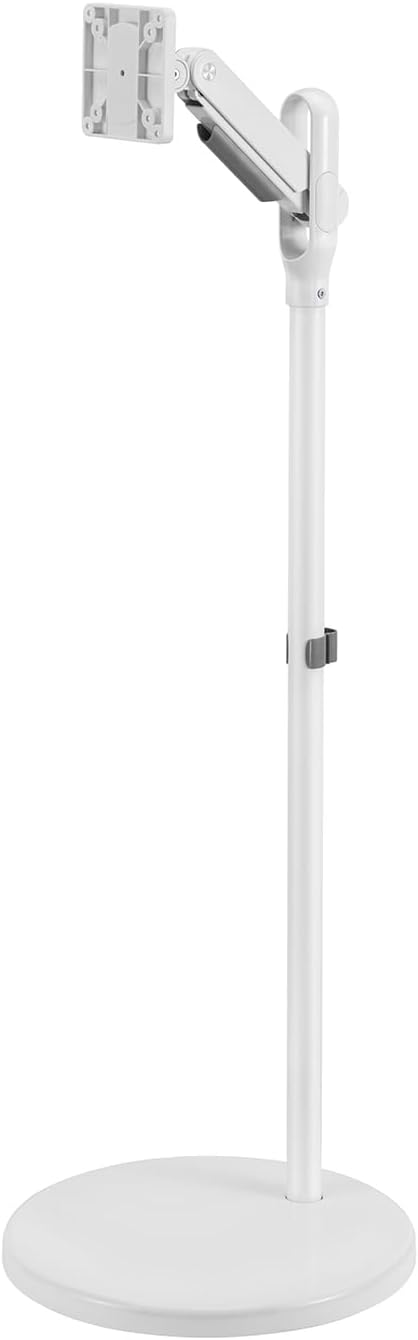
Image 5.1: The stand's VESA mounting plate and adjustable arm, ready for monitor attachment.

Image 5.2: The sturdy base of the stand, featuring concealed casters for easy movement.
6. Operating
The Maclean MC-970W stand offers various adjustments for optimal viewing comfort:
- Adjusting Height: The stand features a gas spring mechanism for effortless height adjustment. To change the height, simply grasp the monitor and gently push it down or pull it up to your desired viewing level. The gas spring will hold the monitor in its new position.
- Tilting the Screen: To adjust the vertical angle of your screen, locate the tilt adjustment knob (or mechanism) on the VESA plate. Loosen it slightly, tilt the screen to your preferred angle (up to +90° or down to -90°), and then tighten the knob to secure the position.
- Swiveling the Screen: The monitor can be swiveled horizontally to change the viewing angle. Gently rotate the screen to the left or right as needed to share content or adjust your perspective.
- Moving the Stand: The base is equipped with concealed casters, allowing for easy relocation. To move the stand, gently push it to the desired spot. Ensure the path is clear of obstacles and the floor surface is stable.

Image 6.1: The stand provides flexibility for various activities, such as gaming, allowing for comfortable viewing positions.

Image 6.2: The stand supports vertical screen orientation, useful for specific applications or content viewing.
7. Maintenance
Proper maintenance ensures the longevity and optimal performance of your stand:
- Cleaning: Wipe the stand with a soft, damp cloth. Avoid using abrasive cleaners, harsh chemicals, or solvents, as these can damage the powder-coated finish.
- Inspection: Periodically inspect all screws, bolts, and connections to ensure they remain tight. Re-tighten any loose fasteners to maintain stability and safety.
- Cable Management: Regularly check that cables are not pinched, strained, or interfering with the stand's movement. Adjust cable routing as needed to prevent damage.
- Caster Care: Keep the casters clean and free of debris to ensure smooth movement.
8. Troubleshooting
If you encounter any issues with your Maclean MC-970W stand, refer to the following common problems and solutions:
| Problem | Possible Cause | Solution |
|---|---|---|
| Stand is unstable or wobbly. | Loose assembly screws; uneven surface; overloaded. | Ensure all assembly screws are tightened securely. Place the stand on a flat, level surface. Verify the monitor weight is within the 2-10 kg range. |
| Monitor does not stay at desired height. | Gas spring tension needs adjustment; monitor weight outside range. | The gas spring tension may need adjustment. Locate the adjustment screw on the arm (refer to the detailed assembly instructions for its exact position) and adjust it to increase or decrease tension. Ensure monitor weight is within 2-10 kg. |
| Difficulty moving the stand. | Casters obstructed; debris on floor; stand overloaded. | Check if the casters are obstructed by debris or carpet. Clean the casters if necessary. Ensure the stand is not overloaded beyond its maximum capacity. |
| Monitor cannot tilt or swivel smoothly. | Adjustment knob too tight; mechanism stiff. | Loosen the tilt adjustment knob slightly. If the mechanism is stiff, apply a small amount of silicone-based lubricant to the moving parts (avoiding electrical components). |
9. Warranty and Support
The Maclean MC-970W Mobile Monitor/TV Stand comes with a 2-year manufacturer's warranty.
For technical support, warranty claims, or replacement parts, please contact Maclean customer service through their official website or your retailer. When contacting support, please have the following information ready:
- Product Model Number: MC-970W
- Date of Purchase
- Proof of Purchase (receipt or order number)
- A detailed description of the issue
Maclean is committed to providing high-quality products and customer satisfaction. We appreciate your purchase.