
1. Introduction
This instruction manual provides essential information for the proper installation, operation, and maintenance of your Balboa Water Group G8460 TP600 Topside Controller. The TP600 is a genuine 6-button control panel designed for use with compatible Balboa spa control systems. Please read this manual thoroughly before attempting any installation or operation.
2. Safety Information
WARNING: Improper installation or use can lead to serious injury or damage to equipment. Always follow these safety guidelines:
- Installation must be performed by a qualified technician in accordance with all local and national electrical codes.
- Disconnect all power to the spa control system before installing or servicing the topside controller.
- Do not attempt to modify the topside controller or its wiring.
- Keep all electrical components dry. Water and electricity are a dangerous combination.
- Ensure the topside controller is securely mounted to prevent accidental dislodgement.
3. Product Overview
The Balboa Water Group G8460 TP600 is an oval-shaped, 6-button topside control panel. It features a clear display and intuitive button layout for managing various spa functions such as jets, lighting, temperature, and mode settings. The controller connects to the main spa pack via a 6-foot cable with a Molex 4-pin connector.
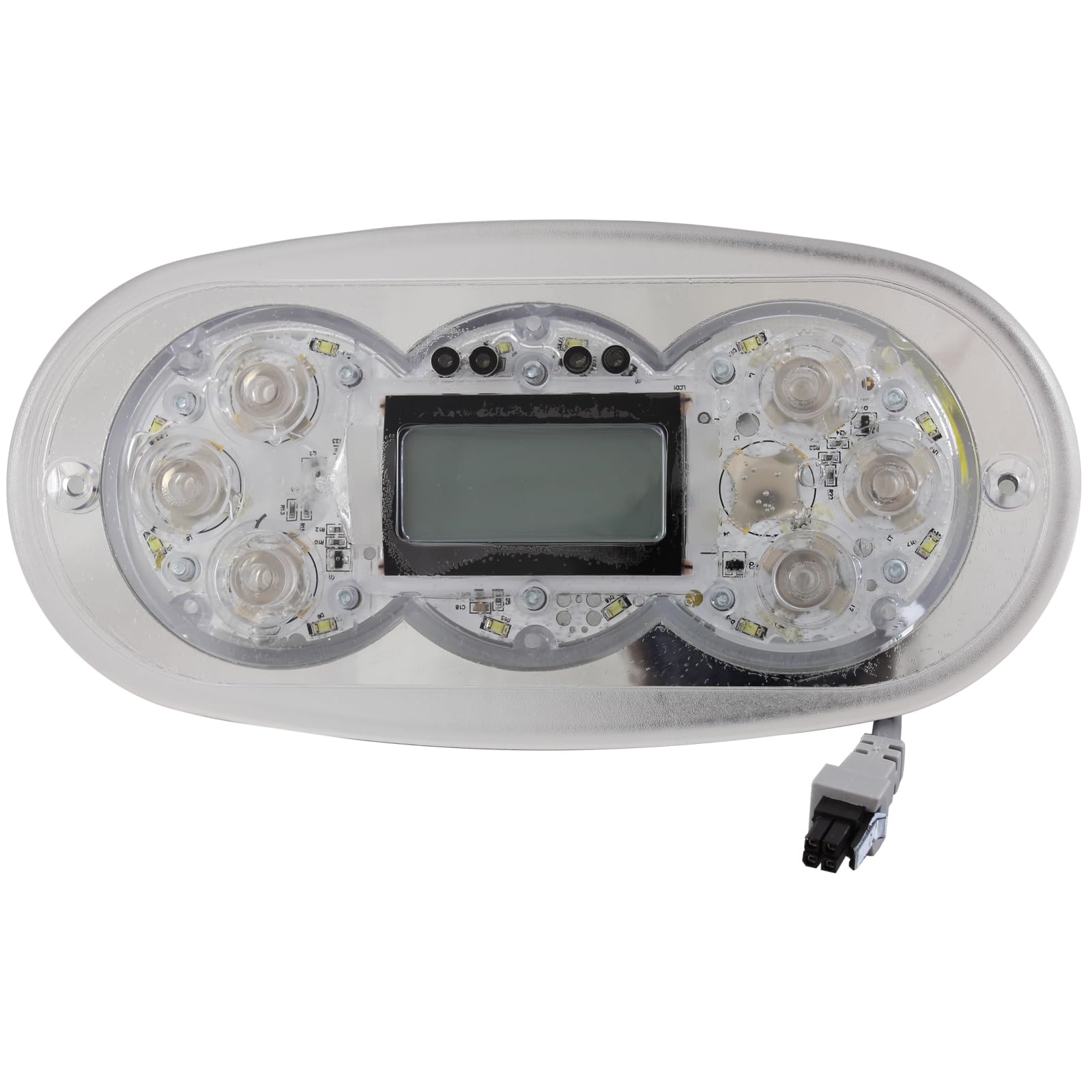
Figure 1: Front view of the Balboa Water Group G8460 TP600 6-button topside controller with its attached Molex 4-pin cable.

Figure 2: Close-up view of the Balboa Water Group TP600 topside controller, highlighting the display and six control buttons.

Figure 3: Rear view of the Balboa Water Group TP600 topside controller, showing the internal circuit board and the Molex 4-pin connector for the cable.
4. Setup and Installation
Installation of the G8460 TP600 topside controller should only be performed by a qualified spa technician. Incorrect installation can void warranties and create safety hazards.
- Power Disconnection: Ensure the main power supply to the spa is completely disconnected at the circuit breaker before beginning installation.
- Remove Old Controller: Carefully remove the existing topside controller from its mounting location. Disconnect its cable from the spa pack.
- Prepare Opening: Clean the mounting surface and ensure the opening is free of debris and compatible with the new TP600 controller's dimensions (7-1/8" x 3-1/2").
- Connect Cable: Route the new TP600 controller's 6-foot cable through the spa cabinet to the main spa pack. Connect the Molex 4-pin connector securely to the designated port on the spa pack. Refer to your spa pack's manual for specific port identification.
- Mount Controller: Insert the new TP600 controller into the prepared opening. Ensure it sits flush and is properly sealed to prevent water ingress. Secure it using the appropriate mounting method (e.g., adhesive backing, clips, or screws, depending on the spa shell design).
- Power Restoration: Once the controller is securely installed and all connections are verified, restore power to the spa at the circuit breaker.
- Initial Test: Power on the spa and test all functions of the topside controller to ensure proper operation.
5. Operating Instructions
The Balboa TP600 topside controller provides intuitive control over your spa's features. While specific functions may vary slightly depending on your spa pack's programming, the general operation is as follows:
- Power Button: Typically used to turn the spa system on or off, or to cycle through modes.
- Jets Buttons: Activate and cycle through different jet pumps (e.g., Jet 1, Jet 2). Pressing multiple times may change speed settings (high/low).
- Light Button: Turns the spa light on/off or cycles through color modes if applicable.
- Temperature Up/Down Buttons: Adjust the desired water temperature. The display will show the set temperature.
- Mode/Program Button: Used to access different operating modes (e.g., Standard, Economy, Sleep) or programming menus. Consult your spa owner's manual for detailed programming instructions.
The display will show the current water temperature, operating mode, and any active functions. Refer to your spa's main owner's manual for detailed explanations of all display icons and advanced programming features.
6. Maintenance
Proper maintenance ensures the longevity and optimal performance of your TP600 topside controller.
- Cleaning: Clean the topside panel regularly with a soft, damp cloth. Do not use abrasive cleaners, solvents, or harsh chemicals, as these can damage the display and buttons.
- Inspection: Periodically inspect the topside controller for any signs of damage, cracks, or loose connections. Ensure the seal around the panel remains intact to prevent water intrusion.
- Cable Integrity: Check the cable for any kinks, cuts, or fraying. If damage is observed, contact a qualified technician for replacement.
7. Troubleshooting
If you experience issues with your TP600 topside controller, consider the following common troubleshooting steps:
- No Power/Blank Display:
- Check if the spa's main power breaker is tripped.
- Verify that the Molex 4-pin connector is securely plugged into the spa pack.
- Consult your spa pack's manual for specific error codes related to power issues.
- Buttons Not Responding:
- Ensure the topside controller is clean and free of debris that might obstruct button presses.
- Try cycling the spa's power off and on at the breaker to reset the system.
- If only specific buttons are unresponsive, the controller may require replacement.
- Incorrect Temperature Reading:
- Verify that the spa's filtration cycle is running correctly, ensuring water circulation past the temperature sensor.
- Check for error codes on the display that might indicate a sensor issue.
For persistent issues or complex problems, it is recommended to contact a qualified spa technician or Balboa Water Group customer support.
8. Specifications
| Model | TP600 |
| Part Number | G8460 |
| Type | Electronic Topside Controller |
| Manufacturer | Balboa Water Group |
| Number of Buttons | 6 |
| Topside Shape | Oval |
| Cord Connector Type | Molex, 4-Pin |
| Cord Length | 6 feet (approx. 1.83 meters) |
| Panel Size | 7-1/8" x 3-1/2" (approx. 18.1 cm x 8.9 cm) |
9. Warranty and Support
For warranty information, please refer to the documentation provided with your original spa purchase or contact your spa manufacturer. For technical support regarding the Balboa Water Group G8460 TP600 topside controller, please contact Balboa Water Group customer service or your authorized dealer. Ensure you have your product model and part number (G8460) available when seeking support.


