1. Introduction
Thank you for choosing the EENOUR D18 Portable Car Refrigerator and DB01 Battery. This manual provides essential information for the safe and efficient operation, maintenance, and troubleshooting of your new appliance. Please read it thoroughly before use and retain it for future reference.
The EENOUR D18 is a versatile portable refrigerator/freezer designed for various applications, including RVs, trucks, camping, and boating. It offers a 19-quart (18-liter) capacity and can operate as both a refrigerator and a freezer, maintaining temperatures from -4°F to 50°F (-20°C to 10°C). When paired with the optional DB01 battery, it provides extended off-grid cooling capabilities.
2. Safety Instructions
- Ensure the power supply voltage matches the specifications of the appliance.
- Do not operate the refrigerator if the power cord is damaged or if the appliance shows signs of malfunction.
- Keep ventilation openings clear of obstructions to ensure proper airflow.
- Avoid placing the refrigerator in direct sunlight or near heat sources.
- Do not immerse the appliance in water or expose it to heavy rain.
- Always disconnect power before cleaning or performing maintenance.
- Keep out of reach of children.
- When using in a vehicle, secure the refrigerator to prevent movement during transit.
- After unpacking, allow the unit to stand upright for at least 6 hours before connecting to power to allow refrigerants to settle.
3. Package Contents
Verify that all items are present in the package:
- EENOUR D18 Portable Car Refrigerator
- DB01 171Wh/15600mAh Battery (Included with this specific package)
- AC Power Adapter (110-240V)
- DC Power Cord (12/24V)
- User Manual

Figure 3.1: EENOUR D18 and included components. Note: DB01 Battery is included with this specific product offering.
4. Product Overview
Familiarize yourself with the main parts of your EENOUR D18 portable refrigerator.

Figure 4.1: Main components of the EENOUR D18 refrigerator.
- Control & Display Panel: Used to adjust settings and monitor status.
- Ventilation Openings: Essential for proper heat dissipation. Keep clear.
- Battery Installation Area: Slot for the optional DB01 battery.
- Solar Panel Input: Port for connecting a solar panel (DC5521 plug recommended).
- AC/DC Power Input: Port for connecting AC or DC power cords.
- Strong Handle: For easy portability.
- Cup Slot: Integrated into the lid for convenience.
- Reversible Door: The lid can be opened from either side.
- LED Light: Illuminates the interior when the lid is open.
- Drain Hole: For easy cleaning and water removal.
- Corner Protectors: Provide added durability and protection.


5. Setup
- Unpacking: Carefully remove the refrigerator from its packaging. Retain packaging materials for future transport or storage.
- Initial Placement: Place the refrigerator on a flat, stable surface. Ensure adequate ventilation around the unit, especially near the ventilation openings.
- Settling Period: After transport, allow the refrigerator to stand upright for at least 6 hours before connecting it to any power source. This allows the compressor oil and refrigerant to settle, preventing potential damage.
- Power Connection: Choose your desired power source (AC, DC, or battery) and connect the appropriate cable. Refer to the 'Power Options' section for detailed instructions.
- Battery Installation (if applicable): If using the DB01 battery, slide it into the designated battery installation area until it clicks into place.
6. Operating Instructions
6.1 Control Panel
The control panel allows you to manage the refrigerator's settings. It typically includes a power button, setting button, and temperature adjustment buttons.

Figure 6.1: EENOUR D18 Control Panel.
6.2 Power On/Off
- Press the Power Button () to turn the unit on or off.
6.3 Temperature Setting
- Use the + and - buttons to adjust the desired temperature. The display will show the set temperature.
- The temperature range is from -4°F to 50°F (-20°C to 10°C).
6.4 Cooling Modes (MAX/ECO)
The refrigerator offers two cooling modes:
- MAX Mode: Provides faster cooling with a power consumption of approximately 38W. Ideal for quickly reaching the desired temperature.
- ECO Mode: Optimizes for power saving with a consumption of approximately 25W. Suitable for maintaining temperature over longer periods, especially when battery powered.
To switch between modes, press the Settings Button () repeatedly until the desired mode is displayed.

Figure 6.2: Power consumption comparison between ECO and MAX modes.
6.5 3-Level Vehicle Battery Protection
This feature prevents your vehicle's battery from being depleted when the refrigerator is powered by the car. You can select one of three protection levels:
- High: Retains the most power for your vehicle's battery. The refrigerator will shut off at a higher voltage threshold.
- Medium: A balanced setting.
- Low: Allows the refrigerator to run longer, but with less reserve power for your vehicle's battery.
To adjust the battery protection level, press and hold the Settings Button () until the battery icon flashes, then use the + or - buttons to select the desired level.

Figure 6.3: 3-Level Vehicle Battery Protection.
7. Power Options
The EENOUR D18 offers flexible power options to suit various environments:
- DC 12/24V Car Cigarette Lighter: Connect using the provided DC power cord for in-vehicle use.
- Household AC 110-240V Outlet: Use the AC power adapter for home or shore power.
- DB01 Battery: For portable, off-grid operation. The battery provides approximately 24 hours of cooling at 32°F (0°C) or 11 hours at -4°F (-20°C).
- Solar Panel Charging: When the DB01 battery is installed, you can charge the battery and power the refrigerator simultaneously using a solar panel (100W solar panel with a DC5521 plug recommended).
- Charging via Car/AC: The DB01 battery can also be charged while installed in the refrigerator when the unit is connected to a car cigarette lighter or household AC outlet.

Figure 7.1: Compatible power sources for the EENOUR D18.
8. DB01 Battery Usage
8.1 Battery Installation and Removal
- To install, align the DB01 battery with the battery slot on the side of the refrigerator and slide it in until it locks securely.
- To remove, press the release button (if present) and slide the battery out.
8.2 Charging External Devices
The DB01 battery features built-in output ports for charging mobile devices:
- Type-C Output/Input (PD3.0, Max 60W): For fast charging compatible devices or charging the battery itself.
- USB Output (QC3.0, Max 18W): For charging standard USB devices.

Figure 8.1: DB01 battery charging mobile devices.
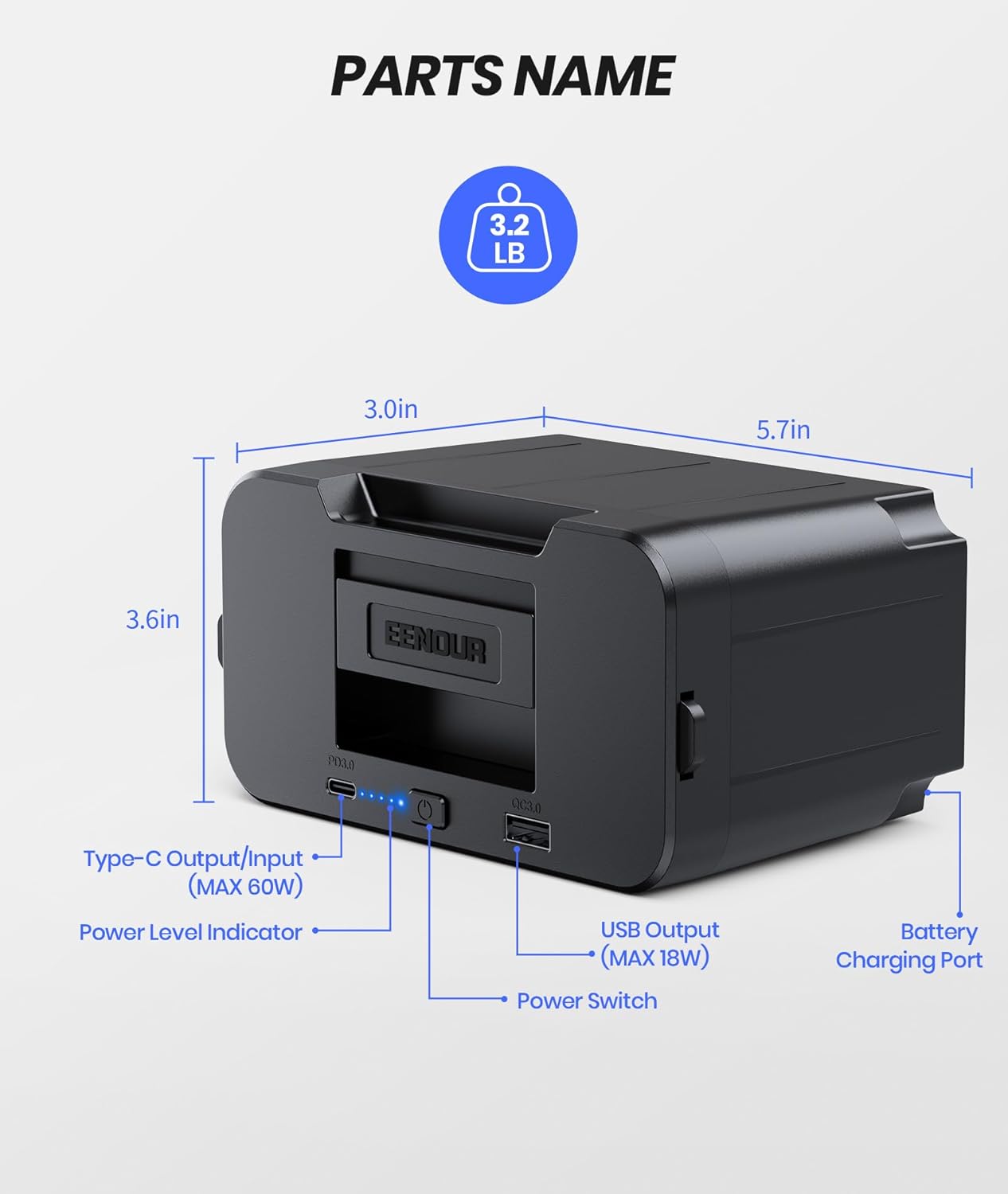
Figure 8.2: DB01 Battery parts and dimensions.
9. Cooling Performance
The EENOUR D18 features a powerful fluorine-free compressor for rapid cooling and thickened EPDM insulation for efficient temperature retention.
- Fast Cooling: Cools from 77°F (25°C) to 32°F (0°C) in approximately 10 minutes, and from 77°F (25°C) to -4°F (-20°C) in approximately 25 minutes (based on an empty box and 77°F ambient temperature).
- Excellent Insulation: The 2-inch thick EPDM interior provides superior insulation, allowing the unit to maintain coolness for several hours even when powered off.
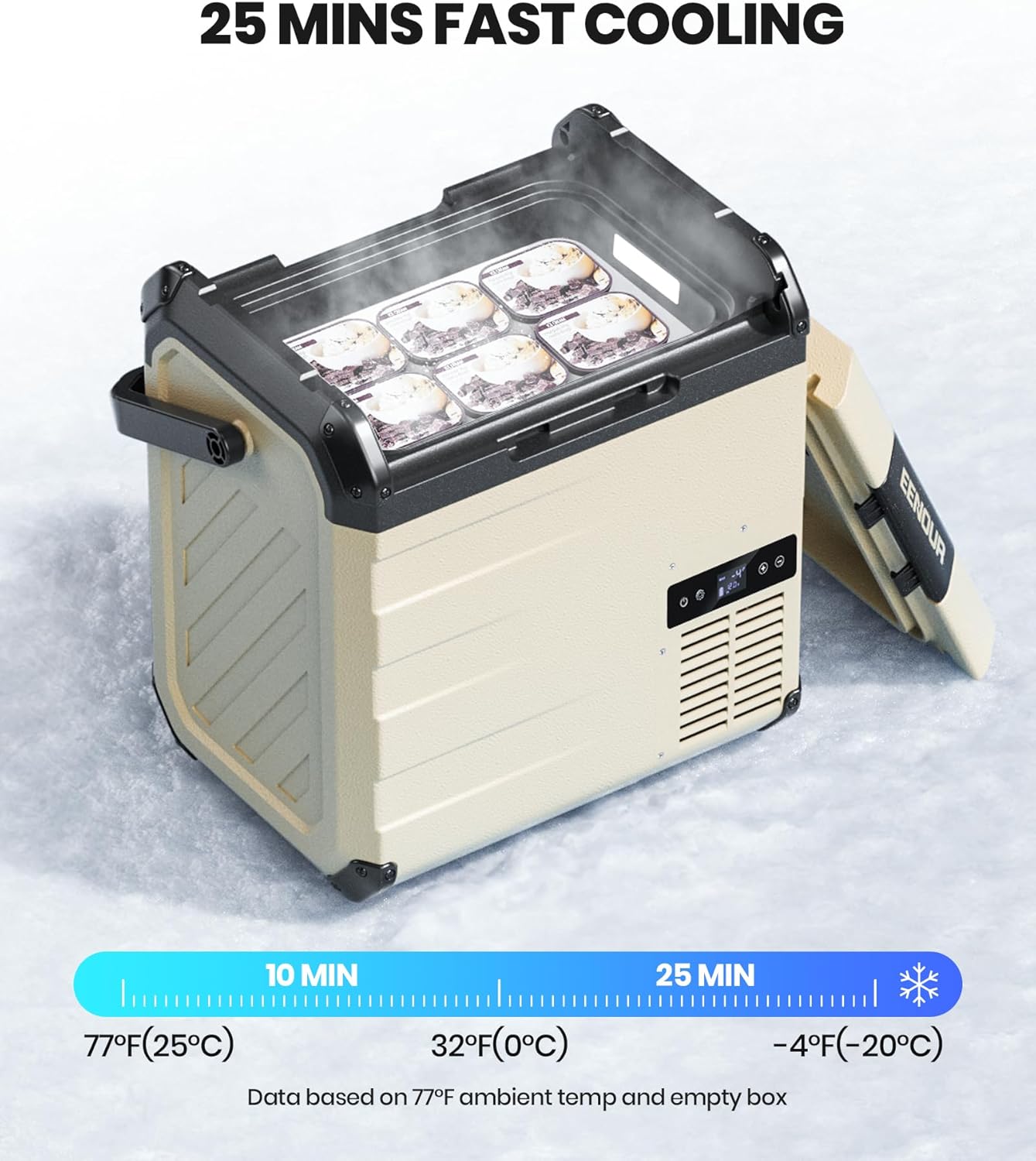
Figure 9.1: Fast cooling performance of the EENOUR D18.

Figure 9.2: Cooling speed comparison.
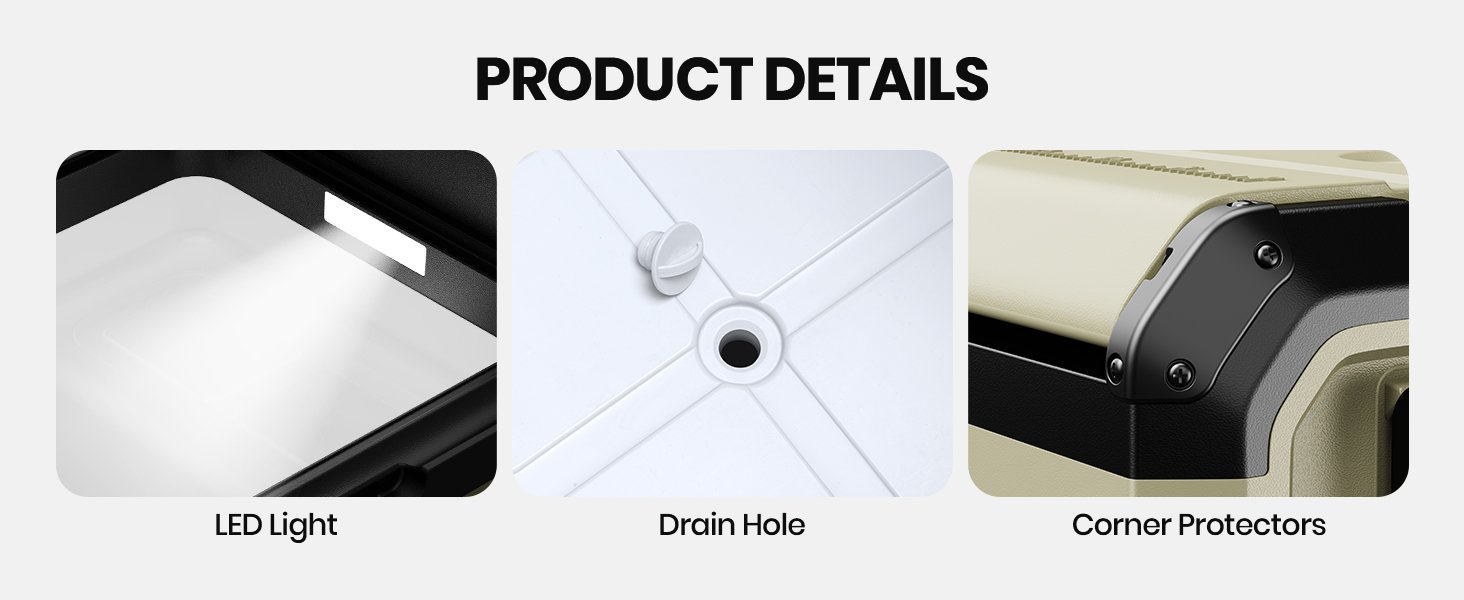
Figure 9.3: EPDM insulation material comparison.
10. Maintenance
10.1 Cleaning
- Always disconnect the power supply before cleaning.
- Wipe the interior and exterior surfaces with a damp cloth and mild detergent.
- Do not use abrasive cleaners or harsh chemicals.
- Use the drain hole to remove any accumulated water from the interior.
- Ensure all parts are dry before reconnecting power.
10.2 Storage
- If storing for an extended period, ensure the refrigerator is clean and dry.
- Leave the lid slightly ajar to prevent odors and mold growth.
- Store in a dry, well-ventilated area, away from direct sunlight and extreme temperatures.
11. Troubleshooting
If you encounter issues with your EENOUR D18, refer to the following common problems and solutions:
| Problem | Possible Cause | Solution |
|---|---|---|
| Refrigerator not turning on | No power supply; Damaged power cord; Battery depleted; Unit not settled after transport. | Check power connection; Replace damaged cord; Charge battery; Allow 6 hours for unit to settle before use. |
| Not cooling effectively | Ventilation blocked; Door not sealed properly; Ambient temperature too high; ECO mode selected; Insufficient power. | Clear vents; Ensure lid is closed tightly; Move to cooler area; Switch to MAX mode; Check power source. |
| Display error codes | Internal fault; Sensor issue. | Refer to the full manual for specific error code meanings or contact customer support. |
| Excessive noise | Unit not level; Fan obstruction; Normal compressor operation. | Place on a level surface; Check for obstructions in fan area; Some noise is normal during cooling cycles. |
| Vehicle battery protection activating too soon | Battery protection level set too high. | Adjust battery protection level to Medium or Low (see Section 6.5). |
12. Specifications
| Feature | Specification |
|---|---|
| Brand | EENOUR |
| Model | D18 |
| Capacity | 19 Quarts (18 Liters) |
| Temperature Range | -4°F to 50°F (-20°C to 10°C) |
| Power Input | DC 12V/24V, AC 110-240V, DB01 Battery, Solar Panel |
| Cooling Modes | MAX (38W), ECO (25W) |
| Insulation Material | Ethylene Propylene Diene Monomer (EPDM) |
| Product Dimensions (D x W x H) | 12.2" x 16.1" x 17.3" |
| DB01 Battery Capacity | 171Wh / 15600mAh |
| DB01 Battery Output | Type-C (PD3.0, Max 60W), USB (QC3.0, Max 18W) |
| Special Features | Portable, 3-Level Vehicle Battery Protection, LED Interior Light, Drain Hole, Reversible Door, Corner Protectors |
13. Warranty and Support
EENOUR products are designed for reliability and performance. For warranty information, technical support, or service inquiries, please refer to the warranty card included with your product or visit the official EENOUR website. Please have your model number (D18) and purchase date available when contacting support.


