
Jonsbo N4 white
Contents
JONSBO N4 White NAS PC Case User Manual
Model: N4 White
1. Product Overview
The JONSBO N4 series NAS mini case is designed for home office, network storage, and enterprise storage applications. This Micro ATX/ITX PC server case facilitates the convenient building of personal or home servers. It features an innovative upper and lower compartment structure, supporting MATX motherboards and half-height expansion cards. The front panel incorporates North American walnut veneer accents, providing both aesthetic appeal and functional ventilation for heat dissipation. The hard drive compartment is engineered to accommodate up to 8 disks, including hot-swappable bays, and the front panel includes a USB 3.2 Gen 2 Type-C port for high-speed data transmission.

Figure 1.1: Angled view of the JONSBO N4 White NAS PC Case, showcasing its compact design and walnut wood panel.

Figure 1.2: Overview of the JONSBO N4 NAS chassis, emphasizing its dual-compartment structure and aesthetic design.
2. Key Features
- 8-Drive Bay Configuration: Supports 6 x 3.5" HDDs (4 hot-swap, 2 non-hot-swap) and 2 x 2.5" SSDs.
- Solid Wood Panel: Features an 8mm thick North American black walnut solid wood panel for a natural texture and integrated home aesthetic.
- Dual Compartment Design: Split top and bottom compartments. The motherboard compartment supports MATX motherboards and half-height expansion cards, along with downdraft coolers.
- Motherboard Compatibility: Supports ITX and Micro-ATX motherboards.
- PSU Support: Compatible with SFX power supplies up to 125mm in length.
- CPU Cooler Clearance: Supports CPU coolers up to 70mm in height.
- GPU Support: Accommodates GPUs up to 230mm in length.
- Cooling System: Includes one built-in 120mm fan for efficient cooling.
- Front I/O: Equipped with 1 x USB 3.2 Gen 2 Type-C and 1 x USB 3.0 port.
- PCI Expansion Slots: Features 4 low-profile PCI expansion slots for versatile card installation.

Figure 2.1: Illustration of the JONSBO N4's large storage capacity with 8 drive bays.

Figure 2.2: The innovative upper and lower compartment structure for optimized component placement.
3. Setup Guide
Follow these steps to assemble your JONSBO N4 NAS PC Case:
- Prepare the Case: Carefully unbox the JONSBO N4 case. Remove any protective films or packaging materials.
- Install Motherboard: Open the top compartment of the case. Secure your ITX or Micro-ATX motherboard into the designated standoffs. Ensure all screws are tightened appropriately.
- Install CPU Cooler: Install your CPU cooler (maximum height 70mm) onto the motherboard before or after installing the motherboard, depending on the cooler type and case access.
- Install Power Supply (PSU): Install your SFX power supply (maximum length 125mm) into its dedicated bay, typically in the lower compartment. Route the necessary cables to the motherboard and drive bays. Modular PSUs are highly recommended for easier cable management in this compact case.
- Install Storage Drives:
- Hot-Swap 3.5" HDDs: Insert up to four 3.5" HDDs into the hot-swap bays on the left side. Ensure they click into place.
- Non-Hot-Swap 3.5" HDDs: Install up to two 3.5" HDDs into the non-hot-swap bays on the right side. These will require manual connection of SATA data and power cables.
- 2.5" SSDs: Mount up to two 2.5" SSDs in their designated non-hot-swap locations, also requiring manual cable connections.
- Install Expansion Cards: If using, install low-profile PCI expansion cards (e.g., GPU, network card) into the 4 available slots. Ensure they are securely seated and screwed into place.
- Cable Management: Route all power and data cables neatly to ensure proper airflow and ease of future maintenance. Utilize cable ties or straps if provided.
- Connect Front I/O: Connect the front panel USB 3.2 Gen 2 Type-C and USB 3.0 cables to their respective headers on the motherboard.
- Final Checks: Before closing the case, double-check all connections to ensure they are secure.
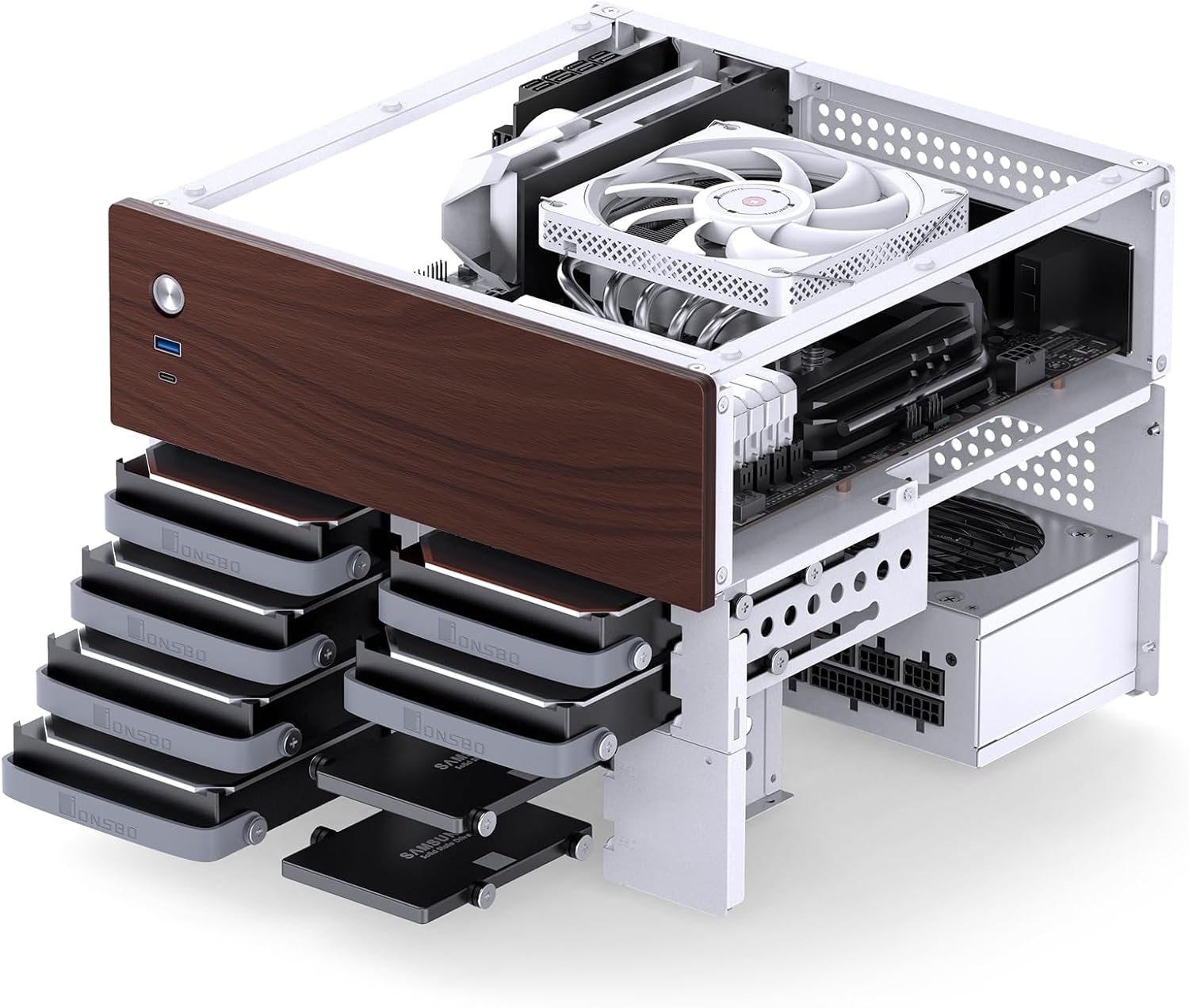
Figure 3.1: Internal layout showing drive bays and component areas.

Figure 3.2: Illustration of PSU and hard drive installation areas.
4. Operating Instructions
Once assembled, the JONSBO N4 functions as a standard PC case for your NAS or server build. Here are some operational considerations:
- Power On/Off: Use the power button on the front panel to turn the system on or off. Ensure all components are properly installed and connected before initial power-up.
- Hot-Swap Drive Usage: The four 3.5" bays on the left side support hot-swapping. This means drives can be inserted or removed while the system is running, provided your operating system and motherboard support hot-swap functionality and the drives are properly unmounted/ejected before removal. Refer to your operating system's documentation for safe hot-swap procedures.
- Front I/O Ports: Utilize the front USB 3.2 Gen 2 Type-C and USB 3.0 ports for convenient connection of external devices such as USB drives, keyboards, or mice.
5. Maintenance
Regular maintenance helps ensure the longevity and optimal performance of your JONSBO N4 case and its components:
- Dust Cleaning: Periodically clean dust from the case's ventilation holes and internal components. Use compressed air or a soft brush. Ensure the system is powered off and unplugged before cleaning.
- Fan Maintenance: Check the built-in 120mm fan for dust buildup and ensure it spins freely. Clean as necessary. If the fan becomes noisy or stops working, consider replacing it.
- Cable Management Check: Occasionally inspect internal cables to ensure they remain neatly routed and do not obstruct airflow.
- Exterior Cleaning: Wipe the exterior surfaces, including the walnut wood panel, with a soft, dry cloth. Avoid harsh chemicals that could damage the finish.
6. Troubleshooting
Here are some common issues and potential solutions:
- System Not Powering On:
- Ensure the PSU is properly connected to the wall outlet and the power switch on the PSU is in the 'On' position.
- Verify all internal power cables (24-pin ATX, CPU 8-pin, GPU, SATA) are securely connected.
- Check the front panel power button connection to the motherboard.
- Excessive Fan Noise:
- Inspect the built-in 120mm fan for dust buildup or obstructions. Clean if necessary.
- Ensure the fan is securely mounted and not vibrating against the case.
- If the fan has a pronounced wobble or persistent noise, consider replacing it with a higher quality fan.
- Drives Not Detected:
- For non-hot-swap drives, ensure both SATA data and power cables are firmly connected.
- For hot-swap drives, ensure they are fully seated in their bays. Verify that hot-swap functionality is enabled in your motherboard's BIOS/UEFI settings.
- Check SATA port connections on the motherboard.
- Limited Space for Components:
- The case is compact. Ensure your chosen CPU cooler (max 70mm), PSU (max 125mm SFX), and GPU (max 230mm) adhere to the specified dimensions.
- Careful cable management is crucial to avoid obstructing airflow and component installation.
7. Specifications

Figure 7.1: Detailed specifications of the JONSBO N4 NAS PC Case.
| Feature | Specification |
|---|---|
| Model Name | JONSBO N4 |
| Dimensions (W x D x H) | 286mm x 300mm x 228mm (11.26 x 11.8 x 8.98 inches) |
| Material | 0.7SGCC steel plate + Dark walnut wood |
| Hard Drive Bays | 6 x 3.5" HDD (4 hot-swap, 2 non-hot-swap), 2 x 2.5" SSD |
| Compatible Motherboard | ITX / Micro-ATX |
| PCI Expansion Slots | 4 slots (low-profile) |
| Front I/O | 1 x USB 3.2 Gen 2 Type-C, 1 x USB 3.0 |
| Power Supply Support | SFX (max 125mm length) |
| CPU Cooler Height | Max 70mm |
| GPU Length Support | Max 230mm |
| Cooling System | 1 x 120mm fan (built-in) |
| Item Weight | 10.38 pounds (approx. 4.71 kg) |
8. Warranty and Support
For warranty information and customer support, please refer to the documentation provided with your purchase or visit the official JONSBO website. Typically, products are covered by a manufacturer's warranty against defects in materials and workmanship.
Return Policy: This product is generally eligible for a refund or replacement within 30 days of purchase, subject to the retailer's specific return policy.
For additional resources and product information, you may visit the Jonsbo Store on Amazon.
Ask a question about this manual
Ask about setup, troubleshooting, compatibility, parts, safety, or missing instructions. Manuals+ will review the question and use this page’s manual context to help answer it.