
1. Introduction
Thank you for purchasing the HOMCOM Tower Fan. This manual provides important information regarding the assembly, operation, maintenance, and safety of your new fan. Please read this manual thoroughly before use and retain it for future reference.

Image 1.1: The HOMCOM Tower Fan operating in a living room, illustrating its cooling effect.
2. Safety Instructions
To reduce the risk of fire, electric shock, or injury, always follow these basic safety precautions:
- Ensure the power supply matches the voltage specified on the fan's rating label.
- Do not operate the fan with a damaged cord or plug. If the cord is damaged, it must be replaced by the manufacturer, its service agent, or similarly qualified persons to avoid a hazard.
- Keep the fan away from water or other liquids. Do not immerse the fan in water.
- Do not insert fingers or foreign objects into the grille while the fan is operating.
- Unplug the fan from the outlet when not in use, when moving it from one location to another, and before cleaning.
- This appliance is not intended for use by persons (including children) with reduced physical, sensory or mental capabilities, or lack of experience and knowledge, unless they have been given supervision or instruction concerning use of the appliance by a person responsible for their safety.
- Children should be supervised to ensure that they do not play with the appliance.
- Do not use the fan outdoors or in wet conditions.
- Place the fan on a stable, flat surface to prevent it from tipping over.
3. Package Contents
Please check the package contents upon opening. If any items are missing or damaged, contact your retailer.
- HOMCOM Tower Fan Unit
- Remote Control
- User Manual (this document)
4. Product Features
The HOMCOM Tower Fan is designed to provide efficient and customizable cooling for your space. Key features include:
- Multiple Speed Settings: Choose from 3 fan speeds (Low, Medium, High) to suit your comfort needs.
- Two Operating Modes: Select between Normal mode for continuous airflow and Night mode for quieter operation.
- Wide Oscillation: An 85° oscillation function ensures broad air distribution across the room.
- Programmable Timer: Set the fan to operate for up to 15 hours with the integrated timer.
- Convenient Remote Control: Adjust settings from a distance of up to 5 meters.
- LED Display: Clear display for easy monitoring of current settings.
- Integrated Handle: For easy portability and relocation.

Image 4.1: Three fan speed options for customized airflow.

Image 4.2: Two operating modes, Sleep and Normal, for personalized cooling.

Image 4.3: The 85° oscillation feature for wide area cooling.

Image 4.4: The 15-hour timer function for scheduled operation.
5. Setup
The HOMCOM Tower Fan requires minimal assembly. Follow these steps to set up your fan:
- Unpack: Carefully remove all components from the packaging.
- Base Assembly: Attach the base to the main fan unit. Ensure it is securely fastened according to the diagrams provided in the packaging. Typically, this involves aligning the base with the bottom of the fan and twisting or screwing it into place.
- Placement: Place the fan on a firm, level surface. Ensure there is adequate space around the fan for optimal airflow and oscillation.
- Power Connection: Plug the power cord into a standard electrical outlet.
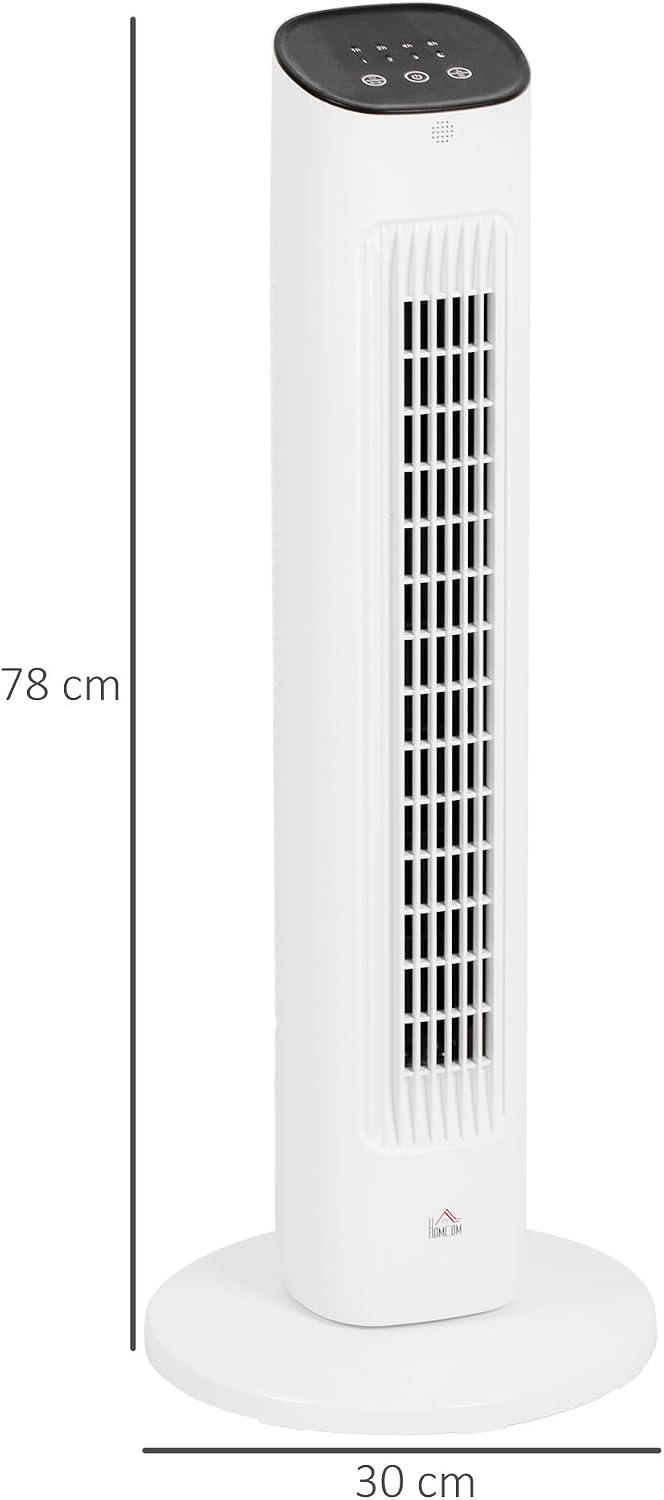
Image 5.1: Fan dimensions for proper placement consideration.
6. Operating Instructions
Your HOMCOM Tower Fan can be operated using the control panel on top of the unit or the included remote control.

Image 6.1: Control panel on top of the fan unit.
6.1 Control Panel & Remote Control Functions
- Power Button (⏻): Press to turn the fan ON or OFF.
- Speed Button (1, 2, 3): Press to cycle through Low (1), Medium (2), and High (3) fan speeds.
- Mode Button (☽): Press to switch between Normal and Night modes. Night mode provides a quieter operation.
- Oscillation Button (↻): Press to activate or deactivate the 85° oscillation function.
- Timer Button (1h, 2h, 4h, 8h): Press repeatedly to set the desired operating time from 1 to 15 hours. The LED display will show the selected duration.
6.2 Remote Control Usage
The remote control allows you to operate all functions of the fan from a distance. Ensure the remote control has working batteries and is pointed towards the fan's receiver.
- Insert 2x AAA batteries (not included) into the remote control.
- The buttons on the remote control correspond to the functions on the fan's control panel.
7. Maintenance
Regular cleaning and maintenance will ensure the longevity and optimal performance of your fan.
- Before Cleaning: Always unplug the fan from the power outlet before cleaning.
- Exterior Cleaning: Wipe the exterior surfaces of the fan with a soft, damp cloth. Do not use abrasive cleaners or solvents, as these may damage the finish.
- Air Filter Cleaning: The fan is equipped with an air filter. Periodically clean the air filter to maintain efficient airflow. Refer to Image 7.1 for the location of the air filter and handle. Gently remove the filter (if detachable) and clean it with a soft brush or vacuum cleaner. Reinstall the filter securely.
- Storage: When not in use for extended periods, store the fan in a cool, dry place, preferably in its original packaging.

Image 7.1: Location of the handle and air filter for maintenance.
8. Troubleshooting
If you encounter any issues with your HOMCOM Tower Fan, refer to the following common problems and solutions:
| Problem | Possible Cause | Solution |
|---|---|---|
| Fan does not turn on. | Not plugged in; power outlet not working; power button not pressed. | Ensure the fan is securely plugged into a working outlet. Press the power button. |
| Fan is not oscillating. | Oscillation function is not activated. | Press the oscillation button on the control panel or remote control. |
| Remote control is not working. | Batteries are dead or incorrectly inserted; remote is too far or not pointed at the receiver. | Replace batteries. Ensure correct polarity. Point the remote directly at the fan. Reduce distance. |
| Weak airflow. | Air filter is dirty; fan speed is set too low. | Clean the air filter (refer to Section 7). Increase the fan speed setting. |
| Unusual noise. | Fan is not on a level surface; foreign object inside the fan. | Place the fan on a stable, flat surface. Unplug the fan and carefully check for any obstructions. |
9. Specifications
Detailed technical specifications for the HOMCOM Tower Fan Model 824-068V90WT:
| Brand | HOMCOM |
| Model Number | 824-068V90WT |
| Color | White |
| Dimensions (D x W x H) | 30P x 30l x 78H cm (Ø30 x 78A cm) |
| Weight | 3 kg |
| Power Source | Corded Electric |
| Wattage | 50 Watts |
| Voltage | 240 Volts |
| Number of Speeds | 3 |
| Operating Modes | 2 (Normal, Night) |
| Oscillation Angle | 85° |
| Timer | 1 to 15 hours |
| Noise Level | 56 Decibels |
| Control Type | Remote Control, Push Button |
| Material | Plastic |
| Certifications | CE |
10. Warranty and Support
HOMCOM products are manufactured to high-quality standards. For information regarding warranty coverage, please refer to the warranty card included with your purchase or contact your retailer. For technical support or service inquiries, please contact HOMCOM customer service through their official website or the contact information provided by your retailer.
Please have your model number (824-068V90WT) and purchase date ready when contacting support.


