
1. Product Overview
The RIVIERA Tilt TV Wall Mount (Model HT-002) is designed to securely hold 32-inch to 55-inch LED/LCD televisions and monitors, with a maximum weight capacity of 66 lbs (30 kg). This mount features a low-profile design, keeping your TV just 1.2 inches from the wall, and offers a tilting range of -5 to +15 degrees to optimize viewing angles and reduce glare. It is compatible with various VESA patterns from 100x100mm up to 400x400mm and can be installed on wood stud, concrete, and brick walls.

Figure 1.1: RIVIERA Tilt TV Wall Mount (Model HT-002)
2. Safety Information
- Read all instructions carefully before installation. If you have any doubts, consult a qualified installer.
- Ensure the wall structure can safely support the combined weight of the mount and your TV. This mount is rated for TVs up to 66 lbs (30 kg).
- Do not install on drywall alone. This mount requires installation into wood studs, concrete, or brick walls.
- Verify the VESA pattern and weight of your TV are within the mount's specifications before proceeding.
- Use all provided hardware. Do not substitute parts unless explicitly instructed.
- Keep children and pets away during installation.
- Periodically check all connections and fasteners to ensure they remain secure.
3. Package Contents
Please verify that all components are present and undamaged before beginning installation. Refer to the included hardware bag for specific quantities.
- Wall Plate Assembly
- TV Bracket Arms (2x)
- Mounting Hardware Kit (screws, anchors, washers, spacers)
- Bubble Level
- Installation Instructions
4. Setup and Installation
This section outlines the general steps for installing your RIVIERA Tilt TV Wall Mount. Always refer to the detailed instructions and diagrams provided in your product packaging for precise guidance.
4.1 Pre-Installation Checklist
- Check TV Compatibility: Ensure your TV's VESA pattern (mounting hole distance on the back) is between 100x100mm and 400x400mm, and its weight does not exceed 66 lbs (30 kg).
- Identify Wall Type: Determine if your wall is wood stud, concrete, or brick. Appropriate anchors are included for concrete and brick walls. Do not install on drywall alone.
- Locate Studs (for wood stud installation): Use a stud finder to accurately locate the center of the wood studs.
- Check for Obstructions: Ensure no electrical wires, water pipes, or other obstructions are behind the drilling area.

Figure 4.1: Compatible Wall Types for Installation
4.2 Installation Steps (3-Step Process)
- Attach Brackets to TV Back:
Carefully place your TV face down on a soft, clean surface. Attach the two vertical TV bracket arms to the mounting holes on the back of your TV using the appropriate screws, washers, and spacers from the hardware kit. Ensure the brackets are centered and securely fastened. The arms should extend slightly below the bottom edge of the TV.
- Install Wall Plate:
Mark the desired height for the top of your TV on the wall. Position the wall plate at this height, ensuring it is level using the included bubble level. Mark the drilling points. Drill pilot holes according to the wall type (wood stud, concrete, or brick) and insert anchors if necessary. Secure the wall plate to the wall using the provided lag bolts. Ensure it is firmly attached and level.
- Hang TV onto Wall Plate:
With assistance, carefully lift the TV with the attached brackets and hook the brackets onto the top edge of the wall plate. Gently lower the TV until the brackets engage with the locking mechanism on the wall plate. Listen for a click or ensure the safety screws/straps are engaged to secure the TV in place. The quick-release pull straps allow for easy removal if needed.

Figure 4.2: Level After Installation with Tool-Free Tilt
5. Operating the Mount (Tilting Function)
The RIVIERA Tilt TV Wall Mount allows you to adjust your TV's vertical viewing angle to reduce glare and achieve optimal viewing comfort.
- Tilt Adjustment: This mount supports a tilt range of -5 degrees (upwards) to +15 degrees (downwards). To adjust the tilt, gently push or pull the bottom of your TV to the desired angle. The mount features a tool-free tilt mechanism for easy adjustment.
- Glare Reduction: Tilting the TV downwards can significantly reduce glare from overhead lights or windows, improving picture clarity.
- Lateral Shift: While not a full swivel mount, the design allows for some lateral shifting of the TV on the wall plate for perfect centering after installation.
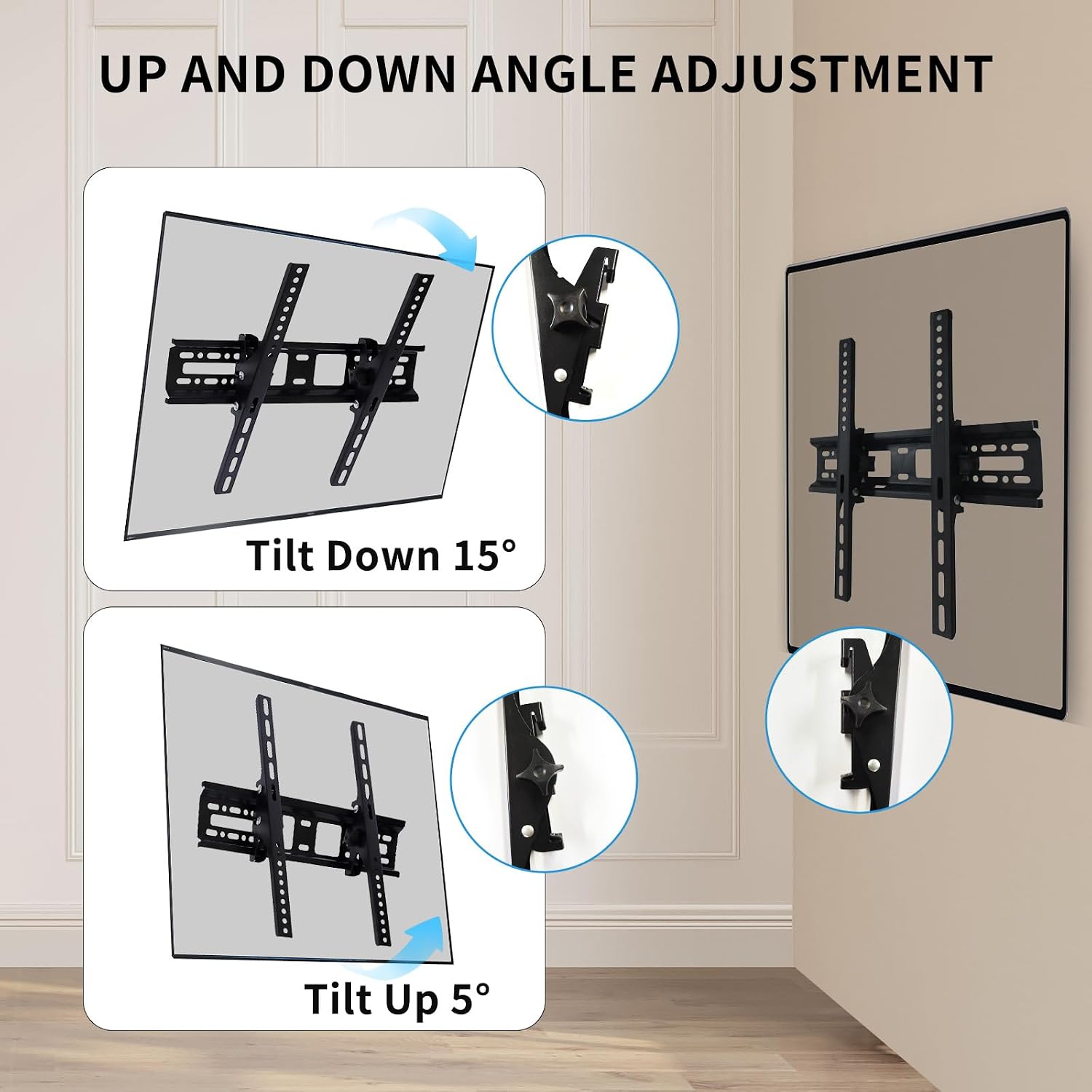
Figure 5.1: Up and Down Angle Adjustment

Figure 5.2: Reduce Glare with Tilt Function
6. Maintenance
The RIVIERA Tilt TV Wall Mount requires minimal maintenance to ensure long-lasting performance and safety.
- Regular Checks: Periodically (e.g., every 6-12 months) inspect all mounting points and fasteners to ensure they are tight and secure. Loose connections can compromise safety.
- Cleaning: Wipe the mount with a soft, dry cloth to remove dust. Avoid using abrasive cleaners or solvents, as they may damage the finish.
- Lubrication: The tilting mechanism is designed for smooth operation and typically does not require lubrication. If movement becomes stiff, ensure no debris is obstructing the mechanism.
7. Troubleshooting
If you encounter issues with your RIVIERA Tilt TV Wall Mount, refer to the following common problems and solutions:
| Problem | Possible Cause | Solution |
|---|---|---|
| TV is not level after installation. | Wall plate not perfectly level during installation. | Slightly adjust the TV on the mount if possible, or carefully re-level the wall plate. The mount allows for minor post-installation leveling adjustments. |
| TV feels unstable or wobbly. | Mounting screws/bolts are loose; incorrect wall anchors used; TV weight exceeds capacity. | Immediately remove TV. Re-tighten all fasteners. Ensure correct anchors were used for your wall type. Verify TV weight is within 66 lbs (30 kg) limit. Reinstall carefully. |
| Difficulty tilting the TV. | Mechanism is stiff or obstructed. | Ensure no cables or objects are obstructing the tilt mechanism. Gently apply force; the mechanism is designed for tool-free adjustment. |
| TV cannot be hung on the wall plate. | TV brackets not correctly aligned or installed. | Ensure the TV bracket arms are correctly attached to the TV and aligned with the wall plate's hooks. Refer to installation step 3. |
8. Specifications
| Brand | RIVIERA |
| Model Number | HT-002 |
| Compatible TV Sizes | 32" - 55" |
| Weight Capacity | 66 lbs (30 kg) |
| VESA Compatibility | 100x100mm, 150x150mm, 200x100mm, 200x150mm, 200x200mm, 300x200mm, 400x200mm, 400x400mm |
| Tilt Angle | -5° to +15° |
| Profile from Wall | 1.2 inches |
| Material | High-quality Steel |
| Compatible Wall Types | Wood Stud, Concrete, Brick |
| Item Weight | 2.33 pounds |
| Package Dimensions | 18.5 x 4.5 x 2 inches |

Figure 8.1: Wide VESA Compatibility
9. Warranty and Support
For specific warranty information regarding your RIVIERA Tilt TV Wall Mount, please refer to the warranty card or documentation included with your product packaging. Warranty terms typically cover manufacturing defects for a specified period from the date of purchase.
If you require technical assistance, have questions about installation, or need to report a missing/damaged part, please contact RIVIERA customer support:
- Website: Visit the RIVIERA Store on Amazon (for general product information)
- Email: support@riviera.com (Example email, actual email not provided)
- Phone: Please refer to your product packaging for direct customer service phone numbers.
When contacting support, please have your model number (HT-002) and purchase date ready.