
XTRONS 14.9 Inch Android 14 Car Stereo for BMW X5 E70 X6 E71 (2011-2013) CIC System
XTRONS 14.9 Inch Android 14 Car Stereo User Manual
Model: XTRONS 14.9 Inch Android 14 Car Stereo for BMW X5 E70 X6 E71 (2011-2013) CIC System
Brand: XTRONS
Introduction
This manual provides comprehensive instructions for the installation, operation, and maintenance of your XTRONS 14.9 Inch Android 14 Car Stereo. Designed specifically for BMW X5 E70 and X6 E71 (2011-2013) models with the CIC system, this unit offers advanced features including a 2K IPS touch screen, Global 4G connectivity, Wireless CarPlay, and Android Auto. Please read this manual thoroughly before installation and use to ensure optimal performance and safety.
Compatibility
This XTRONS car stereo is designed for specific BMW models and systems:
- BMW X5 E70 (2011-2013) Left Driving Vehicles
- BMW X6 E71 (2011-2013) Left Driving Vehicles
Important Note: This unit ONLY works with the original X5 E70 and X6 E71 CIC system. Verify your vehicle's system before installation.
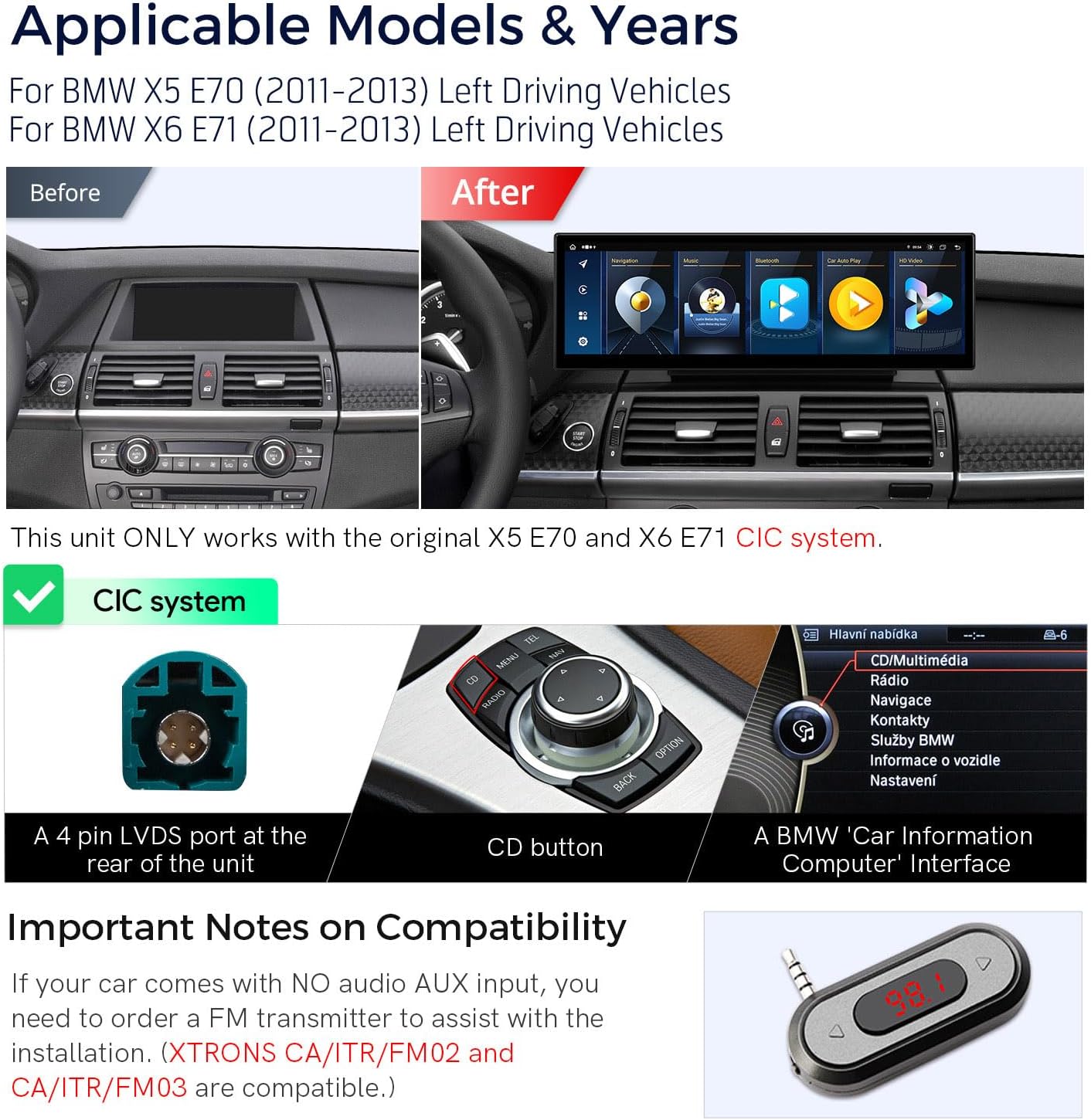
Image: Comparison of BMW dashboard before and after XTRONS stereo installation, showing the integrated display.

Image: Visual guide to identify the CIC system, highlighting the 4-pin LVDS port, CD button on the iDrive controller, and the BMW 'Car Information Computer' interface.
If your car comes with NO audio AUX input, you may need an FM transmitter for audio functionality. Compatible XTRONS FM transmitters include CA/ITR/FM02 and CA/ITR/FM03 (ASIN: B0841Z1LTV).

Image: An FM transmitter, which may be required if your vehicle lacks an AUX input.
Package Contents
Please verify that all items are present in the package:
- 1 x ISO Wiring Harness
- 1 x USB Cable
- 1 x Mini Microphone
- 1 x GPS Antenna
- 1 x 4G Antenna
- 1 x 4G SIM Card Slot
- 1 x Mini Speaker
- 1 x User Manual
- 1 x Installation Instruction

Image: All accessories included with the XTRONS 14.9 Inch Android 14 Car Stereo.
Key Features
- 14.9" 2K IPS Screen: Features a fully-laminated, ultra-slim design with a tailor-made bezel. Enjoy vibrant colors, sharp clarity, and expansive visuals with its ultra-wide 32:9 aspect ratio and 2560x720 resolution.
- Global 4G LTE Connectivity: Insert a Micro-SIM card (not included) to access mobile broadband with download speeds up to 300Mbps. Supports 99% of carriers worldwide for internet data.
- Built-in Wireless CarPlay & Android Auto: Seamlessly integrate your iPhone via Bluetooth for Wireless CarPlay, or connect your Android phone wirelessly via Bluetooth or with a USB cable for Android Auto. Access GPS, calls, music, Google Assistant, and Siri.
- Latest Android 14 with Octa Core: Powered by Android 14 and an Octa-Core processor with 4GB RAM and 64GB ROM, ensuring responsive performance and ample storage for applications.
- Retains Original Car Functions: Integrates OEM car-centric functions like speed, fuel level, and safety warnings. Retains original fiber optic sound system, original radio, original CD player, and Bluetooth. Supports iDrive system and steering wheel controls.
- High Definition Real-view with AHD Camera Support: Supports AHD cameras for high-definition reversing display (cameras not included).
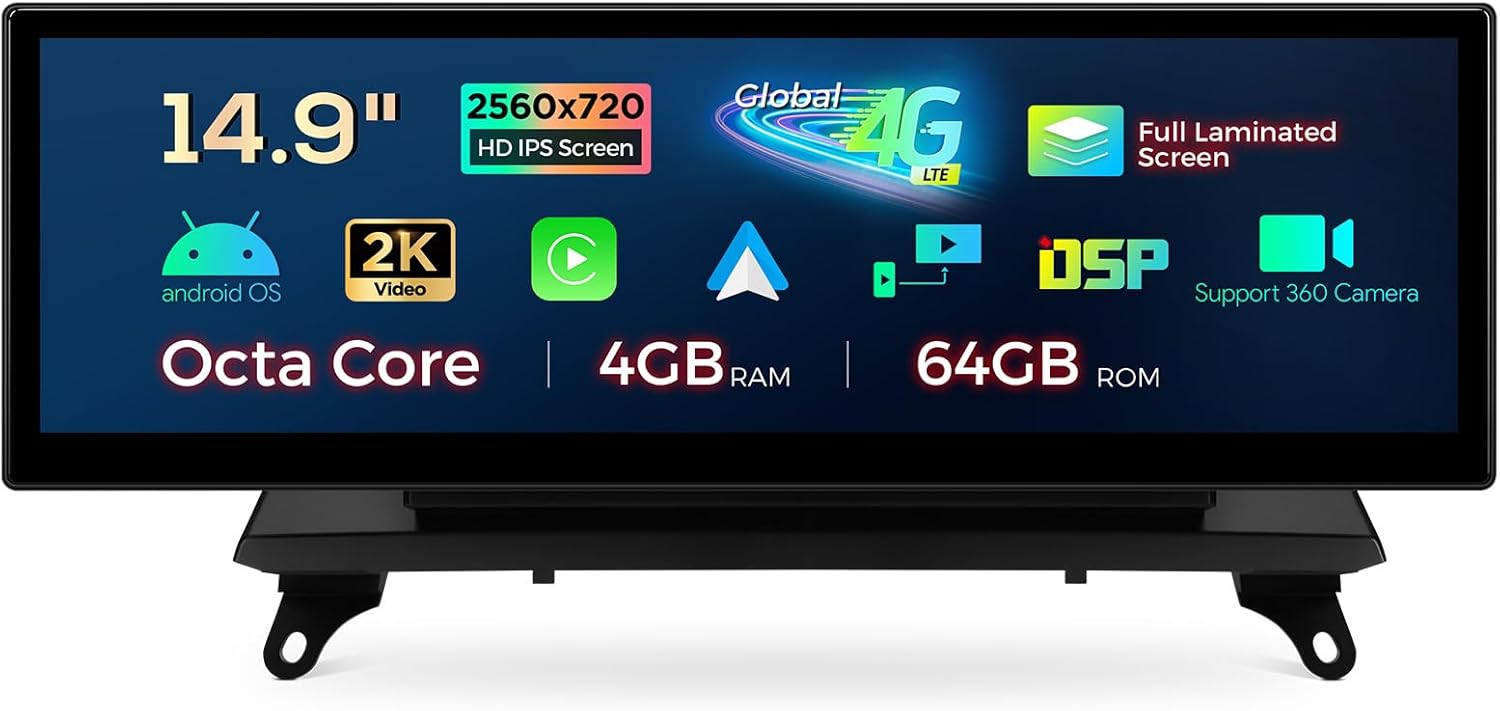
Image: Overview of the XTRONS 14.9 inch display highlighting its 2K IPS screen, Octa Core processor, 4GB RAM, 64GB ROM, Global 4G LTE, and support for 360 camera.
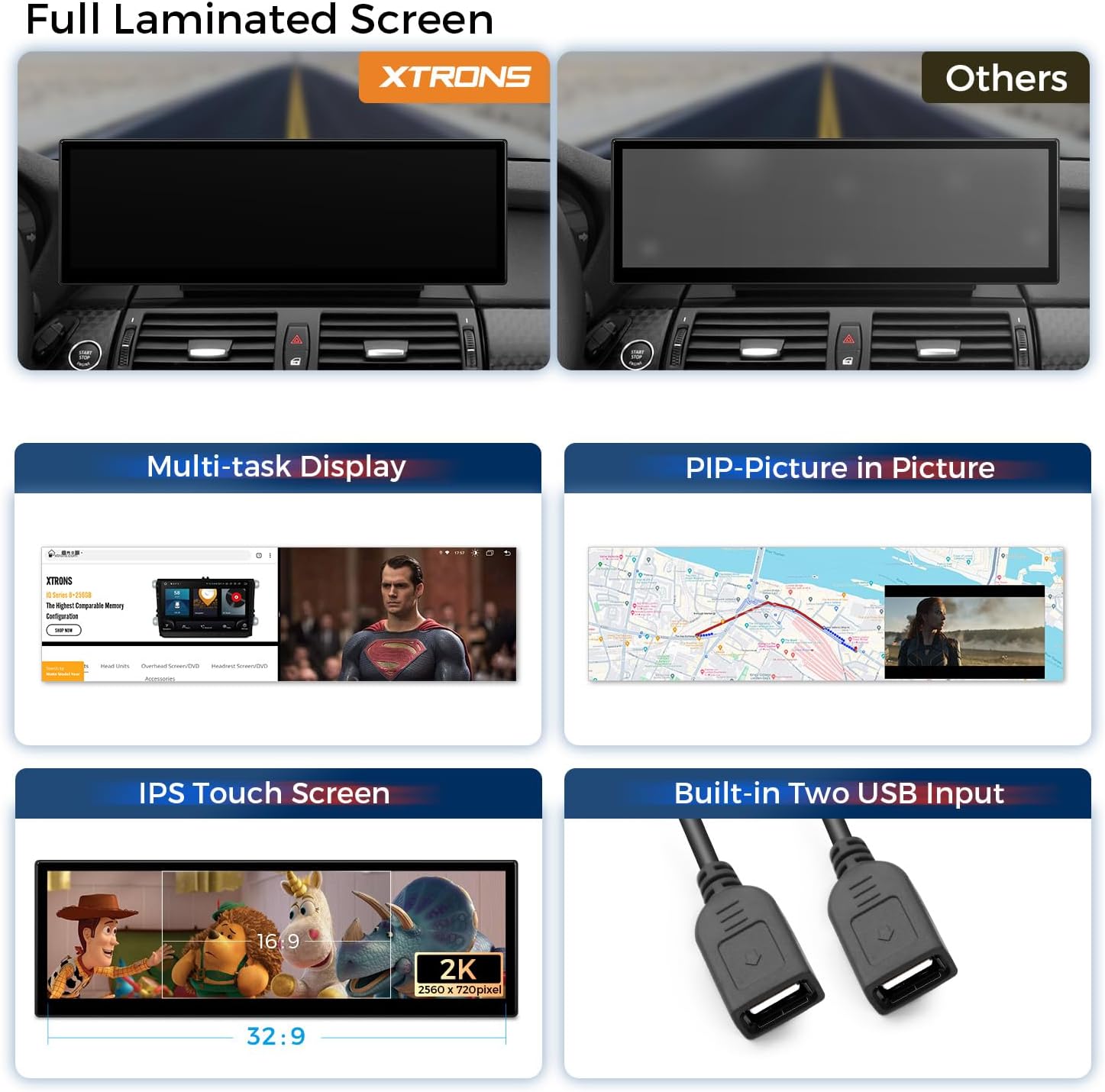
Image: Visual representation of the full laminated screen advantage, multi-tasking capabilities (split screen, picture-in-picture), IPS touch screen clarity, and the two built-in USB inputs.

Image: Illustrates the three internet access options: LTE Cat 7 (up to 300Mbps), support for 99% of worldwide carriers, and USB tethering. Note that it accepts a Micro-SIM card for data only, not phone calls.
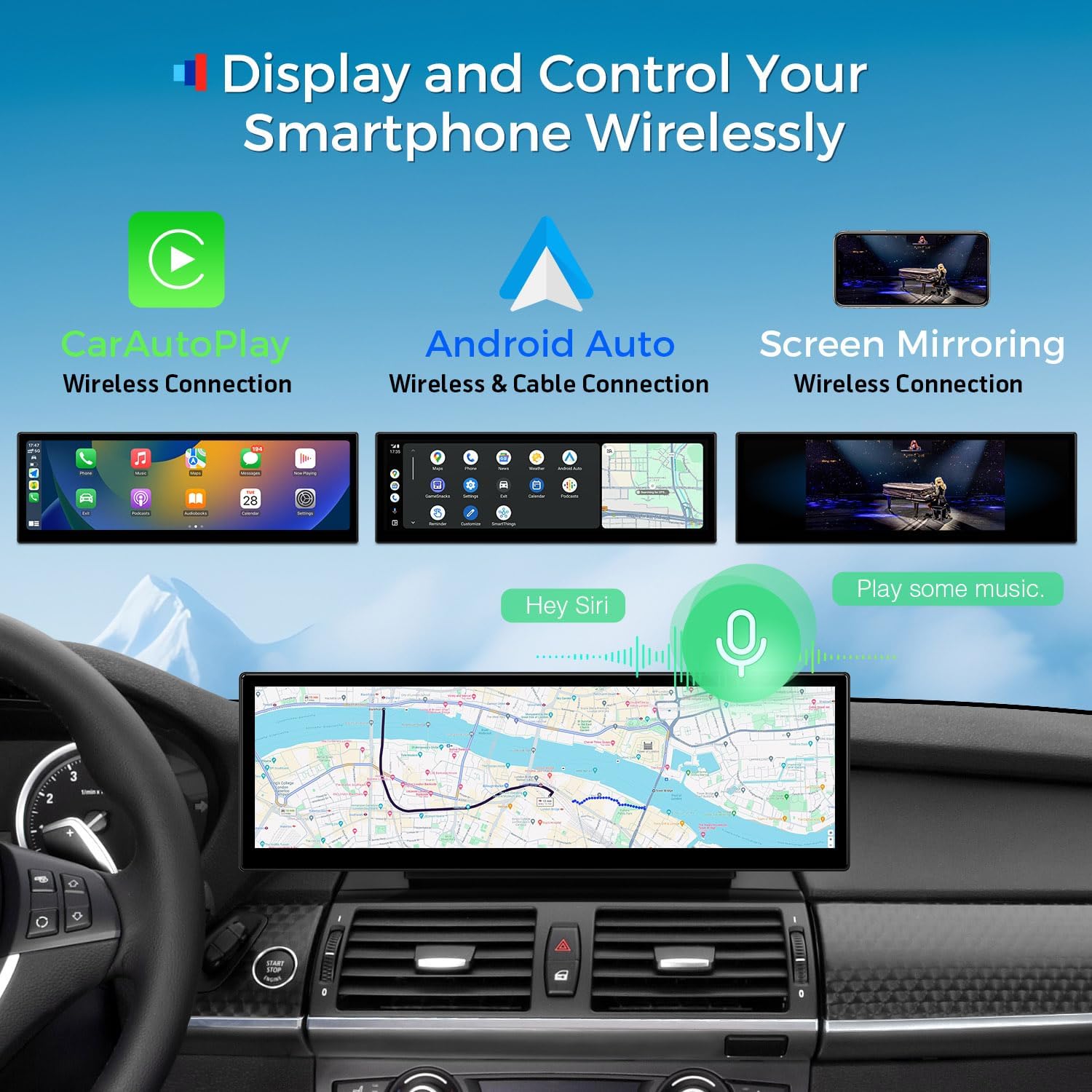
Image: Shows the wireless connectivity features including CarAutoPlay (Wireless CarPlay), Android Auto (Wireless & Cable), and Screen Mirroring, along with voice control functionality.
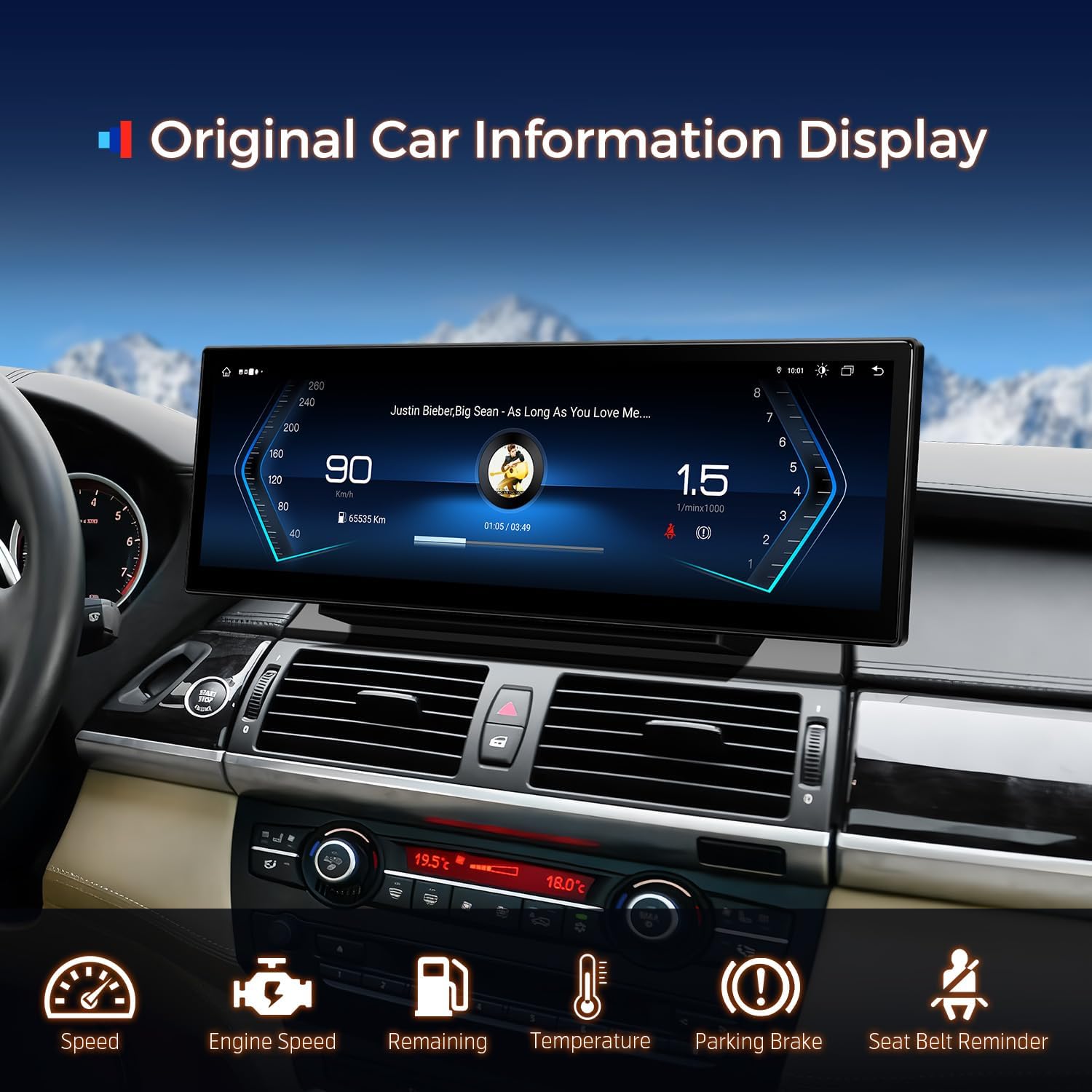
Image: Demonstrates how the unit retains and displays original car information such as speed, engine speed, remaining fuel, temperature, parking brake status, and seat belt reminders.

Image: Highlights the retention of original vehicle functions including the iDrive system, fiber optic amplifier system, original radio, CD player, Bluetooth, backup camera display, and steering wheel controls.
Setup and Installation
Installation of the XTRONS car stereo requires careful attention to detail. It is recommended to consult the included "Installation Instruction" manual for detailed, step-by-step guidance. Professional installation is advised if you are not familiar with car audio system wiring.
Wiring Harness Overview
The unit comes with a comprehensive wiring harness designed for seamless integration with your BMW's existing system. Familiarize yourself with the connections before beginning installation.
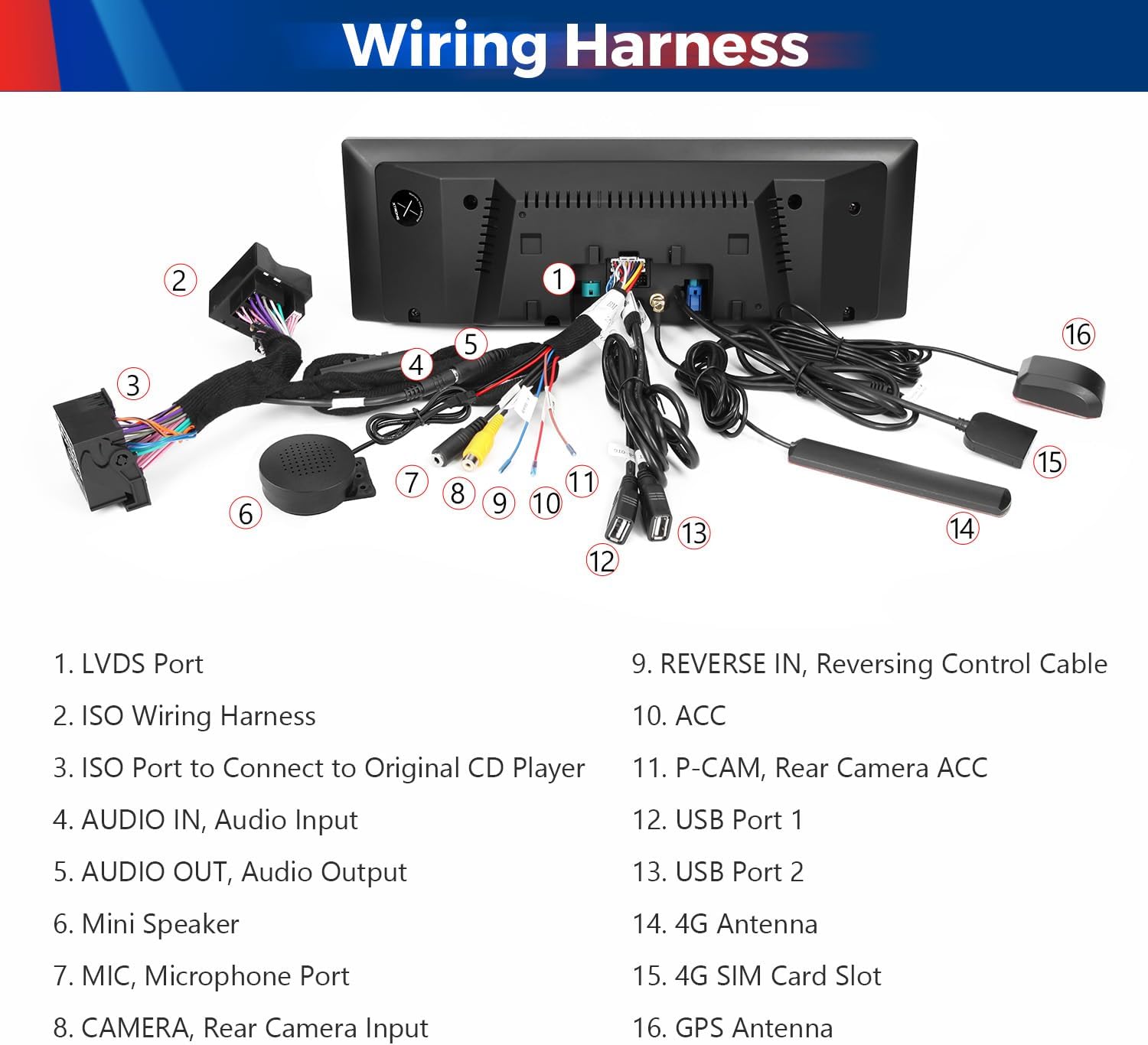
Image: Detailed view of the wiring harness, labeling key ports such as LVDS, ISO Wiring Harness, Audio In/Out, Microphone, USB ports, 4G Antenna, 4G SIM Card Slot, and GPS Antenna.
Key Connections:
- LVDS Port
- ISO Wiring Harness
- ISO Port to Connect to Original CD Player
- AUDIO IN, Audio Input
- AUDIO OUT, Audio Output
- Mini Speaker
- MIC, Microphone Port
- CAMERA, Rear Camera Input
- REVERSE IN, Reversing Control Cable
- ACC
- P-CAM, Rear Camera ACC
- USB Port 1
- USB Port 2
- 4G Antenna
- 4G SIM Card Slot
- GPS Antenna

Image: Installation guideline diagram illustrating the connection points for the LVDS cable, GPS antenna, and the XTRONS ISO harness to the original BMW CD player, including the green fiber optic connection.
Operation
User Interface
The XTRONS unit features a user-friendly interface designed for intuitive navigation. You can customize the dashboard and widgets to suit your preferences.

Image: The customizable user interface (UI) for BMW, featuring a stylish new dashboard and options to personalize with favorite widgets and themes.
Wireless CarPlay and Android Auto
Connect your smartphone for seamless integration:
- Wireless CarPlay: For iPhone users, connect via Bluetooth for a wireless CarPlay experience.
- Wireless/Wired Android Auto: For Android users, connect via Bluetooth wirelessly or use a USB cable for a wired connection.
These features allow access to navigation, calls, music, and voice assistants (Google Assistant, Siri) directly from the car stereo.
GPS Navigation
The unit supports highly accurate GPS navigation. You can use pre-installed maps or download your preferred navigation applications.

Image: The highly accurate GPS navigation interface, showing compatibility with popular navigation apps like Waze, Sygic, iGo Primo, and Google Maps.
4G LTE Connectivity
Insert a Micro-SIM card into the dedicated slot to enable 4G mobile broadband. This allows for online navigation, streaming, and app downloads directly on the unit. Note that this is for data only, not phone calls.
Bluetooth 5.0
Connect your phone via Bluetooth 5.0 for hands-free calls, music streaming, and phone book synchronization. The unit also supports dual-band Wi-Fi (2.4GHz and 5GHz).

Image: Features of Bluetooth 5.0 including phone book sync, hands-free calls, Bluetooth music, and call history display, alongside dual-band Wi-Fi capabilities.
Original Car Information Display
The unit seamlessly integrates with your vehicle's original systems to display crucial information directly on the screen, such as speed, engine speed, fuel level, temperature, parking brake status, and seat belt reminders.

Image: The XTRONS display showing integrated original car information like speed, engine speed, remaining fuel, temperature, parking brake, and seat belt reminder.
Backup Camera Display
The unit supports high-definition real-view with AHD cameras (not included) for a clear display when reversing, enhancing safety and convenience.

Image: The display showing the backup camera view with parking guidelines and reversing radar indication. Note: Cameras are not included.
Maintenance
To ensure the longevity and optimal performance of your XTRONS car stereo, follow these maintenance guidelines:
- Cleaning: Use a soft, dry cloth to clean the screen and exterior. For stubborn smudges, slightly dampen the cloth with water or a screen-safe cleaner. Avoid abrasive materials or harsh chemicals.
- Temperature: Avoid exposing the unit to extreme temperatures. While designed for automotive environments, prolonged exposure to direct sunlight or freezing conditions can affect performance.
- Software Updates: Periodically check the XTRONS official website or contact support for available software updates to ensure the system runs efficiently and has the latest features.
- Physical Protection: Protect the screen from sharp objects or excessive pressure to prevent scratches or damage.
Troubleshooting
If you encounter issues with your XTRONS car stereo, refer to the following common problems and solutions:
| Problem | Possible Cause | Solution |
|---|---|---|
| No Power | Incorrect wiring; Blown fuse; Vehicle battery issue. | Check all power connections. Inspect vehicle fuses. Ensure car battery is charged. |
| No Audio Output | Incorrect audio connections; AUX input not enabled; Volume too low. | Verify audio cable connections. Ensure AUX input is selected or enabled in vehicle settings. Increase volume. |
| CarPlay/Android Auto Not Connecting | Bluetooth/USB connection issue; Phone settings. | Ensure Bluetooth is on and paired. Try a different USB cable. Check phone's CarPlay/Android Auto settings. Restart both phone and stereo. |
| Poor GPS Signal | GPS antenna placement; Obstruction. | Ensure GPS antenna is placed in a clear location, away from metal obstructions. |
| Screen Unresponsive | Software glitch; Temporary freeze. | Perform a soft reset (refer to installation manual for specific steps). If issue persists, contact support. |
For more complex issues or problems not listed here, please refer to the full user manual or contact XTRONS customer support.
Technical Specifications
| Feature | Detail |
|---|---|
| Model | XTRONS 14.9 Inch Android 14 Car Stereo |
| Operating System | Android 14 |
| Processor | Octa Core |
| RAM | 4GB |
| ROM | 64GB |
| Display Size | 14.9 Inches |
| Resolution | 2560 x 720 (2K IPS) |
| Connectivity | Global 4G LTE, Bluetooth 5.0, Dual-Band Wi-Fi, USB |
| Special Features | Wireless CarPlay, Wireless/Wired Android Auto, Screen Mirroring, Retains OEM functions (iDrive, Radio, CD, Amplifier, Steering Wheel Control), Supports AHD Camera |
| Item Weight | 6.49 pounds |
| Product Dimensions | 14.9 x 14.9 x 14.9 inches |
| Mounting Type | Dashboard Mount |
Image: Dimensions of the XTRONS unit (14.9 inches display) and a visual list of all included accessories.
Warranty Information
The XTRONS 14.9 Inch Android 14 Car Stereo comes with a 1-Year Warranty from the date of purchase. This warranty covers manufacturing defects and malfunctions under normal use. Please retain your proof of purchase for warranty claims.
For detailed warranty terms and conditions, please refer to the official XTRONS website or contact customer support.

Image: XTRONS commitment to quality, showing tests like High and Low Temperature Test, Verified In Car Test, 8-hours Accelerated Aging Test, Electrostatic Test, Impact Test, and 1.2 Meters Drop Test.
Customer Support
For any questions, technical assistance, or warranty claims regarding your XTRONS product, please contact XTRONS customer support.
You can typically find contact information on the official XTRONS website or through the seller's page where you purchased the product. Look for an "Ask a question" or "Contact Seller" option.

Image: Guide on how to contact XTRONS support via the Amazon platform, typically by navigating to the seller's storefront and using the "Ask a question" feature.
Ask a question about this manual
Ask about setup, troubleshooting, compatibility, parts, safety, or missing instructions. Manuals+ will review the question and use this page’s manual context to help answer it.