
XTRONS 14.9" 2013-2016 NBT System
XTRONS 14.9 Inch Android 14 Car Stereo Instruction Manual
Model: 14.9" 2013-2016 NBT System
Product Overview
The XTRONS 14.9 Inch Android 14 Car Stereo is designed to seamlessly integrate with BMW F10/F11 (2013-2016) NBT systems, offering a significant upgrade to your vehicle's infotainment. It features a high-resolution 2K IPS touch screen, robust processing power with 4GB RAM and 64GB ROM, and advanced connectivity options including Global 4G, Wireless CarPlay, and Android Auto. This unit retains original car functions while providing a modern and intuitive user experience.

Image: XTRONS 14.9 Inch Android 14 Car Stereo main unit.
What's in the Box
Carefully unpack all components and ensure everything listed below is present:
- 1 x ISO Wiring Harness
- 1 x USB Cable
- 1 x Mini Microphone
- 1 x GPS Antenna
- 1 x 4G Antenna
- 1 x 4G SIM Card Slot
- 1 x Mini Speaker
- 1 x User Manual
- 1 x Audio Cable
- 1 x Installation Instruction
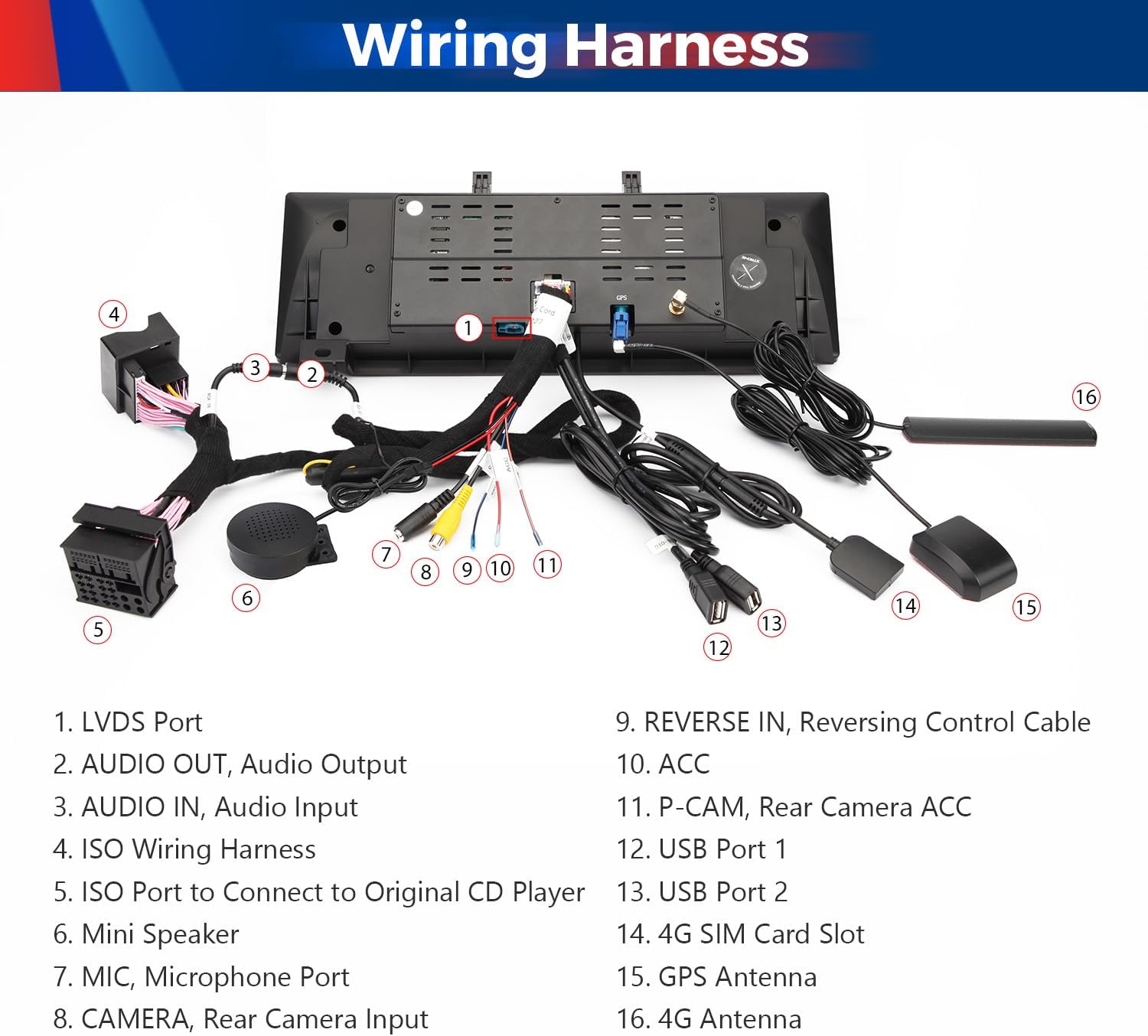
Image: All included accessories and cables for the XTRONS car stereo.
Key Features
- 14.9” 2K IPS SCREEN: Experience enhanced clarity and vibrant colors with our large 2K IPS screen. Crafted with precision, fully-laminated, ultra-slim design with tailor-made bezel. Grade-A 2K IPS screen. Enjoy vibrant colors, sharp clarity, and expansive visuals with its ultra-wide 32:9 aspect ratio.
- Global 4G LTE: Connect with No Boundaries, access your data anywhere and anytime! Just insert a Micro-SIM card and enjoy the convenience of 4G mobile broadband connection anywhere the way it should be, or even SOHO in your car. Download Speed up to 300Mbps. Besides, it supports 99% of carriers worldwide.
- BUILT-IN WIRELESS CAR PLAY AND WIRELESS/WIRED ANDROID AUTO: Compatible with iPhone by Bluetooth wirelessly. You can also connect your Android phone by Bluetooth wirelessly or with a USB cable. It will bring you an incredibly intuitive way to access GPS, calls, music, Google Assistant, Siri from mobile phones while on the road for a truly connected experience.
- LATEST ANDROID 14 WITH OCTA CORE: The combination of 4GB RAM and Android 14. A more stable and mature version than Android 13, makes your every tap is responsive. With the 64GB ROM storage space, you can download the oft-used Apps such as Facebook, Spotify, iHeartRadio, Pandora and more.
- KEEP CAR Original: The car radio seamlessly integrates OEM car-centric functions like speed, fuel level, and safety warnings into your chosen dashboard display, retains original fiber optic sound system, original radio, original CD player, bluetooth.

Image: Visual representation of key features including 2K IPS screen, Global 4G LTE, Android OS, Octa Core, 4GB RAM, 64GB ROM, 2K Video, DSP, and 360 Camera Support.
Compatibility
This XTRONS unit is specifically designed for BMW 5 Series F10/F11 models from 2013-2016 that are equipped with the NBT system. It is crucial to verify your vehicle's original system before installation.
How to Identify Your BMW System (NBT)
The NBT system can be identified by the following features:
- A 6-pin LVDS port at the rear of the unit.
- A "MEDIA" button on the iDrive controller or a touch pad iDrive controller.
Note: A "Car ConnectedDrive" interface does not always mean that you have the NBT system.

Image: Visual guide for identifying the NBT system, showing the LVDS port, Media button, Touch pad controller, and BMW ConnectedDrive interface.
Important Notes on Audio Compatibility
If your car comes with NO audio AUX input, you may need to order an FM transmitter to assist with the installation. XTRONS CA/ITR/FM02 and CA/ITR/FM03 are compatible. Ensure AUX is enabled in your car's original system to enjoy the full audio experience with this head unit.

Image: An FM transmitter, illustrating a solution for vehicles without a built-in AUX input.
Setup
The installation process is designed to be plug-and-play for compatible NBT systems. Refer to the included Installation Instruction manual for detailed steps.
Wiring Harness Diagram

Image: Detailed diagram of the wiring harness connections for the XTRONS car stereo.
Installation Guide Overview
The installation typically involves connecting the LVDS port, audio output/input, ISO wiring harness, USB cables, and antennas. Ensure all connections are secure before powering on the unit.
Image: Simplified diagram showing the connection points for LVDS, fiber optic, and ISO wiring during installation.
Official Installation and Features Video
Video: A detailed walkthrough of the main features and settings of the XTRONS 14.9 Inch Android 14 Car Stereo, including a demonstration of its functionality and user interface.
Operating Instructions
User Interface and Responsiveness
The unit runs on Android 14 with an Octa-Core processor and 4GB RAM, ensuring a responsive and smooth user experience. The 2K IPS touch screen provides clear visuals and accurate touch input.

Image: The customizable user interface of the XTRONS unit, showing dashboard, settings, and app icons.
Wireless CarPlay and Android Auto
Connect your iPhone wirelessly via Bluetooth for CarPlay, or your Android phone wirelessly via Bluetooth or with a USB cable for Android Auto. This allows intuitive access to navigation, calls, music, and voice assistants like Google Assistant and Siri.
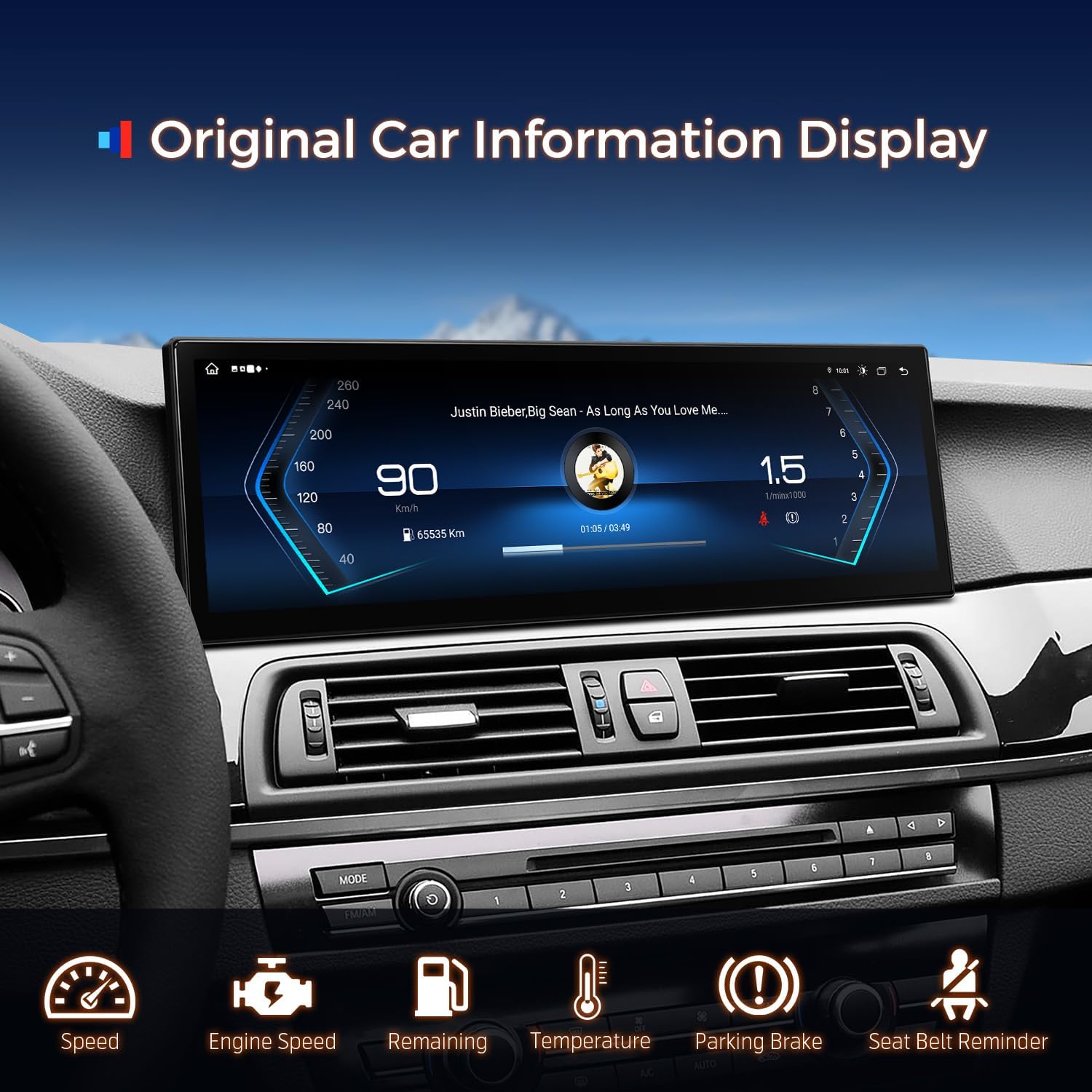
Image: Display showing wireless CarPlay, Android Auto, and screen mirroring functionalities.
Global 4G LTE Connectivity
Insert a Micro-SIM card (not included) into the dedicated slot to enable Global 4G mobile broadband connection. This allows for app downloads (Netflix, YouTube, Spotify, iHeartRadio, Pandora), online navigation, and more, even without phone tethering. Supports 99% of carriers worldwide.
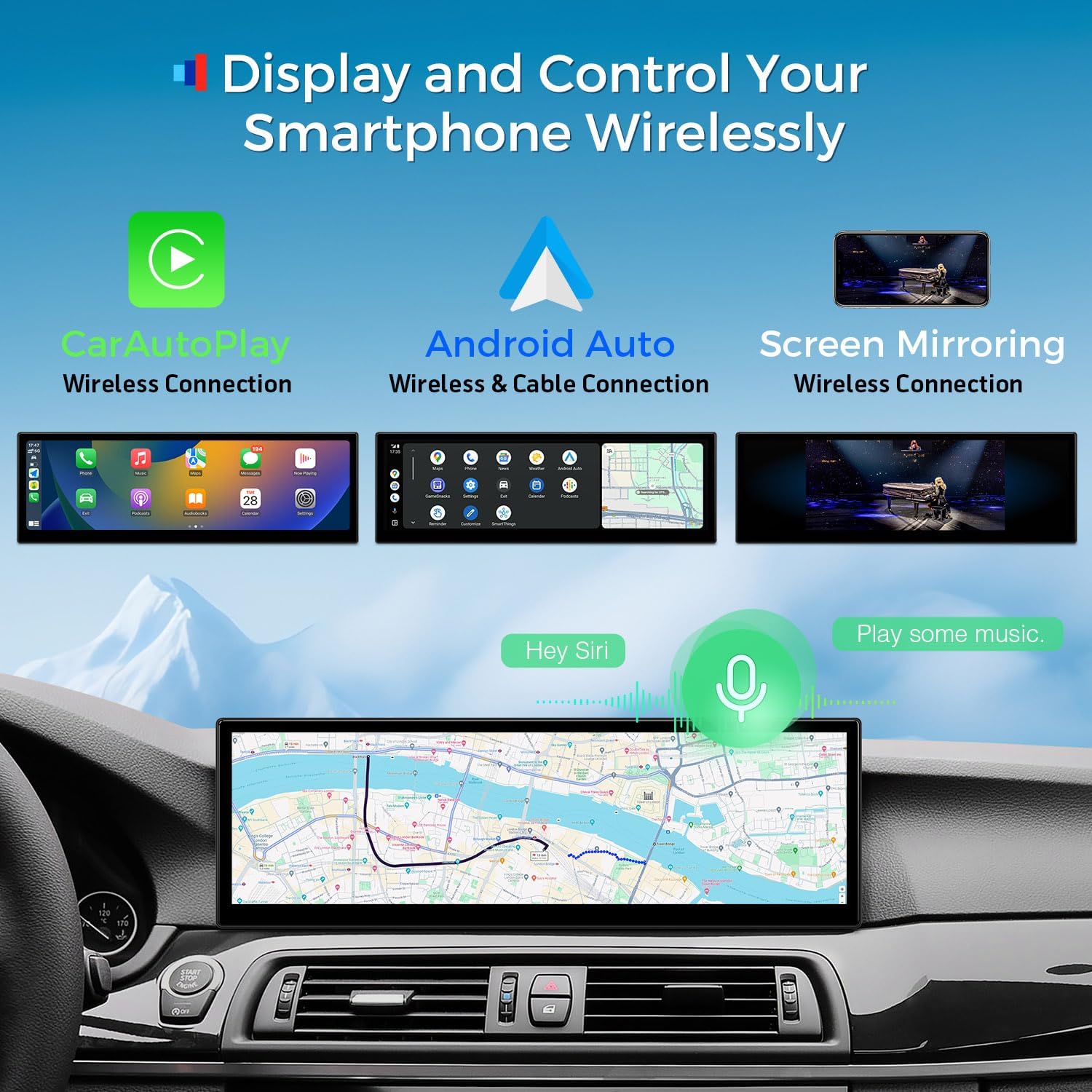
Image: Visualizing the Global 4G LTE capability with up to 300Mbps download speed and worldwide carrier support.
GPS Navigation
The unit supports highly accurate GPS navigation. You can download offline maps from Google Maps for use without an active internet connection. Other navigation apps like Waze, Sygic, and iGO Primo are also supported.

Image: The unit displaying a detailed GPS navigation map.
Retaining Original Car Functions
The XTRONS stereo is designed to retain many of your BMW's original functions, including the iDrive system control, original fiber optic sound system, original radio, original CD player, Bluetooth, steering wheel controls, and backup camera display.
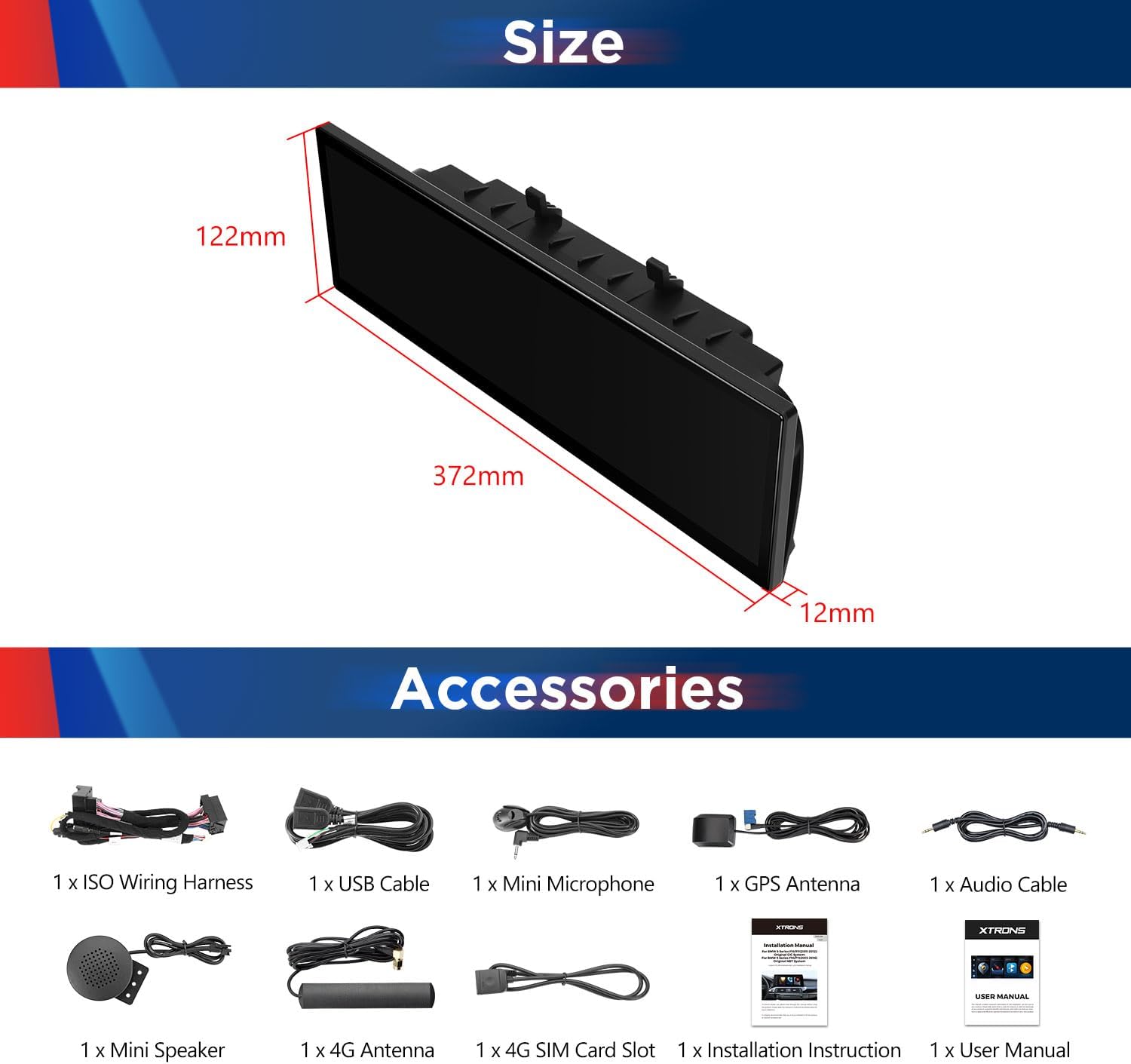
Image: Depiction of retained original functions such as iDrive, amplifier system, radio, CD player, Bluetooth, backup camera, and steering wheel controls.
Accessing Original BMW System
To switch back to your original BMW factory screen and access its settings, simply press and hold the Menu button on your iDrive controller. This allows seamless transition between the Android system and the original car interface.
Troubleshooting
No Audio Output
- Verify that the AUX input is enabled in your car's original system settings.
- Check all audio cable connections, ensuring they are securely plugged in.
- If your car lacks an AUX input, an external FM transmitter (e.g., XTRONS CA/ITR/FM02) may be required.
Connectivity Issues (CarPlay/Android Auto/4G)
- For wireless CarPlay/Android Auto, ensure Bluetooth is enabled on both your phone and the head unit.
- For wired Android Auto, confirm the USB cable is properly connected and functioning.
- For 4G LTE, ensure the Micro-SIM card is correctly inserted and activated with a data plan.
- Note: You cannot have Wi-Fi connected to the unit and use wireless CarPlay/Android Auto simultaneously.
Screen Responsiveness/Lag
- Close any unnecessary background applications to free up RAM.
- Perform a soft reset of the unit (refer to the user manual for specific instructions).
- Ensure the unit's software is up to date.
Maintenance
- Screen Cleaning: Use a soft, lint-free cloth specifically designed for electronics screens. Avoid abrasive materials or harsh chemical cleaners.
- General Cleaning: Wipe down the unit's exterior with a damp cloth. Do not use excessive moisture.
- Software Updates: Periodically check for and install software updates to ensure optimal performance and access to new features.
- Temperature Control: Avoid exposing the unit to extreme temperatures for prolonged periods.
Specifications
| Feature | Detail |
|---|---|
| Display Size | 14.9 Inches |
| Operating System | Android 14 |
| Processor | Octa Core |
| RAM | 4GB |
| ROM | 64GB |
| Connectivity Technology | Bluetooth, USB, Wi-Fi, Global 4G |
| Control Method | Touch, Voice |
| Audio Output Mode | Stereo |
| Supported Internet Services | Pandora, Spotify, iHeartRadio |
| Item Weight | 6.34 pounds |
| Package Dimensions | 17 x 8.8 x 8.25 inches |
Warranty & Support
The XTRONS 14.9 Inch Android 14 Car Stereo comes with a 1-Year Warranty.
For any questions, technical support, or warranty claims, please contact XTRONS directly. You can typically find their contact information on their official website or through the seller's page where you purchased the product.

Image: Example of how to find seller contact information on a product page for support.
Ask a question about this manual
Ask about setup, troubleshooting, compatibility, parts, safety, or missing instructions. Manuals+ will review the question and use this page’s manual context to help answer it.