
Sogledwow GL-C-010WL
Sogledwow GLEDOPTO ESP32 WLED LED Controller with Microphone (Model GL-C-010WL) User Manual
1. Introduction
This manual provides detailed instructions for the installation, operation, and maintenance of your Sogledwow GLEDOPTO ESP32 WLED LED Controller with Microphone. This device is designed to control various addressable LED strip lights, offering dynamic lighting effects, music synchronization, and convenient Wi-Fi app control.
2. Product Overview
The GLEDOPTO ESP32 WLED LED Controller is an advanced lighting control unit featuring an integrated ESP32 chip and a microphone for sound-reactive lighting. It supports a wide range of addressable LED strip types and offers extensive customization through the WLED application.
Key Features:
- ESP32 Chip with Microphone: Equipped with an efficient processing chip and a built-in microphone for music dynamic modes.
- Music Dynamic Mode: Automatically adjusts lighting effects based on music rhythm and sound changes.
- Wi-Fi Network Control: Control your LED strips directly via the WLED app on your smartphone or tablet, no additional gateway required.
- Rich Lighting Modes: Over 100 dynamic modes built-in, from soft gradients to flashing effects.
- Multiple Light Strip Compatibility: Compatible with WS2811, WS2812, SK6812, TM1814, WS2813, WS2815, and other addressable LED strip types.
Package Contents:
- 1 x ESP32 WLED Controller with Mic
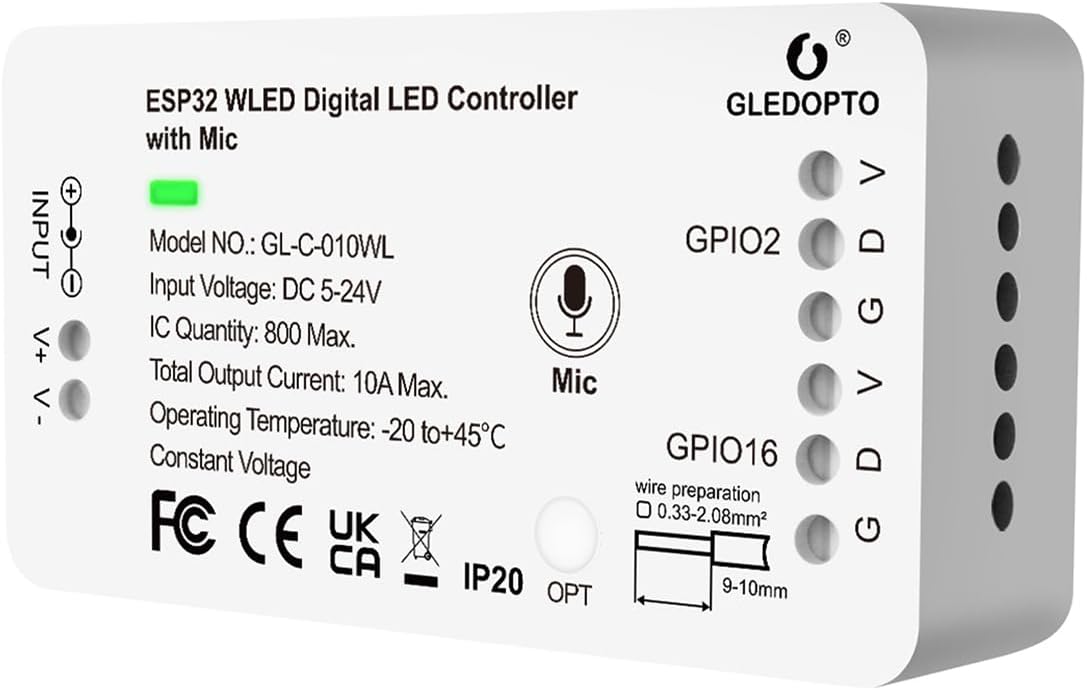
Image 2.1: Front view of the GLEDOPTO ESP32 WLED LED Controller with Mic, showing input and output terminals, microphone icon, and model number GL-C-010WL.
3. Setup
3.1 Wiring Instructions
Ensure all power is disconnected before wiring. Connect your LED strip and power supply to the controller as follows:
- Input (V+, V-): Connect your DC 5-24V power supply to these terminals. Ensure correct polarity.
- Output (V, D, G): Connect your addressable LED strip to these terminals.
- The group of D for GPIO16 is the default output. Use this group first.
- The other group of D is GPIO2, which can be used after configuration in the WLED app.

Image 3.1: Diagram illustrating the wiring connections for the GLEDOPTO ESP32 WLED LED Controller, showing power input and LED strip output terminals (V, D, G for GPIO16 and GPIO2).
3.2 Initial Configuration (WLED App)
The controller uses the WLED app for configuration and control. Follow these steps for initial setup:
- Power on the controller. It will broadcast a Wi-Fi access point (AP) named 'WLED-AP'.
- Connect your smartphone or tablet to the 'WLED-AP' Wi-Fi network. The default password is WLED1234.
- Open a web browser and navigate to
4.3.2.1orwled.me. This will open the WLED interface. - Go to 'Config' > 'Wi-Fi Setup' to connect the controller to your home Wi-Fi network. Enter your network SSID and password.
- After connecting to your home Wi-Fi, the controller will restart. You can then access it via its assigned IP address or mDNS name (e.g.,
wled.local) on your home network.
4. Operation
4.1 App Control
The WLED app provides comprehensive control over your LED strips. You can adjust colors, select dynamic effects, manage segments, and save presets.

Image 4.1: Screenshots of the WLED mobile application interface, demonstrating color selection and device management for multiple controllers.
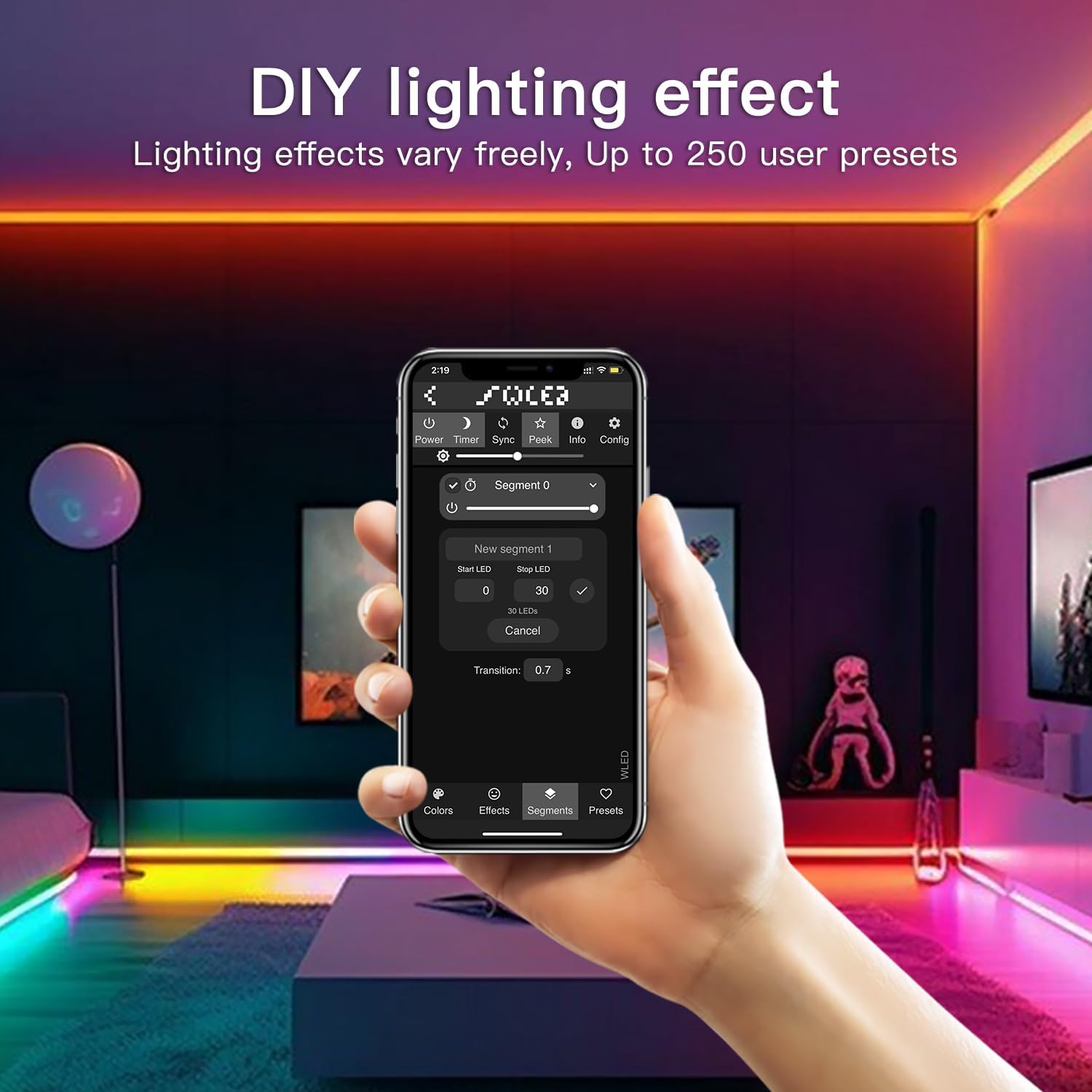
Image 4.2: A mobile phone displaying the WLED app interface for customizing lighting effects and managing segments, with up to 250 user presets available.
4.2 Button Functions
The controller features a single button for basic operations:
- Short press: Toggles On/Off.
- Long press for 1 second: Switches color.
- Long press for 10 seconds: Resets the WLED controller and activates the WLED-AP hotspot for re-configuration.
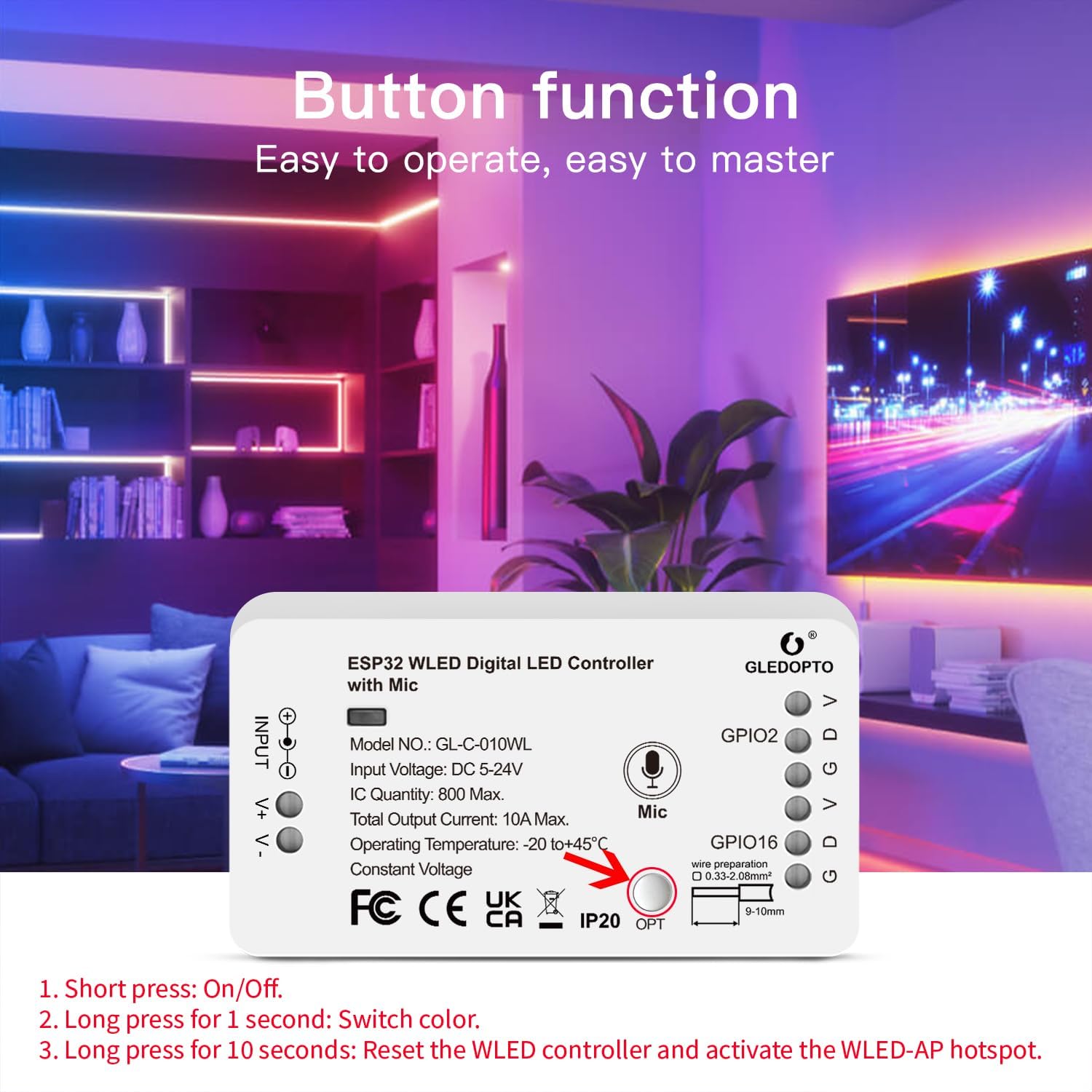
Image 4.3: Diagram of the GLEDOPTO ESP32 WLED LED Controller highlighting the button and its functions for power, color change, and reset.
4.3 Music Dynamic Mode
The built-in microphone allows the LED strips to react to music and ambient sounds, creating a dynamic visual experience.

Image 4.4: An illustration of LED strip lights reacting to music in a living room setting, demonstrating the music dynamic mode feature.
5. Microphone Configuration
After a factory reset or for initial use, the microphone parameters may need to be configured within the WLED app. The device will require a restart after configuration.
Configuration Information:
- Microphone type: Generic I2S
- I2S SD pin: 26
- I2S WS pin: 5
- I2S SCK pin: 21
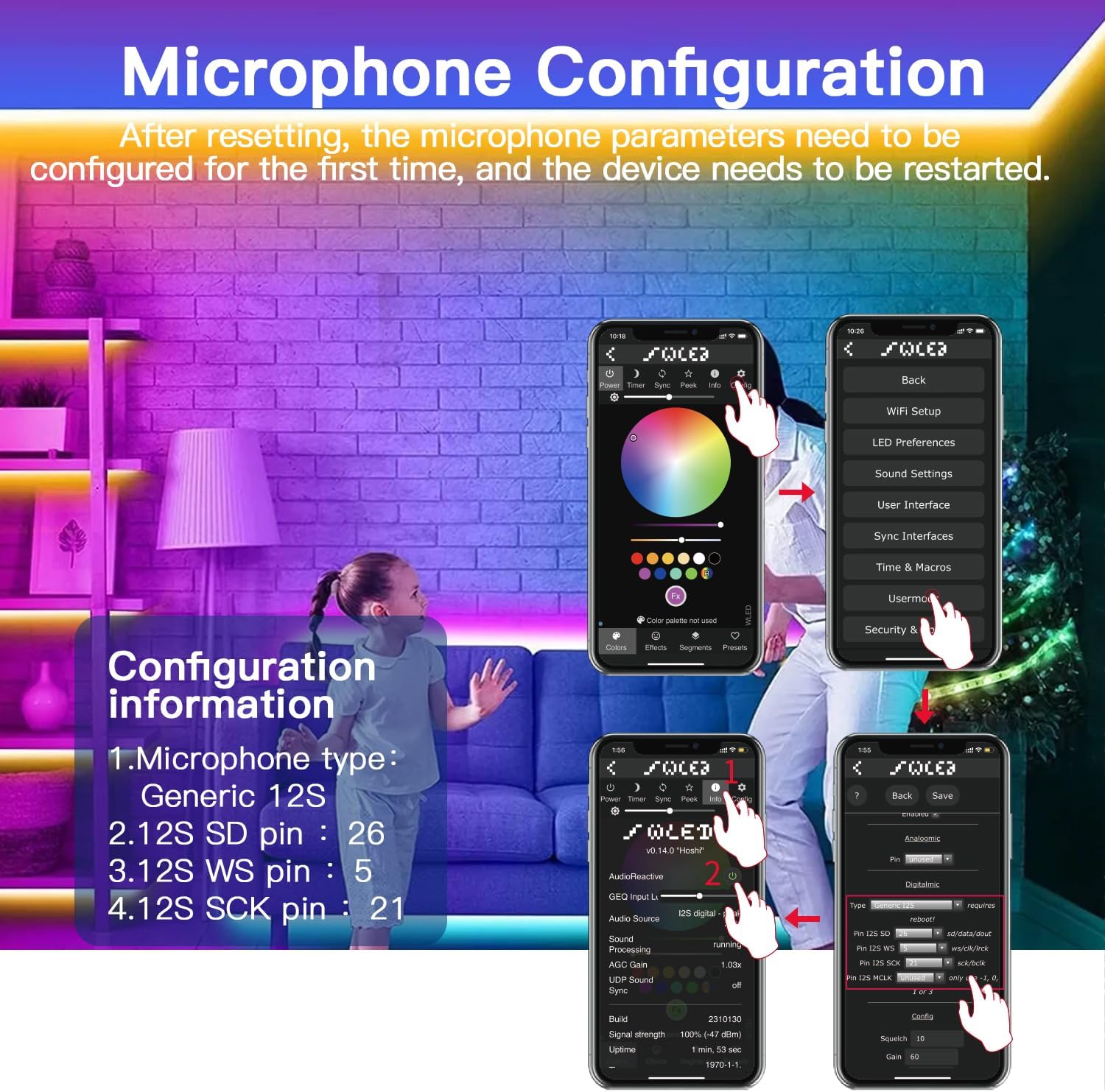
Image 5.1: Screenshots from the WLED app showing the steps to configure microphone settings, including selecting microphone type and assigning I2S pins.
6. Compatibility
This controller is compatible with a wide range of addressable LED strip types, including but not limited to:
- WS2811
- WS2812
- SK6812
- TM1814
- WS2813
- WS2815
- SM16703P
- WS2812B

Image 6.1: Visual representation of various addressable LED strip types supported by the controller, such as WS2812B, SK6812, and WS2811.
7. Specifications
Detailed technical specifications for the GLEDOPTO ESP32 WLED LED Controller with Mic:
| Model No. | GL-C-010WL |
| Input Voltage | DC 5-24V |
| IC Quantity | 800 Max. |
| Total Output Current | 10A Max. |
| Operating Temperature | -20 to +45°C |
| Constant Voltage | Yes |
| Material | Acrylonitrile Butadiene Styrene |
| Item Weight | 2.4 ounces (67.2g G.W.) |
| Package Dimensions | 3.62 x 2.05 x 1.14 inches |
| Indoor/Outdoor Usage | Indoor |
| Water Resistance Level | Not Water Resistant |

Image 7.1: A diagram detailing the product parameters and specifications of the GLEDOPTO ESP32 WLED LED Controller, including model number, input voltage, and operating temperature.
8. Troubleshooting
8.1 Lights Turn Off Spontaneously / Controller Reboots
If your controller experiences spontaneous reboots or the lights turn off unexpectedly, especially when connected to a Wi-Fi network, this might be related to network polling behavior with the ESP32 chip.
Solution:
- Access the WLED app or web interface.
- Navigate to 'Config' > 'Wi-Fi Setup'.
- Locate and delete the 'mDNS' URL name.
- After this change, you will need to access the controller using its IP address directly, as the named domain will no longer be available. This can prevent excessive network polling that may cause reboots.
8.2 No PWM Support for Non-Addressable Strips
This controller is designed for addressable LED strips only (e.g., WS28xx series). It does not support Pulse Width Modulation (PWM) for non-addressable LED strips (e.g., single-color, CCT strips). Attempting to use it with non-addressable strips will not allow dimming or color control.
Solution: Ensure you are using compatible addressable LED strips. If you require a controller for non-addressable strips, a different model with PWM support is necessary.
8.3 Unable to Connect to WLED-AP
If you cannot connect to the controller's initial Wi-Fi access point (WLED-AP) during setup:
- Ensure the controller is powered on.
- Verify the Wi-Fi password is WLED1234.
- Try performing a factory reset by long-pressing the button for 10 seconds. This will reactivate the WLED-AP hotspot.
9. Maintenance
To ensure the longevity and optimal performance of your GLEDOPTO ESP32 WLED LED Controller:
- Keep the device in a dry environment, away from moisture and direct water exposure, as it is not water-resistant.
- Avoid exposing the controller to extreme temperatures outside its operating range (-20 to +45°C).
- Ensure proper ventilation around the device to prevent overheating.
- Regularly check wiring connections to ensure they are secure and free from damage.
- Clean the exterior of the controller with a soft, dry cloth. Do not use liquid cleaners or solvents.
10. Warranty and Support
For warranty information and technical support, please refer to the documentation provided with your purchase or contact Sogledwow customer service directly. Keep your proof of purchase for any warranty claims.
You can visit the Sogledwow Store on Amazon for additional product information and support resources.
Ask a question about this manual
Ask about setup, troubleshooting, compatibility, parts, safety, or missing instructions. Manuals+ will review the question and use this page’s manual context to help answer it.