
Product Overview
The SUPERONE Bluetooth 5.3 Car Adapter is a versatile device designed to enhance your in-car audio and charging experience. It features Bluetooth 5.3 for stable audio streaming, an FM transmitter for connecting to your car radio, hands-free calling, and multiple charging ports including retractable USB-C and Apple cables.
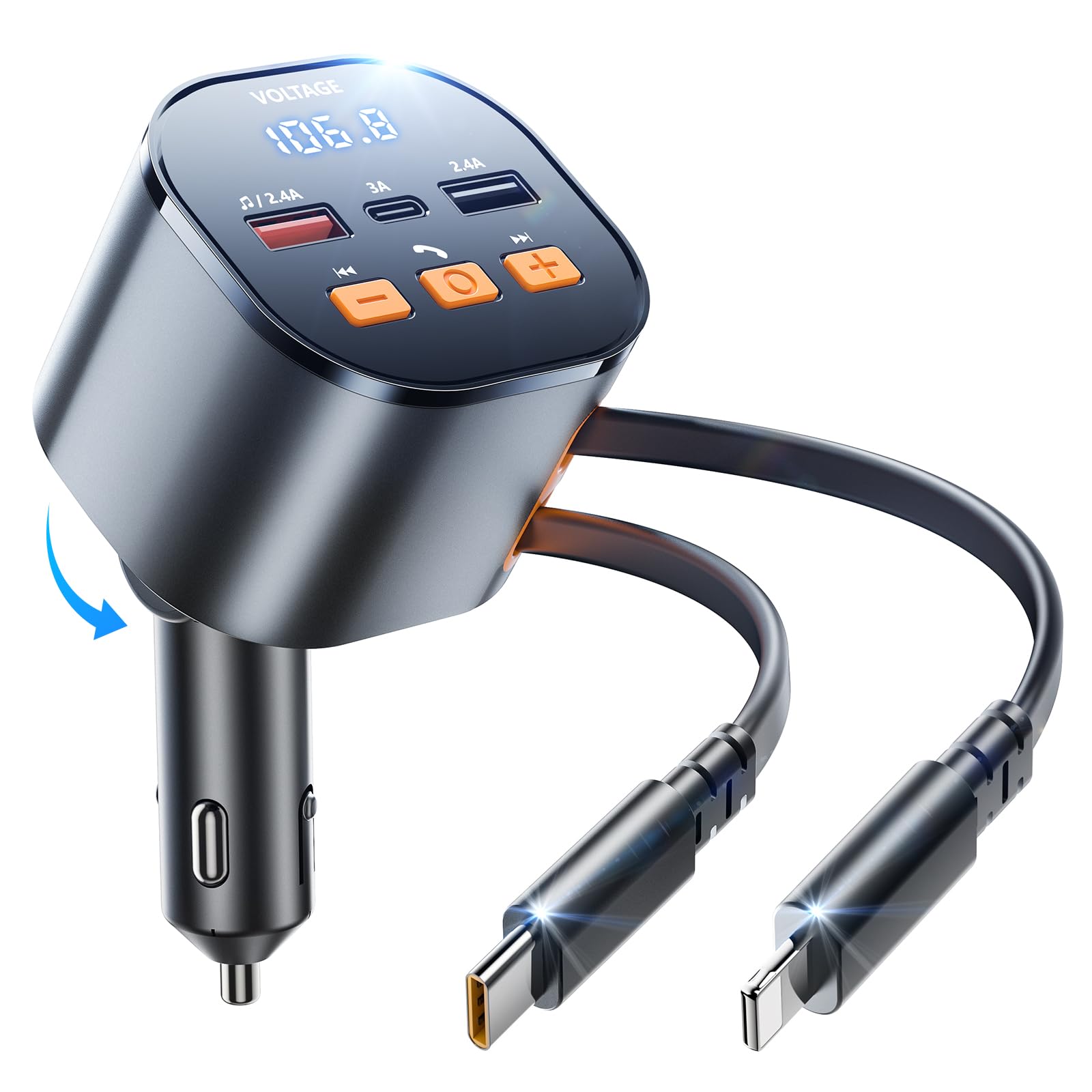
Image: The SUPERONE Bluetooth 5.3 Car Adapter, showcasing its compact design and multiple ports.
Package Contents
- 1 x SUPERONE Bluetooth 5.3 Car Adapter
Setup Instructions
1. Powering On and Adjusting Angle
- Insert the SUPERONE Car Adapter into your vehicle's 12V/24V cigarette lighter socket. The LED display will illuminate, showing the car battery voltage.
- Adjust the adapter's angle as needed for optimal visibility and access. The device features a flexible joint for 180-degree rotation.
2. FM Transmitter Setup
To transmit audio to your car's radio:
- Tune Car Radio: Adjust your car's FM radio to an unused, blank frequency (one with no static or broadcast).
- Set Transmitter Frequency: On the SUPERONE adapter, use the frequency adjustment buttons (often indicated by arrows or +/-) to match the frequency of your car radio. The LED display will show the current FM frequency.

Image: Visual guide for tuning your car radio and the FM transmitter to the same blank frequency.
3. Bluetooth Pairing
To connect your mobile device via Bluetooth:
- Enable Bluetooth on your mobile device.
- Search for available Bluetooth devices. Select 'PT-21' (or similar model name) from the list.
- Once paired, the adapter will confirm the connection, and you can now stream audio from your device.

Image: Visual guide for pairing your mobile device with the SUPERONE Bluetooth car adapter.
Operating Instructions
1. Music Playback
You can play music via Bluetooth or a USB flash drive:
- Bluetooth Streaming: After successful Bluetooth pairing, open your music app on your device and start playback. Audio will transmit to your car radio via the set FM frequency.
- USB Flash Drive: Insert a USB flash drive containing WMA, MP3, WAV, APE, or FLAC audio files into the designated USB-A port (often marked with a music note icon). The adapter will automatically detect and play music from the drive.
Use the 'Previous' (◀◀) and 'Next' (▶▶) buttons on the adapter to control track selection. Long press these buttons to adjust the volume.

Image: The adapter supports music playback from both USB flash drives and Bluetooth-connected devices.
2. Hands-Free Calling
When a call comes in while connected via Bluetooth:
- Answer: Short press the 'Call Answer' button (phone icon).
- Hang Up: Short press the 'Call Answer' button during a call.
- Reject: Long press the 'Call Answer' button.

Image: The adapter enables clear and stable hands-free calling for safe driving.
3. Charging Devices
The adapter offers multiple charging options:
- Retractable Cables: Pull out the integrated USB-C (PD 30W) and Apple (12W) retractable cables to charge compatible devices. These cables extend up to 80cm (31.5 inches).
- Additional Ports: Use the 15W USB-C port and two 12W USB-A ports for other devices. The total output is 81W, allowing for simultaneous charging of up to five devices.

Image: The SUPERONE adapter provides 81W of power across five ports, including retractable cables, to charge multiple devices.
4. Real-time Voltage Monitoring
The LED display on the adapter shows your car's battery voltage in real-time, helping you monitor its health.
5. Adjustable Ambient Lighting
The adapter features adjustable ambient lighting. Press the light bulb icon button to cycle through different lighting modes or turn it off.

Image: Detailed diagram of the SUPERONE car adapter's LED display, USB ports, and control buttons.
Maintenance
1. Retracting Cables
To retract the built-in cables, gently pull the cable out slightly further (about 1 cm), then release it. The cable will automatically retract into the adapter. Avoid manually pushing the cable back in, as this can damage the retraction mechanism.
Video: Demonstrates the proper method for retracting the built-in charging cables on the SUPERONE car adapter.
2. Safety Guidelines
- Avoid exposing the device to water or extreme temperatures.
- Do not disassemble the device.
- Only use approved chargers and batteries with this device.
- This device is intended for in-car use only and should not be used while driving if it interferes with your concentration or vision.
Troubleshooting
1. Low Audio Volume
If the audio volume is too low when streaming via Bluetooth/FM, ensure both your phone's volume and your car radio's volume are turned up. You can also long-press the 'Previous' (◀◀) or 'Next' (▶▶) buttons on the adapter to adjust the output volume.
2. FM Interference/Static
If you experience static or poor audio quality, try changing your car radio and the adapter to a different blank FM frequency. Frequencies between 87.5 MHz and 108.0 MHz are supported.
3. Device Not Charging
Ensure the adapter is securely plugged into the cigarette lighter socket. Check the LED voltage display to confirm it is receiving power. Verify that your device's charging cable is properly connected to the adapter's port or the retractable cable.
4. Bluetooth Connection Issues
If your device fails to pair or maintain a Bluetooth connection, try the following:
- Turn off and on your device's Bluetooth.
- Unplug and replug the car adapter.
- Forget the device ('PT-21') from your phone's Bluetooth settings and attempt to re-pair.
Specifications
| Feature | Detail |
|---|---|
| Bluetooth Version | 5.3 |
| FM Frequency Range | 87.5-108.0 MHz |
| Retractable Cable Length | Up to 80cm (31.5 inches) |
| Retractable USB-C Output | PD 30W |
| Retractable Apple Cable Output | 12W |
| USB-C Port Output | 15W |
| USB-A Port Output | 12W |
| Total Charging Power | 81W |
| Compatible Audio Formats | WMA, MP3, WAV, APE, FLAC |
| Input Voltage | 12-24V |
| Special Features | Bluetooth FM Transmitter, Hands-Free Calls, Real-time Voltage Display, Adjustable Ambient Lighting |
| Dimensions | 7.91 x 5.79 x 2.6 inches |
| Weight | 8.1 ounces |
Warranty and Support
SUPERONE offers an 18-Month Free Replacement policy for this product. For any compatibility issues or other concerns, please contact our customer service team. We provide 7x24h customer service to assist you.