
1. Introduction
Thank you for choosing the BENETECH GMAR866 Split Anemometer. This device is designed for accurate measurement of wind speed, wind volume, and temperature. It features a split design for flexible measurement, a data logging function with 500-record memory, and PC software for advanced data analysis. This manual provides essential information for safe and effective operation of your anemometer.
Package Contents:
- BENETECH GMAR866 Main Unit with Protective Rubber
- Vane (Probe)
- AAA Batteries (4x)
- USB Cable
- Software CD
- Hard Case
- User Manual (Japanese)
2. Safety Information
Please read and understand all safety instructions before using the device. Failure to follow these instructions may result in electric shock, fire, or damage to the device.
- Do not operate the device in explosive atmospheres or near flammable gases.
- Keep the device dry. Do not expose it to rain or moisture.
- Do not attempt to disassemble or modify the device. Refer all servicing to qualified personnel.
- Ensure batteries are inserted with correct polarity. Remove batteries if the device will not be used for an extended period.
- Avoid strong impacts or dropping the device.
3. Product Overview
The GMAR866 consists of a main display unit and a separate vane (probe) for wind measurement. The main unit features an LCD display, control buttons, and a USB port for PC connection.
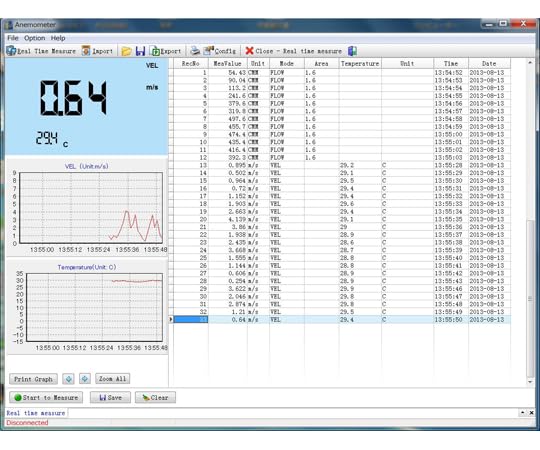
Image: The BENETECH GMAR866 Split Anemometer, showing the main display unit connected to the separate vane (probe).
Main Unit Features:
- LCD Display with Backlight
- Measurement Buttons (HOLD, UNIT, LIGHT, REC, MAX/MIN, AVG, AREA, SET)
- USB Port for PC Connection
- Battery Compartment
- Tripod Mount Thread
Vane (Probe) Features:
- Rotating Blades for Wind Speed Measurement
- Temperature Sensor
- Cable for connection to the main unit
4. Setup
4.1 Battery Installation
- Open the battery compartment cover on the back of the main unit.
- Insert four (4) AAA batteries, ensuring correct polarity (+/-).
- Close the battery compartment cover securely.
4.2 Connecting the Vane
Connect the cable from the vane (probe) to the designated port on the main unit. Ensure the connection is firm.
4.3 PC Software Installation (Windows OS Only)
- Insert the provided software CD into your computer's CD-ROM drive.
- Follow the on-screen instructions to install the data logger software.
- After installation, connect the anemometer to your PC using the supplied USB cable.
- Launch the software to establish communication with the device.
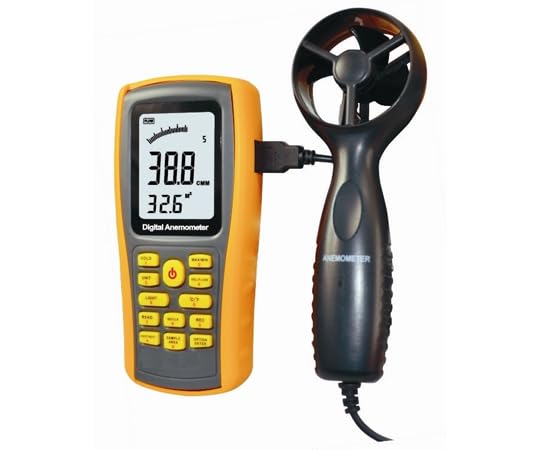
Image: Screenshot of the BENETECH GMAR866 PC software interface, displaying real-time measurements, graphs, and logged data.
5. Operating Instructions
5.1 Power On/Off
Press the POWER button to turn the device on. The device features an automatic power-off function to conserve battery life. To turn off manually, press and hold the POWER button.
5.2 Basic Measurement
Once powered on, the device will display real-time wind speed and temperature. Position the vane in the airflow you wish to measure. Ensure the vane's rotation is unobstructed.
5.3 Unit Selection
Press the UNIT button to cycle through different wind speed units (m/s, ft/min, knots, km/h, mph) and temperature units (°C, °F).
5.4 Data Hold
Press the HOLD button to freeze the current reading on the display. Press it again to release and resume real-time measurement.
5.5 MAX/MIN/AVG Measurement
Press the MAX/MIN button to view the maximum, minimum, or average recorded values during a measurement session. Cycle through these modes by repeatedly pressing the button.
5.6 Wind Volume (CMM) Measurement
- Press the AREA button.
- Use the arrow buttons (if available, or refer to specific button for adjustment) to set the area (0.001 to 9999 m²) of the duct or opening where wind volume is being measured.
- Confirm the area setting. The device will then display wind volume in CMM (Cubic Meters per Minute).
5.7 Data Logging
The GMAR866 can store up to 500 records internally. You can set the recording interval and choose between automatic or manual recording.
- Setting Recording Interval: Use the SET button to access the recording interval settings. Adjust the time as needed.
- Start Recording: Press the REC button to start data logging. The device will automatically record wind speed levels at the set interval. Manual recording is also possible by pressing REC for each data point.
- View Logged Data: Logged data can be reviewed directly on the main unit or transferred to a PC using the software.
5.8 Backlight
Press the LIGHT button to turn the display backlight on or off for improved visibility in low-light conditions.
5.9 Tripod Mounting
The main unit includes a standard tripod mount thread at the bottom, allowing for stable, hands-free operation during long-term measurements.
6. Maintenance
6.1 Cleaning
Wipe the device with a soft, dry cloth. Do not use abrasive cleaners or solvents. Ensure the vane's blades are free from dust and debris for accurate readings.
6.2 Storage
When not in use, store the anemometer in its hard case in a cool, dry place, away from direct sunlight and extreme temperatures. Remove batteries if storing for extended periods.
6.3 Battery Replacement
Replace all four AAA batteries when the low battery indicator appears on the display to ensure continuous accurate operation.
7. Troubleshooting
- Device does not power on: Check battery installation and ensure batteries are not depleted. Replace if necessary.
- Inaccurate readings: Ensure the vane is clean and rotating freely. Check for obstructions in the airflow. Verify correct unit settings.
- PC software not connecting: Ensure the USB cable is securely connected to both the device and the PC. Verify that the software is installed correctly and that your PC is running Windows OS.
- Display is dim: Activate the backlight function. If the issue persists, replace batteries.
8. Specifications
| Parameter | Specification |
|---|---|
| Wind Speed Range | 0.3 - 45 m/s |
| Wind Speed Resolution | 0.001 m/s |
| Wind Speed Accuracy | ±3% ±0.1 dgts |
| Wind Volume (CMM) Range | 0 - 999900 m³/min |
| Wind Volume Resolution | 0.001 - 100 |
| Area Setting Range | 0.001 - 9999 m² |
| Temperature Range | 0 - 45°C |
| Temperature Resolution | 0.1°C |
| Temperature Accuracy | ±1°C |
| Data Logger Capacity | 500 records |
| PC Interface | USB (Windows OS only) |
| Power Supply | 4x AAA 1.5V Batteries |
| Main Unit Dimensions | 145 x 72 x 35 mm |
| Main Unit Weight (with batteries) | 248 g |
| Vane Dimensions | 172 x 65 x 29 mm |
| Vane Weight | 38 g |
| Operating Temperature | 0 - 50°C |
| Operating Humidity | < 80% RH (non-condensing) |
| Other Features | Auto Power Off, Backlight, Data Hold, MAX/MIN/AVG, Beaufort Scale Display, Tripod Mount |
9. Warranty and Support
The BENETECH GMAR866 Split Anemometer comes with a 3-month manufacturer's warranty from the date of purchase. This warranty covers defects in materials and workmanship under normal use. It does not cover damage caused by misuse, accident, unauthorized modification, or improper operation.
For technical support or warranty claims, please contact your retailer or the BENETECH customer service department with your purchase details.