
Srutueo HVR200, NVH200, NRV200, NV200, NV250, NVR (Compatible Models)
Srutueo 12Pcs Vacuum Cleaner Bags HEPA Filter Dust Bag Replacement Manual
Brand: Srutueo
Compatible Models: HVR200, Henry, NVH200, NRV200, NV200, NV250, NVR, David, Hetty, Harry, HHR200A, HVR200A Eco, HVC200, JVC200, JVC225, JVC235, JVR225, NVR200
1. Introduction
This manual provides essential information for the proper use and maintenance of your Srutueo replacement vacuum cleaner bags. These bags are designed with HEPA filtration capabilities to effectively capture dust and allergens, ensuring a cleaner environment. Each package contains 12 high-quality non-woven dust bags, offering intense filtration and a lightweight design for easy handling.
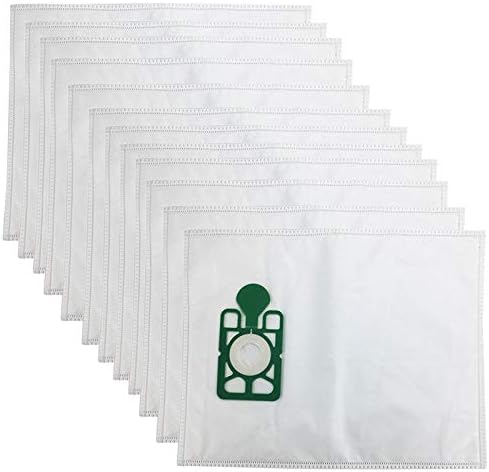
Figure 1.1: Overview of the 12-piece Srutueo vacuum cleaner bag set.
2. Setup and Installation
To install a new dust bag, ensure your vacuum cleaner is unplugged from the power outlet. Locate the vacuum cleaner's bag compartment, typically found by opening a latch or cover on the main unit. Carefully remove the old, full dust bag, ensuring no dust escapes. Insert the new Srutueo dust bag by aligning the bag's collar with the vacuum cleaner's inlet port. Press firmly until the bag is securely seated. Close the compartment cover until it latches securely.
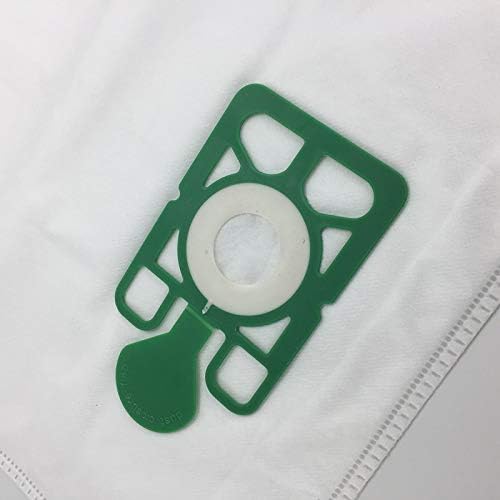
Figure 2.1: Detail of the bag's collar for secure attachment to the vacuum cleaner's inlet.
3. Operating Guidelines
Once the new dust bag is installed, you can operate your vacuum cleaner as usual. The Srutueo HEPA filter bags are designed to provide intense filtration, trapping fine dust particles, pollen, pet dander, and other allergens within the bag. This contributes to improved air quality during and after vacuuming. The non-woven material ensures durability and efficient airflow until the bag is full.
4. Maintenance and Replacement
Regular replacement of the dust bag is crucial for maintaining optimal vacuum cleaner performance and filtration efficiency. Replace the dust bag when:
- Suction power noticeably decreases.
- The bag full indicator (if present on your vacuum model) illuminates.
- The bag appears visibly full or heavy.
To dispose of a full bag, carefully remove it from the vacuum cleaner, ensuring the opening is sealed (some bags have a self-sealing mechanism). Dispose of the bag in a sealed waste bin according to local waste disposal regulations.
5. Troubleshooting
Reduced Suction Power
If you experience reduced suction power, the most common cause is a full or clogged dust bag. Replace the dust bag with a new one. Also, check for any blockages in the vacuum cleaner's hose, attachments, or filters.
Dust Escaping
If dust is escaping from the vacuum cleaner, ensure the dust bag is correctly installed and securely sealed within its compartment. Check for any tears or damage to the bag itself. If the bag is damaged, replace it immediately.
6. Product Specifications

Figure 6.1: Dimensions of the Srutueo replacement vacuum cleaner bag.
| Feature | Detail |
|---|---|
| Brand Name | Srutueo |
| Item Weight | 1.09 pounds (for the package) |
| Package Dimensions | 12.8 x 8.27 x 2.48 inches |
| Special Feature | Lightweight, Intense Filtration |
| Compatible Device | Vacuum Cleaner (Henry, NUVAC models) |
| Number of Items | 12 |
| Material | Non-woven |
| Bag Size | 407mm x 315mm |
7. Warranty and Support
For specific warranty information or customer support regarding your Srutueo vacuum cleaner bags, please refer to the product packaging or contact the seller directly through the platform where the purchase was made. General product support for replacement parts typically covers manufacturing defects.
Ask a question about this manual
Ask about setup, troubleshooting, compatibility, parts, safety, or missing instructions. Manuals+ will review the question and use this page’s manual context to help answer it.