
suitU d6398390-7e45-46fa-aa4a-c0c5a8383f40
SUITU Portable 12V DC Tire Inflator Air Compressor
Model: d6398390-7e45-46fa-aa4a-c0c5a8383f40
1. Introduction
Thank you for choosing the SUITU Portable 12V DC Tire Inflator Air Compressor. This device is designed for quick and efficient inflation of various items, primarily vehicle tires, using a 12V DC power source. It features a digital display for precise pressure settings, an integrated LED light for convenience, and multiple inflation modes.
Please read this manual thoroughly before operating the device to ensure safe and correct usage. Keep this manual for future reference.
2. Safety Instructions
- Ensure the vehicle engine is running when using the compressor to avoid draining the car battery.
- Do not leave the compressor unattended during operation.
- Keep out of reach of children.
- Avoid prolonged continuous operation. Allow the compressor to cool down after 10-15 minutes of use to prevent overheating.
- Do not expose the compressor to rain or moisture.
- Always check the recommended pressure for the item being inflated to prevent over-inflation.
- Disconnect the power cable when not in use or before cleaning.
3. Product Overview
Familiarize yourself with the components of your SUITU Portable Air Compressor.
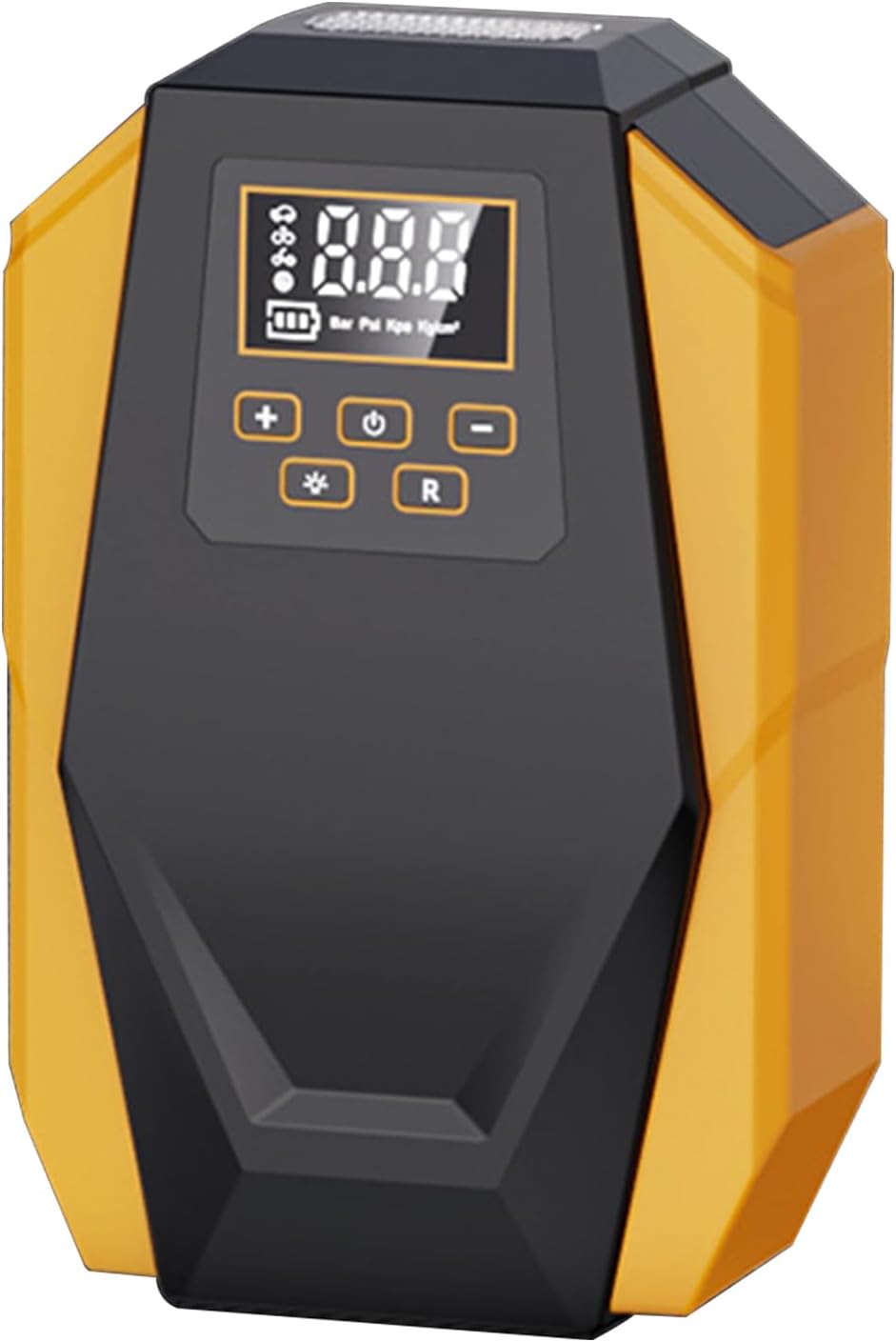
Front view of the SUITU portable air compressor, showing its digital display, power button, pressure adjustment buttons, and mode selection.
Key Features:
- Digital Display: Shows current pressure and target pressure.
- Pressure Adjustment Buttons (+/-): Increase or decrease target pressure.
- Power Button: Turns the compressor on/off.
- Mode Button (R): Selects inflation unit (PSI, BAR, KPA, Kg/cm²).
- LED Light Button: Activates the integrated LED light.
- Inflation Hose: Connects to the item being inflated.
- DC 12V Power Cable: Connects to your vehicle's 12V power outlet.
4. Setup
- Connect Power: Insert the 12V DC power cable into your vehicle's cigarette lighter socket. Ensure the vehicle engine is running.
- Attach Hose: Screw the inflation hose connector onto the valve stem of the item you wish to inflate. Ensure a tight seal to prevent air leakage.

The SUITU portable air compressor actively inflating a car tire, with the hose securely attached to the tire valve.
5. Operating Instructions
5.1 Powering On and Setting Pressure
- After connecting the power and hose, press the Power button to turn on the compressor. The digital display will illuminate.
- Press the 'R' button to cycle through the desired pressure units (PSI, BAR, KPA, Kg/cm²).
- Use the '+' and '-' buttons to set your target inflation pressure. Refer to the item's recommended pressure (e.g., vehicle door jamb or owner's manual for tires).
5.2 Inflation Process
- Once the target pressure is set, press the Power button again to start inflation. The compressor will begin to operate.
- The digital display will show the current pressure as it inflates.
- The compressor will automatically shut off once the preset target pressure is reached.
- Disconnect the inflation hose from the valve stem and then unplug the power cable from the 12V socket.
5.3 Using the LED Light
Press the LED Light button (often marked with a sun or lightbulb icon) to turn on the integrated LED light. This is useful for operating the compressor in low-light conditions or as an emergency light.

The SUITU portable air compressor demonstrating its integrated LED light, providing illumination for use in low-light conditions.
5.4 Multiple Inflation Modes
The compressor is versatile and can inflate various items. While the core operation remains the same, ensure you use the correct pressure settings for each item.

The SUITU portable air compressor positioned next to a basketball, car tire, motorcycle tire, and bicycle tire, illustrating its versatility for different inflation needs.
6. Maintenance
- Cleaning: Wipe the exterior of the compressor with a soft, damp cloth. Do not use harsh chemicals or abrasive cleaners. Ensure no water enters the internal components.
- Storage: Store the compressor in a cool, dry place, away from direct sunlight and extreme temperatures. Ensure the hose and power cable are neatly coiled to prevent damage.
- Hose Inspection: Periodically check the inflation hose for any cracks, kinks, or damage. Replace if necessary.
7. Troubleshooting
| Problem | Possible Cause | Solution |
|---|---|---|
| Compressor does not turn on. | No power from 12V socket; Blown fuse in vehicle or compressor; Loose connection. | Check vehicle's 12V socket and fuse; Ensure power cable is securely plugged in; Check compressor's internal fuse (if accessible, refer to manufacturer). |
| Compressor runs but does not inflate. | Hose not securely attached; Leak in hose or valve connection; Damaged compressor pump. | Ensure hose is tightly screwed onto valve stem; Check hose for damage; Contact customer support if pump is suspected to be faulty. |
| Inaccurate pressure reading. | Loose hose connection; Sensor malfunction. | Ensure hose is tightly connected; Compare reading with a known accurate gauge; Contact customer support if persistent. |
| Compressor overheats and shuts off. | Prolonged continuous use. | Allow the compressor to cool down for at least 15-20 minutes before resuming operation. Avoid continuous use for more than 10-15 minutes. |
8. Specifications

An image displaying the approximate dimensions of the SUITU portable air compressor: 7.63 inches in height and 5 inches in width.
- Model Number: d6398390-7e45-46fa-aa4a-c0c5a8383f40
- Power Source: Corded Electric (DC 12V)
- Voltage: 12 Volts (DC)
- Maximum Pressure: 120 PSI (Pound per Square Inch)
- Maximum Power: 10 Watts
- Noise Level: 70 dB
- Hose Length: 3 Meters
- Item Weight: Approximately 680 g (1.5 Pounds)
- Parcel Dimensions: 19.3 x 12.7 x 6.35 cm
- Special Features: Digital Display, LED Light, Portable, Quick Inflation
- Color: Yellow
9. Warranty and Support
Specific warranty details are not provided in the product information. For warranty claims or technical support, please refer to the purchase documentation or contact the retailer/manufacturer directly.
When contacting support, please have your product model number (d6398390-7e45-46fa-aa4a-c0c5a8383f40) and proof of purchase readily available.
Related documentsd6398390-7e45-46fa-aa4a-c0c5a8383f40


Ask a question about this manual
Ask about setup, troubleshooting, compatibility, parts, safety, or missing instructions. Manuals+ will review the question and use this page’s manual context to help answer it.