
MAIRDI M200V
MAIRDI M200V Bone Conduction Headphone User Manual
Brand: MAIRDI | Model: M200V
Introduction
The MAIRDI M200V Bluetooth Bone Conduction Headphone offers an innovative open-ear listening experience combined with advanced communication features. Designed for comfort and situational awareness, these headphones transmit sound through your cheekbones, leaving your ears open to your surroundings. Equipped with an AI noise-canceling microphone, they ensure crystal-clear calls in various environments. This manual provides comprehensive instructions for setup, operation, and maintenance of your M200V headphones.

Figure 1: MAIRDI M200V Bone Conduction Headphone with included USB dongle.
Product Features
- Supreme Sound Immersion: Features premium transducers and an exclusive bass vocal vibrator for enhanced audio quality with minimal vibration and sound leakage. Enjoy rich bass and intricate details while maintaining awareness of your surroundings.

Figure 2: Illustration of True Bone Conduction technology delivering sound directly to the inner ear.
- ENC Dual Mic Noise Canceling: An adjustable boom microphone with AI dual microphone noise canceling technology effectively eliminates 98% of background noise, ensuring clear conversations in noisy environments. Ideal for phone calls, video conferences, and online learning.

Figure 3: Crystal clear calls are enabled by CVC 8.0 dual mic noise canceling technology.
- Long-Lasting Performance: Equipped with a large capacity battery providing up to 8 hours of continuous music and calls, and an impressive 200 hours of standby time. Magnetic charging ensures convenient and secure power replenishment.

Figure 4: Enjoy reliable battery life for extended use.
- Multi-Point Pairing & USB Dongle: Powered by Qualcomm (QCC) 5.3 Bluetooth technology for strong signal transmission and reduced power consumption. Supports simultaneous connection with two Bluetooth devices. Includes a USB Bluetooth adapter for seamless pairing with PCs lacking Bluetooth functionality.

Figure 5: Dual connectivity with included USB dongle for versatile use.
- Ultimate Comfort and Fit: Lightweight design (only 32g) ensures extended wear without discomfort. The upgraded titanium alloy neckband provides a secure fit, preventing slippage during physical activities, even when wearing helmets and glasses.

Figure 6: Advanced QCC 5.3 Bluetooth Technology for fast and stable connection.
What's in the Box
Your MAIRDI M200V package includes the following items:
- Bone conduction headphone x1
- USB adapter x1
- User manual x1
Setup
1. Power On/Off
- Power On: Long press the Power On/Off button for 4 seconds. The blue light will flash once, indicating power on.
- Power Off: Long press the Power On/Off button for 4 seconds. The red light will flash twice, indicating power off.
2. Bluetooth Pairing
- Initial Pairing: After powering on, the headset will automatically enter pairing mode. The blue and red lights will flash alternately. On your mobile device or computer, turn on Bluetooth and search for "M200V" to connect. Once connected, the blue light will breathe every 10 seconds.
- Multi-Point Connection: To connect to a second device, turn off the Bluetooth function on the first paired device. Then, turn on Bluetooth on the second device and search for "M200V" to pair. After successful pairing with the second device, turn on Bluetooth on the first device. The headset will automatically connect to both devices.
3. Using the USB Dongle
The included USB dongle allows for wireless connection to devices without built-in Bluetooth, such as desktop PCs.
- Insert the USB dongle into an available USB port on your computer.
- Power on your M200V headset. It will automatically attempt to connect to the dongle.
- Once connected, the headset will function as a plug-and-play audio device for your computer.
Video 1: Official product video demonstrating the Wireless Bluetooth Bone Conduction Headphone with Mic Boom, including features like Bluetooth 5.3 technology, noise cancellation, and battery life.
Operating Instructions
Controls Overview
- Volume - / Last Song: Decrease volume or skip to the previous track.
- Volume + / Next Song / Power On/Off: Increase volume, skip to the next track, or power the device on/off.
- Multi-Function Button: Used for various call and playback controls (e.g., answer/end calls, play/pause music).
- Dual Mic Noise Reduction: The boom microphone features advanced noise reduction for clear voice pickup.
- LED Indicator: Provides status updates (e.g., pairing mode, connected, charging).
Usage Scenarios
The M200V headphones are versatile for various activities:
- Office Work & Meetings: The AI noise-canceling microphone ensures clear communication during calls and virtual meetings (compatible with platforms like Microsoft Teams, Zoom, Facetime, Webex).

Figure 7: Ideal for office meetings and remote work, ensuring clear audio and voice.
- Driving: Maintain awareness of road sounds while taking calls or listening to navigation.

Figure 8: Stay connected and aware while driving.
- Sport & Running: The secure and lightweight design makes them suitable for active use, allowing you to hear your environment for safety.

Figure 9: Perfect for outdoor activities like hiking, keeping you aware of your surroundings.
Maintenance
- Charging: Use the provided magnetic charging cable to charge the headphones. Ensure the charging pins align correctly. A full charge takes approximately 2 hours.
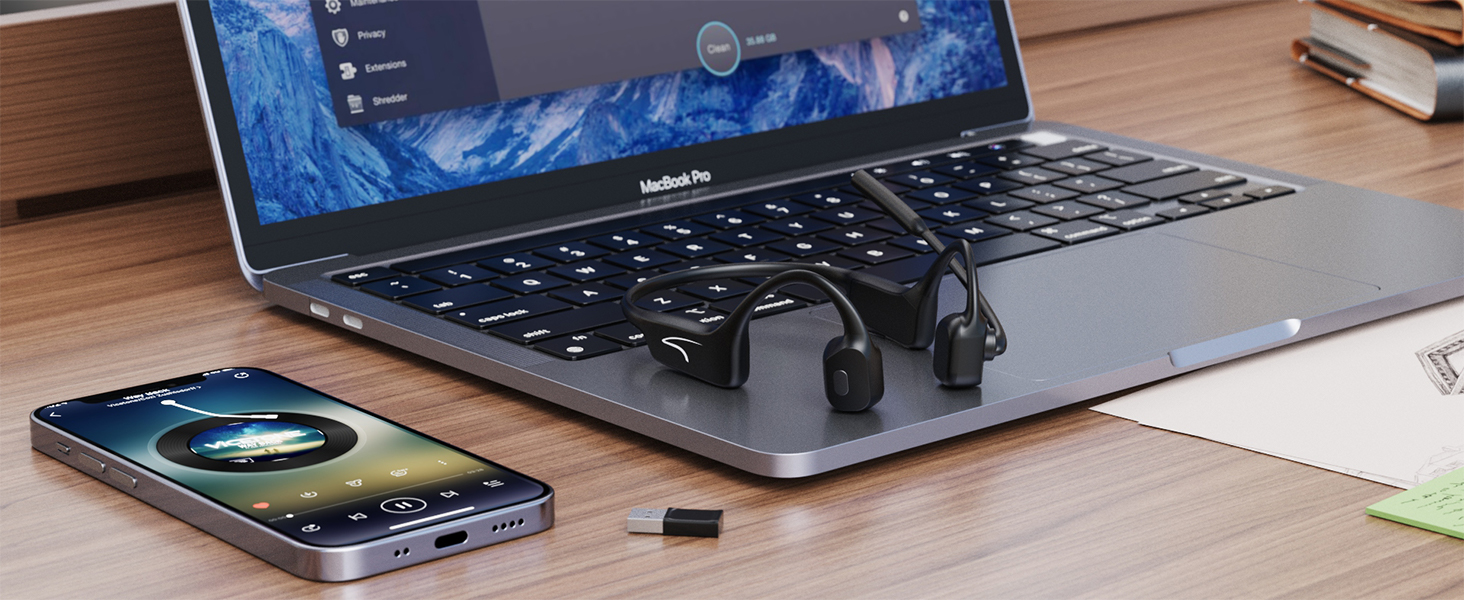
Figure 10: Magnetic charging for secure and convenient power replenishment.
- Cleaning: Wipe the headphones with a soft, dry cloth. Avoid using harsh chemicals or abrasive materials.
- Water Resistance: The headphones are IP65 waterproof, meaning they are protected against dust and low-pressure water jets. Do not submerge them in water.
Video 2: Short preview video demonstrating the IP65 waterproof rating of the MAIRDI M200V headset.
- Storage: Store the headphones in a cool, dry place away from direct sunlight and extreme temperatures.
Troubleshooting
| Problem | Possible Cause | Solution |
|---|---|---|
| Headphones do not power on. | Low battery. | Charge the headphones fully using the provided magnetic cable. |
| Cannot pair with device. | Bluetooth not enabled; headset not in pairing mode; device too far. | Ensure Bluetooth is on and the headset is in pairing mode (alternating blue/red light). Move closer to the device. Try restarting both devices. |
| Sound quality is poor or "tinny". | Improper placement; audio source quality; bone conduction limitations for heavy bass. | Adjust the placement of the transducers on your cheekbones for optimal sound. Note that bone conduction technology is optimized for voice clarity and situational awareness, not heavy bass music. |
| Microphone not picking up voice clearly. | Microphone boom not positioned correctly; excessive background noise. | Ensure the microphone boom is positioned close to your mouth. The AI noise-canceling works best for consistent background noise, but extreme noise may still affect clarity. |
| Headphones stopped charging. | Charging cable or port issue; internal fault. | Ensure the magnetic charging cable is clean and securely connected. Try a different USB power source. If the issue persists, contact customer support. |
Specifications
| Feature | Detail |
|---|---|
| Model Name | M200V Bone Conduction Headphone |
| Connectivity Technology | Wireless (Bluetooth 5.3) |
| Headphones Jack | USB (for dongle) |
| Included Components | Bone conduction headphone x1, USB adapter x1, User manual x1 |
| Material | Stainless Steel, Plastic |
| Compatible Devices | PC, laptop, Mac, tablet, cell phone |
| Control Type | Volume Control, Touch |
| Water Resistance Level | Waterproof (IP65) |
| Frequency Range | 20 Hz - 20,000 Hz |
| Battery Life | 8 Hours (Talk & Music) |
| Standby Time | 200 Hours |
| Audio Driver Type | Bone Conduction Driver |
| Item Weight | 10.5 ounces |
| Manufacturer | Xiamen Mairdi Electronic Technology Co. Ltd |
Warranty & Support
For warranty information and customer support, please refer to the contact details provided with your product packaging or visit the official MAIRDI website.
- Return Policy: This product typically has a 30-day return/replacement policy from the date of purchase. Please check your specific purchase details for exact terms.
- Protection Plans: Extended protection plans may be available for purchase. Refer to your retailer for options.
- Contact Support: For any questions or issues, you can reach out to MRDSET Store Customer Service.
Related documentsM200V

Ask a question about this manual
Ask about setup, troubleshooting, compatibility, parts, safety, or missing instructions. Manuals+ will review the question and use this page’s manual context to help answer it.