
SENCOR SRV 3150OR
SENCOR SRV 3150OR Robotic Vacuum Cleaner User Manual
Model: SRV 3150OR
Introduction
This manual provides comprehensive instructions for the safe and efficient operation, maintenance, and troubleshooting of your SENCOR SRV 3150OR Robotic Vacuum Cleaner. Please read this manual thoroughly before using the appliance and retain it for future reference.
Package Contents
Verify that all components are present in the package:
- Robotic vacuum cleaner body (including two side brushes and filters)
- Battery charging station
- Cleaning accessory
- 3x Textile mopping sleeves
- Remote control
- 2x AAA batteries (for remote control)
- 2x Spare side rotating brushes
- Power adapter
- 1x Spare HEPA filter
- 1x Spare foam filter
- Cleaning brush

Image: The SENCOR SRV 3150OR robotic vacuum cleaner displayed with all its included accessories, including the charging station, remote control, various brushes, filters, and mopping pads.
Setup
1. Charging Station Placement
Place the charging station against a wall in an open area, ensuring there are no obstacles within 1 meter (3 feet) to the sides and 2 meters (6 feet) in front. Connect the power adapter to the charging station and plug it into a power outlet.

Image: The robotic vacuum cleaner automatically returning to its charging station, illustrating the recommended clear space around the station for optimal navigation.
2. Initial Charging
Place the robot on the charging station. Ensure the charging contacts on the robot align with those on the station. The indicator light on the robot will show charging status. For first use, charge the robot fully, which typically takes several hours.
3. Installing Side Brushes
If not pre-installed, gently push the left (L) and right (R) side brushes onto their respective posts on the underside of the robot until they click into place.
Operating Instructions
Control Methods
The SENCOR SRV 3150OR can be controlled directly on the unit or via the included remote control.
- On-Device Control: Press the power button on the top of the robot to start or pause cleaning.
- Remote Control: Use the remote for comprehensive control, including starting/stopping, changing modes, adjusting suction, and directing the robot.
Cleaning Modes
The robot features Sencor Smart Room technology for efficient navigation and various cleaning modes:
- Automatic Mode: Cleans larger areas by intelligently navigating the space.
- 30-Minute Program: Initiates a 30-minute cleaning cycle, after which the robot returns to its charging station.
- Spot Cleaning: Focuses on a specific dirty area.
- Edge Cleaning: Cleans along walls and furniture edges.

Image: The robotic vacuum cleaner actively cleaning a wooden floor, demonstrating its ability to cover surfaces effectively.
Simultaneous Vacuuming and Mopping
The SRV 3150OR is equipped with a 2-in-1 dust and water tank, allowing it to vacuum and mop simultaneously. Attach a textile mopping sleeve to the water tank before use. You can adjust the suction power (3 levels) and mopping intensity (3 levels) via the remote control to suit different floor types and cleaning needs.

Image: The robotic vacuum cleaner performing its mopping function on a hard floor, with visual indicators of water droplets to show the process.

Image: An inverted view of the robot, clearly showing the main rotating brush, two side brushes, and the attached mopping pad, highlighting its cleaning mechanisms.
Obstacle Navigation
With a height of only 7.5 cm (2.95 inches), the robot can easily pass under most furniture. Intelligent impact and drop sensors help it navigate around obstacles and prevent falls from stairs.
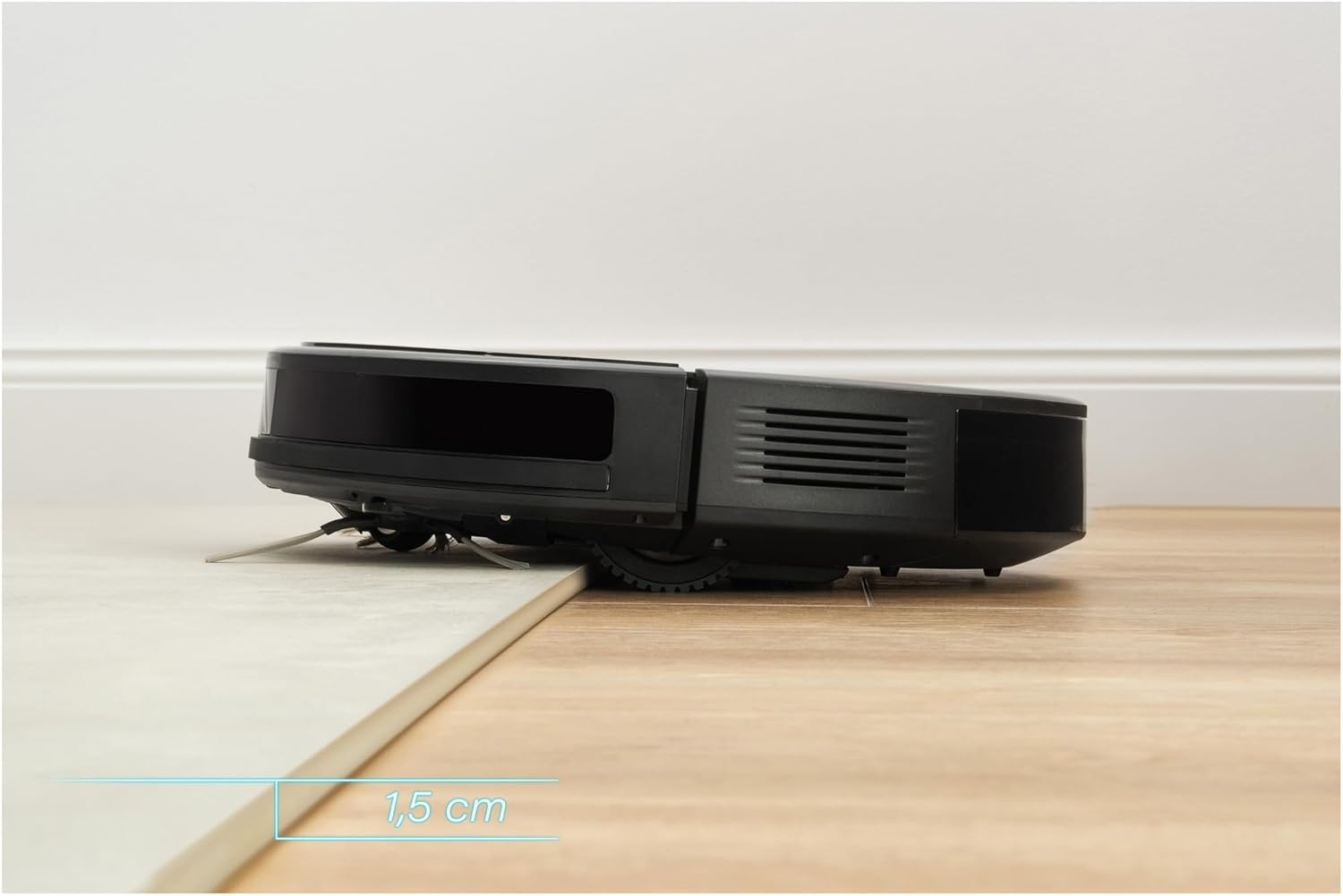
Image: The robotic vacuum cleaner demonstrating its ability to climb over a small threshold, indicating its maneuverability over minor height differences.
Maintenance
Regular maintenance ensures optimal performance and extends the lifespan of your robotic vacuum cleaner.
1. Emptying Dustbin and Water Tank
After each cleaning cycle, or when full, remove the 2-in-1 dust and water tank. Open the compartment, empty the dust, and discard any dirty water. Rinse the water tank thoroughly with clean water.
2. Cleaning Brushes
- Main Rotating Brush: Remove the main brush cover and lift out the brush. Use the included cleaning accessory to remove hair and debris tangled around the brush.
- Side Brushes: Periodically check side brushes for wear or entanglement. Remove them by pulling gently and clean any hair or debris. Replace if worn.
3. Cleaning Filters
Remove the HEPA and foam filters from the dustbin. Tap them gently to remove dust. Do not wash HEPA filters with water. Replace filters every 3-6 months, or as needed, to maintain suction power.
4. Mopping Sleeves
After each mopping session, remove the textile mopping sleeve and wash it by hand or machine. Allow it to air dry completely before reattaching.
5. Sensor Cleaning
Wipe the cliff sensors (located on the underside) and bumper sensors with a clean, dry cloth to ensure proper navigation.
Troubleshooting
If you encounter issues with your SENCOR SRV 3150OR, refer to the following common problems and solutions:
| Problem | Possible Cause | Solution |
|---|---|---|
| Robot does not turn on or charge. | Battery depleted; charging contacts dirty; power adapter not connected. | Ensure robot is properly seated on charging station. Clean charging contacts. Check power adapter connection. |
| Robot gets stuck frequently. | Too many obstacles; low clearance areas; tangled brushes. | Clear the cleaning area of excessive clutter. Check for and clean tangled brushes. |
| Poor cleaning performance. | Full dustbin; clogged filters; worn brushes. | Empty dustbin. Clean or replace filters. Clean or replace main and side brushes. |
| Robot does not return to charging station. | Charging station obstructed; robot too far from station. | Ensure charging station is in an open area. Manually place robot near station to assist. |
Specifications
| Feature | Specification |
|---|---|
| Brand | SENCOR |
| Model Number | SRV 3150OR |
| Color | Black |
| Product Dimensions (L x W x H) | 14.6 x 7.5 x 13.1 cm (5.75 x 2.95 x 5.16 inches) |
| Weight | 2.15 Kilograms (4.74 lbs) |
| Dust/Water Tank Capacity | 215 Milliliters |
| Voltage | 240 Volts |
| Material | Plastic |
| Noise Level | 65 dB |
| Battery Type | Lithium-ion |
| Battery Life (Runtime) | Up to 100 minutes |
| Filter Type | HEPA |
| Control Type | Remote Control |
| Surface Recommendation | Carpet (and hard floors, implied by mopping) |
Warranty and Support
For warranty information and technical support, please refer to the warranty card included with your product or visit the official SENCOR website. Keep your purchase receipt as proof of purchase.
For further assistance, contact SENCOR customer service.
Related documentsSRV 3150OR


Ask a question about this manual
Ask about setup, troubleshooting, compatibility, parts, safety, or missing instructions. Manuals+ will review the question and use this page’s manual context to help answer it.