
1. Introduction and Overview
The Setpower PG216Wh Portable Power Station is a versatile and lightweight power solution designed for various applications, including outdoor adventures, home backup, and powering portable devices. Its unique magnetic design allows for secure attachment to metal surfaces, enhancing convenience during use.
Key Features:
- Unique Magnetic Design: Securely fastens to metal items for convenient outdoor use.
- Lightweight and Portable: Weighs only 3.7 lbs, making it easy to carry.
- 216Wh Large Capacity: Provides 216W/15,000mAh of power for portable devices and 12-volt refrigerators.
- 3-Hour Faster Recharging: Supports three fast-charging technologies: solar panels, household AC plugs, and DC cigarette lighters.
- Versatile Output Ports: Equipped with one Type-C, one USB, and one DC socket, with a maximum output of 100W, capable of powering up to 3 portable devices simultaneously. Directly powers SetPower fridges via DC cable.

Image 1: The Setpower PG216Wh Portable Power Station, showcasing its compact and robust design.
2. Setup
2.1 Unboxing and Initial Inspection
Upon receiving your Setpower PG216Wh, carefully unpack all components and inspect for any damage. Ensure all accessories are present: 12/24V DC Power Cable, AC Charging Adapter, and User Manual.
2.2 Initial Charging
Before first use, fully charge the power station. The PG216Wh supports three charging methods:
- AC Wall Outlet: Use the provided AC Charging Adapter to plug into a standard household outlet.
- Car DC Outlet: Use the provided 12/24V DC Power Cable to charge from your vehicle's cigarette lighter socket.
- Solar Panel: Connect a compatible solar panel (sold separately) to the DC input port for solar charging.
A full charge typically takes approximately 3 hours using fast-charging technologies.

Image 2: The portable power station connected to a wall outlet for fast recharging.

Image 3: Visual representation of the three versatile recharging options for the power station.
2.3 Magnetic Attachment
The power station features a magnetic back, allowing it to be securely attached to metal surfaces. This is particularly useful for mounting it on the side of a SetPower 12V refrigerator, vehicle panels, or other metallic objects to prevent movement during travel or outdoor use.
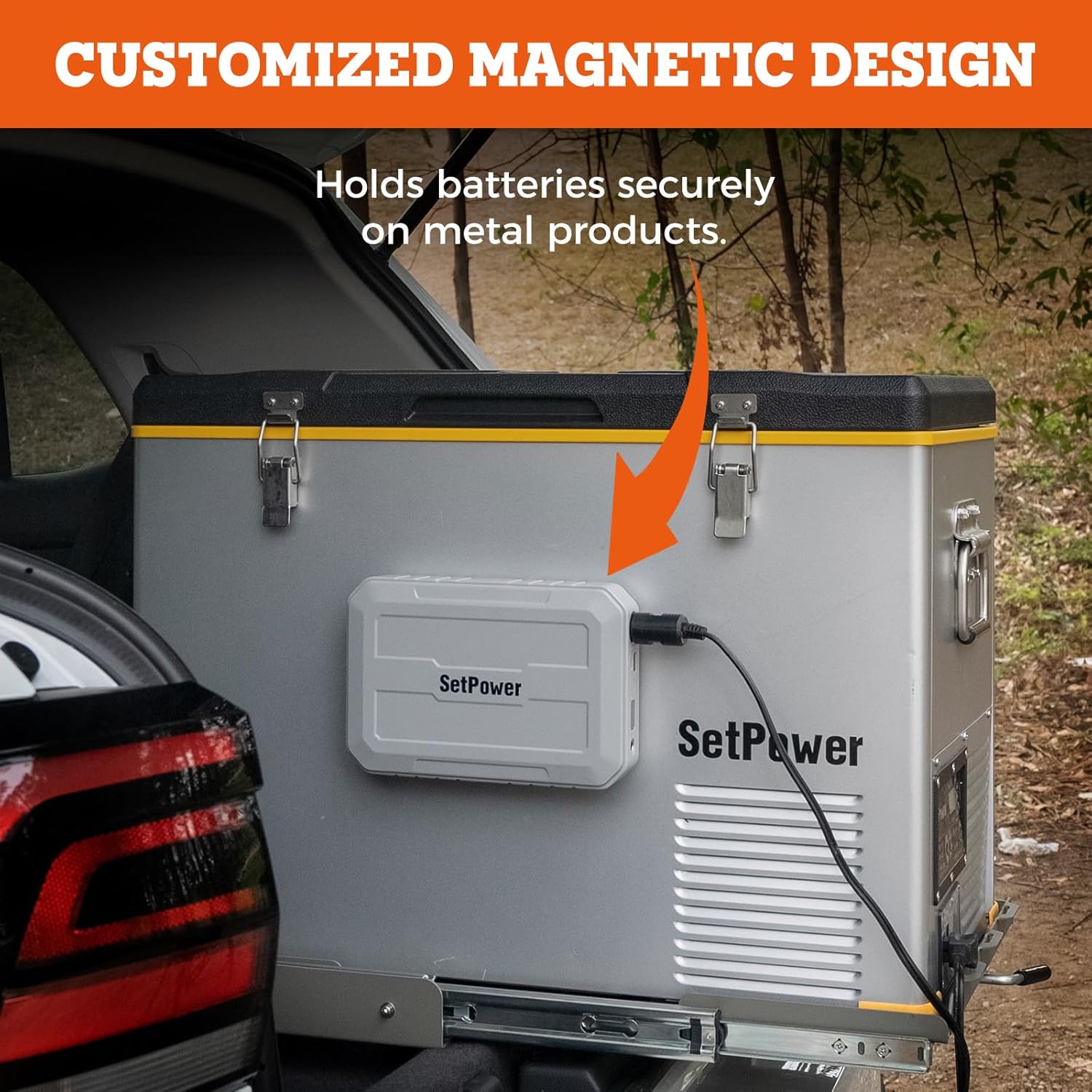
Image 4: The magnetic design in action, securing the power station to a portable refrigerator.
3. Operating Instructions
3.1 Powering On/Off
To power on the device, press and hold the power button located on the front panel until the display illuminates. To power off, press and hold the power button again until the display turns off.
3.2 Display Information
The digital display shows the current battery charge level as a percentage, allowing you to monitor remaining power at a glance.
3.3 Connecting Devices
The power station offers multiple output options:
- USB-A Port: For charging smartphones, tablets, and other USB-powered devices (Output: 5V/2.4A).
- Type-C Port: For faster charging of compatible devices (Output: 5V/3A).
- DC Socket: For powering 12V appliances such as portable refrigerators (Output: 13.3V/10A Max).
Connect your devices to the appropriate port. The power station can charge up to 3 portable devices simultaneously.

Image 5: The power station demonstrating its ability to charge multiple devices like phones, LED lights, Macbooks, drones, and car fridges.
3.4 Powering a SetPower Refrigerator
To power a SetPower 12V refrigerator (e.g., PT35, PT45, PT55, RV45S), connect the refrigerator's DC cable directly to the DC socket on the PG216Wh. This provides a reliable power source for extended cooling without needing a direct AC connection.
Video 1: A user demonstrating the Setpower PG216Wh powering a portable refrigerator, highlighting its utility for camping and off-grid use.
Video 2: A detailed review of the Setpower PG216Wh's performance in running a portable fridge, including battery life and charging methods.
4. Maintenance
4.1 General Care
- Keep the power station clean and dry. Avoid exposure to extreme temperatures or direct sunlight for prolonged periods.
- Do not disassemble or attempt to repair the device yourself. Contact customer support for assistance.
4.2 Battery Health
- For optimal battery longevity, avoid completely draining the battery frequently. Recharge it when the charge level is low.
- Store the power station with a partial charge (around 50-70%) if not used for extended periods.
4.3 Protective Features
The Setpower PG216Wh is equipped with multiple protective features to ensure safe operation:
- Temperature Protection: Prevents overheating or operation in unsafe temperature ranges.
- Short Circuit Protection: Automatically shuts off power in case of a short circuit.
- Overcharge Protection: Safeguards the battery from being overcharged.

Image 6: An illustration of the power station's built-in safety mechanisms: temperature, short circuit, and overcharge protection.
5. Troubleshooting
5.1 Device Not Powering On
- Ensure the battery is sufficiently charged. Check the display for the current charge level.
- Press and hold the power button for a few seconds to ensure it's properly activated.
5.2 Devices Not Charging
- Verify that the power station is turned on and has adequate charge.
- Check that the charging cables are securely connected to both the power station and your device.
- Ensure the device you are trying to charge is compatible with the output specifications of the power station's ports.
5.3 Unusual Behavior or Error Codes
If the power station exhibits unusual behavior or displays error codes, power it off, wait a few minutes, and then power it back on. If the issue persists, refer to the detailed troubleshooting section in the full user manual or contact customer support.
6. Specifications
| Feature | Specification |
|---|---|
| Brand | Setpower |
| Model Name | PG216Wh |
| Battery Capacity | 150 Amp Hours (216Wh / 15,000mAh) |
| Battery Cell Composition | Lithium Ion |
| Output (USB-A) | 5V/2.4A |
| Output (Type-C) | 5V/3A |
| Output (DC Socket) | 13.3V/10A Max |
| Max Output Power | 100W |
| Item Dimensions | 10 x 6 x 2 inches |
| Battery Weight | 1.8 Kilograms (3.7 lbs) |
| Recharging Time | Approx. 3 hours (using fast-charging) |
| Special Features | Fast Charging, Lightweight, Overload Protection, Portable, Magnetic Design |

Image 7: Detailed product specifications including dimensions and port layout.
7. Warranty and Support
7.1 Warranty Information
The Setpower PG216Wh Portable Power Station comes with a 1 YEAR WARRANTY. Please retain your proof of purchase for warranty claims.
7.2 Customer Support
For any questions, technical support, or warranty inquiries, please refer to the contact information provided in your product packaging or visit the official Setpower website.
8. Additional Resources
8.1 Product Videos
Video 3: An overview of the Setpower PG216Wh, highlighting its features and benefits for portable power needs.
Video 4: Demonstrating the Setpower RF30 Dual-Zone 12V Cooler with App Control, which can be powered by the PG216Wh.
Video 5: A test of how long the Setpower battery can keep a fridge cold, providing real-world usage insights.
