
1. Important Safety Instructions
Please read and understand all safety instructions before using this product. Failure to follow these instructions may result in electric shock, fire, or serious injury.
- Keep out of reach of children and pets: The high-voltage grid can cause electric shock. The device features a 360° protective grid cover to prevent accidental contact, but supervision is always recommended.
- Do not touch the electric grid: Never insert fingers or metal objects into the internal high-voltage grid.
- Waterproof Design: The device features a waterproof design suitable for outdoor use in rain. However, it cannot be soaked in water. Avoid submerging the unit.
- Power Source: Use only the specified charging methods (solar or Type-C cable). Do not use unauthorized adapters or cables.
- Cleaning: Always turn off and unplug the device before cleaning. Use the provided brush to clean the grid.
- Placement: Place the zapper away from flammable materials and liquids. Ensure adequate ventilation.
- Repair: Do not attempt to repair or modify the device yourself. Contact qualified service personnel for any repairs.

Image: The PALONE Solar Bug Zapper is designed with a protective grid to prevent accidental contact, ensuring safety for children and pets.

Image: The bug zapper features a waterproof design for outdoor use, but it should not be submerged in water.
2. Product Overview
The PALONE Solar Bug Zapper MWS-058 is an efficient and versatile insect control device designed for both indoor and outdoor use. It features a powerful 4500V electric grid, UV light attraction, and multiple operating modes, including a night light function.
Key Features:
- Efficient Mosquito Control: Attracts flying insects with 365-395nm wavelength UV light and eliminates them with a 4500V high-voltage grid. Effective for areas up to 100 square meters.
- 2-in-1 Functionality: Combines bug zapping with an LED night light. The bottom LED light provides moderate, soft illumination.
- Dual Charging Modes: Supports solar charging for outdoor use and Type-C USB charging for indoor or faster charging.
- 360° Pest Control: Double-sided design attracts and eliminates pests from all directions. Suitable for hanging in various scenarios.
- Safe and Eco-Friendly: Features a protective grid cover and operates without chemicals, odors, or toxins.
Components:
- Main Unit (Bug Zapper)
- Solar Panel (integrated or external, depending on model variant)
- Type-C Charging Cable
- Cleaning Brush
- Hook (for hanging)
- Indicator Light
- Dust Plug

Image: Detailed view of the bug zapper's components, including the hook for hanging, indicator light, dust plug, and cleaning brush.
3. Setup
Unpacking:
- Carefully remove the bug zapper and all accessories from the packaging.
- Inspect the device for any damage. If damaged, do not use and contact customer support.
Initial Charging:
Before first use, it is recommended to fully charge the device using the Type-C cable.
- Connect the Type-C cable to the charging port on the device and plug the other end into a compatible USB power adapter (not included) or a power bank.
- The indicator light will show charging status (e.g., red for charging, blue for fully charged).
Placement:
- Outdoor Use: For optimal solar charging, place the device in a location where the solar panel receives direct sunlight for several hours during the day.
- Hang the zapper using the integrated hook in areas prone to insects, such as patios, gardens, or camping sites.
- Indoor Use: Place the zapper on a stable surface or hang it in a room where insect control is needed. Ensure it is away from direct drafts or strong light sources that might reduce its effectiveness.

Image: The bug zapper can be charged using its solar panel in direct sunlight or via a Type-C cable for indoor convenience.
4. Operating Instructions
Powering On/Off:
Locate the power button on the device. Press and hold to turn on or off. A short press typically cycles through modes.
Operating Modes:
The PALONE Solar Bug Zapper offers multiple operating modes to suit different needs. Cycle through modes by pressing the mode button (if separate) or the power button (if combined).
- Human Sensor Mode: The illuminated light will automatically turn on when it senses a person within 5-7 meters and turn off after 30 seconds of no movement. This mode is ideal for security lighting.
- Anti-mosquito Mode: Activates the UV light and high-voltage grid to attract and eliminate flying insects. This is the primary bug zapping function.
- Lighting Mode: Activates the bottom LED light, providing soft ambient illumination without the bug zapping function. Useful as a night light.
- Comprehensive Mode: Combines both the Anti-mosquito and Lighting functions for simultaneous pest control and illumination.

Image: Visual representation of the four operating modes: Human Sensor, Anti-mosquito, Lighting, and Comprehensive.

Image: Demonstration of the Human Sensor Mode, where the light activates upon detecting movement within 5-7 meters.

Image: The device can operate in Anti-mosquito Mode (blue light) or Lighting Mode (white light), even in rainy weather.
Charging:
- Solar Charging: Place the device with its solar panel facing direct sunlight during the day. The indicator light will show charging status. This method is environmentally friendly and convenient for outdoor use.
- Type-C Charging: For faster charging or when sunlight is unavailable, connect the provided Type-C cable to the device and a USB power source.
5. Maintenance
Cleaning the Electric Grid:
Regular cleaning ensures optimal performance of the bug zapper.
- Ensure the device is turned off and disconnected from any power source (Type-C cable or solar panel if detachable).
- Use the provided small brush to gently sweep away any dead insects or debris from the high-voltage grid.
- For models with an open bottom, dead insects may fall out naturally. Ensure the area beneath is clean.
- Do not use water or cleaning solutions directly on the electric grid.
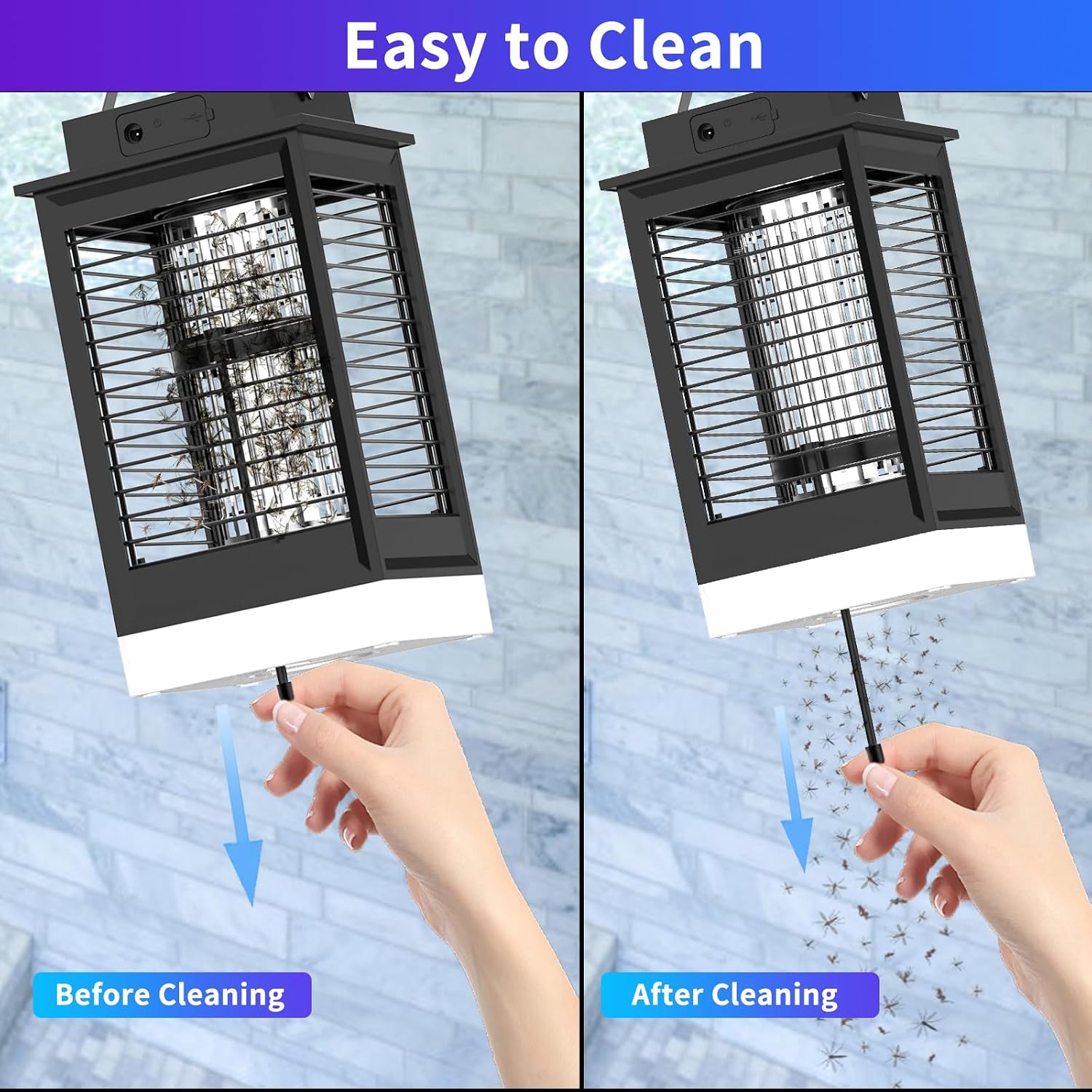
Image: Illustration of the easy cleaning process, showing the removal of dead insects from the zapper's grid.
Storage:
When not in use for extended periods, store the bug zapper in a cool, dry place, away from direct sunlight and moisture. Ensure the battery is partially charged before storage to prolong its lifespan.
6. Troubleshooting
- Device not turning on:
- Ensure the device is fully charged. Connect to Type-C power for at least 2-3 hours.
- Check if the power button is pressed correctly.
- Bug zapper not attracting/killing insects:
- Ensure the device is in Anti-mosquito or Comprehensive mode.
- Clean the electric grid if it's covered with dead insects or debris.
- Place the zapper in a dark area, as competing light sources can reduce effectiveness.
- Verify the UV light is functioning.
- Solar charging not working:
- Ensure the solar panel is exposed to direct sunlight and not shaded.
- Clean the surface of the solar panel from dust or dirt.
- Battery not holding charge for long:
- Battery performance can degrade over time. Ensure it's fully charged before use.
- Operating in Comprehensive mode (zapping + lighting) consumes more power than Anti-mosquito mode alone.
- Light flickers:
- This might indicate a low battery. Recharge the device.
- If flickering persists after charging, contact customer support.
7. Specifications
| Feature | Detail |
|---|---|
| Brand | PALONE |
| Model Number | MWS-058 |
| Voltage | 4500V (Electric Grid) |
| Power | 7.5W |
| Charging Type | Solar, Type-C USB |
| UV Wavelength | 365-395nm |
| Coverage Area | Up to 100 square meters |
| Target Species | Fly, Mosquito, other flying insects |
| Item Weight | 982 Grams |
| Style | Waterproof |
8. Warranty and Support
Warranty Information:
Specific warranty details, including duration and coverage, are typically provided with your purchase documentation or on the product packaging. Please refer to these materials for comprehensive warranty information.
Customer Support:
For technical assistance, troubleshooting beyond this manual, or warranty claims, please contact PALONE customer support. Contact information can usually be found on the product packaging, the official PALONE website, or through your retailer.
When contacting support, please have your product model number (MWS-058) and purchase date ready.