
1. Introduction
The GODOX Magic XT1 is a compact and versatile wireless lavalier microphone system designed for high-quality audio recording across various devices. This system features a touchscreen interface, advanced noise cancellation, and multiple recording modes, making it suitable for interviews, live streaming, outdoor shooting, and content creation. This manual provides comprehensive instructions for the proper setup, operation, and maintenance of your Magic XT1 system.

Image 1.1: GODOX Magic XT1 Wireless Lavalier Microphone System components.
2. What's in the Box
Carefully unpack your GODOX Magic XT1 system and ensure all items are present:
- 1 x Receiver
- 2 x Transmitter
- 1 x Storage Box
- 2 x Magnetic Back Clip
- 2 x Furry Windscreen
- 4 x Magnetic Back Button
- 1 x USB-A to USB-C Data Cable
- 1 x 3.5mm TRS-TRS Connect Cable
- 1 x 3.5mm TRS to USB-C Adapter Cable
- 1 x Cold Shoe Base

Image 2.1: Contents of the GODOX Magic XT1 package.
3. Product Overview
3.1 Receiver (RX) and Charging Case
The receiver unit serves a dual purpose: it receives audio signals from the transmitters and acts as a portable charging and storage case for both transmitters. Its compact design allows for easy portability.

Image 3.1: The receiver unit also functions as a charging and storage case for the transmitters.
3.2 Transmitters (TX)
The two transmitter units are lightweight (approximately 8 grams each) and feature built-in microphones. They are designed for discreet placement and can be attached using the magnetic back clips or buttons.

Image 3.2: Transmitter unit and wearing options.
3.3 Touchscreen Interface
The receiver is equipped with an intuitive OLED touchscreen and physical buttons for easy navigation and control over settings such as volume, recording modes, and noise reduction.

Image 3.3: Customizable touchscreen interface.
3.4 Audio Quality and Features
The Magic XT1 delivers 48kHz/24-bit high-resolution audio with a 70dB Signal-to-Noise Ratio (SNR) and a maximum 115dB Sound Pressure Level (SPL). It includes a 3.5mm headphone jack for real-time audio monitoring.

Image 3.4: Premium acoustic build for high-fidelity audio.
3.5 Wireless Transmission
The system operates on a 2.4GHz wireless frequency, offering a stable transmission range of up to 200 meters (656 feet) in line-of-sight conditions.

Image 3.5: Maximum 200m line-of-sight transmission range.
4. Setup
4.1 Initial Charging
Before first use, fully charge the receiver and transmitters. Place the transmitters into the receiver's charging slots. Connect the receiver to a power source using the provided USB-A to USB-C data cable.
4.2 Powering On/Off
- To Power On: Press and hold the power button on the receiver and each transmitter until the indicators light up.
- To Power Off: Press and hold the power button on each unit until the indicators turn off.
4.3 Pairing
The transmitters and receiver are typically pre-paired at the factory. If re-pairing is necessary, refer to the on-screen instructions on the receiver's touchscreen or the detailed pairing guide in the full manual.
4.4 Connecting to Devices
The Magic XT1 offers wide compatibility with various recording devices:
- Cameras: Use the 3.5mm TRS-TRS cable to connect the receiver's 'OUT' port to your camera's microphone input. Secure the receiver to your camera's cold shoe mount.
- Smartphones/Tablets (USB-C): Use the 3.5mm TRS to USB-C adapter cable to connect the receiver's 'OUT' port to your device's USB-C port.
- Smartphones/Tablets (Lightning): A 3.5mm to Lightning cable (GAC-IC10, sold separately) is required to connect the receiver's 'OUT' port to your Apple device.
- Computers (UAC Support): Connect the receiver's USB-C port directly to your computer's USB port using the USB-A to USB-C data cable. Select 'Magic XT1' as the sound input device in your computer's audio settings.

Image 4.1: Connection methods for various devices.
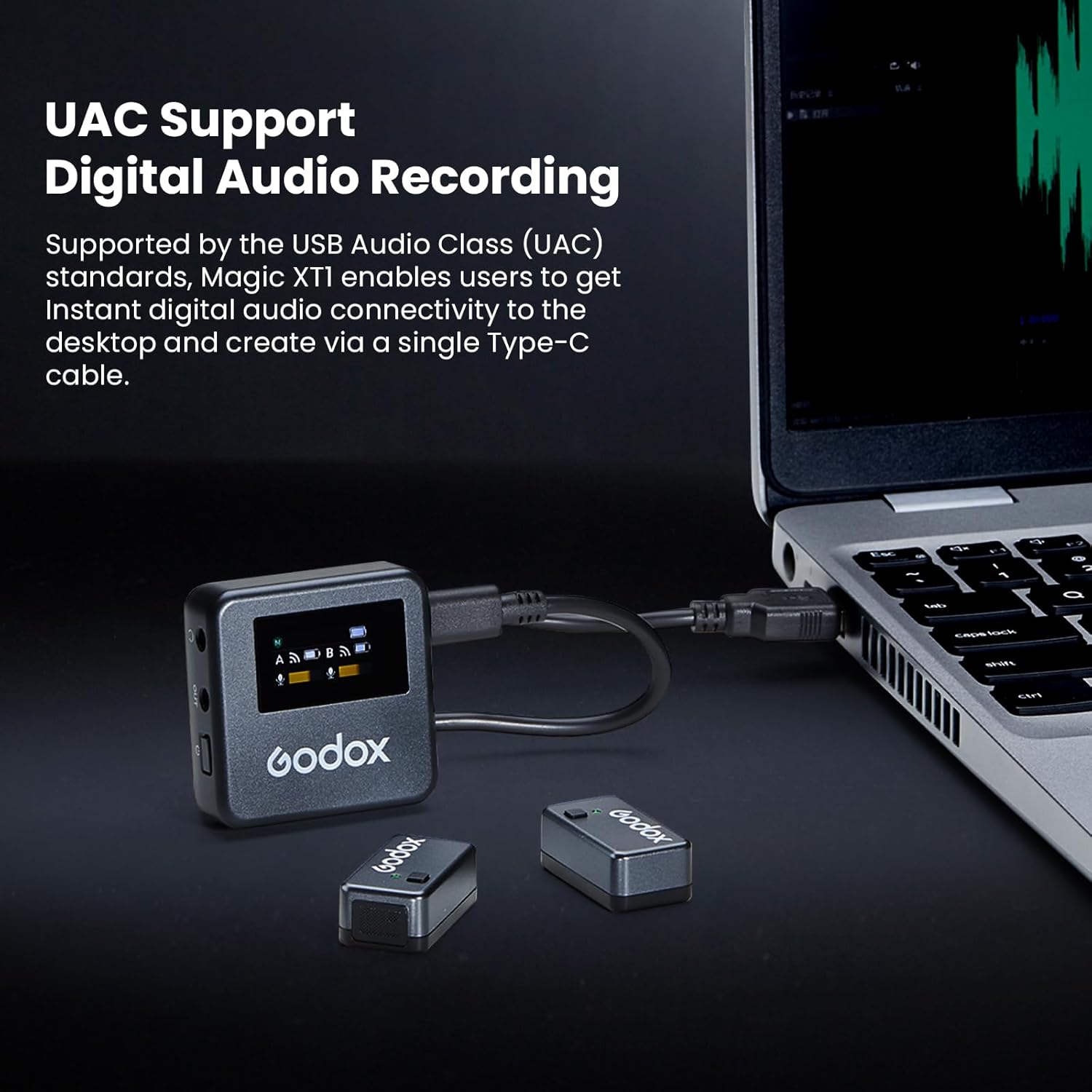
Image 4.2: UAC support for digital audio recording with computers.
5. Operating Instructions
5.1 Using the Touchscreen
The receiver's OLED touchscreen allows you to access and adjust various settings. Tap icons to navigate menus and swipe to change values or options. Physical buttons may also be present for quick access to common functions.
5.2 Audio Monitoring
Connect headphones to the 3.5mm headphone jack on the receiver to monitor audio in real-time during recording. This ensures optimal audio levels and quality.

Image 5.1: 3.5mm headphone jack for real-time monitoring.
6. Recording Modes
The Magic XT1 offers three distinct recording modes to suit different scenarios:
- Mono Mode: Combines audio from both transmitters into a single mono track. This is suitable for single-person recordings or when a combined audio output is desired.
- Stereo Mode: Records audio from each transmitter onto separate left and right channels, providing a stereo soundscape. Ideal for two-person interviews or when distinct audio sources are needed.
- -6dB Safety Track Mode: Records a primary audio track and a secondary backup track at -6dB lower volume. This helps prevent audio clipping or distortion in case of unexpected loud sounds.

Image 6.1: Available recording modes.
7. Audio Settings
The system provides powerful custom settings for precise audio control:
- 1-Click Dynamic Noise Reduction (DNR): Activates intelligent noise cancellation to reduce ambient background noise, enhancing vocal clarity.
- 150Hz Low-Cut Filter: Filters out low-frequency sounds such as wind noise, rumble, or air conditioning hum, improving the overall audio quality.
- 10-Level Volume Adjustment: Allows for individual volume control for each microphone, enabling fine-tuning of audio levels.

Image 7.1: Pro Audio Treatment settings.
8. Charging and Battery Life
The transmitters provide approximately 8 hours of runtime on a full charge. When stored in the receiver, the entire system (receiver and two transmitters) supports up to 16 hours of recording time, thanks to the receiver's integrated charging capabilities.
Image 8.1: Battery life indicators for transmitters and the entire system.
9. Maintenance
To ensure the longevity and optimal performance of your GODOX Magic XT1 system, follow these maintenance guidelines:
- Cleaning: Use a soft, dry cloth to clean the exterior of the receiver and transmitters. Avoid using liquid cleaners or solvents.
- Storage: When not in use, store the transmitters in the receiver's charging slots within the provided storage box to protect them from dust and physical damage.
- Battery Care: For extended storage, ensure the batteries are partially charged (around 50%) to prolong their lifespan. Avoid fully discharging or overcharging for long periods.
- Environmental Conditions: Keep the device away from extreme temperatures, high humidity, and direct sunlight.
10. Troubleshooting
If you encounter issues with your GODOX Magic XT1, refer to the following common problems and solutions:
| Problem | Possible Cause | Solution |
|---|---|---|
| No audio output | Incorrect cable connection, low battery, un-paired units, incorrect device input selection. | Check all cable connections. Ensure units are charged and powered on. Verify pairing. Select 'Magic XT1' as audio input on your recording device. |
| Poor audio quality / Noise | Interference, high ambient noise, incorrect gain settings, wind noise. | Move away from sources of interference. Activate Dynamic Noise Reduction (DNR) or Low-Cut Filter. Adjust microphone volume. Use furry windscreens outdoors. |
| Short wireless range | Obstructions, strong interference, exceeding line-of-sight. | Ensure clear line-of-sight between transmitter and receiver. Avoid areas with dense Wi-Fi or other 2.4GHz devices. Reduce distance if necessary. |
| Transmitters not charging | Receiver not powered, improper placement in charging slots, dirty charging contacts. | Ensure receiver is charged or connected to power. Verify transmitters are correctly seated in charging slots. Clean charging contacts if necessary. |
If the problem persists, please contact GODOX customer support for further assistance.
11. Specifications
| Feature | Specification |
|---|---|
| Item Model Number | Magic XT1 |
| Item Weight | 7.1 ounces |
| Product Dimensions | 5.79 x 4.02 x 2.8 inches |
| Batteries | 2 Lithium Ion batteries required (included) |
| Battery Type | Lithium Ion |
| Power Source | Battery Powered |
| Color Name | Black |
| Compatible Devices | Camera, Personal Computer, Smartphone, Tablet |
| Connector Type | 3.5 mm TRS, USB Type-C |
| Hardware Platform | Camera, Smartphone, Computer, Tablet |
12. Warranty and Support
For warranty information and customer support, please refer to the documentation included with your product or visit the official GODOX website. Specific warranty terms may vary by region and retailer.