
1. Introduction
Thank you for choosing the Nerunsa D60Pro Bluetooth Headphones. These wireless in-ear headphones are designed to provide a high-fidelity audio experience with advanced features like Bluetooth 5.4 connectivity, 4 ENC noise-cancelling microphones, and intuitive touch controls. Please read this manual carefully before using your headphones to ensure proper operation and to maximize their lifespan.
Package Contents
- Nerunsa D60Pro Wireless Earbuds (Left and Right)
- Charging Case
- USB Charging Cable
- Multiple Sizes of Eartips (Small, Medium, Large)
- User Manual
2. Safety Information
To prevent damage to your device or injury to yourself and others, please observe the following precautions:
- Hearing Protection: Avoid listening at high volume levels for extended periods to prevent hearing damage.
- Driving Safety: Do not use headphones while driving or cycling where it may distract you from traffic or other hazards.
- Water Exposure: While the headphones are waterproof, avoid submerging them in water for prolonged periods or exposing them to high-pressure water jets. Ensure the charging port is dry before charging.
- Children: Keep the headphones and small parts away from children to prevent choking hazards.
- Disposal: Dispose of the product and its battery responsibly according to local regulations. Do not dispose of in fire.
- Temperature: Do not expose the device to extreme temperatures (hot or cold) or direct sunlight.
3. Setup
3.1 Charging the Headphones and Case
Before first use, fully charge the headphones and charging case.
- Place the earbuds into the charging case, ensuring they are correctly seated.
- Connect the USB charging cable to the charging port on the case and the other end to a USB power adapter (not included) or a computer's USB port.
- The indicator lights on the charging case will show the charging status. A full charge is indicated when all lights are solid or turn off, depending on the model's specific indicator design.
- The D60Pro supports fast charging.
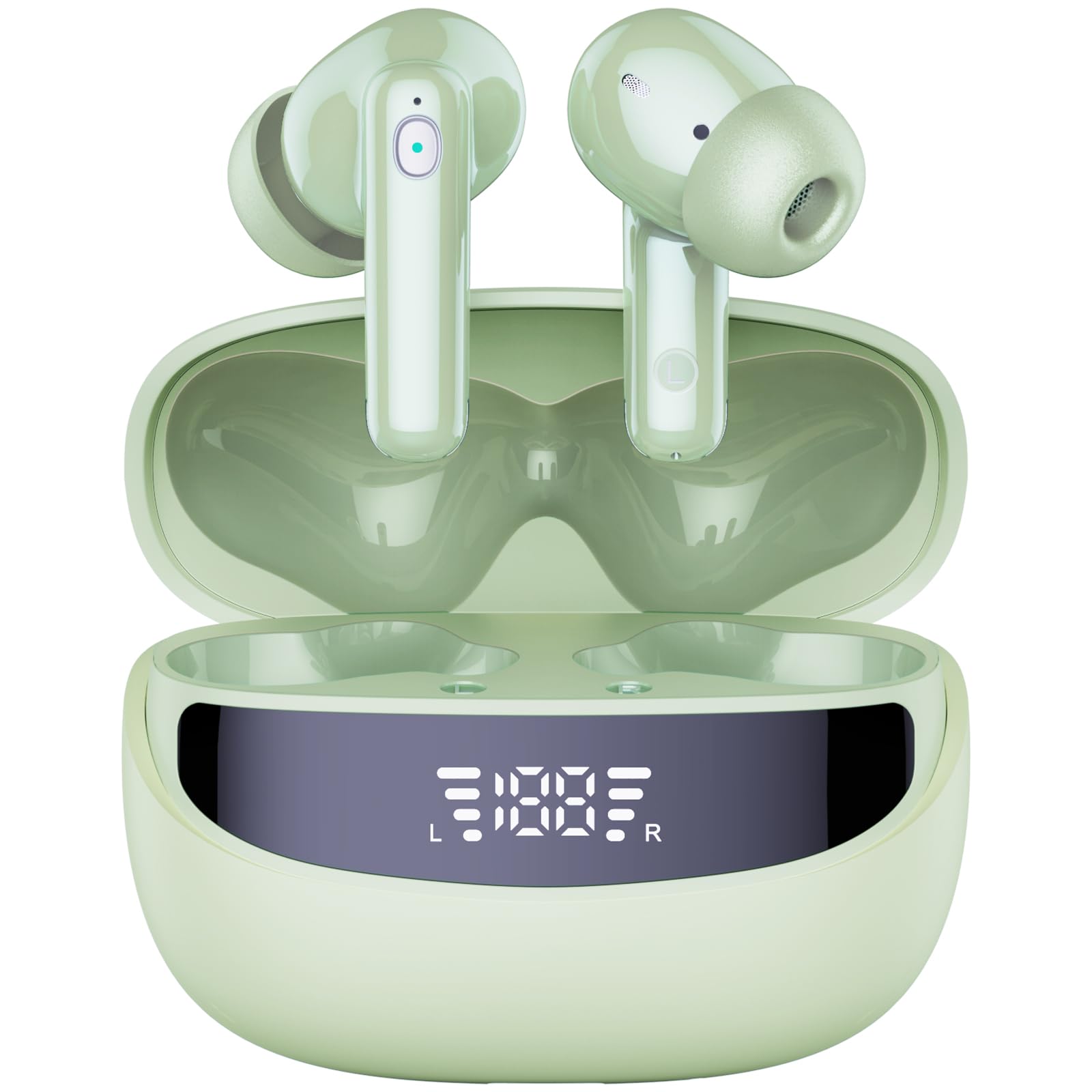
Image: Nerunsa D60Pro Bluetooth Headphones. This image displays the two earbuds resting within their charging case, which is typically compact and designed for portability. The earbuds are visible, showing their in-ear design and possibly touch-sensitive surfaces. The charging case often features LED indicators to display battery status.
3.2 Pairing with a Bluetooth Device
The D60Pro headphones utilize Bluetooth 5.4 for a stable and efficient connection.
- First-time Pairing:
- Open the charging case. The earbuds will automatically power on and enter pairing mode. The indicator light on one earbud will flash (e.g., white and red alternately), indicating it's ready to pair.
- On your device (smartphone, tablet, computer), go to Bluetooth settings and turn on Bluetooth.
- Search for available devices and select "Nerunsa D60Pro" from the list.
- Once connected, the earbud indicator lights will typically turn off or flash slowly.
- Reconnecting:
- Once paired, the earbuds will automatically connect to the last paired device when taken out of the charging case and Bluetooth is enabled on your device.
4. Operating Instructions
The D60Pro headphones feature intuitive touch controls on each earbud.
4.1 Power On/Off
- Power On: Open the charging case, or long-press the touch area on both earbuds for 3 seconds.
- Power Off: Place the earbuds back into the charging case and close the lid, or long-press the touch area on both earbuds for 5 seconds.
4.2 Music Playback Controls
- Play/Pause: Single tap on either the Left (L) or Right (R) earbud.
- Next Track: Double tap on the Right (R) earbud.
- Previous Track: Double tap on the Left (L) earbud.
- Volume Up: Triple tap on the Right (R) earbud.
- Volume Down: Triple tap on the Left (L) earbud.
4.3 Call Management
- Answer/End Call: Single tap on either earbud.
- Reject Call: Long-press on either earbud for 2 seconds.
4.4 Voice Assistant
- Activate Voice Assistant: Long-press on the Left (L) earbud for 2 seconds.
5. Maintenance
5.1 Cleaning
- Use a soft, dry, lint-free cloth to clean the earbuds and charging case.
- Do not use harsh chemicals, cleaning solvents, or strong detergents.
- Gently remove any earwax or debris from the eartips and speaker mesh using a small, soft brush or cotton swab.
5.2 Storage
- When not in use, always store the earbuds in their charging case to protect them and keep them charged.
- Store the device in a cool, dry place, away from direct sunlight and extreme temperatures.
5.3 Water Resistance
The Nerunsa D60Pro headphones are rated as waterproof. This means they are resistant to sweat and light splashes, making them suitable for sports and exercise. However, they are not designed for swimming or prolonged submersion. Ensure the charging port is completely dry before connecting the charging cable to prevent damage.
6. Troubleshooting
| Problem | Possible Cause | Solution |
|---|---|---|
| Earbuds not pairing with device. | Bluetooth is off on device; earbuds not in pairing mode; previously paired device interfering. | Ensure Bluetooth is on. Place earbuds in case, close, then open to re-enter pairing mode. Forget "Nerunsa D60Pro" from your device's Bluetooth list and re-pair. |
| No sound from earbuds. | Volume too low; earbuds not connected; media paused. | Increase volume on both earbuds and device. Check Bluetooth connection. Ensure media is playing. |
| One earbud has no sound. | Earbuds not properly synced; low battery on one earbud. | Place both earbuds back in the charging case, close the lid, then take them out again. Ensure both earbuds are charged. |
| Charging case not charging. | Faulty cable or adapter; dirty charging port. | Try a different USB cable and power adapter. Clean the charging port gently. |
| Touch controls not responding. | Earbuds are wet; temporary software glitch. | Ensure earbuds are dry. Restart the earbuds by placing them in the case and taking them out. |
7. Specifications
- Model Name: D60Pro
- Brand: Nerunsa
- Connectivity: Wireless Bluetooth 5.4
- Ear Placement: In-Ear
- Control Type: Touch Control
- Microphone: 4 ENC Noise-Cancelling Microphones
- Water Resistance Level: Waterproof (suitable for sweat and splashes)
- Battery Composition: Lithium-Polymer
- Battery Included: Yes (1 A)
- Special Features: Fast Charging
- Material: Plastic, Aluminum
- Item Weight: Approximately 1 Gram (per earbud, case weight not specified)
- Recommended Uses: Music listening, calls, exercise
- Compatible Devices: Bluetooth-enabled devices
8. Warranty and Support
Nerunsa products are designed and manufactured to the highest quality standards. For information regarding warranty coverage, technical support, or customer service, please refer to the warranty card included in your package or visit the official Nerunsa website. Please retain your proof of purchase for warranty claims.