
Introduction
Thank you for choosing the Hisense Portable Air Conditioner. This manual provides essential information for the safe and efficient operation, maintenance, and troubleshooting of your AP0921CR1G unit. Please read it thoroughly before use and retain it for future reference.

Figure 1: Front view of the Hisense Portable Air Conditioner.
Key Features
- Cooling Capacity: Cools areas up to 400 sq ft (approximately 20 ft x 20 ft) with 9,000 SACC (DOE) / 14,000 BTU (ASHRAE) capacity.
- Quiet Operation: Designed for a relaxing environment with a noise level of 49 dB.
- Versatile Modes: Features 3 operating modes: Cooling, Fan, and Dehumidifier for year-round comfort.
- Drain-Free Design: Operates without the need for manual water removal in cooling mode due to self-evaporating technology.
- Adjustable Airflow: Multi-directional auto air flow with adjustable louvers that automatically open to a preset position.
- Easy Installation: Includes a snap-assembly window kit that fits windows 18" to 50" wide for quick setup.
- Convenient Control: Dimmable LED digital controls on the unit and an included remote control for easy adjustments from anywhere in the room.
- Washable Filter: Features a washable, removable filter for simple cleaning and maintenance, ensuring efficient operation and good air quality.
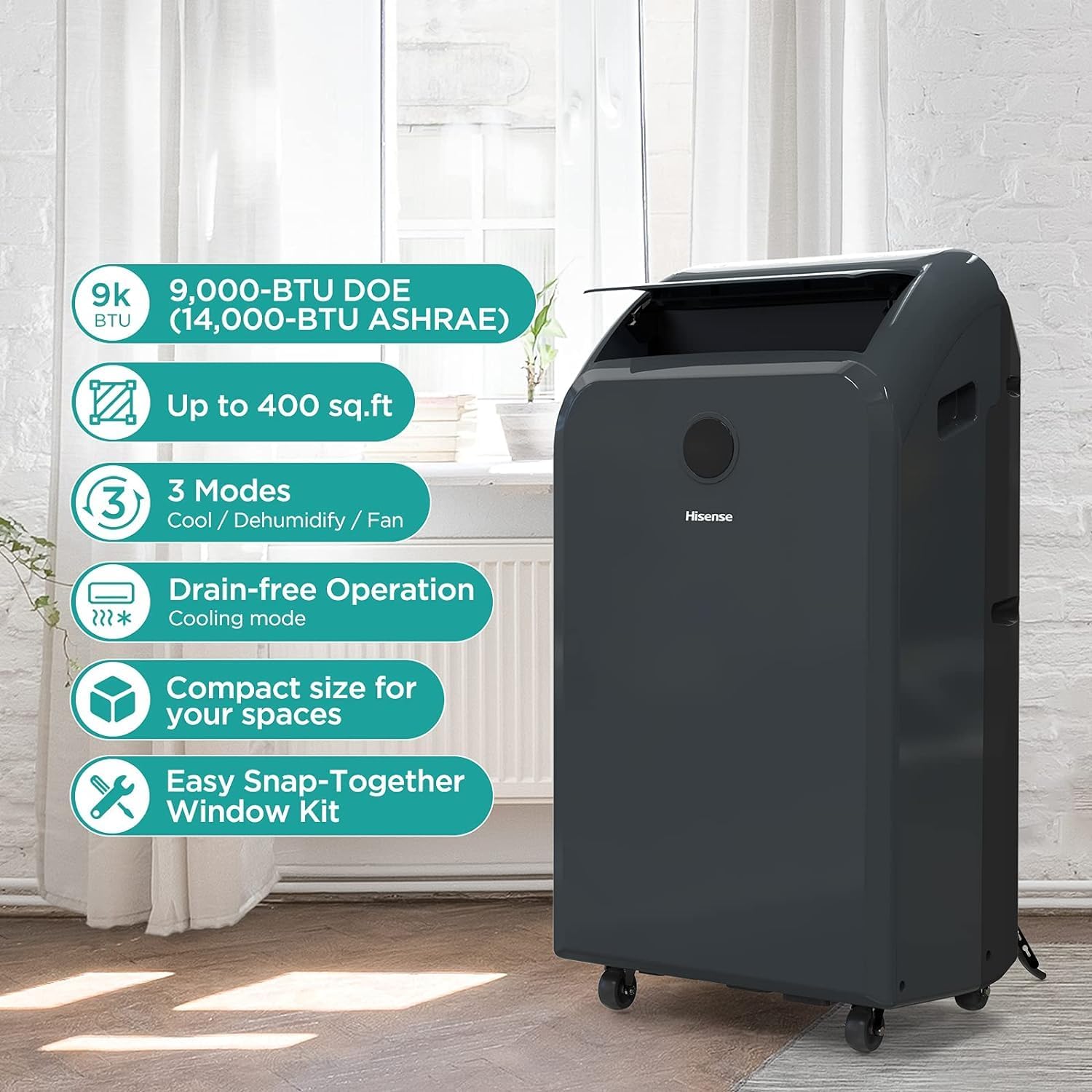
Figure 2: Key features of the portable air conditioner.
Setup
Unpacking and Placement
Carefully remove the unit from its packaging. The unit is equipped with wheels for easy portability. Place the air conditioner on a flat, stable surface near a window and a grounded electrical outlet.
Window Kit Installation
The snap-assembly window kit is designed for quick and easy installation. It accommodates windows between 18 and 50 inches in width. Assemble the window kit components according to the diagrams provided in the full instruction manual (not included here) and secure it in your window opening. Connect the exhaust hose(s) from the unit to the window kit securely.

Figure 3: Window kit dimensions for proper installation.
Power Connection
Ensure the unit is plugged into a 115 Volts, 60Hz grounded electrical outlet. Do not use extension cords or adapter plugs.
Operating Instructions
The Hisense Portable Air Conditioner can be controlled via the dimmable LED digital control panel on the unit or the included remote control.
Control Panel Overview

Figure 4: Remote control for convenient operation.
Operating Modes
Press the MODE button to cycle through the available modes:
- Cool: Provides cooling and dehumidification. Adjust temperature using the +/- buttons.
- Dehumidify: Removes moisture from the air.
- Fan: Circulates air without cooling. Adjust fan speed (High, Medium, Low) using the Fan Speed button.
Temperature and Fan Speed Adjustment
Use the + and - buttons on the control panel or remote to set your desired temperature. Press the FAN SPEED button to select between High, Medium, or Low fan settings.
Timer and Sleep Functions
The unit features a timer function to program automatic on/off times and a sleep mode for quieter operation during rest periods. Refer to the full manual for detailed instructions on setting these functions.
Maintenance
Filter Cleaning
The washable, removable filter should be cleaned regularly to ensure optimal performance and air quality. Depending on usage, clean the filter every two weeks. To clean:
- Unplug the air conditioner from the power outlet.
- Locate and remove the air filter (typically at the back or side of the unit).
- Wash the filter with warm, soapy water. Rinse thoroughly.
- Allow the filter to air dry completely before reinserting it into the unit.
Do not operate the unit without the filter in place.

Figure 5: Regular maintenance ensures efficient operation.
Unit Cleaning
Wipe the exterior of the unit with a soft, damp cloth. Do not use harsh chemicals or abrasive cleaners.
Troubleshooting
If your Hisense Portable Air Conditioner is not operating as expected, please review the following common issues before contacting customer support:
- Unit does not turn on: Check if the power cord is securely plugged into a grounded outlet. Ensure there is power to the outlet.
- Unit is not cooling effectively: Verify that the exhaust hose is properly installed and not obstructed. Ensure windows and doors are closed. Clean the air filter if it is dirty. Check if the room size exceeds the unit's capacity.
- Water leakage: In cooling mode, the unit is designed for drain-free operation. If water leaks, check for proper leveling of the unit or if the drain plug is securely closed (if applicable for continuous drainage).
- Unusual noise: Ensure the unit is on a flat, stable surface. Check for any obstructions in the air intake or exhaust vents.
For more detailed troubleshooting steps, please consult the comprehensive user manual that came with your product or visit the Hisense support website.
Specifications
| Feature | Specification |
|---|---|
| Brand | Hisense |
| Model Info | AP0921CR1G |
| Product Dimensions | 12.5"D x 17.4"W x 29.1"H |
| Cooling Capacity (SACC) | 9,000 BTU |
| Cooling Power (ASHRAE) | 14,000 British Thermal Units |
| Noise Level | 49 dB |
| Voltage | 115 Volts |
| Floor Area Coverage | Up to 400 Square Feet |
| Installation Type | Window (Portable) |
| Special Features | Portable, Remote control |
| Refrigerant | R 410A |
| Filter Type | Washable, removable filter |
| Certification | Energy Star |

Figure 6: Detailed product specifications.
Warranty and Support
This Hisense Portable Air Conditioner comes with a warranty covering parts and labor for 2 years from the date of purchase. For warranty claims, technical support, or service inquiries, please contact Hisense customer service. Keep your proof of purchase for warranty validation.
For the most up-to-date support information, visit the official Hisense website or refer to the contact details provided in your product's packaging.


