
Product Overview
This multi-functional console sofa table is designed to efficiently utilize space behind your sofa, in hallways, or offices. It features a built-in power hub with 1 standard 120VAC outlet, 2 AC plugs, and 2 USB ports, powered by a 4.9-foot extension cord. Constructed with quality engineered wood and a sturdy metal frame, it offers durability and a high load-bearing capacity of up to 220 lb.
Safety Information
- Adjustable feet, anti-tipping strap, and expansion screw provide double stability, safeguarding floors.
- Meets EPA TSCA Title VI standards.
- The top of the table is made of FSC-certified wood.
- Always ensure the table is stable before placing items on it. If used as a standalone console, consider anchoring it to a wall using the provided anti-tipping strap for enhanced stability.
Package Contents
Verify all components are present before beginning assembly:
- Tabletop sections (Engineered wood, Rustic Brown)
- Metal frame components
- Power hub with 1 standard 120VAC outlet, 2 AC Plugs & 2 USB Ports
- 4.9' ft power cord
- Adjustable feet
- Anti-tipping strap and expansion screws
- Assembly Guide
- Installation Tool (Hex Key)

Image showing all components of the Keelian 70-inch Narrow Console Sofa Table laid out, including wooden tabletop sections, metal frame pieces, power hub, and hardware.
Assembly Instructions
Assembly is straightforward and typically takes 30-45 minutes. All necessary tools are included.
Step 1: Unpack and Identify Parts
Carefully unpack all components and lay them out on a clean, soft surface to prevent scratches. Refer to the assembly guide to identify each part.
Step 2: Assemble the Metal Frame
Connect the metal support rods using the provided screws and hex key. Ensure all connections are secure but do not overtighten.

Image illustrating the assembly of the metal frame components, showing screws being tightened with a hex key.
Step 3: Attach Tabletop Sections
Place the wooden tabletop sections onto the assembled metal frame. Secure them using the remaining screws.

Image demonstrating how to attach the wooden tabletop sections to the metal frame, ensuring proper alignment.
Step 4: Install Power Hub
The power hub can be installed in various positions (e.g., at the ends or in the middle) according to your preference. Secure it with the provided screws.

Image showing the installation of the power hub into a pre-cut slot on the tabletop, with screws securing it in place.
Step 5: Adjust Feet and Secure (Optional)
Adjust the leveling feet at the bottom of the table legs to ensure stability on uneven surfaces. For added security, especially if the table is not placed between a sofa and a wall, use the anti-tipping strap to anchor it to the wall.
Setup
Position the console table in your desired location, such as behind a sofa, in a narrow hallway, or under a window. Ensure the 4.9-foot power cord can reach a wall outlet.
For optimal stability, especially in high-traffic areas or if children/pets are present, it is recommended to place the table between a sofa and a wall, or to utilize the provided anti-tipping strap to secure it to the wall.
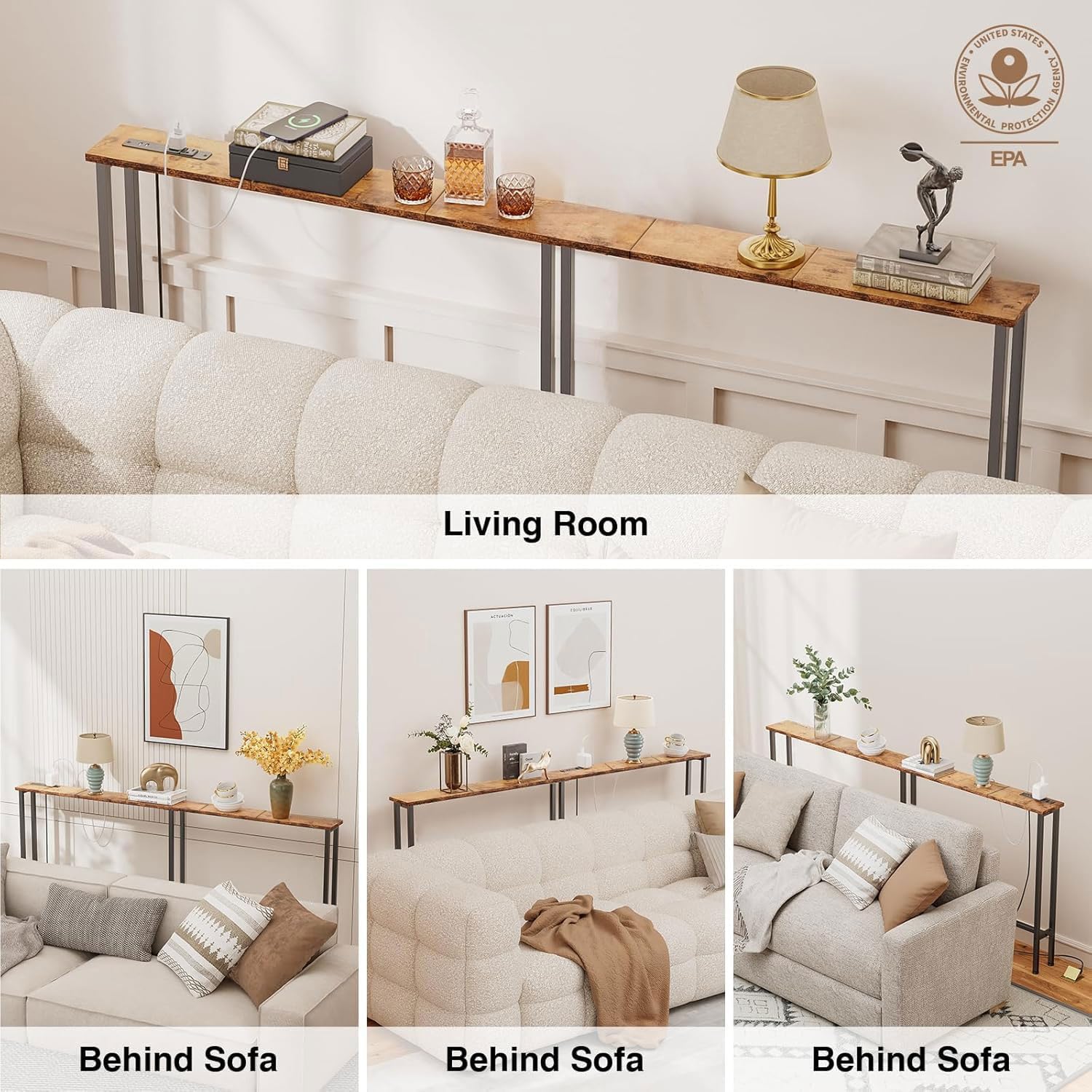
Image showing the console table placed behind a sofa, demonstrating its narrow profile and how it fits snugly against the wall.
Operating Instructions
Plug the table's 3-prong power cord into a standard 120VAC wall outlet.
Use the 2 AC outlets to power lamps, laptops, or other electronic devices.
Use the 2 USB ports to charge mobile phones, tablets, or other USB-powered devices. Note that these are standard USB ports and do not support fast charging.
Official product video demonstrating the functionality of the integrated power outlets and USB ports on the Keelian Narrow Console Sofa Table, showing devices being plugged in and charging.
Maintenance
To clean the tabletop and metal frame, simply wipe with a damp cloth. Avoid using harsh chemicals or abrasive cleaners, as these may damage the finish.
Regularly check all screws and connections to ensure they remain tight. Retighten if necessary to maintain stability.
Troubleshooting
Table feels wobbly:
- Ensure all assembly screws are tightened.
- Adjust the leveling feet at the bottom of each leg to compensate for uneven flooring.
- If the table is freestanding, consider using the anti-tipping strap to secure it to a wall.
Power outlets or USB ports not working:
- Verify that the main power cord is securely plugged into a functional wall outlet.
- Check if the devices you are trying to charge are working correctly with other power sources.
Specifications
| Feature | Detail |
|---|---|
| Brand | Keelian |
| Model Name | ST-70-01 |
| Product Dimensions | 70.87"D x 5.9"W x 31.1"H |
| Material | Metal, Wood |
| Color | Rustic Brown |
| Maximum Weight Recommendation | 30 Kilograms (approx. 66 lbs) |
| Power Outlets | 1 standard 120VAC outlet, 2 AC Plugs |
| USB Ports | 2 USB Ports (standard charging) |
| Power Cord Length | 4.9 feet |
| Frame Joint Type | Screw or Bolt |
| Included Components | Assembly Guide, Installation Tool |
| Certifications | EPA TSCA Title VI, FSC-Certified Wood |
Warranty and Support
Keelian offers 24/7 manual online assistance and exceptional after-sales support. For any questions during purchase or product usage, please reach out to us promptly. We are dedicated to ensuring your satisfaction.