1. Introduction
This manual provides essential information for setting up, operating, and maintaining your BOSGAME M4 Neo Mini PC. The M4 Neo is a compact desktop computer featuring an AMD Ryzen 7 7840HS processor, 32GB DDR5 RAM, and a 1TB PCIe 4.0 SSD, designed for various applications including gaming, office work, and multimedia. Please read this manual thoroughly before use to ensure optimal performance and longevity of your device.
2. Package Contents
Verify that all items listed below are present in your package:
- 1x R7 7840HS Mini PC
- 1x HDMI Cable
- 1x Power Adapter
- 1x User Guide (This document)
- 1x VESA Mount with Screws
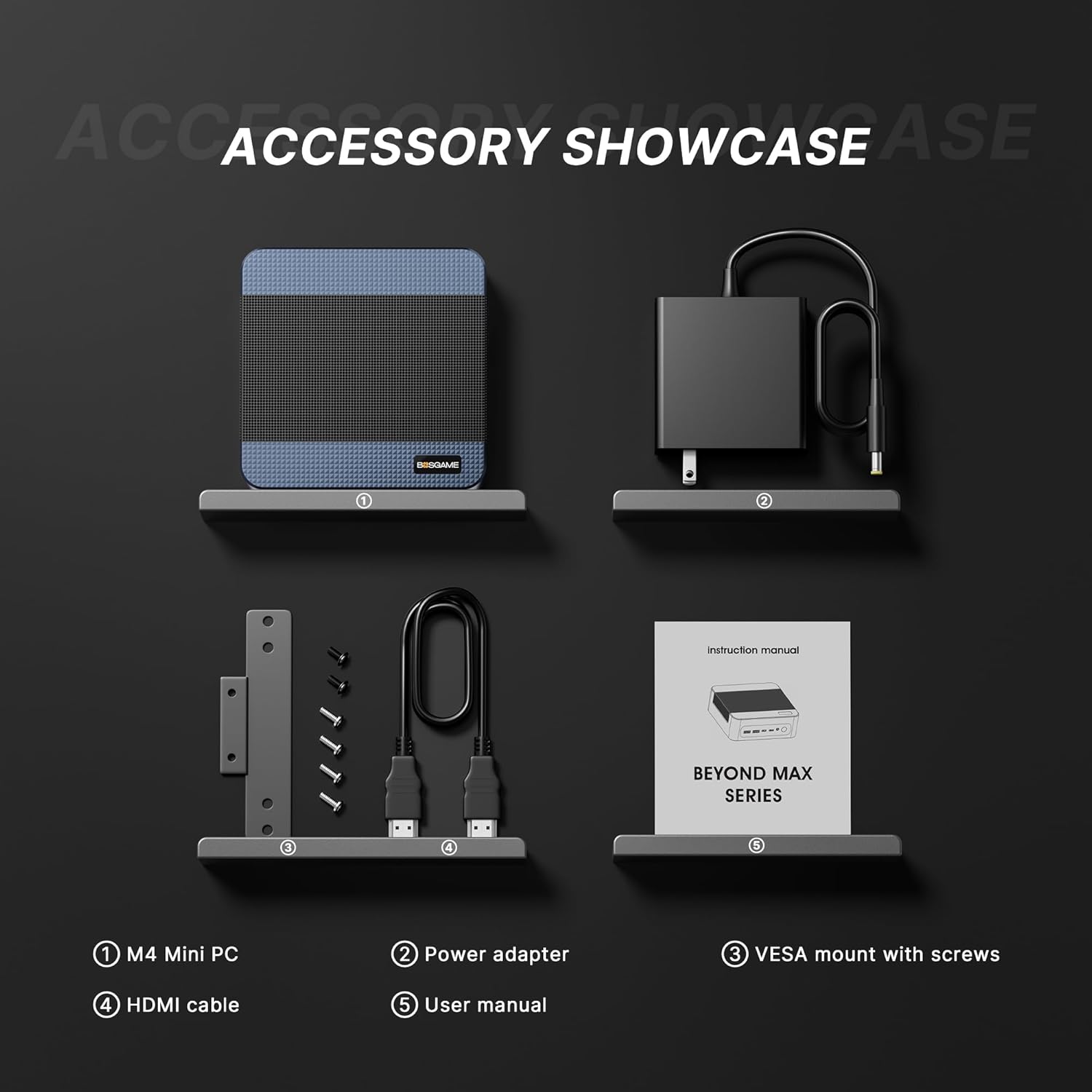
Description: This image displays the complete set of items included in the BOSGAME M4 Neo Mini PC package. It shows the compact mini PC unit, a power adapter for electrical connection, a VESA mount with screws for attaching the PC to a monitor or wall, an HDMI cable for display connectivity, and the user manual.
3. Product Overview
The BOSGAME M4 Neo Mini PC is designed for high performance in a small form factor. Below are its key features and port layout.
3.1 Key Features
- Processor: AMD Ryzen 7 7840HS (8 Cores/16 Threads, up to 5.1 GHz)
- Graphics: AMD Radeon 780M (12 CUs, 2.7 GHz)
- Memory: 32GB DDR5 4800MHz RAM
- Storage: 1TB PCIe 4.0 SSD (expandable with dual M.2 slots up to 4TB)
- Connectivity: Dual 2.5G RJ45 LAN, Wi-Fi 6E, Bluetooth 5.2
- Display Output: Supports 4K Triple Display via HDMI 2.0, USB4.0 (DP Alt Mode), and DisplayPort
- Unique Port: Oculink (PCIe 4.0 x4) for external GPU or high-speed NVMe arrays
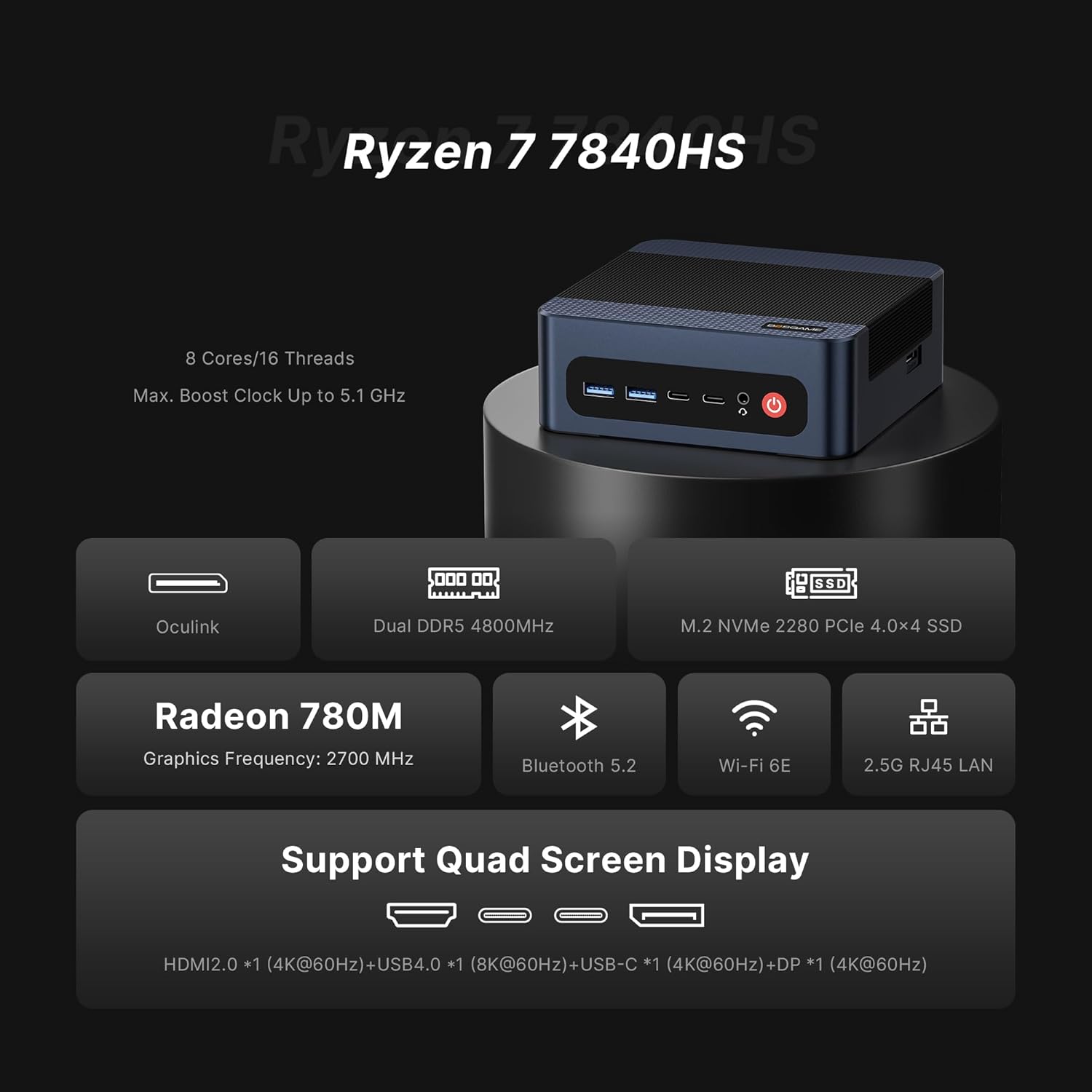
Description: This graphic illustrates the primary technical specifications of the M4 Neo Mini PC, including its AMD Ryzen 7 7840HS processor, Radeon 780M integrated graphics, DDR5 RAM, PCIe 4.0 SSD, and various connectivity options like Oculink, Bluetooth 5.2, Wi-Fi 6E, and 2.5G RJ45 LAN. It also indicates support for quad-screen display.
3.2 Port Layout
Familiarize yourself with the available ports on the front, side, and back of the device.
- Front: 2x USB3.2 10Gbps, 1x USB-C 4K@60Hz, 1x USB4.0 8K@60Hz, Audio Jack, Power Button
- Side: Oculink Port
- Back: DC Power Input, 2x 2.5G RJ45 LAN, 2x HDMI2.0 4K@60Hz, 1x DisplayPort 4K@60Hz, 2x USB2.0 480Mbps

Description: This image provides a clear visual guide to all input/output ports on the BOSGAME M4 Neo Mini PC. It labels the USB ports (USB3.2, USB-C, USB4.0), audio jack, and power button on the front; the Oculink port on the side; and the DC power input, dual 2.5G RJ45 LAN ports, HDMI 2.0 ports, DisplayPort, and USB 2.0 ports on the back.
4. Setup Instructions
Follow these steps to set up your BOSGAME M4 Neo Mini PC:
- Connect Display: Connect your monitor(s) to the Mini PC using the HDMI, DisplayPort, or USB4.0 ports. The device supports up to three 4K displays simultaneously.
- Connect Peripherals: Plug in your USB keyboard and mouse into the available USB ports.
- Connect Network (Optional): For a wired internet connection, connect an Ethernet cable to one of the 2.5G RJ45 LAN ports. For wireless, Wi-Fi 6E is built-in.
- Connect Power: Plug the power adapter into the DC input port on the back of the Mini PC, then connect the adapter to a power outlet.
- Power On: Press the power button located on the front of the Mini PC. The system will begin to boot.
5. Operating Instructions
5.1 Initial Boot and Operating System Setup
Upon the first boot, the Mini PC will guide you through the initial setup of the pre-installed operating system (Windows 11). Follow the on-screen prompts to configure language, region, network, and user accounts. The device is also compatible with Linux and Ubuntu operating systems.
5.2 Network Connectivity
- Wired Connection: If you connected an Ethernet cable during setup, your PC should automatically connect to the network.
- Wireless Connection: To connect to Wi-Fi, click the network icon in the system tray, select your desired Wi-Fi network, and enter the password. The Mini PC supports Wi-Fi 6E for high-speed wireless connectivity.
- Bluetooth: Bluetooth 5.2 is integrated for connecting wireless peripherals such as keyboards, mice, and headphones. Access Bluetooth settings through the operating system.
5.3 Multi-Display Setup
The BOSGAME M4 Neo supports connecting up to three displays simultaneously for an expanded workspace. Connect your monitors to the available HDMI, DisplayPort, and USB4.0 ports. Once connected, you can configure display settings (extend, duplicate, or single display) through your operating system's display settings.

Description: This image illustrates the BOSGAME M4 Neo Mini PC's ability to support multiple displays. The mini PC is shown connected to three separate monitors, showcasing its capability for extended desktop environments, suitable for productivity, gaming, or multimedia consumption.
6. Maintenance
Proper maintenance ensures the longevity and optimal performance of your Mini PC.
- Cleaning: Regularly clean the exterior of the Mini PC with a soft, dry cloth. Use compressed air to gently clear dust from ventilation openings to prevent overheating. Ensure the device is powered off and unplugged before cleaning.
- Software Updates: Keep your operating system and drivers updated to the latest versions. This improves security, stability, and performance.
- Storage Expansion: The Mini PC features dual M.2 2280 NVMe PCIe 4.0 SSD slots, allowing for storage expansion up to 4TB. Refer to the detailed instructions for opening the chassis and installing additional storage if needed.
- Ventilation: Ensure the Mini PC is placed in a well-ventilated area and that its vents are not obstructed.
7. Troubleshooting
If you encounter issues with your BOSGAME M4 Neo Mini PC, refer to the following common troubleshooting steps:
| Problem | Possible Cause | Solution |
|---|---|---|
| No power | Power adapter not connected or faulty outlet. | Ensure power adapter is securely connected to the PC and a working power outlet. Test the outlet with another device. |
| No display | Monitor not connected, incorrect input selected, or faulty cable. | Check display cable connections. Ensure monitor is on and set to the correct input source (HDMI, DP, USB-C). Try a different cable or monitor. |
| No internet connection (wired) | Ethernet cable disconnected or router issue. | Verify Ethernet cable is securely connected to both the PC and the router. Restart your router/modem. |
| No internet connection (wireless) | Wi-Fi disabled, incorrect password, or out of range. | Ensure Wi-Fi is enabled in OS settings. Re-enter Wi-Fi password. Move closer to the Wi-Fi router. |
| System freezes or crashes | Overheating, software conflict, or driver issues. | Ensure proper ventilation. Update drivers and OS. Check for conflicting software. If persistent, contact support. |
8. Specifications
Detailed technical specifications for the BOSGAME M4 Neo Mini PC:
| Feature | Detail |
|---|---|
| Processor | AMD Ryzen 7 7840HS (8 Cores, 16 Threads, up to 5.1 GHz) |
| Graphics | AMD Radeon 780M (Integrated) |
| RAM | 32 GB DDR5 4800MHz SODIMM |
| Storage | 1 TB M.2 2280 NVMe PCIe 4.0 SSD (Dual Slot up to 4TB) |
| Operating System | Windows 11 (Compatible with Linux and Ubuntu) |
| Wireless Connectivity | Wi-Fi 6E (802.11ax), Bluetooth 5.2 |
| LAN | Dual 2.5G RJ45 LAN ports |
| Video Output | 2x HDMI 2.0 (4K@60Hz), 1x DisplayPort (4K@60Hz), 1x USB4.0 (8K@60Hz / DP Alt Mode) |
| USB Ports | 2x USB3.2 (10Gbps), 1x USB-C (4K@60Hz), 1x USB4.0 (8K@60Hz), 2x USB2.0 (480Mbps) |
| Other Ports | Audio Jack, Oculink (PCIe 4.0 x4) |
| Dimensions (LxWxH) | 5 x 5 x 1.8 inches (approx. 12.7 x 12.7 x 4.57 cm) |
| Weight | 1.2 pounds (approx. 0.54 kg) |
9. Warranty and Support
BOSGAME is committed to providing quality products and customer satisfaction.
- Warranty: Your BOSGAME M4 Neo Mini PC comes with a 12-month warranty from the date of purchase.
- Technical Support: Lifetime technical support is provided for this product.
- Contact Support: For any technical assistance or warranty claims, please contact BOSGAME Official support via email at Qingzhuomao@163.com.
- Online Resources: For additional information and FAQs, please visit the BOSGAME Store on Amazon.
Note: No official product videos were found in the provided data to embed in this manual.


